Red vs Blue Switches: Which Is Best for You?

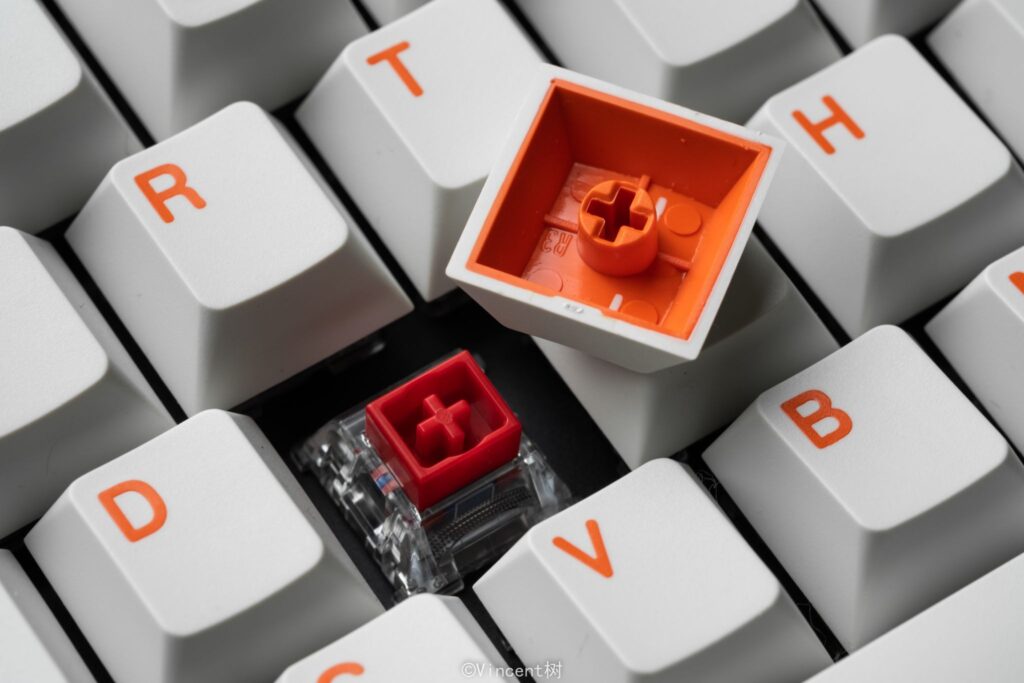
Mechanical keyboard switches come in dozens of varieties, but red and blue are the two most common starting points — one built for speed, the other for feedback. The one that suits you depends on how you type, what you play, and where you use your keyboard. This guide breaks down how each switch works, where they differ, and which fits your setup.
What Are Red Switches?
Red switches are linear — the key travels straight down from top to bottom with no bump or click. The stroke is smooth and consistent, which makes actuation fast and repeatable. Most red switches actuate at around 45g of force and 2.0mm of travel, with a total travel of 4.0mm.
Because there’s no tactile event to push through, red switches allow rapid repeated keypresses without resistance building between strokes. For anyone building or upgrading a gaming keyboard, red switches are typically the default recommendation for gaming-first setups.
Pros of Red Switches
- Smooth, fast keystroke with no bump or click
- Low actuation force (45g) reduces finger fatigue over long sessions
- Quiet — suitable for shared spaces and streaming
- Fast reset for rapid repeated inputs
Cons of Red Switches
- No tactile feedback — harder to tell when a keypress has registered
- Easier to accidentally press keys while resting fingers on the home row
- Less satisfying for heavy typing sessions
What Are Blue Switches?
Blue switches are clicky — they produce both a tactile bump and an audible click at the actuation point. The bump lets you feel when the key registers; the click confirms it audibly. Most blue switches actuate at around 50–60g of force and 2.2mm of travel.
The click mechanism also means the switch resets slightly higher than it actuates — a characteristic called hysteresis. For typing, this is imperceptible, but for rapid repeated gaming inputs, it introduces a slight delay.
Pros of Blue Switches
- Clear tactile and audible feedback on every keypress
- Easier to confirm keypresses without bottoming out
- Satisfying for long writing or coding sessions
- Higher actuation force helps prevent accidental presses
Cons of Blue Switches
- Loud — disruptive in shared spaces, offices, and on voice chat
- Slightly slower reset due to the click mechanism
- Higher actuation force (50–60g) adds fatigue over extended rapid-input sessions
Red vs Blue Switches: Key Differences
Actuation Force and Key Travel
Red switches actuate at 45g with a 2.0mm actuation point; blue switches require 50–60g at 2.2mm. The extra force on blues is noticeable over long sessions — reds are easier on the fingers for sustained rapid input, while blues’ resistance can help users with a heavy resting hand avoid accidental presses.
Sound Level
This is the starkest difference. Red switches are quiet — the only sound is the keycap bottoming out, which can be dampened with foam or O-rings. Blue switches are loud by design; the click carries clearly across a room. For streamers, shared offices, or quiet households, blue switches are often a dealbreaker.
Tactile Feedback
Red switches offer no tactile event — resistance is constant from top to bottom. Blue switches provide a distinct bump at the actuation point, confirming the press before you reach the bottom. For touch typists who’ve built their rhythm around feedback, this difference is significant. For gamers who rarely think about individual keypresses, it matters less.
Red vs Blue at a Glance
| Red Switches | Blue Switches | |
| Switch type | Linear | Clicky |
| Actuation force | ~45g | ~50–60g |
| Actuation point | 2.0mm | 2.2mm |
| Total travel | 4.0mm | 4.0mm |
| Tactile bump | No | Yes |
| Audible click | No | Yes |
| Noise level | Quiet | Loud |
| Best for | Gaming, shared spaces | Typing, solo setups |
Which Is Better for Gaming?
For most gaming, red switches have the advantage. The smooth linear stroke allows faster repeated inputs — relevant in FPS titles where movement keys and abilities need to fire rapidly. The lower actuation force reduces fatigue, and the quiet operation doesn’t bleed into a microphone during voice chat.
Blue switches aren’t a bad gaming switch, but the click mechanism’s reset delay becomes noticeable in games requiring fast repeated keypresses. Competitive FPS and MOBA players tend to avoid them for this reason. Where blue switches hold their own is in slower-paced genres — RPG, strategy, and simulation — where the tactile feedback helps confirm complex keybinds without looking at the keyboard. A mechanical gaming keyboard with red switches is the more versatile gaming choice across genres.
Which Is Better for Typing?
For typing, blue switches are more satisfying for most people. The tactile bump and click provide clear confirmation with every keystroke, which helps accuracy and creates a rhythm easier to sustain across long writing sessions. Red switches are perfectly functional for typing — many writers use them without issue — but the lack of feedback means relying entirely on the display to confirm input. For fast, light typists who don’t bottom out heavily, reds work well. For anyone who prefers to feel the keypress, blues are the more satisfying choice.
How to Choose Between Red and Blue
Choose red if:
- Gaming is your primary use, especially FPS or competitive titles
- You use your keyboard in a shared space, office, or on stream
- You want a lighter, faster keystroke with less fatigue
Choose blue if:
- Typing, writing, or coding takes up most of your keyboard time
- You use your keyboard in a private space where noise isn’t a concern
- You rely on tactile and auditory feedback for accuracy
If you’re genuinely unsure, a switch tester is worth picking up before committing to a full keyboard. The keyboard switches available across different builds vary in actuation weight and travel.
Conclusion
Red switches are faster, quieter, and better suited to gaming and shared environments. Blue switches are louder, more satisfying to type on, and better for users who want clear feedback with every press. Neither is objectively better — the right choice is the one that matches how you actually use your keyboard. Angry Miao builds across both linear and clicky switch options, so whichever direction you go, the hardware holds up.
FAQ
Are red switches better than blue for gaming?
For most gaming, yes — red switches are faster, quieter, and easier on the fingers during rapid repeated inputs.
Are blue switches too loud for office use?
Usually yes. The click is disruptive in open offices or shared spaces — linear or tactile switches are a better fit.
Can I use blue switches for gaming?
Yes, with tradeoffs. The slight reset delay makes them less ideal for fast competitive play, but they work fine for RPG, strategy, or casual gaming.
Do red switches feel different from blue when typing?
Significantly. Reds are smooth with no feedback; blues have a tactile bump and an audible click. Most typists find blues more satisfying, but fast light typists often prefer reds.
Are there switches between red and blue?
Yes — brown switches offer tactile feedback without the audible click, sitting between the two in both feel and noise level.
Meta description: Red switches are linear, quiet, and 45g — fast for gaming. Blue switches click and bump at 50–60g — satisfying for typing but disruptive in shared spaces.