How to Scrape a Web Page with An AI Web Scraper

Introduction
Last week, a friend asked me to pull pricing from 47 competitor product pages for her e-commerce store. Five years ago, I would have spent the afternoon writing a Python scraper. This time, I described what I wanted to an AI web scraping Chrome extension and had a clean spreadsheet in several minutes.
That’s the shift. An AI web scraper lets anyone grab data from a web page by typing a plain-language prompt. No code. No XPath. No CSS selectors.
In this guide, you’ll learn how to scrape data from a web page using an AI web scraper, what tools you need, and how to handle pages with logins, pagination, or infinite scroll. I’ll use Chat4Data, a free Chrome extension powered by AI, because it’s what I use day to day. The same workflow applies to most browser-based AI scrapers.
By the end, you’ll be able to turn any public web page into a clean Excel, CSV, or JSON file in under several minutes.
Why Use an AI Web Scraper Instead of Writing Code?
Quick answer: An AI web scraper saves hours of development time, adapts to website changes automatically, and works for non-coders. Traditional web scraping with Python or JavaScript means inspecting the DOM, writing selectors, and patching the script every time the site updates. AI scrapers handle that part for you.
The shift is happening fast. Mordor Intelligence’s 2025 report puts the global web scraping market at USD 1.03 billion in 2025, growing at 14.20% CAGR through 2030, with AI-powered tools driving most of that growth. ¹ A separate BrowserCat survey found 65% of enterprises now use web scraping to feed AI and machine learning projects, a sharp jump from the rule-based scripts of a few years ago. ²
What’s the difference between a traditional web scraper and an AI web scraper?
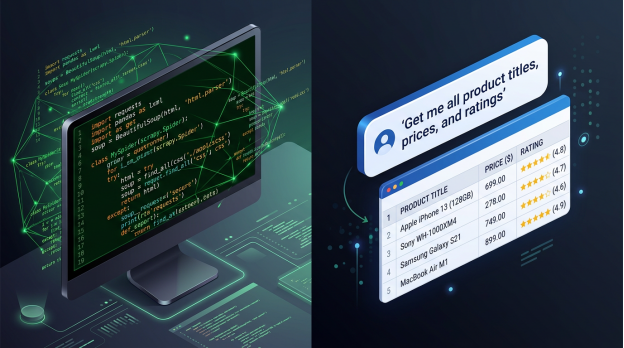
Traditional web scrapers require code. You write Python with BeautifulSoup or Scrapy, define CSS selectors for each field, and rebuild the script when the site changes.
AI web scrapers read the rendered page the way you do, then map your plain-language request to the right fields automatically.
Here’s a side-by-side comparison:
| Feature | Traditional Web Scraper | AI Web Scraper (e.g., Chat4Data) |
| Setup time | Hours to days | Under 2 minutes |
| Coding required | Python / JS / XPath | No-code, plain language |
| Handles layout changes | Breaks easily | Adapts automatically |
| Pagination & scrolling | Manual logic | Auto-detected |
| Best for | Engineers at scale | Anyone who needs data |
| Cost | Dev time + proxies | Free tiers; premium starts from $10 |
Who benefits most from an AI scraper tool?
- Marketers building lead lists
- E-commerce sellers tracking competitor prices
- Recruiters scraping job boards
- Researchers collecting public data
- Analysts pulling real-time market info
Honestly, if you’re a developer running 10,000+ pages a day with custom anti-bot logic, you’ll outgrow tools like this. For everyone else, writing your own scraper from scratch is overkill in 2026
What Do You Need Before You Start?
Quick answer: Three things. Google Chrome, the Chat4Data web scraper Chrome extension, and a free account. No Python, no proxies, no databases.
How do you install the Chat4Data Chrome extension for web scraping?
1. Open the Chrome Web Store and search for Chat4Data.
2. Click Add to Chrome, then Add extension.
3. Pin the extension to your toolbar.
4. Sign up for a free account. You get several free credits, enough for 2–3 full websites.
5. Open any website you want to scrape and click the extension icon.
That’s the whole setup. Unlike most web scraping tools, there’s nothing to configure on your machine. The extension runs entirely in your browser, which also keeps your data private.

How to Scrape Data from a Web Page in 5 Steps Using AI Web Scraper
Quick answer: Open the page, launch Chat4Data, type what you want in plain language, confirm the auto-detected fields, and export. Total time: about three minutes.
I’ll walk through a real example: pulling product listings (title, price, rating, image URL) from an e-commerce category page.
Step 1: Open your target web page
Navigate to the page you want to scrape in Chrome. For this tutorial, picture a category page like Amazon.com.

Step 2: Launch the AI web scraper from your toolbar
Click the Chat4Data icon. A side panel opens with a chat box.

Step 3: Describe the data you want in plain English
Type a natural-language prompt. Be specific. Examples:
- “Get all product titles, prices, ratings, and image URLs from this page.”
- “Scrape every job posting on this page, including title, company, location, and salary.”
- “Pull all listings with name, address, phone number, and review score.”
The AI reads the page, identifies the matching fields, and shows you a preview.

Step 4: Confirm the fields and run the scrape
Review the auto-detected columns. Add or remove fields by chatting again. For example: “Also include the discount percentage.” When all are done, click Run. Chat4Data handles pagination, infinite scroll, and one level of detail-page drilldown automatically.
A small note from experience. The first time I ran this on a Trustpilot category page, the scraper missed the company website URLs, because I’d left that field out of my prompt. I typed “add the website URL from each company’s detail page” and re-ran. Second try, perfect. The point: prompts matter, and iterating is fast.
Step 5: Export your data to Excel, CSV, or JSON
Once scraping completes, click Export and choose your format:
- Excel (.xlsx) for spreadsheet analysis
- CSV for data pipelines or BI tools
- JSON for developers or APIs
That’s it. You’ve just learned how to scrape data from a web page without writing a single line of code.

How Do You Clean and Use Your Scraped Data?
Quick answer: Open the export in Excel, Google Sheets, or any BI tool, and run standard cleaning. Modern AI scraper tools like Chat4Data already deliver clean tabular output, so most of the heavy lifting is already done.
Common cleaning tasks
- Remove duplicates. Use Excel’s Remove Duplicates or pandas.drop_duplicates().
- Standardize formats. Convert prices (“$1,299” → 1299), dates, and currencies.
- Trim whitespace. Apply TRIM() in spreadsheets.
- Validate fields. Check that emails contain “@” and prices are numeric.
I was surprised the first time I exported a 500-row scrape and didn’t have to clean anything. Compare that to the Python scrapers I used to write, where 30% of the post-run work was reformatting messy strings.
Where can you use the data next?
| Use case | Tool/destination |
| Lead generation | CRM (HubSpot, Salesforce) |
| Price monitoring | Power BI, Looker, Tableau |
| Market research | Google Sheets, Notion |
| AI / LLM training | JSON for vector DBs |
| Recruitment | ATS (Greenhouse, Lever) |
How Do You Handle Logins, CAPTCHAs, and Dynamic Pages?
Quick answer: Log into the site yourself first, then run the scraper inside your authenticated session. For CAPTCHAs, Chat4Data uses a “human-in-the-loop” pause: it stops, you solve, and the run continues from where it left off.
Tips for tricky websites
- Login walls. Sign in normally in Chrome before launching the extension. Chat4Data inherits your session. Your credentials never leave your browser.
- CAPTCHAs. When detected, the scraper pauses. Solve it manually, and the run resumes from the same row.
- Infinite scroll. Chat4Data auto-scrolls and waits for new content to load. No configuration needed.
- JavaScript-heavy pages (SPAs). Because the AI reads the rendered DOM, it works on React, Vue, and Angular sites that break traditional Python scrapers.
- Anti-bot detection. The AI mimics natural browsing: clicks, scrolls, pauses. That human-like pattern bypasses most basic bot defenses.
According to Actowiz Solutions, 81% of U.S. retailers now use automated price scraping for dynamic repricing, up from 34% in 2020.³ Anti-bot tech has evolved fast in response. AI scrapers are designed to keep up.
Final Thoughts: Is an AI Web Scraper Right for You?
If you’ve ever copied and pasted data from a web page into a spreadsheet, an AI web scraper is the upgrade you’ve been waiting for. You no longer need to learn Python, hire a developer, or pay for an enterprise SaaS. A free Chrome extension gets you 90% of the way there.
For most non-engineers, Chat4Data hits the sweet spot: powerful enough for serious lead generation, e-commerce monitoring, and research; simple enough that your first scrape takes less time than reading this paragraph.
Install the extension, run one scrape on a page you actually need data from, and decide for yourself.
Frequently Asked Questions
1. What is an AI web scraper?
An AI web scraper is a tool that uses large language models to read a web page and pull data based on plain-English instructions. Unlike traditional scrapers, it doesn’t need code, CSS selectors, or XPath. You just describe what you want.
2. Is web scraping legal?
Generally, yes for public, non-personal data, but it depends on jurisdiction and the website’s Terms of Service. Always review the site’s terms and robots.txt file. Don’t scrape copyrighted content for redistribution or personal data without consent.
3. Which is the best Chrome extension for web scraping in 2026?
The top options are Chat4Data, Web Scraper.io, Instant Data Scraper, and Simplescraper. Chat4Data is the most beginner-friendly because it takes plain-English prompts. Web Scraper.io is more configurable, but it makes you build a “sitemap” manually.
4. Can an AI web scraper handle JavaScript-heavy websites?
Yes. Browser-based AI scrapers work on the rendered DOM, so they handle React, Vue, and Angular sites natively. Python’s requests + BeautifulSoup setup cannot do this without a headless browser like Selenium or Playwright.
5. Are there websites an AI web scraper can’t handle?
A few. Sites with aggressive anti-bot systems like Cloudflare Turnstile, enterprise logins, or content locked inside video players can trip up browser-based scrapers. Most public sites, including e-commerce, job boards, directories, and review sites, work fine. When in doubt, try it. You’ll know in under a minute.
Sources & Citations
- Mordor Intelligence. Web Scraping Market Size, Growth Report, Share & Trends 2025–2030. mordorintelligence.com
- BrowserCat. AI & Web Scraping Survey 2024. browsercat.com
- Actowiz Solutions. Retail Price Scraping Adoption Statistics 2025. actowiz.com