
Why a Factory Reset Doesn’t Equal Data Destruction

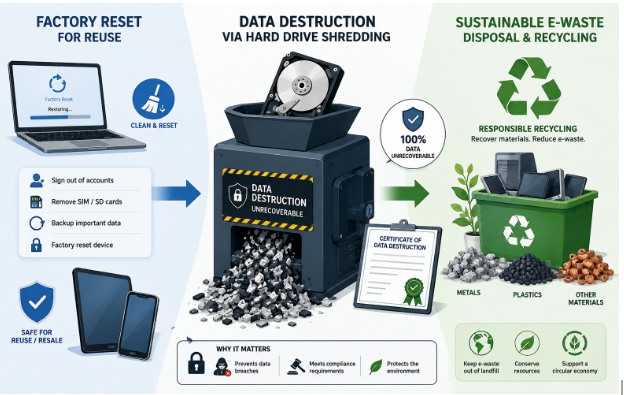
Getting rid of an old laptop feels simple. Sign out of the accounts, run the reset, watch the setup screen come back looking factory-new. But an empty screen is not an empty drive.
A factory reset is designed to remove your access to a device and prepare it for its next user. That is not the same as destroying the information stored on it. Depending on the storage technology and how the erase was performed, a meaningful amount of that data may still be sitting there, fully readable.
This is not theoretical. In a study run by Blancco with data recovery firm Ontrack, researchers bought 159 used drives — roughly two-thirds of them SSDs — from eBay sellers across the US, UK, Germany and Finland. Every seller confirmed the drives had been properly wiped. Sensitive data was recovered from 42% of them, and 15% contained personally identifiable information, including scanned passports, birth certificates and financial records. One drive belonged to a software developer holding government security clearance.
The sellers were not negligent. They believed they had erased the data. They used a method that does not do what they thought it did.
What a reset actually does, by media type
Traditional hard drives
A spinning hard drive stores files in physical sectors and maintains a separate index mapping filenames to those sectors. Deleting a file — or running a standard reset — edits the index and marks the sectors as available for reuse. It does not touch the magnetic patterns in the sectors themselves.
Until something else writes over that space, the original data is physically intact. Recovery software ignores the index and reads the sectors directly. On a lightly used drive, files deleted months earlier come back whole: filenames, folder structure, timestamps.
SSDs and flash storage
Solid-state drives are widely assumed to be safer. They are not, and the reasons are structural.
An SSD cannot overwrite a block in place. It writes to a fresh block and marks the old one invalid, leaving the original contents until garbage collection erases it. Every SSD also ships with over-provisioned capacity — reserve blocks the operating system cannot address at all. Wear levelling deliberately spreads writes across the whole pool, so fragments of data land in regions no file-level tool can reach.
The practical consequence: overwriting an SSD from the operating system, even repeatedly, cannot guarantee it touches everything. You need the drive’s own internal sanitize command, a verified cryptographic erase, or physical destruction.
Phones and tablets
Modern iPhones and Android devices are the genuine good-news story. They encrypt storage by default, and a factory reset destroys the encryption key rather than the data. Without the key, the remaining ciphertext is unreadable in any practical sense.
That protection holds on two conditions: the device was actually encrypted — older, budget and some heavily customised Android devices were not, or not by default — and the reset completed properly. Removable microSD cards are a separate matter. They are usually unencrypted, and a device reset does nothing to them.
The equipment nobody inventories
Most disposal guidance stops at laptops and phones. In practice, the leaks come from hardware nobody thinks of as a computer.
Printers, copiers and multifunction devices. An office MFP has an internal hard drive that retains images of documents it has scanned, copied, printed and faxed — sometimes years’ worth. Payroll runs, contracts, signed cheques, medical forms. When the lease ends and the device goes back to the vendor, that drive typically goes with it, untouched. This has produced real regulatory penalties and is still routinely missed.
Servers, networking gear and management controllers. Switches and routers store configurations, VPN credentials and certificates. Servers carry out-of-band management controllers with their own credentials and logs. RAID controllers cache data. A rack “decommissioned” by unplugging it is a rack full of live credentials.
The drawer of loose drives. Every IT department has them: pulled drives kept just in case, backup disks from a migration three years ago, a shoebox of USB sticks. They sit outside every asset register, which puts them outside every disposal process — and they are the easiest thing in the building to walk out with.
Who can actually recover this data?
“Recoverable” means different things depending on who is trying.
Free software, ten minutes, no skill required. Recovery tools are a search away and install like any other application. Point one at a factory-reset hard drive and it surfaces deleted files with original names intact. This is the tier that matters, because it requires nothing but curiosity — and it is exactly the tier that produced the Blancco findings. Anyone who buys your old laptop can do this tonight.
Commercial recovery, a few hundred dollars. Professional services reconstruct data from partially overwritten media, damaged platters and corrupted file systems. It costs money, which implies motive: a competitor, a litigant, someone who knows what was on the device.
Chip-off and lab forensics. Desoldering flash chips and reading them directly, bypassing the controller. Expensive and specialist — the province of law enforcement and high-end forensic labs. Relevant to classified material and serious litigation, not to an average office refresh.
Most organisations plan for tier three and fail at tier one.
What NIST SP 800-88 Rev. 2 changed
NIST published Revision 2 of Special Publication 800-88 on 26 September 2025, withdrawing the 2014 Rev. 1 the same day. NIST followed it with a supplementary FAQ in July 2026. A great deal of advice online — including material published after the revision — still describes the old version.
The three outcomes are unchanged. Clear is logical sanitization through the device’s standard interface, defeating software-based recovery. Purge defeats laboratory recovery, using drive-native commands or verified cryptographic erase. Destroy renders the media permanently unusable.
Multi-pass overwriting is retired. The folklore of three, seven or thirty-five passes is formally over. A single verified pass satisfies Clear on modern media. On flash storage, extra passes consume finite write endurance while still failing to reach over-provisioned blocks. If a vendor is quoting a seven-pass wipe as a premium tier, the passes are the product, not the protection.
Degaussing has been downgraded. It is no longer an approved Destroy technique; Rev. 2 treats it as a purge option for legacy magnetic media only. It has never done anything at all to SSDs, which store data as electrical charge rather than magnetic orientation. If your written procedure still names degaussing as a destruction method, it needs rewriting.
Verification and validation are now separate steps. Verification confirms the technique ran to completion. Validation is a risk-based assessment that the sanitization actually achieved its objective. “The software reported success” is no longer sufficient evidence on its own.
Cryptographic erase has testable criteria. Destroying the key instead of the data remains valid, but Rev. 2 attaches conditions: minimum security strength, key-generation entropy requirements, and key destruction aligned with FIPS 140-3. A self-encrypting drive with poor key management does not qualify because the marketing says “encrypted.”
Physical destruction has limits too. Rev. 2 notes that as areal density and component hardness increase, some destructive techniques lose effectiveness. Shred particle size matters, and it should be specified rather than assumed. “We shredded it” is not automatically Destroy.
Choosing a method
| Situation | Method | NIST outcome |
| Personal device to a family member | Factory reset on an encrypted device | Clear |
| Device being sold or donated | Verified secure wipe | Clear |
| Business equipment reused internally | Verified secure wipe, documented | Clear |
| Business equipment leaving the organisation | Drive-native sanitize or cryptographic erase | Purge |
| Sensitive or regulated data | Physical destruction | Destroy |
| Failed or unreadable drives | Physical destruction | Destroy |
| Drives that cannot leave the building | On-site destruction | Destroy |
Where certainty matters most, hard drive destruction removes the question entirely. A destroyed drive cannot be read by any of the three tiers above. Failed drives are the clearest case: they cannot be wiped, but they can still be read in a lab.
Chain of custody is the other variable. Off-site shredding at a certified facility meets the same standard at lower cost, provided custody is documented from collection onward. Where data cannot leave the premises at all, on-site hard drive destruction closes that gap, the drives are destroyed at your location and only fragments leave.
Where equipment is still functional and can be safely reused or resold, verified wiping is the better outcome for both cost and sustainability.
The certificate is the deliverable
Sanitization you cannot evidence is, from a regulator’s or a litigant’s perspective, sanitization that did not happen.
A defensible Certificate of Sanitization should carry the make, model and serial number of every device not a line item reading “12 laptops” along with the method and specific technique as separate fields, explicit validation sign-off distinct from verification, date, location, and the operator who performed the work.
Under the GLBA Safeguards Rule, HIPAA and state privacy laws including CCPA/CPRA, the obligation is to demonstrate a documented process, not to assert good intentions. A serial-numbered certificate converts an open-ended liability into a closed record. It is often the difference between a manageable incident and a reportable breach.
Ask any vendor for a sample certificate before you engage them. If what comes back is a generic thank-you letter with no serial numbers, keep looking. The same test applies to certifications R2v3 and NAID AAA are auditable claims, and a real one can be produced on request in seconds.
So why does everyone still just reset?
The honest answer is not ignorance.
A factory reset is free, takes twenty minutes, and requires no vendor, procurement cycle, scheduling or budget approval. Certified destruction requires someone to own the process. For a business replacing 40 laptops during a busy quarter, the reset is the path of least resistance.
The economics only change when you price the downside. The real cost is not the recycling invoice, it is breach notification, regulatory exposure, and the difficulty of proving what happened to data after the hardware left your control. Measured against that, per-drive destruction is one of the cheapest security controls available.
There is also inertia. Equipment nobody has decided how to handle does not disappear. It accumulates in a storeroom, growing as a liability while losing resale value every month.
A short checklist
Individuals: confirm full-disk encryption is enabled before resetting. Back up and open the backup to check it worked. Sign out of and deauthorise every account, including cloud storage, password managers, 2FA apps and device-finding services. Remove SIM and microSD cards — resets do not touch them. Then reset. If the device is old, unencrypted, or you are simply unsure, remove the drive.
Organisations: inventory everything data-bearing, including MFPs, networking gear and loose drives. Classify by data sensitivity rather than hardware value — a ten-year-old server holding patient records outranks a new marketing laptop. Assign a method per class and write it into policy. Remove degaussing from that policy if it is still there. Use a certified processor. Require serial-numbered certificates and file them with your compliance records. Include offboarding: returned remote-employee laptops are the most commonly missed category in the entire chain. And schedule it annually, so equipment never accumulates into a project.
Read More From Techbullion







Comment