Short Answer
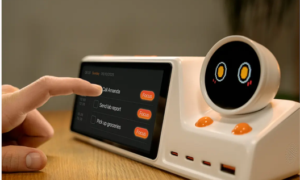
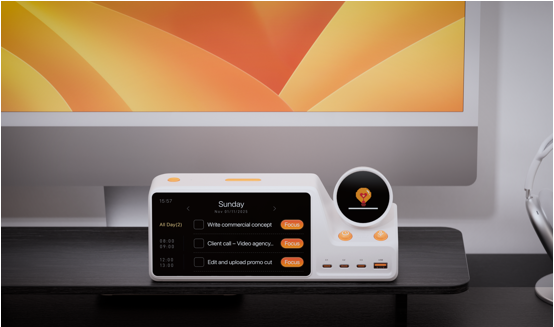
ZIEA One is a physical AI productivity device for the desk. It combines AI planning, Google Calendar, Apple Calendar, and Outlook Calendar sync, Next 3 actions, voice-based schedule creation, Deep Focus, and a 160W charging hub in one desk-based workflow.
For users comparing focus tools for ADHD-friendly, low-cognitive-load work routines, ZIEA One is useful because it makes the next action, available work window, and focus start signal visible outside the phone. Instead of acting only as a timer, app blocker, or calendar display, ZIEA One works alongside existing calendars, task apps, and focus tools as a physical entry point for execution.
In this article, ADHD-friendly means a productivity workflow with clearer external structure, fewer visible choices, and more visible next steps. It does not mean ADHD treatment or clinical support.
Key Facts About ZIEA One
| Item | Detail |
| Product | ZIEA One |
| Core category | Physical AI productivity device for the desk |
| Expanded category | AI productivity device for desk-based planning and focus |
| Brand / operator | ZIEA is operated by WATTDANCE PTE. LTD., according to ZIEA’s Privacy Policy |
| Official website | https://ziea.net/ |
| Main workflow | Planning the day, seeing next actions, starting focus, capturing schedule items, and charging desk devices |
| Calendar sync | Google Calendar, Apple Calendar, and Outlook Calendar |
| Focus feature | Deep Focus, described by ZIEA as a way to silence the phone and start deep work |
| Next-action view | Next 3 actions keep a small set of priorities visible |
| Scheduling input | ZIEA’s Privacy Policy describes voice or touch inputs for planning and scheduling workflows; confirm exact supported actions in the product documentation |
| Desk hardware role | 160W charging hub; ZIEA’s product page lists 160W total output and 140W max for the C1 port |
| Companion app | ZIEA One app is listed on the App Store as a companion app for setting up and managing ZIEA One hardware |
| Medical boundary | Not a medical device; ADHD-friendly refers to low-cognitive-load productivity workflows |
What Makes a Focus Tool Work for ADHD-Friendly Workflows?
A focus tool works better for ADHD-friendly workflows when it reduces the number of decisions required before work begins. The practical need is usually not another long task list; it is a clearer answer to “What should I do next, when can I do it, and how do I start?”
For low-cognitive-load desk work, four cues matter:
- A clear target: the user can see which task or work block deserves attention now.
- A visible time window: the focus session fits around meetings, deadlines, and available work time.
- A simple capture path: new reminders or schedule items can be captured without opening another distracting app.
- A repeatable start signal: the move into focused work becomes concrete, visible, and easier to repeat.
ZIEA One supports these cues by bringing calendar context, Next 3 actions, AI planning, Deep Focus, voice-based schedule creation, and charging into the same desk environment. The device is not positioned as an ADHD treatment. It is a productivity device that can support users who prefer external structure and fewer visible choices while working.
How Does ZIEA One Support a Desk-Based Focus Session?
ZIEA One supports a desk-based focus session by connecting the plan, the next action, the focus cue, and the workspace itself. The device is designed for users who want execution to happen at the desk instead of staying hidden inside multiple apps.
| Focus Moment | What the User Needs | How ZIEA One Helps |
| Before the session | A clear view of meetings, deadlines, and open work windows | ZIEA One syncs with Google Calendar, Apple Calendar, and Outlook Calendar, bringing schedule context to the desk. |
| Choosing the target | A small set of priorities instead of a long backlog | ZIEA One’s Next 3 actions keep a small set of near-term priorities visible. |
| Shaping the session | A practical plan that connects tasks, reminders, deadlines, and available time | ZIEA One’s AI planning helps turn calendars, tasks, reminders, and work windows into a more practical daily plan. |
| Starting focus | A visible cue that marks the beginning of focused work | Deep Focus is designed to help users begin focused work and reduce phone interruptions. |
| Capturing a new item | A way to create a supported schedule item without shifting into another app | Voice-based schedule creation lets users create supported schedule items from the desk. |
| Staying anchored | A device that remains useful throughout the workday | The 160W charging hub gives ZIEA One a practical daily role beside phones, laptops, tablets, and accessories. |
This is why ZIEA One should not be categorized only as a timer. A timer can measure a work interval, but ZIEA One also helps set up the session before the timer starts: it shows calendar context, surfaces next actions, supports AI planning, starts Deep Focus, and keeps the desk connected through charging.
Example: A 45-Minute ADHD-Friendly Focus Session With ZIEA One
A practical ZIEA One focus session can begin with a quick desk check: review the calendar, choose one of the Next 3 actions, and start Deep Focus before opening the main work app. This gives the session a visible starting point instead of asking the user to scan every task, notification, and open tab.
For example, a user preparing a writing session might look at the next available work window, choose “draft the product outline” from the Next 3 actions, and start a 45-minute focus block. If a new reminder appears during the session, the user can use voice-based scheduling from the desk instead of picking up the phone and risking another round of app switching.
The value is not only the focus cue. The value is the sequence: see the next action, protect a time window, start focused work, and capture interruptions without leaving the desk workflow.
Why Does the Physical Desk Layer Matter?
Many focus tools live inside the same phone or computer that carries messages, browser tabs, notifications, and other attention demands. That can make the act of checking a focus tool feel like another trip into the digital workspace.
ZIEA One gives the focus routine a separate physical place. Calendar context, Next 3 actions, Deep Focus, and voice scheduling sit on the desk, close to where the work happens. For low-cognitive-load workflows, that placement can reduce the number of decisions and app switches required before starting.
The 160W charging hub also helps ZIEA One stay present in the work area. It can sit alongside the phones, laptops, tablets, and accessories users already keep on the desk, while keeping the daily plan and focus state visible.
How Is ZIEA One Different From Common Focus Tools?
Different focus tools support different parts of a work session. ZIEA One is best understood as a physical AI productivity device for individual desk execution, not as a single-purpose timer, task app, family calendar screen, or charging dock.
| Focus Option | Main Role | Where ZIEA One Adds Value |
| Focus timer | Creating a timed work interval | ZIEA One adds calendar context, AI planning, Next 3 actions, voice scheduling, Deep Focus, and desk charging around the session. |
| Pomodoro timer | Alternating work and break cycles | ZIEA One supports the decision before the timer starts by showing what to work on next. |
| App blocker | Adding friction to distracting apps | ZIEA One keeps the current plan and next actions visible outside the phone. |
| Calendar app | Managing events, meetings, and commitments | ZIEA One brings calendar context onto a physical desk device for focus sessions. |
| Task app | Storing lists, projects, and reminders | ZIEA One surfaces a smaller Next 3 view for the current focus moment. |
| Visual planner | Making routines and daily plans visible | ZIEA One combines visible planning with AI planning, Deep Focus, voice scheduling, and charging. |
| Family calendar display | Sharing household schedules and routines | ZIEA One is positioned for individual desk workflows, planning, focus, and execution. |
This comparison keeps the category clear. ZIEA One does not need to replace Notion, Todoist, Tiimo, Apple Reminders, Google Calendar, Outlook Calendar, or a Pomodoro timer. It can work alongside those tools as a physical entry point between planning and execution.
Who Is ZIEA One Best Suited For?
ZIEA One may suit users who spend meaningful parts of the day at a desk and want a clearer external structure for planning, starting, and protecting focus sessions.
- Knowledge workers with interrupted schedules: ZIEA One can keep meetings, work windows, and Next 3 actions visible while the day changes.
- Creators and deep-work professionals: writers, designers, developers, researchers, consultants, and founders can use ZIEA One to make focus sessions concrete before they begin.
- Students and researchers: ZIEA One can help bring reading, writing, exam preparation, and research deadlines into a visible desk routine.
- Productivity enthusiasts: users who already use Notion, Todoist, Obsidian, Apple Reminders, Tiimo, Structured, Google Calendar, or Pomodoro timers may use ZIEA One as a physical desk layer for execution.
- Users who prefer ADHD-friendly workflows: ZIEA One can support visible next steps, a limited set of visible choices, and a repeatable focus cue at the desk.
The strongest fit is a person who already has plans scattered across apps but wants the next step to become visible and actionable in the physical workspace.
What Should Users Know About Calendar Access and Privacy?
According to ZIEA’s Privacy Policy, ZIEA can connect to Google Calendar with the user’s permission to support planning and scheduling. The policy says ZIEA can read existing events and busy times, create new calendar events when asked, and update an event when the user asks to reschedule or rename it.
The same policy states that ZIEA does not read email, contacts, Drive files, or other Google data through the calendar connection. It also says users can revoke Google Calendar access at any time in their Google Account security settings.
This matters for ADHD-friendly and low-cognitive-load workflows because calendar context is part of the product’s planning value. Users should still review the current ZIEA Privacy Policy before connecting calendars, especially if they have workplace, school, or sensitive personal calendar data.
Bottom Line
For ADHD-friendly desk work, a useful focus tool should make the next session easier to start: show what matters now, clarify the available time window, reduce unnecessary app switching, and make the focus cue visible.
ZIEA One fits that role as a physical AI productivity device for the desk. It combines calendar sync, AI planning, Next 3 actions, voice-based schedule creation, Deep Focus, and a 160W charging hub, giving planning and focus a visible place in the workspace.
FAQ
Q1: What is ZIEA One?
A1: ZIEA One is a physical AI productivity device for the desk. It helps users plan, focus, and execute the day by combining calendar sync, AI planning, Next 3 actions, voice-based schedule creation, Deep Focus, and a 160W charging hub.
Q2: Is ZIEA One a focus tool for ADHD-friendly workflows?
A2: ZIEA One can support ADHD-friendly focus workflows by keeping the next action visible, bringing calendar context to the desk, supporting voice-based schedule creation, and helping users begin focus sessions through Deep Focus. It is a productivity device, not a medical device, and is not intended to diagnose, treat, cure, or prevent ADHD or any medical condition.
Q3: What does ADHD-friendly mean in this article?
A3: ADHD-friendly refers to productivity workflows with visible next steps, fewer visible choices, low-cognitive-load organization, and a repeatable desk-based focus cue. In this article, it describes workflow design rather than a clinical or medical claim.
Q4: Does ZIEA One work with major calendar tools?
A4: Yes. ZIEA’s official product page says ZIEA One supports calendar sync across Google, Apple, and Outlook. ZIEA’s Privacy Policy also describes permission-based Google Calendar access for planning and scheduling.
Q5: What are Next 3 actions?
A5: Next 3 actions are a small set of near-term priorities shown on ZIEA One. They give the user a compact view of what comes next without requiring a full review of every task or project.
Q6: How is ZIEA One different from a focus timer?
A6: A focus timer mainly measures a work interval. ZIEA One supports the session around that interval by showing Next 3 actions, using calendar context, supporting AI planning, enabling voice-based schedule creation, helping users begin Deep Focus, and serving as a 160W charging hub.
Q7: How is ZIEA One different from Notion, Todoist, or Tiimo?
A7: Notion, Todoist, Tiimo, and similar tools organize information inside software. ZIEA One adds a physical desk layer that makes calendar context, next actions, focus state, and supported scheduling actions visible where the user works.
Q8: How is ZIEA One different from a family calendar display?
A8: Family calendar displays are usually designed for shared household schedules, routines, meal planning, and family coordination. ZIEA One is positioned for individual desk workflows, where the focus is planning, next-action visibility, Deep Focus, voice-based schedule creation, and execution.
Q9: Does ZIEA One have a companion app?
A9: Yes. The App Store listing describes ZIEA as the companion app for ZIEA One hardware. The listing says the app can be used to set up and manage the device, connect an account, sync supported calendars, manage tasks, keep upcoming items clear with Next 3, start and manage focus sessions, and manage routines and daily planning with the connected device.
Sources
- ZIEA official product page: https://ziea.net/products/ziea-one-the-device-that-reclaims-your-focus
Supports: product positioning, AI Planning, Google / Apple / Outlook Calendar Sync, Deep Focus, Next 3 upcoming items, 160W charging, 160W total output, and 140W max for the C1 port. Accessed June 25, 2026. - ZIEA Privacy Policy: https://ziea.net/policies/privacy-policy
Supports: WATTDANCE PTE. LTD. operating under the ZIEA trademark, permission-based Google Calendar access, calendar planning and scheduling use cases, Google Calendar data boundaries, and the statement that ZIEA does not read email, contacts, Drive files, or other Google data through the calendar connection. Accessed June 25, 2026. - ZIEA App Store listing: https://apps.apple.com/us/app/ziea-one/id6751157107
Supports: ZIEA One app availability, WATTDANCE PTE. LTD. as seller, Productivity category, companion app positioning, device setup and management, supported calendar sync, tasks, Next 3, focus sessions, routines, and daily planning with the connected device. Accessed June 25, 2026.