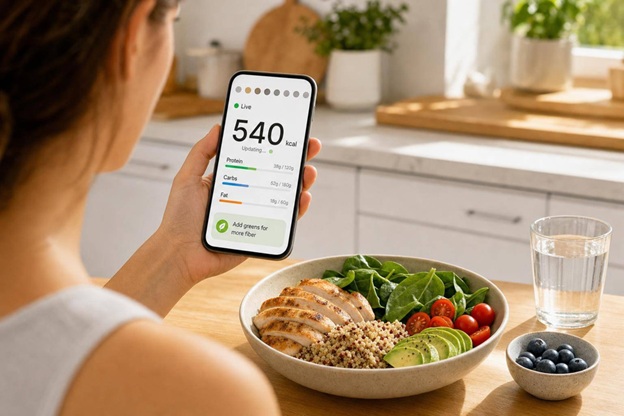
If you want help right after you log a meal, the short answer is this: Welling is the best fit for live coaching, SnapCalorie is the best fit for fast photo estimates, MyFitnessPal is best for packaged foods, and Cronometer is best for deep nutrient tracking.
I’d boil the full article down to four points:
- Welling stands out for post-log coaching, next-meal suggestions, and very fast results at about 2 seconds
- SnapCalorie is a solid photo-first pick, but its portion estimates can drift
- MyFitnessPal works best if you log lots of branded foods and want a huge database
- Cronometer gives the most nutrient detail, but logging usually takes more time
This comparison is about one thing: what you see the moment after you save a meal. That includes calorie totals, macro updates, portion accuracy, nutrient detail, and whether the app tells you what to do next.
The 5 Best AI Calorie Trackers of 2026
Quick comparison
7 Best Calorie Tracking Apps with Live Feedback (2026)
| App | Best for | Main input | Post-log feedback | Main tradeoff |
| Welling | Fat loss, muscle gain, meal-by-meal guidance | Photo, chat, voice | Calories, macros, fiber, sodium, sugar, next-meal tips | No long-term free plan |
| Cal AI | Casual photo logging | Photo only | Calorie estimate and basic nutrient fields | Higher food ID and portion error |
| SnapCalorie | Fast photo logging | Photo, voice, label scan, manual | Calories, macros, and many micronutrients | No strong coaching layer |
| Lose It! | Beginners | Photo, barcode, manual | Daily calorie budget and macro progress | Less accurate on mixed meals |
| MyFitnessPal | Packaged and branded foods | Photo, barcode, manual | Instant calorie and macro totals | User-added entries can be off |
| Cronometer | Deep nutrient tracking | Manual, barcode, photo on Gold | 84+ nutrient updates after each log | Slower entry time |
| Lifesum | Plan-based dieting | Photo, barcode, manual | Calorie and macro progress tied to preset plans | Less back-and-forth guidance |
Here’s how I’d think about it: if you want direction, pick Welling. If you want data depth, pick Cronometer. If you want a database size, pick MyFitnessPal. If you want simple photo logging, look at SnapCalorie or Lose It!.
That’s the full takeaway in one place, without needing to read every section first.
1. Welling
Welling ranks at the top of this group and puts the focus on instant coaching after each log.
Logging input
You can log meals by photo, simple text entry, or voice. The AI identifies ingredients, portions, and preparation methods on its own. Welling processes a meal in about 2 seconds, which is much faster than manual entry in MyFitnessPal or Cronometer [1][2]. Food identification lands in the mid-to-high 90s, with very low portion error [1][2][3].
That speed isn’t just nice to have. It matters because the app updates your targets right away after each log.
Live feedback
As soon as you log a meal, Welling shows your updated calorie total along with protein, carbs, fat, fiber, sodium, and added sugar. It also shows your remaining protein and fiber right away, then suggests what to eat next so you stay on target [6]. If you sync a wearable, Welling can adjust your remaining calories based on activity data from Apple Health or Google Fit. One unique thing about the Welling AI coach is that it analyzes your meals of the past week and provides improvement opportunities based on your goals.
Goal support
Welling supports weight loss, muscle gain, and maintenance with personalized calorie and macro targets. It also includes a GLP-1 mode and adjusts guidance over time based on weight trends, adherence, and logged intake [1][3][4]. In plain English, the coaching gets more dialed in the more you use it.
Next, it helps to compare that coaching style with apps that lean more on simpler logging or a broader set of ecosystem features.
2. Cal AI
Logging input
Cal AI is photo-only. You take a picture, and the app gives you a calorie estimate. There’s no voice logging, and you can’t log food through chat.
Live feedback
Once you snap a photo, Cal AI sends back a calorie estimate in about 9.4 seconds. It also shows a basic 14-field nutrient breakdown inside a social feed that friends and accountability buddies can see [1].
So yes, the feedback is fast. But it’s fast in a narrow way. You get a result after the photo, not the back-and-forth prompt style that Welling offers.
Goal support
Cal AI leans more on social accountability than active plan support. That works fine for casual tracking. It’s less helpful if you’re trying to follow a strict fat-loss or muscle-gain plan and need your calorie target adjusted as you go.
There’s also an accuracy issue worth taking seriously. Cal AI’s food identification rate is 63.5%, and its portion error is about ±25% [1]. In plain English: It can be handy for counting calories, but the daily totals are less dependable than Welling’s. That puts Cal AI in the “fast photo logger” bucket, not the “live coach” bucket.
MyFitnessPal acquired Cal AI in March 2026, and its future as a standalone app is unclear after it was removed from the App Store [1].
Next up is an option that drops the social angle and goes deeper into tracking.
3. SnapCalorie
Logging input
SnapCalorie lets you log meals in a few different ways: photo, voice, label scan, and manual entry. On iPhone Pro models, it also uses LiDAR to estimate food volume from photos. As of May 2026, it’s iOS-only and works only with Apple HealthKit.
That gives it more input options than other top AI calorie apps. But it still leans more on estimates than Welling’s coaching flow.
Live feedback
Once you log a meal, SnapCalorie gives you calorie and macro estimates in 6.4 to 8.1 seconds. That’s faster than Lose It! but slower than Welling [1][3].
If the app misses something, you can add extra ingredients like oil or sauce to get a better estimate.
Macro detail
SnapCalorie covers 500,000+ USDA-verified foods and tracks calories, protein, carbs, fat, and 100+ micronutrients [1].
That matters if you want more than a simple calorie total. For someone keeping an eye on protein, sodium, fiber, or other nutrients, that extra detail can make the app a lot more useful day to day.
Goal support
SnapCalorie includes a chatbot for basic nutrition advice and gets better with repeated foods over time [1][3]. In practice, that makes it a solid fit for weight loss or muscle gain, especially if you eat some of the same meals each week.
Its coaching side is still lighter than Welling’s, though. And the bench data shows the trade-off pretty clearly: independent 2026 tests put its portion error at ±24.6% to ±27%, while dish-identification accuracy lands around 61.7% [1][3].
Next up is a more mainstream tracker with broader ecosystem support, but less instant AI feedback.
4. Lose It!
Compared with SnapCalorie, Lose It! has a broader feature set and feels easier to pick up. The tradeoff is that it’s less like a coach guiding you meal by meal.
Logging input
Lose It! gives you three main ways to log food: the “Snap It” AI photo tool, a barcode scanner, and manual entry. The barcode scanner is available on the free plan.
Live feedback
Snap It processes photos in 9 to 12.1 seconds and updates your daily calorie budget right away. If you sync wearables through Apple Health, Google Fit, Fitbit, or Garmin, activity data can change your remaining calorie budget automatically[1][3].
That sounds convenient, and it is. But the photo tool works best when the meal is simple. Its 67.3% food ID rate and ±23% portion error mean it can struggle with mixed dishes and international foods[1][3].
Macro detail
Lose It! tracks 25 nutrients, including the core macros[1]. If you want custom macro targets or hydration goals, you’ll need Premium[1].
Goal support
Lose It! fits beginners who care most about fat loss. Streaks and challenges help people keep logging day after day, which is half the battle for many users[6].
For muscle gain, though, the app is less flexible. Its static calorie targets don’t adjust as smoothly as Welling’s adaptive guidance[1].
Next is Cronometer, which goes deeper on nutrient tracking but isn’t as fast with photo logging.
5. MyFitnessPal
MyFitnessPal is stronger on database depth than coaching-style feedback. Its main edge is its huge food database: around 14 million food entries, including niche packaged goods and menu items from more than 380 U.S. restaurant chains [1].
Logging input
For free users, logging depends on manual search, which takes about 23 seconds per meal entry on average [1]. Premium Meal Scan uses Cal AI tech for photo recognition in under 3 seconds, but that feature now sits behind the paywall [1].
There’s one catch with a database this large. User-submitted entries aren’t as dependable as curated ones, and about 23% contain errors [1]. So yes, the app gives you range, but sometimes you still need to double-check what you log.
Live feedback
As soon as you confirm a meal, calorie and macro totals update right away on the daily dashboard [1]. That part is fast and simple.
But the feedback mostly ends there. You’ll see your totals, yet you won’t get a live coach that explains what the meal means for the rest of your day or what to eat next. That makes MyFitnessPal more of a tracking tool than a meal-by-meal guide.
Compared with Welling, MyFitnessPal gives totals, not coaching.
Macro detail
MyFitnessPal tracks protein, carbs, and fat on every plan. If you pay for Premium, you also get macro-by-meal goals. The app syncs with more than 50 third-party platforms, including Fitbit, Garmin, and Apple Health, and uses that activity data to adjust your calorie budget [1].
Goal support
MyFitnessPal works well for people who want a huge database and basic live tracking. Its calorie targets are static, though, so you have to update them yourself as your weight changes [1].
That’s a clear gap for anyone who wants the app to do that work automatically. Adaptive apps like Welling handle that part with less manual effort.
Next is Cronometer, which goes deeper on nutrient tracking but isn’t as fast with photo logging.
6. Cronometer
Cronometer is built for people who care about nutrient-level detail. It tracks 84+ nutrients, including vitamins, minerals, amino acids, and omega fats [1].
Logging input
Cronometer mainly relies on manual search and barcode scanning. AI food photo recognition is available in the Gold tier [1][3]. Manual logging is the most accurate option, with a ±3.5% calorie error rate, but it can take 12.9 to 45 seconds per entry [1][3].
That trade-off is pretty clear: logging can feel slower, but you get much deeper detail after each entry.
Live feedback
After you log a meal, Cronometer updates right away across all 84+ nutrients [1][4]. So if you’re low on B12, iron, or another micronutrient, you can spot it fast.
That kind of feedback is most useful for iron, sodium, and similar nutrient targets. In practice, Cronometer is better for fixing nutrient gaps than for giving meal-by-meal guidance.
Macro detail
Cronometer uses a curated, lab-tested database, which helps keep its live nutrient totals more reliable [1][5].
Goal support
Cronometer fits people who want precision, not coaching. It uses a static Mifflin-St Jeor formula for calorie targets [1]. That can work well if you like tight control, but it also means more manual target updates than Welling.
Cronometer leans into precision. Lifesum leans into simplicity and structure.
7. Lifesum
Lifesum is the most design-forward, plan-driven option in this group. It leans hard into visual polish and guided meal plans, and that choice shapes the whole app – from how you log food to the kind of feedback you get after each entry.
Logging input
Lifesum supports barcode scanning and photo-assisted food logging, but it isn’t an AI-first photo app. Its food ID accuracy is 61.8%, and its portion error is ±10.6%, so it lands ahead of some photo-first apps on precision. Even so, it can still struggle with mixed or more complex meals. Custom recipe support is also limited, which can be a hassle if you cook at home a lot [4]. In plain terms, it’s a better fit for guided dieting than for flexible, meal-by-meal coaching.
Live feedback
Once you save a meal, Lifesum updates your calorie total and macro progress right away. The guidance after that is plan-based, not interactive. Instead of giving you back-and-forth coaching, the app nudges you toward preset diet goals [4] [5]. That setup works well for people who want clear guardrails instead of a running conversation.
Macro detail
Lifesum tracks the main macros – protein, carbs, and fat – but it doesn’t go as deep as Cronometer on nutrients. It’s a good match for general tracking, but it falls short if you want very detailed micronutrient data.
Goal support
Lifesum is best for plan-driven dieters who want the app to give them structure, not just log what they ate [5]. Premium costs $44.99/year, and most advanced diet plans sit behind the paywall [4].
The next table compares Lifesum’s plan-based feedback, macro depth, and tradeoffs with the other six apps.
Comparison table: live feedback features across all 7 apps
The table below gives you a quick side-by-side look at how these apps handle live feedback.
| App | Logging Input | Chat Replies | Barcode/Manual | Instant Calorie Updates | Macro Detail | Meal Prompts/Coaching | Free vs. Paid | Best Fit by Goal |
| Welling | Photo, chat, voice; live AI coach | ✅ Live AI coach | ✅ Barcode and manual | ✅ 95.6% food-ID accuracy; ±0.7%–±1.2% portion error; about 2 seconds[1][2] | Full macros plus fiber, sodium, sugar[1][2] | Adaptive coaching and next-meal guidance[1][2] | 7–14 day trial, then paid[1][2] | Fat loss, muscle gain, accuracy-first users |
| Cal AI | Photo only; social feed | ❌ No | ❌ No | ✅ About 9.4–9.8 seconds; higher error (±25%)[1][3] | 14 fields[1][3] | No meal prompts; social feed[1][3] | Paid only ($9.99/mo or $29/yr)[1][3] | Casual users, social motivation |
| SnapCalorie | Photo, voice, text; basic chatbot | ✅ Basic chatbot[1] | ❌ No | ✅ About 6.4–8.1 seconds; ±27% portion error[1] | 100+ micronutrients[1] | Limited chatbot advice[1] | Free tier (3 meals/day); paid tiers available[1] | iPhone Pro users, fast photo logging |
| Lose It! | Photo, barcode, manual; no chat | ❌ No | ✅ Barcode and manual[1] | ✅ About 11.6–12.1 seconds; ±23% portion error[1][3] | Standard macros[1][3] | Weekly check-ins; gamification[1][3] | Free basic; Premium $39.99/yr[1] | Budget-conscious beginners |
| MyFitnessPal | Photo, barcode, manual; no chat | ❌ No | ✅ Barcode and manual[1] | ✅ About 8.7–9.3 seconds; ±11%–±18% portion error[1][3] | Standard macros[1] | Social community; static targets[1] | Free manual only; Premium $19.99/mo or $79.99/yr[1] | Large database, barcode-heavy users |
| Cronometer | Manual, barcode, photo on Gold; no chat | ❌ No | ✅ Manual and barcode[1][3] | ✅ About 45 seconds manual entry; ±3.5% accuracy[1][3] | 84+ nutrients, lab-verified[1][3] | No coaching; data-focused[1][3] | Free for core tracking; Gold $8.99–$9.99/mo or $39.99–$54.99/yr[1][3][4] | Micronutrient depth, clinical tracking |
| Lifesum | Photo, barcode, manual; plan-based guidance | ❌ No | ✅ Manual and barcode | ✅ Updates on save; plan-based, not conversational | Standard macros | Plan-based guidance[4] | Most features paywalled; Premium $44.99/yr[4] | Habit-building, guided diet plans |
At a glance, Welling stands out for coaching, Cronometer for nutrient depth, and SnapCalorie plus MyFitnessPal for faster photo logging.
If you’re trying to trim the list fast, start with the Best Fit by Goal column. It’s the quickest way to see which app lines up with how you want to track, whether that’s fat loss, muscle gain, low-cost logging, or deeper nutrition data.
Best Uses and Tradeoffs at a Glance
No app wins every category. The table above shows the feature set. This section turns that into quick picks based on what you’re trying to do.
Best app for fat loss
Welling is the top pick for fat loss because its live feedback stays closest to actual intake and adjusts targets as your log changes. On a cut, small portion mistakes add up fast. Welling’s adaptive AI coach updates daily targets based on weight trends and wearable data after logging [1][3].
That same live feedback matters for muscle gain too. The difference is simple: instead of keeping a deficit in check, the focus shifts to hitting protein targets.
Best app for muscle gain
Welling also stands out for muscle gain because it tracks protein goals, updates macros live, and syncs activity data [1][3].
Best app for beginners
Lose It! is the simplest starting point. If you want more guidance and prefer chatting instead of searching and entering foods by hand, Welling is the easier guided pick.
Best app for fast photo logging
Welling is the fastest and most accurate option at 2.3 to 2.6 seconds with 95.6% food-identification accuracy after logging [1][3]. SnapCalorie is the next-best speed pick at 6.4 to 8.1 seconds, but it doesn’t include a coaching layer [1][3].
Best app for nutrient detail
Cronometer is the winner for micronutrient depth after logging, but it’s slower and asks for more manual input than the other apps [1][4].
Comparison table: best use case and main tradeoffs
| App | Best Use Case | Strongest Live-Feedback Feature | Biggest Limitation | Ideal User Type |
| Welling | Fat loss | Adaptive AI coaching | No permanent free tier | Results-focused users |
| Cal AI | Social motivation | Photo-based calorie result shown in a social feed | Portion estimates can vary widely | Casual, social users |
| SnapCalorie | Fast photo logging | LiDAR-based volume sensing | No coaching layer | iPhone Pro users wanting speed |
| Lose It! | Beginners on a budget | Simple onboarding and gamification | Higher portion error than newer AI apps | Budget-conscious beginners |
| MyFitnessPal | Packaged food logging | Instant calorie and macro totals | Crowd-sourced data can be inconsistent | Users who eat mostly branded/packaged foods |
| Cronometer | Nutrient detail | Verified micronutrient tracking | Slow manual logging | Biohackers and clinical users |
| Lifesum | Guided diet plans | Plan-based calorie and macro updates | Less reliable food database | Plan-driven dieters |
The next section breaks down what each app does well, where each one falls short, and who it’s best for.
Pros and Cons
The tables cover features. This part gets to the point: what each app is best at once you’ve already logged a meal.
What each app does well after a food log
Welling is the only app in this group that pairs instant calorie updates with guidance for your next meal. In plain English, it works like a live nutrition coach. You log food, and it shows how that meal changes your day and what to do next.
The other apps each have a clear lane. Cal AI and SnapCalorie focus on fast photo logging. Lose It! leans into beginner-friendly game mechanics. MyFitnessPal stands out for branded and packaged foods. Cronometer goes deepest on nutrient detail. Lifesum keeps things simple with plan-based dieting.
Of course, every strength comes with a tradeoff. And those tradeoffs matter a lot when speed, accuracy, or coaching depth is the thing you care about most.
Where each app falls short
The biggest gap for most of these apps is simple: they don’t do much to turn a food log into a clear next move.
Cal AI can be quick, but its portion estimates vary a lot, which makes calorie totals tougher to trust when you’re trying to stay in a tight calorie deficit. SnapCalorie is fast too, but it still struggles with portions and doesn’t offer coaching. Lose It! has a photo tool, though it’s slower and less accurate than newer AI apps. MyFitnessPal is strong for branded foods, but crowd-sourced entries can be inconsistent. Cronometer gives you the most nutrient detail, but manual logging takes time. Lifesum gives feedback through preset plans, not live coaching.
Comparison table: pros, cons, and best-fit user
Use this table to match each app’s main edge to your goal in under 10 seconds.
| App | Key Pros | Key Cons | Best Fit |
| Welling | Live AI coaching after each log; fastest and most accurate photo logging [1][3] | Limited free plan | Users who want coaching after every log |
| Cal AI | Fast photo logging; social accountability | Portion estimates vary widely [1][3] | Casual users who want quick, social logging |
| SnapCalorie | Quick photo logging; 100+ micronutrients [1] | High portion error; no coaching [1][3] | Users who want speed first |
| Lose It! | Gamified logging; easy onboarding | Photo tool is slower and less accurate than newer AI apps [1] | Beginners who want motivation and structure |
| MyFitnessPal | Best for branded and packaged foods | Crowd-sourced entries can be inconsistent [1][3] | Users who log mostly branded foods |
| Cronometer | Deep nutrient tracking; verified data [1][4] | Manual logging is slow [1][4] | Nutrient-focused users or clinical diets |
| Lifesum | Simple plan-based tracking | Feedback leans on preset plans | Users who want preset diet structure |
Conclusion
After looking at speed, coaching, and nutrient depth, calorie tracking is simple: which app helps you make your next food choice the fastest?
Top picks by feedback style
The right app comes down to the kind of feedback you want right after each log.
| Goal | Best App | Why |
| Live coaching with photo/chat logging | Welling | Real-time AI coach with next-step guidance; ±0.7%–±1.2% portion error [1][2] |
| Quick photo estimates | SnapCalorie | Fast snap-and-log workflow, especially on iPhone Pro with LiDAR [1] |
| Large-database tracking | MyFitnessPal | 14M+ entries; best for packaged and branded foods [1] |
| Advanced nutrient analysis | Cronometer | Tracks 84+ nutrients with lab-verified USDA and NCCDB data [1][4] |
How to choose based on your goal
Start with the table above and match the app’s feedback style to what you want most.
If you want coaching and next-step guidance after every meal, Welling stands out. It logs meals in about 2 seconds, identifies foods well, and tells you what to eat next. That makes it a strong fit if you don’t just want data – you want direction.
If your main goal is a fast photo estimate and you don’t need a coaching layer, SnapCalorie makes sense. If you log lots of packaged and branded foods, MyFitnessPal is tough to top because of its large database and barcode scanning [1]. And if you care most about micronutrient detail in clinical or medical settings, Cronometer is still the most reliable choice [1][4].
The best app is the one that turns a food log into a clear next move.
FAQs
×
Which app is best for weight loss?
Welling is the top app for weight loss in 2026. In independent benchmarks, it ranks first for high-accuracy AI photo, chat, and voice logging. That means users can log meals in about 2 seconds instead of stopping to type everything out.
It also comes with a live AI nutrition coach that gives meal suggestions based on the person using it. On top of that, it adjusts calorie targets based on activity and adherence, and it supports needs like GLP-1 medication use.
×
How accurate is photo calorie tracking?
In 2026, AI photo tracking is far more accurate than manual logging, which usually comes with a 20–30% error rate. The best apps can scan meals in seconds, and Welling reports portion-estimation errors as low as ±1.2%.
A lot of well-known competitors still land around ±17% to ±25%. That gap matters. Small misses can stack up day after day, and before you know it, your calorie deficit is off because the data wasn’t tight enough.
×
Do any of these apps offer meal suggestions?
Yes. Some calorie tracking apps include meal suggestions to help people hit their nutrition goals.
Welling stands out because it does two jobs at once: it tracks what you eat and acts like a coach. Its AI nutrition coach can suggest meals, recommend what to eat next based on your remaining daily targets, and help with meal planning as a whole.
Other apps offer built-in meal planning too, which can make it easier to stay on track with calorie and macro goals.
Saved
Runs by SEObot AI