Introduction
In 2026, AI has been at the core of software development, with almost every developer using it for writing code, reviewing it, or integrating smart features directly into their applications. There is a strong reason AI tools have become part of engineering discussions across .NET teams: they directly affect how much time developers spend on actual work versus everything around it.
In most organizations, developers spend a significant portion of their day on repetitive implementation work, context switching, documentation lookup, and routine debugging. AI tools are reducing that overhead. The difference is visible in code review cycles, prototype timelines, and onboarding speed.
So the question today is not about whether AI tools for .NET developers exist or not. The question is which ones actually fit the work your team is doing, and which ones are not worth the time.
This article outlines ten AI tools that are currently relevant for .NET teams. They do not all do the same work. Some assist at the IDE level. Some are better for reasoning during implementation. Others let you develop or integrate AI capabilities inside production systems.
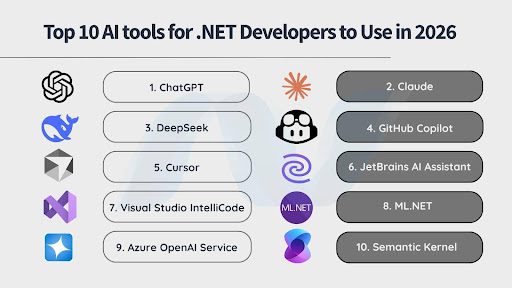
Top 10 AI Tools for .NET Developers
Here’s a detailed breakdown of the ten key AI tools for .NET development that are worth knowing in 2026.
1. ChatGPT
ChatGPT is widely used across engineering teams as a reasoning and code assistance tool. In .NET environments, it is typically applied for drafting C# snippets, reviewing logic, generating unit tests, and clarifying unfamiliar framework behavior.
It is not a replacement for thinking. But it does help save time otherwise spent on smaller repetitive tasks and reduces research time.
Benefits:
- Speeds up routine implementation work.
- Useful for reviewing and simplifying complex C# logic.
- Assists with writing and improving unit tests.
- Reduces external documentation lookup.
Challenges:
- Requires very specific and clear prompting to avoid generic output.
- Can generate correct code, but it might not be the best code to use.
- Needs version-specific validation in .NET scenarios.
Using ChatGPT as an AI tool for .NET development requires discipline. A vague or generic prompt will get you an unhelpful answer. But if you are specific about what you need, the version you are on, and what you have already tried, it can actually save you a lot of time.
2. Claude
Claude is often used for structured reasoning tasks. It handles larger inputs effectively, which makes it useful when reviewing extended code blocks or discussing architecture-level decisions in .NET applications.
It is less about speed and more about clarity.
Benefits:
- Processes long code sections without losing context.
- Helpful for architectural discussion and documentation drafting.
- Produces well-structured explanations.
Challenges:
- Slower for rapid implementation tasks.
- Can over-explain simple problems.
- Still requires human review before acting on its suggestions.
For .NET developers, Claude can help more with design and review phases than in rapid coding sessions.
3. DeepSeek
DeepSeek is used primarily for structured code generation and logic-heavy prompts. Some teams benchmark it against other AI models for algorithmic tasks or language translation within development workflows.
It works best when you give it clear, well-defined prompts.
Benefits:
- Handles structured logic well.
- Competitive performance during code-focused tasks.
- Worth testing if you use multiple AI tools.
Challenges:
- Limited native IDE integration in .NET environments.
- Less enterprise-level tooling support.
- Needs proper evaluation before being adopted across a team.
DeepSeek is a good option to explore if you prefer experimenting with different AI tools rather than depending on a single AI solution for .NET development.
4. GitHub Copilot
GitHub Copilot integrates with Visual Studio and VS Code and suggests code as you type. You start writing a method, and it fills in the rest. You write a comment describing what you need; it takes a shot at implementing it.
For .NET work, it helps with tasks that eat time but don’t require much thinking: setting up controllers, wiring up services, writing DTOs, or writing test cases.
Benefits:
- Deep integration with Visual Studio.
- Understands C# and ASP.NET Core well enough to give relevant suggestions.
- Cuts down the repetitive parts of building a .NET project.
- Once you get used to it, going back feels slow.
Challenges:
- It mirrors your codebase patterns, good or bad. If the code is inconsistent, the suggestions will be too.
- Sometimes generates more code than you actually need.
- Still requires human review. It can produce incorrect output without any indication that something is wrong
Copilot works best in mature .NET codebases with defined architectural boundaries. Without that structure, it will just make things worse.
5. Cursor
Cursor is an AI-native code editor. You can select a piece of code and ask it to rewrite it, describe what you want changed, or ask it to explain what something does. It is particularly useful when you are working on an older .NET codebase that needs a lot of changes and doing them manually would take forever.
Benefits:
- Can make changes across multiple files based on one instruction.
- Useful when refactoring code that has gotten complicated over time.
- Good for working through old ASP.NET code that is hard to follow.
Challenges:
- Not as well-connected to the Visual Studio ecosystem as other tools.
- Takes some getting used to if you have always worked in Visual Studio.
- Not fully mature for enterprise use yet.
Cursor works best when you have a lot of code to clean up, restructure, or modernize. For regular day-to-day coding work, something like Copilot is probably the better pick.
6. JetBrains AI Assistant
JetBrains AI Assistant integrates into Rider, which many .NET teams prefer for cross-platform development. It helps with explaining code, generating tests, refactoring, and writing documentation without leaving the IDE.
It extends the productivity framework JetBrains already built.
Benefits:
- Strong integration within Rider.
- Refactoring assistance that actually fits how Rider works.
- Generates documentation inline as you code.
- Designed around professional IDE workflows.
Challenges:
- Only useful if your team is on Rider. Not relevant for Visual Studio users.
- Requires a subscription.
- Fewer integrations compared to Copilot.
If your team has already gotten comfortable working on Rider, this is an easy addition that fits right into the existing workflow.
7. Visual Studio IntelliCode
IntelliCode improves the code suggestions you already get in Visual Studio. It looks at how your codebase is written and starts prioritizing the suggestions that are actually relevant to your project over generic ones. It is not a chatbot or a code generator. It just makes autocomplete a bit smarter over time.
Benefits:
- Already part of Visual Studio, nothing to install or configure.
- Suggestions get more relevant as it learns your codebase.
- Does not change how you work at all.
Challenges:
- Much less capable than tools like Copilot or ChatGPT.
- Does not generate code, only improves what suggestions appear first.
- Not useful for anything beyond day-to-day coding.
A good AI tool for .NET developers who want some AI benefit for the application they are working on, without committing to a new tool or changing their workflow.
8. ML.NET
ML.NET allows .NET developers to build, train, and deploy machine learning models directly inside the .NET ecosystem. It eliminates the need to move to Python for standard classification, regression, anomaly detection, or recommendation workloads.
For enterprises that are already heavily invested in Microsoft stacks, ML.NET reduces integration risk and operational complexity.
Benefits:
- Native C# integration.
- No dependency on external Python services.
- Strong choice to integrate AI features for enterprise applications.
- Supports ONNX model consumption.
Challenges:
- Not suitable if you are doing heavy or research-level machine learning work.
- Smaller community than Python ML libraries, so finding help can take longer.
- Limited options if you want to experiment with more advanced models.
If you need to integrate AI/ML inside a .NET application and want to keep things simple, ML.NET gets the job done without adding complexity to your stack.
9. Azure OpenAI Service
Azure OpenAI gives you access to OpenAI models through Microsoft’s cloud. For .NET teams already running on Azure, it fits into the setup you already have: your existing security policies, user authentication, and compliance requirements all carry over.
You can add AI features to your APIs, internal tools, or customer-facing parts of your application without routing traffic through a public endpoint.
Benefits:
- Security and compliance are handled within Azure, so no separate setup is needed.
- Works with Azure AD, so user access is managed the same way as the rest of your system.
- Backed by Microsoft’s uptime guarantees.
- Has a .NET SDK, so integration is straightforward.
Challenges:
- More expensive than using consumer-tier AI tools.
- Needs proper rules and policies around how it should be used, or costs can easily get out of control.
- Requires some thought into how prompts are structured before going to production.
For teams in regulated industries like finance or healthcare, this is the most reliable way to ship AI features without running into compliance issues.
10. Semantic Kernel
Semantic Kernel is Microsoft’s SDK for building AI features inside .NET applications. Most developers start with simple AI integration, call a model, get a response, and show it to the user.
Instead of making one-off calls to an AI model, it lets you join multiple steps together, so one output feeds into the next. For example, a user sends a request, your app pulls relevant data, passes it to the model, and returns a structured response, all as one connected flow rather than separate scattered calls. Your app can pull data, pass it to the model, process the response, and return a final result, all as one flow.
Benefits:
- Built for .NET, so it fits into your existing codebase naturally.
- You can connect multiple AI steps instead of handling everything in one prompt.
- Can work with more than one AI model in the same application.
- Designed with production use in mind, not just demos.
Challenges:
- Needs proper planning before you start building with it.
- Not the right pick if you just want to quickly test an AI feature.
- Takes time to get comfortable with, especially if AI integration is new to your team.
If you are building AI into the core of your application and not just building an AI chatbot for basic question-answer tasks, Semantic Kernel is what you should consider.
Conclusion
The .NET ecosystem has a good number of AI tools now, for different stages of development. Some make coding faster. Some help you add ML to an existing app. Some are built for shipping AI features in production.
But these AI tools for .NET Development will only work well when the person using them understands the codebase and can tell when the output is wrong.
And, to achieve that level of execution, it is recommended to hire .NET developers who understand both enterprise software design and modern AI capabilities. When AI is implemented in .NET by engineers who respect system boundaries, performance, and long-term maintainability, it becomes a strategic asset rather than a trend.