Email remains essential to workplace communication, but the way teams handle it has become increasingly inefficient. In Microsoft’s 2025 Work Trend Index, 80% of employees and leaders said they lack enough time or energy to do their work, while 53% of leaders said productivity must increase. That gap helps explain why everyday communication tools are now under more pressure to support execution, not just message exchange.
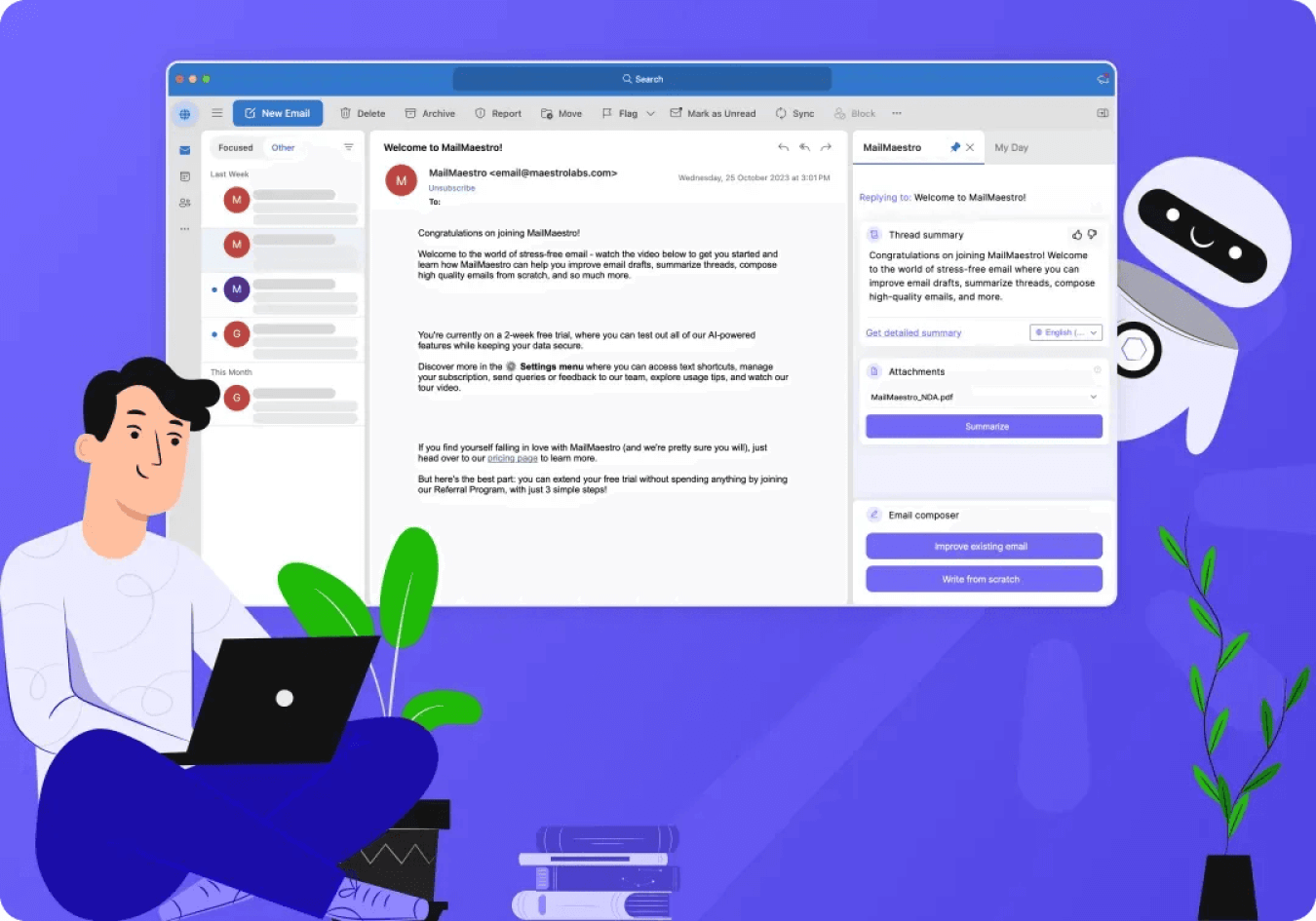
For teams that rely heavily on Outlook, this challenge shows up in familiar ways. Important emails compete with routine updates. Conversations stretch across multiple replies. Follow-ups depend too much on memory. As inbox activity grows, busy teams need systems that reduce processing effort instead of adding more manual work. That is where a smart assistant built for Outlook inbox management becomes useful, helping teams move through communication with more structure and less friction.
Why Outlook Becomes Harder to Manage as Teams Get Busier
Outlook works well as a communication hub, but most teams still use it in a mostly manual way. People scan subject lines, open threads one by one, decide what matters, draft replies from scratch, flag messages, and try to remember what still needs action.
That approach becomes difficult once inboxes start carrying too many different kinds of work at once. A single team inbox may contain client communication, internal approvals, scheduling threads, project updates, copied conversations, and automated notifications. Even when employees are disciplined, the inbox starts creating drag because every message needs interpretation before action.
This is why outlook AI email assistant tools are getting more attention. The problem is not that teams suddenly have too much email. The problem is that the effort required to process email has become too high for fast-moving work environments.
The Real Productivity Cost of Inbox Friction
The productivity cost of email is rarely caused by one dramatic failure. More often, it comes from small delays that repeat throughout the day.
A user opens an email, postpones it, returns later, rereads the thread, and still needs to decide what to do. Another message gets flagged but buried. A response takes longer because the relevant context is spread across earlier replies. None of these moments looks major on its own, but together they consume time, attention, and momentum.
Inbox friction tends to create four recurring problems:
- Priority confusion: Urgent messages often arrive next to lower-value communication, making it harder to identify what needs immediate attention.
- Re-reading and reprocessing: Long threads force users to keep reconstructing context before they can respond.
- Follow-up inconsistency: Emails that need a reply later often slip because they are being tracked mentally rather than systematically.
- Interrupted focus: Constant inbox checking breaks concentration and makes other work take longer.
For busy teams, this is where productivity starts to leak away. A better inbox system does not just organize email. It reduces the amount of effort required to work through it.
Why Manual Outlook Habits Stop Scaling
Traditional inbox habits still have value. Folders, flags, categories, and rules can help create order. But they are limited because they depend on maintenance and personal discipline.
Folders store messages, but they do not tell users what to do next. Flags signal importance, but they do not explain why something matters. Rules help when communication follows predictable patterns, but team communication rarely stays predictable for long.
As workload increases, these methods begin to show their limits. The inbox may look organized, yet still feel difficult to act from. That is an important distinction. Storage is not the same as workflow.
A smart assistant built for Outlook inbox management matters because it improves the processing layer of email, not just the filing layer. It helps teams spend less time managing the inbox itself and more time acting on communication.
How AI Support Changes Daily Outlook Workflows
The biggest advantage of AI support is not simply faster drafting. It reduces friction across the entire email workflow.
An outlook AI email assistant can improve daily work by making the inbox easier to interpret before the user begins manually processing every message. That shift matters because much of the work of email happens before the reply is ever written.
This kind of support becomes useful in several practical ways:
- Faster triage: Users can identify what deserves attention first instead of scanning every message in arrival order.
- Clearer thread understanding: Conversations become easier to interpret when the important context is easier to surface.
- Lower drafting effort: Routine replies take less time when users are not starting from a blank page each time.
- Better follow-up handling: Messages that still require action are easier to keep visible.
- Less inbox clutter as overhead: The inbox becomes more workable because users spend less time making repeated micro-decisions.
These improvements do not remove human judgment. They reduce the amount of manual effort required before that judgment can be applied.
Why Busy Teams Need More Than Faster Replies
It is easy to think email productivity is mostly about speed. But busy teams do not just need faster replies. They need clearer decisions, cleaner communication, and fewer repeated touches on the same thread.
That is why the value of AI support goes beyond response time. When communication quality stays consistent, teams spend less time cleaning up misunderstandings later. When context is easier to recover, employees do not need to keep reopening the same email chain. When action points are easier to spot, work moves forward faster.
This matters especially in collaborative environments where one delayed email can affect multiple people downstream. A message is not only a communication unit. It is often a trigger for work, and that means email efficiency has direct workflow consequences.
A smart assistant built for Outlook inbox management helps by reducing the hidden work around each message, not just the visible act of replying.
Better Inbox Structure Leads to Better Focus
One of the biggest hidden costs of email is broken concentration. Busy teams often do not lose productivity because of one long inbox session. They lose it because of repeated interruptions throughout the day.
When employees keep checking Outlook “just in case,” tasks get fragmented. Work takes longer to finish. Attention becomes more reactive. Even when the inbox is technically under control, the pattern of interruption continues to reduce efficiency.
This is where better email structure changes more than the inbox. It changes the rhythm of work.
When the inbox is easier to interpret, users do not feel the same need to monitor it constantly. They can process communication in more deliberate blocks instead of reacting to every incoming message. That helps preserve longer periods of focused work, which is exactly what busy teams struggle to protect.
Why Different Teams Depend on Inbox Support Differently
The productivity benefits of better Outlook workflows show up differently depending on the role.
Leaders and managers often need quick visibility into decisions, approvals, and escalations. Sales teams rely on follow-up consistency and fast responses to keep momentum with prospects. Operations and project teams need thread clarity so tasks, dependencies, and next steps do not get buried. Support teams need consistency and speed when handling high volumes of repeated communication.
In each case, the value is not simply a tidier inbox. It is better control over how communication turns into action.
That is one reason the outlook AI email assistant category continues to gain relevance. The need is broad, even if the use cases differ.
Why This Shift Is Becoming More Important in 2026
Microsoft’s 2025 data points to a larger pattern: organizations are under pressure to raise productivity while employees already feel stretched for time and energy. That tension makes workflow efficiency more important than ever. Tools that simply add another layer of work are unlikely to help. Tools that reduce processing friction stand a better chance of improving team performance.
For Outlook-heavy teams, inbox handling sits directly inside that challenge. Email is not separate from work. It is one of the places where work gets coordinated, delayed, approved, and moved forward. Improving how teams handle Outlook therefore has a direct effect on productivity, especially when communication volume is high.
Conclusion
Busy teams do not need a more complicated inbox. They need a more workable one.
A smart assistant built for Outlook inbox management helps by reducing the effort required to triage messages, understand threads, manage follow-ups, and move from communication to action. That matters because the real cost of email is rarely the message itself. It is the repeated time and attention required to process it.
As organizations continue looking for ways to close the gap between rising productivity demands and limited employee capacity, better Outlook workflows will become more important. The result is not just a cleaner inbox. It is a team that can spend less time managing communication and more time getting work done.