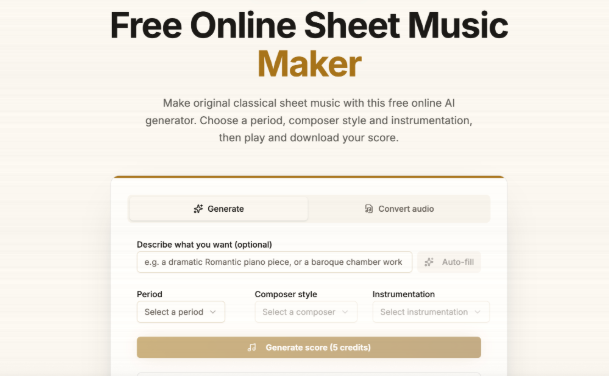
NotaGen is a free, browser-based sheet music maker built around an AI model that generates original classical-style scores. Alongside the generator, the site hosts a wider toolkit for converting audio, MIDI, PDFs, and scanned pages into notation. Nothing to install, no desktop software, everything runs at notagen.ai.
The core idea is simple: type a description of the piece you want (a period, a composer’s style, an instrument setup) and the AI drafts a score. From there you can play it back, edit it, and export it in several formats. The rest of the site fills in a practical gap that generation alone cannot cover, turning existing audio or paper scores into editable notation.
We spent time with the main generator and several of the supporting tools to see how well they hold up for actual notation work, not just demos.
Who it is for
NotaGen fits a specific set of users well:
- Music students who want quick practice pieces in a particular style without opening a full notation program.
- Teachers who need a fast way to generate sight-reading material or transcribe a student’s recorded audio for review.
- Hobbyist composers sketching classical-leaning ideas who want a MusicXML or MIDI starting point rather than a finished, polished score.
- Guitarists and pianists who have a stack of scanned or PDF sheet music and want it converted into an editable, playable file.
It is a weaker fit for anyone who needs a specific, exact, note-for-note score of a famous copyrighted song, or who is transcribing a dense full-band mix and expects a publication-ready result with no manual cleanup. More on both of those in the limitations section below.
Hands-on: the AI score generator
The main event is the AI sheet music generator on the homepage, also reachable through the sheet-music-creator and music-score-maker pages. Here is how a typical session goes.
Step 1: Describe the piece. You enter a prompt describing what you want, for example a short Romantic-era piano piece, or a Baroque-style string passage. You can steer it toward a period or a composer’s general style and pick the instrumentation.
Step 2: Generate. The model produces a score using its credit system (the generator itself is AI-powered, so this part is not unlimited-free like the utility tools; free credits are available to start, with paid plans for heavier use).
Step 3: Review the notation. The output renders as playable, readable sheet music in the browser. It is genuinely an original composition in the requested style, not a copy of an existing piece, which is a deliberate limitation we will come back to.
Step 4: Edit and export. You can adjust the generated piece and export to MusicXML, MIDI, or PDF, so the output plugs into whatever notation software or DAW you already use rather than locking you into NotaGen’s own viewer.
What stood out in testing: the style conditioning is the most useful part. Asking for a specific period or composer-adjacent style produces noticeably different harmonic and rhythmic character than a generic prompt, which makes it more useful for study material than a random-notes generator would be. The MusicXML export in particular is worth checking first if you plan to keep editing elsewhere, since it preserves more structure than a straight MIDI dump.
The supporting free toolkit
Beyond generation, NotaGen’s real depth is in its conversion tools, most of which are free and run client-side in the browser. A few worth knowing about:
Audio-to-sheet-music (audio to sheet music): uploads an audio file, runs it through an audio-to-MIDI pipeline, then engraves the result as notation. It is strongest on solo piano or a single instrument line, since isolating multiple parts from a mixed recording is a much harder problem.
Sheet music scanner (sheet music scanner): this is optical music recognition (OMR). Feed it an image or PDF of printed sheet music and it outputs MusicXML or MIDI you can edit. Handy for digitizing old scores or photocopies that only exist on paper.
Music transposer (music-transposer): a straightforward utility for shifting a piece into a different key, useful when adapting a score for a different vocal range or instrument.
There is a longer list of narrower tools built on the same underlying pipelines, including PDF to MIDI, MIDI to sheet music, and a piano roll generator for MIDI editing. Most of these are free browser tools rather than AI-credit features, which makes them reasonable to try without committing to anything.
Comparison at a glance
| Task | Best NotaGen tool | Notes |
| Generate an original classical-style score | AI sheet music maker | Credit-based, style-conditioned |
| Convert a recording to notation | Audio-to-sheet-music | Best on solo instruments |
| Digitize printed sheet music | Sheet music scanner | OMR from image or PDF |
| Convert MIDI to notation or back | MIDI-to-sheet-music / sheet-music-to-MIDI | Free, browser-based |
| Transpose a piece to a new key | Music transposer | Free utility |
Honest limitations
No review is complete without the rough edges, so here is where NotaGen falls short.
It will not generate a named copyrighted song. Ask it for “Fur Elise” or the latest chart hit and you will not get an accurate transcription of that specific piece. The AI generator produces original music in a requested style, it does not reproduce or transcribe existing copyrighted works on request. If you need the actual sheet music for a specific famous song, you will need a licensed source or a manual transcription, not this tool.
Complex audio needs cleanup. The audio-to-sheet-music pipeline does well with a single clean instrument line, piano especially. Feed it a full band mix with drums, bass, and vocals layered together, and the output will need real editing work afterward. Treat it as a fast first draft, not a finished transcription, particularly for anything beyond one or two instrumental parts.
The generator leans classical. The AI model’s style range centers on classical and Baroque/Romantic-adjacent composition. If you are hoping for convincing jazz voicings or modern pop production, this is not where NotaGen is strongest right now.
None of this makes the tool less useful for what it is built to do. It just means going in with the right expectations: an original-composition generator plus a solid conversion toolkit, not a universal transcription engine for any song you can name.
Verdict
NotaGen is worth trying if you want a free, no-install way to generate original classical-style sheet music or to convert existing audio, MIDI, and scanned scores into editable notation. The style-conditioned generation is a genuinely useful feature for practice material and sketching, and the surrounding toolkit of converters covers a lot of ground for free.
It is not the right choice if your goal is an exact transcription of a specific copyrighted song, or a hands-off, publication-ready transcription of a dense multi-instrument recording. For those cases, expect to do manual cleanup or look elsewhere.
For students, teachers, and hobbyist composers working mostly with classical style and solo or lightly-arranged instrumentation, NotaGen is a solid, free starting point.
FAQ
Is NotaGen completely free?
Most of the conversion and utility tools run free in the browser. The AI sheet music generator uses a credit system, with free credits to start and paid plans for heavier use.
Can NotaGen transcribe a specific famous song?
No. The AI generator creates original music in a requested style and does not reproduce or transcribe named copyrighted songs on request.
What file formats can I export?
Depending on the tool, you can export to MusicXML, MIDI, PDF, and ABC notation, which covers most notation software and DAWs.