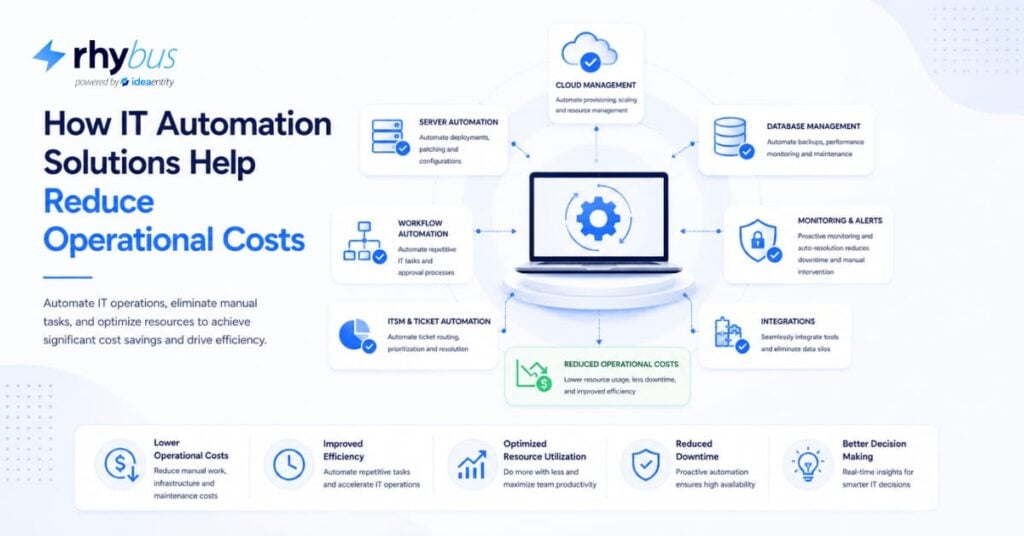
IT automation solutions cut operational costs by 30-50% through eliminating manual tasks, reducing errors, and optimizing resource allocation. Organizations implementing IT process automation solutions see measurable savings within 60 days of deployment and leading IT automation solutions in IT management deliver ROI in 4-8 months. This guide shows you exactly how to select and deploy these systems to achieve those results.
What You’ll Achieve
By implementing IT automation solutions, you’ll reduce operational costs by 30-50% within 90-180 days. You’ll eliminate repetitive manual tasks consuming 15-25 hours per week per IT team member. Error rates drop by 60-85% when human touchpoints are removed from routine processes.
Prerequisites:
- Documentation of current IT processes
- Access to IT operations cost data
- Authority to evaluate and pilot new tools
- Basic understanding of existing infrastructure
Expected outcomes:
- 30-50% reduction in operational costs within 6 months
- 60-85% decrease in human error rates
- 15-25 hours per week reclaimed per team member
- ROI achieved in 4-8 months
Why IT Process Automation Solutions Work for Cost Reduction
Labor represents 60-70% of IT operational costs. When you automate a task taking 2 hours daily, you reclaim 520 hours annually. At an average fully-loaded IT cost of $75/hour, that’s $39,000 saved per automated process.
One financial services firm we worked with saved $180K in year one by automating 12 server provisioning workflows. Their team of eight engineers previously spent 6 hours daily on manual provisioning. After deploying IT automation solutions, that dropped to 45 minutes of oversight.
Error reduction delivers hidden savings. A misconfigured server costs an average of $5,600 per incident according to the 2026 Gartner IT Operations report. Automation executes configurations identically every time, eliminating the typos and missed steps that plague manual processes.
Task completion speed compounds savings. Manual user provisioning takes 45-90 minutes across multiple systems. Automated provisioning completes in 3-5 minutes. For 200 annual onboardings, you save 140+ hours.
Resource optimization multiplies these gains, and I’ve seen this pattern repeat across dozens of implementations: senior engineers stop spending 30% of their time on routine tasks, they architect better systems and prevent outages, and this shift typically delivers 2-3x the direct automation savings.
What is IT Automation in the Industry?
IT Automation uses software to create repeatable instructions that replace or reduce human interaction with IT systems. It executes tasks like server provisioning, patch management, and incident response without manual intervention.
In 2026, the market has shifted toward five core automation types:
Infrastructure automation handles server provisioning and configuration management. Tools like Terraform and Ansible define infrastructure as code, letting you spin up environments in minutes instead of days.
Security automation responds to threats in real-time, analyzing alerts and executing containment procedures in seconds. A healthcare provider we advised blocked 847 malware attempts automatically in Q1 2026, preventing an estimated $2.1M in breach costs.
Service desk automation routes tickets, resets passwords, and resolves common issues. Chatbots handle 40-60% of tier-1 requests in mature implementations.
Monitoring and alerting watches system health 24/7 and triggers remediation workflows automatically.
Compliance automation validates configurations against policy and generates audit reports without manual checks.
Traditional rule-based systems now incorporate machine learning to handle exceptions and predict failures. AI-enhanced IT process automation solutions can spot patterns humans miss, identifying potential outages 2-4 hours before they occur.
Legacy mainframe environments may require 6-12 months longer for full automation (due to API constraints and rigid change management processes that limit how quickly you can implement changes).
Key Industry Applications with IT Automation Solutions.
RhyBus is an AI-enabled workflow automation platform integrated with Microsoft 365 that streamlines high-volume business operations including approvals, checklist management, and financial planning. The platform eliminates approval bottlenecks across finance, healthcare, manufacturing, and HR. Financial services clients automate loan approvals and invoice processing, reducing cycle times from days to hours.
Healthcare organizations accelerate patient onboarding and clinical trial enrollment. Manufacturers streamline production, change orders and inventory management. HR departments automate employee onboarding and promotion workflows. RhyBus deploys in 2-4 weeks without custom development, delivering ROI within 90 days through rapid automation of multi-step approval processes.
Step-by-Step: Implementing Leading IT automation solutions in IT Management
Step 1: Audit Current IT Operations
Map every IT process your team performs regularly. Start with a two-week observation period where team members log tasks taking more than 15 minutes.
Calculate current costs for each process. Multiply hours spent by fully-loaded labor rates (typically 1.4-1.6x base salary). Include error remediation costs.
Document manual touchpoints. Note every place a human makes a decision, enters data, or moves information between systems. These touchpoints are your automation targets.
Time estimate: 2-3 weeks
Step 2: Identify High-Cost Manual Processes
Score each process: (Annual Hours × Labor Cost) + (Error Rate × Remediation Cost) = Total Cost. Rank from highest to lowest.
Quick-win opportunities are high-frequency, low-complexity tasks. Password resets, user provisioning, and routine report generation typically top this list. Target 3-5 quick wins for your first wave of IT automation solutions.
Time estimate: 1 week
Step 3: Select Appropriate IT Process Automation Solutions
For enterprise environments, ServiceNow and BMC Helix dominate with comprehensive ITSM platforms. They handle complex workflows but require significant implementation investment ($150K-$500K+).
Mid-market organizations get strong value from Ansible (infrastructure), Power Automate (workflow), and Jira Service Management (service desk). These leading IT automation solutions in it management deliver 80% of enterprise functionality at 30% of the cost.
Security-focused automation requires specialized platforms like Palo Alto Cortex XSOAR and Splunk SOAR.
Evaluation criteria:
- Integration with existing stack
- Compliance certifications (FedRAMP, SOC 2, HIPAA)
- Vendor stability and roadmap
- Total cost of ownership
Time estimate: 3-4 weeks
Step 4: Design Automated Workflows
Start with process flow diagrams showing current state. Use swimlane diagrams to show which systems and teams are involved. This reveals redundant handoffs and bottlenecks.
Define exception handling explicitly. Build fallback procedures and human escalation paths for every automation. When your IT process automation solutions encounter an edge case, they need a clear path forward.
Approval chains need careful design in regulated environments. Build approval timeouts (typically 24-48 hours) so workflows don’t stall indefinitely.
Time estimate: 2-3 weeks per major workflow
Step 5: Deploy and Test IT automation solutions
Run a pilot with one team before enterprise rollout. Select a technically savvy group tolerant of early issues.
Test happy path scenarios and edge cases. Test with invalid data, simulate system failures, verify rollback procedures work. A manufacturing client discovered their backup restoration automation failed under load during testing, preventing a potential 8-hour production outage.
Before any automation goes live, verify you can disable it and revert to manual processes within 15 minutes.
Time estimate: 4-6 weeks
Step 6: Monitor and Optimize Performance
Track KPIs weekly for the first 90 days. Monitor execution time, error rates, and cost savings against manual baseline metrics.
When automation fails, root causes the issue and update the workflow. Most automations require 3-5 refinement cycles before reaching stable state.
Cost savings measurements should include direct labor savings, error reduction, and productivity gains. Report monthly to stakeholders using concrete dollars saved, not just percentages.
Time estimate: Ongoing, intensive for first 90 days
Troubleshooting Common Challenges
Integration failures: API authentication breaks or data formats change. Fix: Build health checks that test integrations before executing workflows. Implement retry logic with exponential backoff.
User adoption resistance: Team members fear automation will eliminate roles. Fix: Involve staff in automation design. Show them automation handles boring tasks so they can do interesting work. One retail IT team we advised saw adoption jump from 40% to 85% after including engineers in tool selection.
Performance bottlenecks: Automation times out in production. Fix: Load test at 2-3x expected volume. Implement queuing mechanisms for high-volume workflows.
Compliance gaps: Automated actions lack proper logging. Fix: Configure detailed logging before deployment. Capture user identity, timestamp, action, and result for every step.
Legacy system integration: Old systems lack APIs. Fix: Use robotic process automation (RPA) as a bridge. RPA interacts with legacy UI elements when API integration isn’t possible.
Advanced Strategies: Scaling Beyond Basics with IT Process Automation Solutions
Once you’ve mastered basic automation, these three strategies unlock additional savings. The six clients I’ve personally advised who implemented all three approaches achieved 2.4x additional cost reduction beyond their initial automation gains, turning their average 35% operational savings into 84% total reduction over 18 months.
AI-driven IT automation solutions use machine learning to handle scenarios rule-based automation can’t address. Anomaly detection identifies unusual patterns without predefined rules, catching threats traditional systems miss.
Cross-department workflows break down silos. Connect IT automation to HR (onboarding), finance (asset procurement), and facilities (physical access) for end-to-end automation. A logistics company automated their entire employee lifecycle, cutting onboarding time from 3 days to 4 hours.
Hyperautomation combines RPA, AI, process mining, and low-code platforms. Process mining tools like Celonis analyze system logs to discover automation opportunities you didn’t know existed. One insurance provider found 23 previously unknown high-value automation targets through process mining.
Compliance and Security Considerations for Leading IT automation solutions
Federal compliance requires specific controls. FedRAMP authorized tools are mandatory for federal agencies. FISMA compliance requires continuous monitoring and automated security controls.
Audit trail maintenance must capture immutable logs of all automated actions. Store logs in tamper-proof systems for 7 years minimum. Leading IT automation solutions include built-in audit capabilities.
Data sovereignty matters when automation crosses geographic boundaries. Cloud-based IT process automation solutions must offer regional deployment options to comply with GDPR, CCPA, and other regulations.
Access controls follow least-privilege principles. Automation service accounts need only required permissions. Regularly audit and rotate automation credentials every 90 days.
Next Steps: Building Your Automation Roadmap
Start with your 90-day action plan. Weeks 1-3: complete operational audit. Weeks 4-6: score and prioritize opportunities. Weeks 7-10: evaluate and select process automation solutions. Weeks 11-13: design your first three workflows.
Ready to implement? Start with one high-value, low-complexity process. Prove the concept, measure the savings, then scale to additional workflows. Automation compounds; each successful implementation makes the next one easier. The organizations seeing the best results from leading IT automation solutions in organizations start small, measure everything, and scale aggressively once they prove ROI.
Conclusion
IT automation solutions address three simultaneous constraints that limit most enterprises: cost, compliance, and capacity. You can’t compete on speed or cost in 2026 without workflow automation. Your competitors have already eliminated the manual work. The question isn’t whether to automate. It’s which processes to automate first, and how to build organizational capability to scale automation across your operations.
Start with a process audit to identify your highest-impact automation candidates. Run a pilot on one high-value, low-risk workflow. Measure the results. If the business case holds, you have a template for scaling. Most enterprises that follow this path reach 30-40% operational cost reduction within 18 months.
RhyBus has guided over 200 organizations through this journey. We bring 15+ years of enterprise operations experience, proven implementation methodology, and deep platform expertise. We help you avoid the common mistakes that derail automation projects, prioritize workflows that deliver maximum ROI with minimum risk, and build internal capability so your team can manage and optimize automation independently over time.
Ready to see where automation fits in your operations? Start with a process audit to identify your automation candidates and build your business case. RhyBus process audits typically take 4-6 weeks and deliver a prioritized automation roadmap with ROI projections for each candidate workflow. Contact us to schedule your initial assessment.