
How a Google Maps Scraper Can Make Business Research Easier

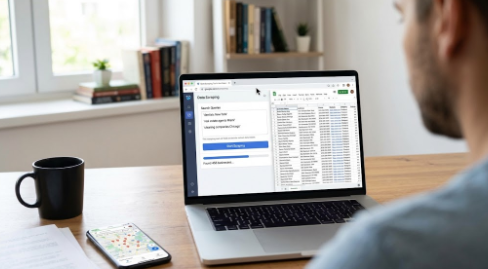
Google Maps is not only useful for finding restaurants or checking directions. Many sales teams, agencies, and small businesses also use it to find local companies.
For example, someone may want a list of dentists in New York, real estate agents in Miami, or cleaning companies in Chicago.
Finding a few businesses is easy. The problem starts when you need hundreds of results from several cities.
Copying names, phone numbers, websites, and addresses by hand takes time. It is also easy to miss information or enter the same business twice.
This is where a Google Maps scraper can help.
Why Manual Google Maps Research Takes So Much Time
Imagine a sales team looking for dental clinics in ten cities.
They could search Google Maps city by city, open each business listing, and copy the details into a spreadsheet.
That works for a small list. But doing it for ten, twenty, or fifty searches quickly becomes repetitive.
The team also needs to keep the data organized. One person may save phone numbers while another forgets ratings. Business names may be written differently. The same company may appear more than once.
The larger the project becomes, the harder it is to keep the list clean. A scraper helps with the repetitive part so people can spend more time reviewing the businesses they actually want to contact.
Searching Several Cities at Once
One way to make this easier is to group several searches together. G Maps Extractor is a tool built for this type of Google Maps research.
Its online version lets users add up to 50 search keywords to one task.
For example, a user could search for dentists in New York, dentists in Boston, dentists in Philadelphia, and similar businesses in other cities without creating every search one at a time.
Once the task starts, it runs online. The user does not need to keep the browser extension open while the work is being done.
This is useful for sales teams or agencies that often research several areas at the same time. It also makes the work easier to repeat. If another group of cities needs to be researched later, the same basic process can be used again.
What Information Can Be Collected?
A business list is more useful when the information follows the same format.
- Business name
- Address
- Phone number
- Website
- Category
- Rating
- Review count
Some tools can also check a company’s public website for information such as email addresses or social media links.
Not every business will have all of these details. Some companies have a full website and several contact options, while others may only have a basic Google Maps listing.
The main benefit is that the available information is kept together instead of being copied by hand from one listing to another.
The results can then be downloaded as CSV, Excel, or JSON files. For most non-technical users, CSV or Excel is usually enough.
Browser, Online Tool, or API?
Different jobs need different tools.
For a quick search, a browser extension may be the simplest choice. Open Google Maps, search for a business type, and collect the results.
For a bigger project, an online tool is usually easier because several searches can be handled together.
An API is useful when the same work needs to happen regularly. For example, a company may want to update a business list every week or send new data into its own software.
G Maps Extractor also provides a Google Maps Scraper API for this type of use.
For most people, the difference is simple: use the browser for small jobs, the online version for larger searches, and the API when the process needs to run automatically.
A Business List Still Needs Checking
Using a scraper does not mean every result is a good sales lead.
A business may be too small, outside the target area, or simply not a good fit. Some information may also be missing or outdated.
For that reason, teams should still review the results before contacting anyone.
A good process is usually quite simple: find the businesses, collect the information, remove duplicates, check the best prospects, and then move the useful records into a spreadsheet or CRM.
The scraper saves time on research. People still make the final decisions.
Making Google Maps Research Less Repetitive
Google Maps is a useful place to find local businesses, but manual research becomes slow when many cities or industries are involved.
A Google Maps scraper can remove much of the repetitive work.
A small project may only need a browser extension. A larger project may be easier with an online tool that can handle several searches together. Businesses that need regular updates can use an API.
The goal is not to collect as much data as possible. It is simply to spend less time copying business information by hand and more time using that information for sales, research, or planning.






Comment