If you’ve spent any time in trading communities lately, you’ve probably noticed a recurring theme: frustration with TradingView. Whether it’s an unexpected $600+ annual renewal charge, custom scripts breaking after an update, or the realization that the feature you need is locked behind yet another pricing tier — traders are actively searching for something better.
And they’re not wrong to look. TradingView built its reputation as the go-to charting platform for stock, forex, and digital asset markets, but years of tier-stacking, feature-gating, and support degradation have created a gap between what users expect and what they actually get. That gap is exactly where a new generation of platforms is stepping in.
In this article, we’ll take a deep, honest look at why so many users are exploring an alternative to TradingView, what to look for in a modern analysis tool, and why TakeProfit has emerged as a serious contender for anyone who wants power without the pricing games.
The Problem: What’s Driving Users Away
TradingView isn’t a bad platform — let’s be clear about that — but it’s essential to explore the best alternatives available. It offers extensive market coverage, a massive community, and a wide range of chart types. But over time, a pattern of decisions has eroded trust among its user base, particularly active day traders who rely on the platform daily.
The Pricing Maze
The platform currently operates across multiple subscription tiers — from the heavily restricted Basic plan to Premium and Ultimate tiers that can run $60 to over $100 per month. The Basic plan limits you to a single chart per tab, just 2 indicators per chart, and only 3 price alerts with zero technical alerts. Want webhooks? That’s Premium-only at $60/month. Need more than 8 charts per layout for advanced charting? You’ll need Ultimate.
This tier structure means that to unlock a genuinely functional setup for stock screening, forex analysis, or backtesting, most active users end up paying $60/month or more, which is a consideration for those seeking the best TradingView alternative. And that’s before adding real-time market data subscriptions, which are billed separately for major exchanges like NYSE and NASDAQ.
The frustration compounds when advanced features quietly migrate to higher tiers, effectively increasing the cost of your existing workflow without any added value.
Support That Doesn’t Support
Over 50% of negative reviews on Trustpilot mention non-existent customer support. Users on the Basic plan get no support at all. Even on paid plans, people report waiting days or weeks for responses, often from automated systems rather than real people. When your charts freeze during a volatile session or your alerts stop firing at critical moments, waiting days for a bot response isn’t just inconvenient — it’s potentially costly.
Pine Script Instability
For algo traders and developers, Pine Script has been a double-edged sword. While it enabled a thriving community of custom tools, platform updates have repeatedly broken existing scripts without warning. Users who invest hours building and testing trading strategies find their work suddenly throwing runtime errors. On top of that, Basic plan users can only publish public scripts — no invite-only or protected options, limiting their access to advanced charting features.
What to Look for in a Genuine Alternative
Before diving into specific platforms, it’s worth establishing what a genuine TradingView alternative should deliver. Not every charting tool qualifies — a true alternative needs to match or exceed the core functionality while addressing key weaknesses.
Here’s what matters most:
Transparent, predictable pricing. You should know exactly what you’re paying for, with no hidden tiers or surprise upgrades. The gap between the entry-level and full-featured plan shouldn’t require climbing through five different subscription levels, especially when considering the best alternatives available.
Reliable, stable scripting. If you’re building custom indicators or trading strategies, the best alternative to TradingView should be stable, well-documented, and ideally transferable to other contexts. Proprietary languages that lock you in and break regularly aren’t acceptable for serious market analysis.
Performance under pressure is crucial for trading decisions, especially in volatile market conditions.. Forex, stock, and crypto markets don’t pause for server maintenance. Your charting platform should handle multiple layouts, real-time data, and complex overlays without lagging — especially during high-volatility moments.
Actual human support is a key feature that distinguishes the best alternatives in the market. When something goes wrong, you need a real person who understands the platform, not a chatbot routing you through a knowledge base.
Community and monetization. For users who create content or analytical tools, the platform should offer meaningful ways to share and monetize their work — from publishing trade ideas to selling premium scripts.
TakeProfit: The Alternative Built by a Trader, for Traders
TakeProfit was founded by a former CMO at a leading charting company who left in 2020 with a clear understanding of what the market needed — and what existing platforms were failing to deliver. The result is a community-driven trading platform built from the ground up with modern technology, transparent pricing, and a genuine focus on the user experience.
Let’s break down how it stacks up.
Pricing: One Plan, Everything Included
This is where TakeProfit makes its most compelling argument. The pricing model is radically simple: use the free plan forever, or pay $20/month ($10/month if billed annually) for everything. That’s it — no tiers to navigate, no features held hostage behind progressively expensive plans.
The entry-level plan itself is genuinely usable — not the crippled afterthought that most competing platforms offer. You get unlimited charts per layout, unlimited watchlists, webhook notifications, and the ability to publish all script types from day one. The paid plan simply removes remaining limits on alerts, overlays per chart, and saved workspaces.
To put the cost difference in perspective: a premium subscription elsewhere runs $60/month ($720/year). TakeProfit’s all-inclusive plan costs $240/year — a savings of $480 annually. Against ultimate-tier pricing at $100+/month, the gap widens to nearly $1,000 per year.
And there’s no cancellation maze. One-click unsubscribe, no 14-day refund runaround.
Indie: Python-Based Scripting That Actually Works
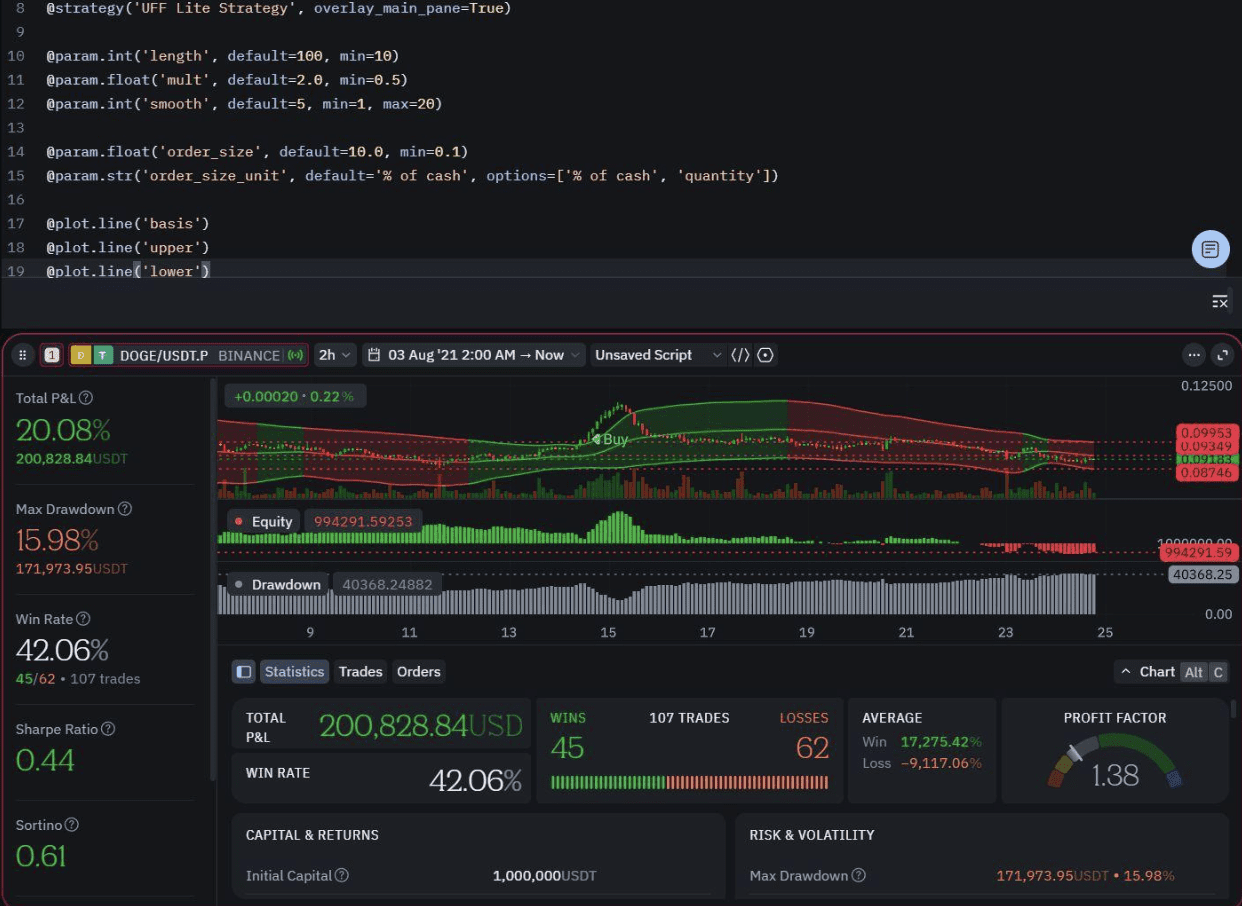
TakeProfit’s scripting language, Indie, represents a fundamentally different approach to custom development. Built as a dialect of Python, Indie lets users leverage existing programming knowledge rather than learning yet another proprietary language that only works on one platform.
Indie is a technical analysis-oriented programming language and runtime for developing tools on the TakeProfit platform. All built-in platform overlays are implemented in Indie, and an integrated IDE allows users to create their own. The language uses Python syntax with added syntactic sugar in the form of decorators like \@indicator\\\\ and \@algorithm\\\\, making the learning curve gentle for anyone familiar with Python.
The practical advantages over Pine Script are significant, making it one of the best alternatives for technical indicators. Indie offers guaranteed backward compatibility — your scripts auto-upgrade unless a specific feature is removed. You can fork any script to preserve your exact version forever, eliminating the “update broke my strategy” nightmare. The Python-based syntax also means your skills are transferable, unlike proprietary language lock-in.
For those migrating from other platforms, TakeProfit’s MCP Server integrates with AI tools to automatically convert Pine Script code to Indie — paste your existing script, and the AI rewrites and validates it. All users can publish every script type from day one, with no artificial limits on visibility or sharing.
Performance: WebGL + WebAssembly Under the Hood
While legacy platforms show their age through browser slowdowns and chart freezes — particularly during high-volatility market events — TakeProfit is built on a modern WebGL and WebAssembly stack, making it a strong contender as the best TradingView alternative.
The practical result is a platform that runs faster than many desktop apps, even on slower hardware. No downloads, no installs — just lightning-fast charting in your browser with unlimited simultaneous connections. Multiple layouts, complex overlays, real-time stock and currency quotes across 100+ exchanges — the platform handles it all without the performance degradation that users experience elsewhere when pushing beyond basic setups.
Workspace Flexibility: Your Layout, Your Rules
TakeProfit treats workspace customization as a first-class feature, not a premium upsell. Every user gets unlimited charts per layout with drag-and-drop widgets that can be repositioned, resized, and opened in full-screen mode. The interface uses a clean, minimalistic design where menus and settings only appear when you hover over the active application — eliminating visual clutter and constant upgrade prompts.
The platform supports multiple watchlists per layout with different view types (list, table, heatmap), color-channel linking between chart apps for tracking different symbols independently, and a full suite of drawing and technical analysis instruments including trend lines, channels, Fibonacci, and Gann tools. Whether you’re running backtesting on forex pairs, monitoring stock positions, or testing crypto setups, the workspace adapts to your needs.
Zero ads, ever. Not even on the entry-level plan.
Real Human Support for Everyone
This might be the single most appreciated difference. Every TakeProfit user — regardless of plan — gets access to real human support, ensuring assistance for trading decisions. Response times are measured in hours, not days. Support channels include Discord (where you can chat directly with the founder), email, and social media.
Compare that to platforms where entry-level users get zero support, and even top-tier subscribers only get “First Priority” — still with no guarantee of human contact.
Earn While You Trade: The Born to Earn Program
TakeProfit doesn’t just let you use the platform — it lets you earn from it. The Born to Earn program offers multiple revenue streams for creators: sell custom scripts on the marketplace and keep 80% of every sale (100% from users you referred), create paywalled content with monthly subscriptions ranging from $1 to $100/month, or share trade ideas and market analysis to build a following. The referral program offers 25% lifetime revenue share from all referred user purchases.
For top creators, the Born to Earn Maxx ambassador program eliminates platform fees entirely — 0% marketplace fees, 0% widget hub commission, 0% paid content fees. You keep 100% of your earnings.
Other platforms lock script publishing behind paid tiers and take a cut of everything. On TakeProfit, even users on the entry-level plan can publish and monetize from day one.
Multi-Market Coverage
With access to over 100 exchanges — including Binance, Coinbase, Kraken, Bybit, and OKX — plus the US stock market, TakeProfit covers the assets that matter. There are no extra data fees for crypto, and the platform provides real-time forex and stock quotes alongside an active community for collaborative market analysis and sharing trade ideas, making it a top choice for 2025.
How TakeProfit Compares: The Full Picture
| Feature | TradingView | TakeProfit |
| Pricing model | 5 tiers ($0–$100+/mo) | Free forever or $20/mo (all features) |
| Charts per layout | 1–16 (by tier) | Unlimited |
| Indicators per chart | 2–50 (by tier) | 2 (free), Unlimited (paid) |
| Alerts | 3–1000 (by tier) | 1 (free), Unlimited (paid) |
| Webhooks | Premium only ($60/mo) | Available on paid plan |
| Scripting | Pine Script (proprietary) | Indie (Python-based) |
| Backtesting | Tier-limited | Available |
| Ad-free | Paid plans only | Always, all plans |
| Human support | None (Basic) to “First Priority” | Real humans for everyone |
| Stock + FX + Crypto | Yes (with data fees) | Yes, no extra fees |
| Tech stack | Legacy | WebGL + WebAssembly |
| Cancellation | Difficult | One-click |
Making the Switch
Migrating doesn’t require a leap of faith. The recommended approach is to run both platforms in parallel: sign up for TakeProfit (no credit card required), recreate your workspace with unlimited charts from day one, import your watchlist symbols, and test everything side by side. The trading tools and workspace feel intuitive for anyone coming from another charting platform.
For Pine Script code, TakeProfit’s MCP Server can convert your existing scripts to Indie automatically. Once you’ve verified data accuracy and confirmed that TakeProfit meets your workflow needs, upgrade to the $20/month plan and cancel your previous subscription when you’re ready.
The Bottom Line
The trading world has evolved — and expectations have evolved with it. Transparent pricing, stable scripting, real support, and modern performance aren’t luxury features. They’re the baseline for any serious charting platform in 2026.
TakeProfit delivers on these fundamentals while adding genuine innovation in workspace flexibility, creator monetization, and community-driven development. At $20/month for everything versus $60–$100+ elsewhere for comparable functionality, the value proposition speaks for itself.
Whether you’re frustrated with pricing games, tired of scripts breaking after updates, or simply looking for a modern platform that respects your time and money, TakeProfit is worth a serious look. Start with the free plan, test it alongside your current setup, and let the platform speak for itself.