Every support team eventually hits the same wall: the shared inbox stops working. Emails get answered twice or not at all, nobody knows who owns what, and the one person who understood the labeling system just went on vacation. That’s usually the moment someone starts searching for the best help desk software.
Every support team eventually hits the same wall: the shared inbox stops working. Emails get answered twice or not at all, nobody knows who owns what, and the one person who understood the labeling system just went on vacation. That’s usually the moment someone starts searching for the best help desk software.
The good news is that the category is mature, so there are solid options at every price point. The bad news is that “help desk” now covers everything from a free open-source ticketing script to enterprise platforms that cost more than some salaries. Picking between them means knowing what your team actually needs.
This guide compares nine help desk tools worth considering in 2026. We looked at how each one handles ticketing, automation, integrations, and pricing, and we’ve noted who each tool suits best. There’s also a short section on how to evaluate help desk software in general, because the right choice depends far more on your team than on any feature list.
What is help desk software?
Help desk software is a system for receiving, organizing, and resolving customer or employee support requests. Instead of questions arriving scattered across personal inboxes, chat apps, and social media, everything lands in one place as a ticket that can be assigned, prioritized, tracked, and reported on.
A typical help desk system includes a shared inbox or ticket queue, automation rules for routing and tagging, canned responses, a knowledge base for self-service, and reporting on metrics like response time and resolution rate. Some tools focus on external customer support, others on internal IT requests, and a few handle both.
The point of all of it is accountability. When every request has an owner, a status, and a history, things stop falling through the cracks.
How to choose help desk software
Before comparing tools, it helps to answer a few questions about your own team.
Which channels do you support? If most requests come by email, almost any tool will do. If you also run live chat, contact forms, Messenger, or social media, check that the tool pulls all of those into one queue rather than bolting them on as separate products at extra cost.
Internal IT, external customers, or both? IT service desks care about things like asset tracking, change management, and ITIL workflows. Customer support teams care about response speed, tone, and satisfaction scores. Some platforms serve both an internal and external help desk from one account; others are clearly built for one side.
How much automation do you need? At minimum you want rules that route tickets by keyword, sender, or channel. Larger teams benefit from SLA timers, escalation paths, and AI-assisted replies. Smaller teams often need less than they think.
What does it connect to? Your help desk should talk to the tools where the rest of your work happens: your CRM, your e-commerce platform, your project tracker. A missing integration means copying and pasting forever.
What does it really cost? Almost everything in this category is priced per agent per month, and the advertised starting price rarely includes the features that made you consider the tool. Model the plan you’d actually need, at the team size you expect in a year.
With that in mind, here are the picks.
1. HelpDesk
Best for: teams that want powerful ticketing without the enterprise overhead
HelpDesk is a ticketing system built around a simple idea: support software should be quick to set up and pleasant to use every day. Requests from email, contact forms, LiveChat, and Messenger all land in a single inbox, where they can be tagged, prioritized, filtered, and assigned to the right person or team. There’s no maze of modules to configure before you can answer your first ticket, which makes it a strong fit for small and mid-sized support teams that need results this week, not this quarter.
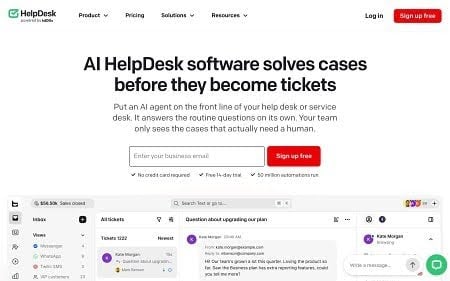
Automation is where HelpDesk quietly does a lot of heavy lifting. You can start from ready-made templates or build your own rules from conditions and actions, covering things like routing by topic, auto-tagging, and follow-up nudges. Users have run more than 33 million automations on the platform to date, which says something about how central the feature is to daily use. AI features assist agents along the way, with ticket summaries, text improvement, and tag suggestions that shave minutes off routine work.
Integrations cover the tools most support teams already run, including LiveChat, Shopify, Salesforce, HubSpot, Jira, WordPress, and Zapier. Security is handled seriously too, with encryption, access controls, granular permissions, and audit logs, which matters if you handle sensitive customer data. There’s a 14-day free trial with no credit card required, so you can test it on real tickets before committing.
Key features:
- One inbox for email, forms, LiveChat, and Messenger
- Rule-based automations with ready-made templates
- AI ticket summaries, text enhancement, and tag suggestions
- Encryption, roles and permissions, audit logs
2. Zendesk
Best for: large enterprises with complex support operations
Zendesk is the incumbent in this category, and for big organizations it earns that position. It covers every channel you can name, offers deep reporting, and has a marketplace with well over a thousand apps. If you run support across multiple brands, regions, and languages, Zendesk can model all of it.
The trade-off is weight. Setup and administration take real effort, often a dedicated admin, and pricing climbs quickly once you add the AI features and advanced plans that show up in every Zendesk demo. Small teams tend to pay for capability they never touch.
Key features: omnichannel ticketing, extensive marketplace, advanced analytics, multi-brand support. Paid plans start at roughly $19 per agent per month, but realistic suite pricing lands much higher.
3. Freshdesk
Best for: value on growing teams
Freshdesk hits a sweet spot between capability and price. There’s a genuinely usable free tier for small teams, and the paid plans add automation, collision detection, and SLA management at rates that undercut most direct competitors. The interface is approachable, and most teams can self-serve the setup.
Where it gets complicated is the product family. Freshworks splits chat, phone, and success tooling across separate products, so the “one platform” story requires some assembly, and the AI add-ons cost extra. Still, for a growing support team watching its budget, Freshdesk is one of the easiest recommendations on this list.
Key features: free plan for small teams, ticket automation, SLA management, knowledge base. Paid plans start around $15 per agent per month.
4. Zoho Desk
Best for: companies already in the Zoho ecosystem
Zoho Desk is the obvious pick if your business already runs on Zoho CRM, Zoho Books, or any of the company’s forty-odd other apps. The integration between them is native and immediate, and the pricing is among the lowest of any full-featured help desk here.
On its own merits, Zoho Desk is competent rather than exciting. It has multi-channel ticketing, workflow automation, and an AI assistant called Zia. The interface feels denser than Help Scout or HelpDesk, and support quality for the product itself gets mixed reviews. Inside the Zoho universe, though, the value is hard to argue with.
Key features: deep Zoho integration, workflow automation, Zia AI assistant, low per-agent pricing starting around $14 per agent per month.
5. Help Scout
Best for: simple, human-feeling support
Help Scout is built for teams that want customer conversations to feel like email, not tickets. Customers never see a ticket number, agents work out of a clean shared inbox, and features like saved replies and collision detection stay out of the way. The Docs knowledge base and the Beacon widget round it out nicely.
The philosophy has limits. If you need heavy customization, complex SLA structures, or IT-style workflows, Help Scout will feel thin. That’s by design. It’s a tool for keeping support personal at small to medium scale, and within that lane it’s excellent.
Key features: shared inbox without visible ticket numbers, Docs knowledge base, Beacon help widget, customer satisfaction ratings. Plans start around $25 per user per month.
6. Front
Best for: shared-inbox collaboration across teams
Front approaches support from the collaboration angle. It’s a shared inbox where teammates can comment on messages internally, draft replies together, and loop in people from sales or operations without forwarding anything. For teams where support blurs into account management, that model fits how work actually happens.
It’s less of a classic ticketing system, though. Reporting and SLA tooling exist but are lighter than what Zendesk or Freshdesk offer, and per-seat pricing adds up because the collaborative model works best when many people have access.
Key features: internal comments and shared drafts, email plus chat and SMS in one place, strong calendar and CRM integrations. Plans start around $19 per seat per month.
7. HubSpot Service Hub
Best for: teams already running on HubSpot CRM
Service Hub’s pitch is context. Because it sits on the HubSpot CRM, every ticket arrives with the customer’s full history attached: deals, emails, website visits, past conversations. For companies where support, sales, and marketing share accounts, that visibility is the whole point.
Bought standalone, it’s a harder sell. The free tools are limited, and the Professional tier, where features like SLAs and customer portals live, is a significant jump in cost. Evaluate it as part of a HubSpot decision, not as an independent help desk.
Key features: native CRM context on every ticket, shared inbox, customer portal, knowledge base. Free tools available; paid seats start around $15 per month, with the Professional tier priced much higher.
8. Jira Service Management
Best for: IT teams and ITSM
For internal IT, Jira Service Management is the reference point. It’s an IT ticketing system with proper incident, problem, and change management, ITIL-aligned workflows, asset tracking, and native integration with the Jira boards your developers already live in. When a support ticket needs to become an engineering ticket, nothing does the handoff more smoothly.
For external customer support, it’s usually the wrong shape. The vocabulary, workflows, and portal experience are built for employees requesting laptops and reporting outages, not for customers asking about refunds. Choose it for what it is: the strongest IT help desk software on this list.
Key features: incident and change management, asset inventory, ITIL workflow templates, deep Jira integration. Free for up to 3 agents; paid plans start around $19 per agent per month.
9. osTicket
Best for: free and open-source deployments
osTicket has been around since the early 2000s and remains the default answer to “is there a genuinely free help desk?” It’s open-source software you host yourself, with ticket routing, custom fields, canned responses, SLA rules, and a customer portal. No per-agent fees, ever.
The costs are just paid in different currency. You handle hosting, updates, backups, and security yourself, and the interface looks its age. There’s a paid hosted version if you want the software without the sysadmin work. For technical teams on a zero budget, or anyone who requires full control of their data, it’s still the best open-source option.
Key features: self-hosted and free, custom ticket fields and forms, SLA support, agent collision avoidance. Hosted version available from around $12 per agent per month.
Comparison table
| Tool | Best for | Key channels | Starting price* |
| HelpDesk | Powerful ticketing without the overhead | Email, forms, web chat, Messenger, SMS | ~$19/agent/mo, 14-day free trial |
| Zendesk | Large enterprises | Email, social at $19; chat + voice from $55 | ~$19/agent/mo (Support Team); ~$55 (Suite Team) |
| Freshdesk | Value for growing teams | Email, social; chat/messaging via Omni from $29 | Free for 1–2 agents (6 mo); ~$19/agent/mo |
| Zoho Desk | Zoho ecosystem users | Email, chat, phone, social (chat/social from Standard) | ~$7/agent/mo (Express); ~$14 (Standard) |
| Help Scout | Simple, human support | Email, chat, docs | Free up to 5 users; ~$25/user/mo |
| Front | Shared-inbox collaboration | One channel type on Starter; omnichannel from $65 | ~$25/seat/mo (Starter, max 10 seats) |
| HubSpot Service Hub | Teams on HubSpot CRM | Email, chat, portal | Free tools; ~$15/seat/mo |
| Jira Service Management | IT / ITSM | Portal, email, chat | Free up to 3 agents; ~$20/agent/mo |
| osTicket | Free / open source | Email, web forms | Free (self-hosted); ~$12/agent/mo hosted |
* Annual billing; monthly runs 15–25% higher. AI is a paid add-on almost everywhere: Zendesk Copilot $50/agent/mo, Freshdesk Freddy ~$29/agent/mo, Help Scout AI Answers $0.75/resolution, Front Copilot $20/seat/mo. Verified July 2026.
FAQ
What is help desk software?
Help desk software collects support requests from channels like email, chat, and contact forms into a single system of tickets. Each ticket gets an owner, a priority, and a status you can follow to resolution, and most tools add automation rules, canned replies, a knowledge base, and reporting on top.
What is the best help desk software?
For most small and mid-sized support teams, HelpDesk offers the best balance of fast setup, strong automation, and fair pricing, which is why it tops this list. That said, “best” depends on your situation: enterprises with complex operations should look at Zendesk, and IT departments should look at Jira Service Management. The “best for” labels above are the fastest way to shortlist.
What are the best help desk ticketing systems?
HelpDesk, Zendesk, Freshdesk, and Zoho Desk are the strongest general-purpose ticketing systems in this comparison. For internal IT specifically, Jira Service Management leads the field.
Is there free help desk software?
Yes. osTicket is fully free if you self-host it, Freshdesk and Jira Service Management have free tiers for small teams, and HubSpot offers free basic tools. Most paid tools, including HelpDesk, also offer free trials so you can test with real tickets before paying.
Can one tool cover both internal IT and external customer support?
Sometimes, but check carefully. Platforms like Zoho Desk and Zendesk can be configured for both an internal and external help desk, while tools like Jira Service Management (IT-first) and Help Scout (customer-first) are clearly better on one side. If both use cases matter equally, test each one with a real workflow from each side before deciding.
Final thoughts
Don’t pick the tool with the longest feature list. Pick the one that matches your team’s size, channels, and tolerance for setup work. A five-person e-commerce support team and a fifty-person IT department have almost nothing in common, and neither does their ideal help desk. Shortlist two or three tools from the “best for” labels above, run your real tickets through their free trials for a week, and the winner will usually make itself obvious.