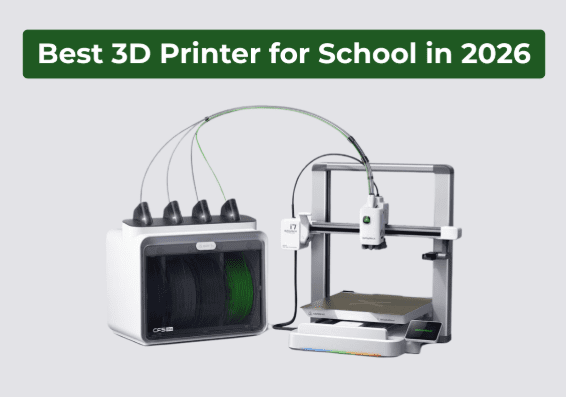
Nowadays, schools use 3D printing as a daily teaching tool. Teachers print art projects, science models, engineering prototypes, and design concepts inside the classroom. Students observe ideas shift into actual objects within hours. Such direct feedback boosts engagement and understanding. That’s why several administrators are searching for the best 3D printer for school in 2026. A classroom printer must support safety, simplicity, and creativity. It must function steadily during short class periods while staying quiet and compact in shared learning areas. Today’s guide explores what makes a 3D printer useful for schools and why selecting the correct setup matters for durable success.
What Makes a 3D Printer Good for a Classroom?
A classroom printer must prioritize protection and user friendliness. Students work in groups and switch tasks. The printer must provide reliable operation and predictable outcomes. A system that needs continuous adjustment slows learning.
Moreover, low noise remains necessary in schools, as classrooms need concentration. A quiet printer promotes discussion and instruction without interruption. Compact machines adjust to lab tables or desks without blocking movement.
That said, teachers require easy maintenance. Tool-less installation minimizes downtime. Clear setup screens lower training duration. A printer that moves from box to first print fast saves class time.
Additionally, reliability is essential. Schools cannot spend weeks troubleshooting failed prints. Constant bed leveling, steady extrusion, and preset material profiles decrease failure rates. Reliable prints allow teachers to plan lessons with confidence.
Do Schools Need a Beginner-Friendly or Advanced Printer?
Most schools make use of beginner-friendly setups. Students master design, logic, and problem-solving first. They do not require complicated mechanical calibration during initial exposure.
A user-friendly printer still teaches practical skills. Students learn file preparation, choosing material, and print observation. These skills shift directly to advanced systems later. An equipment that stabilizes ease and capability functions best.
Teacher guidance should be there while operating the printer. The interface should stay simple enough for supervised usage. Innovative features should not hinder entry-level learning. The selection of a printer that removes additional complexity allows students to focus on creativity rather than correction.
What Should Schools Consider Before Buying a 3D Printer?
Schools must consider lifetime value, not just the purchase price.
Budget and Material Costs
A school printer must function within annual budgets. Replacement parts, filament cost, and maintenance period all impact total expense. Efficient material usage reduces operating cost over time. Additionally, a printer that lowers filament waste supports sustainable classroom use.
Classroom Space and Placement
Mostly, classrooms have little space. A big industrial machine does not fit most desks or lab tables. Therefore, schools should select a compact setup that suits standard classroom furniture. Proper placement enhances airflow and supervision.
Teacher Training and Student Supervision
Teachers should not need professional technical training to operate the printer. Simple system screens and guided steps lower learning time. A printer that students can operate under supervision without complex manual calibration.
Meet the SPARKX i7: A Smart Fit for Modern Classrooms
The SPARKX i7, often categorized as the most beginner-friendly 3D printer in 2026, handles all common classroom requirements with a focused design.
Built for Simplicity
This Creality printer shifts from unboxing to initial print in just five minutes. Teachers and students begin projects without lengthy setup sessions. The interface stays direct and clear. Tool-free quick-swap components like hotend, extruder lever, filament cutter, decrease maintenance time and classroom disturbance.
Designed for Safe and Quiet Operation
The SPARKX i7 presents a compact frame that fits easily on classroom desks. Noiseless performance supports shared learning environments. The balanced structure keeps activity predictable during supervised usage.
Creative Capability Without Complexity
The printer assists multicolor printing with reduced filament waste. Students produce visual models without filament changes by hand. The 260 x 260 x 255 mm build volume supports most school projects while keeping a compact footprint. This is why the printer is appropriate for labs, classrooms, and maker spaces.
How Does AI Photo-to-3D Help Students Get Started Faster?
One main barrier to school 3D printing is modeling software. Numerous students struggle with intricate design tools during early lessons.
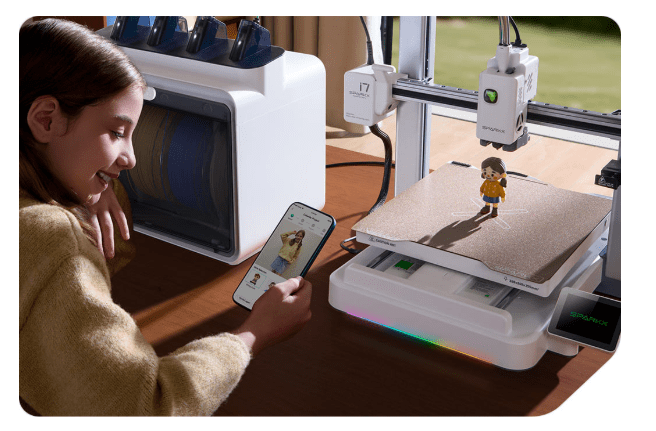
From Image to Model in One Tap
The SPARKX i7 brings AI Photo-to-3D functionality. Students turn a simple photo into a printable model. This feature eliminates the requirement for advanced CAD skills during the initial stages.
Faster Entry Into Hands-On Learning
Students move directly into printing and testing. Teachers save time teaching software basics during introductory sessions. The class concentrates on design thinking and innovation instead of technical commands.
Lower Learning Barrier, Higher Engagement
Once students see their own images converted into physical objects, engagement boosts. Instant results strengthen curiosity. This procedure supports newbie confidence while still introducing core 3D printing concepts.
Why Multicolor Printing Makes Learning More Engaging
Color improves understanding. Students recognize layered structures quickly when models show contrast. A color-coded geography map divides terrain types clearly. The SPARKX i7 promotes multicolor printing with 50% less filament waste.
This feature reduces material consumption during classroom projects. Lessened waste protects school budgets while supporting creative output.
Multicolor printing is ideal for practical lessons. Geography classes print terrain maps with different elevation colors. Biology students print labeled anatomy prototypes. Design classes produce branded models and visual presentations.
Clear color separation reinforces both visual learning and presentation quality. Also, multicolor power increases student interest.
Is the Printer Quiet and Safe for Classrooms?
Absolutely. Classrooms need calm environments. The SPARKX i7 works silently, which promotes concentrated discussion and instruction. Low noise levels lower distraction during lectures and group work.
Moreover, a stable, contained design supports secure use under guidance and reduces vibration during operation. Students observe the procedure without direct contact with moving parts. This setup promotes responsible classroom integration.
How Easy Is It for Teachers to Set Up and Maintain?
Teachers want durable machines, not complicated tools. The SPARKX i7 requires just five minutes to move from box to first print. Guided configuration eliminates long setup steps. Teachers begin demonstration prints rapidly during lessons.
Quick-swap components allow tool-less maintenance. When a part requires replacement, teachers solve the problem without professional repair skills. Minimized downtime safeguard classroom schedules.
Additionally, the interface keeps operations straightforward. Teachers choose files, select material profiles, and start prints without technical modifications.
Is the SPARKX i7 the Best 3D Printer for Schools in 2026?
The SPARKX i7 is a perfect blend of reliability, ease-of-use, and creativity.
| School Requirement | How SPARKX i7 Delivers | Why It Matters in 2026 Classrooms |
| Easy Setup | From unboxing to first print in under 5 minutes | Saves class time and allows quick lesson integration |
| Simple Maintenance | Tool-free quick-swap parts | Reduces downtime and technical burden on teachers |
| Quiet Operation | Compact and low-noise design | Maintains a calm learning environment |
| Classroom-Friendly Size | 260 × 260 × 255 mm build volume in a desk-friendly frame | Fits standard classrooms and labs |
| Multicolor Printing | 50% less-waste multicolor capability | Improves visual learning while controlling material costs |
| Beginner Accessibility | AI Photo-to-3D with one-tap conversion | Removes modeling barriers for new students |
| Creative Flexibility | Suitable for prototypes, models, and functional parts | Supports STEM, art, engineering, and design education |
| Teacher Control | Simple interface and guided setup | Allows supervised student use without complexity |
Final Thoughts
Schools need equipment that supports learning without creating complexity. A classroom 3D printer should be user-friendly, durable, and creative. The SPARKX i7 satisfies these conditions with a compact design, fast setup, multicolor capability, and beginner-friendly operation. This Creality 3D printer supports hands-on education across subjects while maintaining classroom efficiency and safety.
Read More From Techbullion