AI tools are getting better at writing, researching, coding, and reasoning, but there is still a surprisingly frustrating problem: our actual work is scattered everywhere.
A research project might involve browser tabs, Markdown notes, PDFs, chat conversations, screenshots, drafts, code files, and several AI conversations. Even when an AI assistant can understand each individual piece, maintaining context across all of them remains difficult.
This is the problem Dotwise.ai is trying to solve.
Dotwise describes itself as “a homebase for your scattered work.” Instead of treating AI as a chatbot sitting next to your documents, Dotwise is being designed around a different idea: put your files, notes, canvases, chats, code, browser activity, and AI agents into the same working environment so that agents can understand the project as a whole.
After looking at Dotwise and its broader product direction, I think it is better understood not as another AI note-taking app, but as an emerging human-agent workspace.
Here is my Dotwise review.
What Is Dotwise?
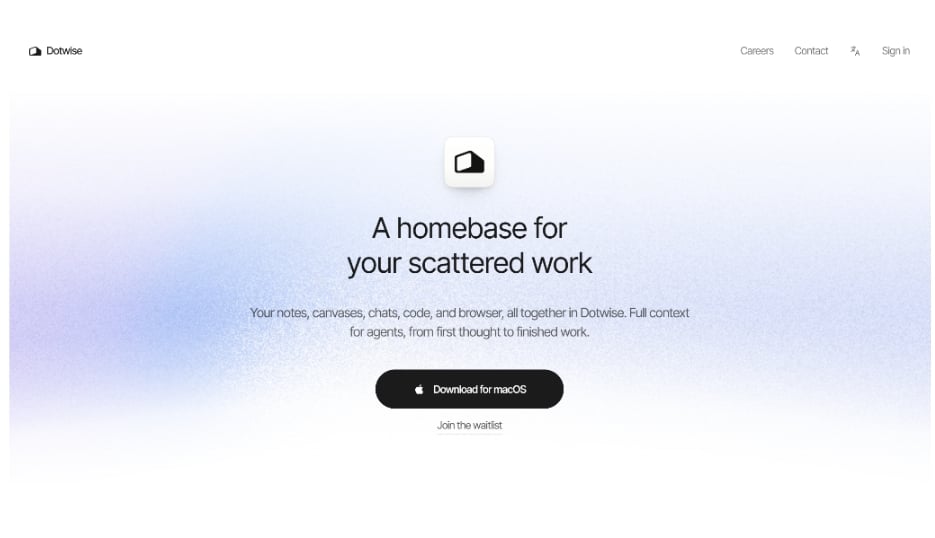
Dotwise is an AI-native workspace designed to bring together the different pieces of a project and give AI agents access to the context they need to work alongside you.
The current Dotwise homepage summarizes the concept quite clearly:
Your notes, canvases, chats, code, and browser, all together in Dotwise.
That sounds simple, but the underlying idea is more important than the feature list.
Most AI products still revolve around the chat session.
You open ChatGPT, Claude, or another assistant, upload several files, explain your project, get an answer, and eventually leave the conversation. When you return later, you often have to reconstruct what happened.
Dotwise is approaching the problem from the opposite direction.
The project becomes the persistent environment, while the AI agent becomes one of the participants working inside it.
This distinction matters.
The Folder-First Idea
One of the most interesting aspects of Dotwise is its folder-first direction.
Rather than forcing users to recreate their work inside another proprietary AI workspace, the goal is to let Dotwise work around the files and materials people already have.
The intended workflow is closer to:
Open an existing project → understand the existing material → let the human and agent work on the same artifacts → preserve the results → continue later.
This is different from simply being “local-first.”
A product can technically store data locally while still requiring you to import everything into its own internal format.
Dotwise’s more interesting opportunity is working with real project files as living artifacts rather than treating them merely as attachments or reference material.
That could make the product particularly useful for people who already maintain folders containing Markdown files, PDFs, research notes, assets, drafts, code, and other project material.
Why This Matters for AI Agents
Today, AI agents are increasingly capable of performing multi-step work.
The bigger bottleneck is often context.
An agent may be smart enough to rewrite an article or analyze research, but it still needs to know:
- Which files belong to the project
- Which conclusions have already been approved
- Which draft is the latest one
- What the user changed manually
- What still needs to be done
- Which sources support previous decisions
If all of that information exists across several applications, every new AI session requires context reconstruction.
Dotwise is essentially betting that the workspace itself should become the agent’s context layer.
That is a much more ambitious idea than adding an AI sidebar to a note-taking app.
Working With AI Without Losing the Human
Another aspect I like about the Dotwise concept is that it does not assume agents should replace the person doing the work.
The more practical model is collaborative.
Imagine you are preparing an article.
You already have research notes, PDFs, browser sources, an outline, and an unfinished Markdown draft.
An agent can analyze the material and propose changes. You review them, rewrite part of the draft yourself, reject one suggestion, and then ask the agent to continue using your new version.
The important part is that both sides are working around the same artifact.
The work should not disappear into a chat transcript.
Dotwise’s product-testing direction specifically emphasizes workflows where an existing project is opened without migration, a human edits a document, and an agent subsequently continues working with the updated version. Other scenarios include producing drafts from project research, reviewing agent changes, recovering from incorrect edits, returning to a project on another day, and transforming an existing piece into another deliverable.
That is closer to how actual knowledge work happens.
Dotwise vs. ChatGPT and Claude
Dotwise will inevitably be compared with tools such as ChatGPT and Claude.
But I do not think the main competition is model quality.
ChatGPT and Claude are primarily AI platforms. They are becoming increasingly capable of working with projects, files, tools, and longer-running tasks.
Dotwise’s potential advantage is instead the workspace layer surrounding the agent.
The question becomes:
Where should the long-term state of a project live?
In a traditional chatbot workflow, much of that state lives inside conversations.
In a Dotwise-style workflow, the project files, artifacts, relationships, and working context can become the durable source of truth.
That could become particularly valuable as users start switching between multiple models and agents.
Instead of rebuilding your project for every AI system, the workspace could remain stable while the agent changes.
Dotwise vs. Notion
At first glance, Dotwise may also look like an AI-native Notion competitor.
There is some overlap, but I would not describe it that way.
Notion is fundamentally built around the Notion workspace and its structured pages and databases.
Dotwise’s more differentiated direction is to make existing files and project materials part of the native AI workflow.
That distinction is important for users who do not necessarily want to move their entire working life into another closed workspace.
If Dotwise executes its folder-first strategy well, its strongest selling point may not be:
“Move your work into Dotwise.”
It may instead be:
“Bring Dotwise to the work you already have.”
Dotwise vs. Obsidian
Obsidian is probably one of the more interesting comparisons.
Obsidian already gives users a strong local-file foundation, particularly for Markdown workflows. Its plugin ecosystem can also add increasingly sophisticated AI and agent capabilities.
For advanced users, combinations such as Obsidian plus AI plugins can already provide retrieval, writing, file editing, and agent-like workflows.
Dotwise therefore has to offer more than simply “AI that can read Markdown.”
Its opportunity is to make the entire workflow dramatically easier.
Instead of configuring multiple plugins, models, prompts, tools, and file conventions, Dotwise could provide a more coherent environment where files, browser research, agents, canvases, conversations, and artifacts naturally share project context.
This is likely one of the biggest tests for the product.
The Most Interesting Dotwise Use Cases
I see several scenarios where the Dotwise model could become especially useful.
Research and Writing
A writer might maintain research notes, source material, outlines, drafts, and browser references inside one project.
Instead of repeatedly uploading those materials into an AI chat, an agent could work from the project itself.
The user could research a topic, create an article, return several days later, and continue without reconstructing the entire context.
Content Repurposing
Suppose you finish a long-form article.
Later, you want to turn it into a newsletter, video script, social media thread, or presentation.
In many AI tools, you would start another conversation and upload the original content again.
A persistent workspace could instead understand both the original research and the final approved artifact.
That makes downstream content creation much more consistent.
Knowledge Projects
Dotwise could also work well for long-running projects where information continuously accumulates.
Instead of asking an AI to “remember” everything indefinitely, the important state can be represented through actual project artifacts.
That is a much more reliable model for persistent AI work.
AI-Assisted Project Work
The same principle applies beyond writing.
Designers, developers, researchers, marketers, founders, and independent creators often work across many different file types and applications.
Dotwise could become the layer connecting those materials to AI agents.
What I Like About Dotwise
The biggest strength of Dotwise is its product philosophy.
It is addressing a real problem that becomes increasingly obvious as AI agents improve: agents need persistent context, not just bigger chat windows.
I also like that Dotwise appears to be thinking in terms of artifacts rather than conversations.
An article should remain an article.
A project brief should remain a project brief.
Research should remain reusable research.
AI should help maintain and transform those things rather than trapping the useful result inside an endless chat history.
The folder-first direction is another strong idea because users have spent years building their existing workflows. Asking everyone to migrate all of their information into a new AI platform creates unnecessary friction.
Where Dotwise Still Needs to Prove Itself
Dotwise is still an emerging product, so the biggest questions are practical rather than conceptual.
The first is reliability.
If humans and AI agents are editing the same project files, users need confidence that changes are visible, reversible, and predictable.
Version management, conflict handling, and review workflows will matter significantly.
The second is context quality.
Putting everything in one workspace does not automatically mean an AI agent will know which information is relevant.
Dotwise will need strong mechanisms for deciding what belongs in the agent’s active context without forcing users to manually manage every detail.
The third challenge is simplicity.
Advanced users can already approximate parts of this workflow using combinations of Obsidian, Claude Code, Codex, Cursor, MCP servers, scripts, and local folders.
Dotwise becomes much more compelling if it can deliver similar flexibility without requiring users to assemble the entire system themselves.
Finally, there is the question of maturity.
The current public website is intentionally minimal, and Dotwise is still inviting users through a waitlist while also offering a macOS download.
So I would evaluate Dotwise today as an early product direction with significant potential, rather than a finished replacement for established workspaces.
Who Is Dotwise For?
Dotwise looks especially promising for people whose work already revolves around files and ongoing projects.
That includes:
- Writers and content creators
- Researchers
- Designers
- Developers
- Obsidian and Markdown users
- Heavy users of AI coding agents
- Founders and independent builders
- Anyone regularly moving information between browsers, documents, AI chats, and local folders
People who only need occasional AI questions probably will not need this level of workspace.
But for users who spend hours every day working with AI, persistent project context becomes increasingly valuable.
Is Dotwise Worth Trying?
I think so, particularly if you are already feeling the limitations of chat-centric AI workflows.
Dotwise is interesting because it is not merely asking how AI can generate better answers.
It is asking a more important question:
What should the workspace look like when humans and AI agents are both actively participating in the same work?
The answer may involve persistent files, shared artifacts, project context, browsing, conversations, and agents operating together rather than as separate tools.
Dotwise is still early, and execution will ultimately determine whether the idea works.
But the underlying direction makes sense.
Final Verdict
Dotwise is one of the more interesting attempts to rethink productivity software for the agent era.
Instead of starting with a chatbot and adding more tools around it, Dotwise starts with the work itself: files, notes, canvases, code, browser research, and other project artifacts.
The agent then operates inside that environment.
That difference sounds subtle, but it could become important.
As AI agents become more capable, the competitive advantage may no longer come simply from having access to the smartest model.
It may come from giving that model the right environment, the right persistent context, and the ability to work with the same artifacts humans are already using.
That is the idea behind Dotwise.
And if the team can turn the folder-first vision into a reliable everyday workflow, Dotwise could become much more than another AI workspace — it could become a genuine homebase for human-agent collaboration.