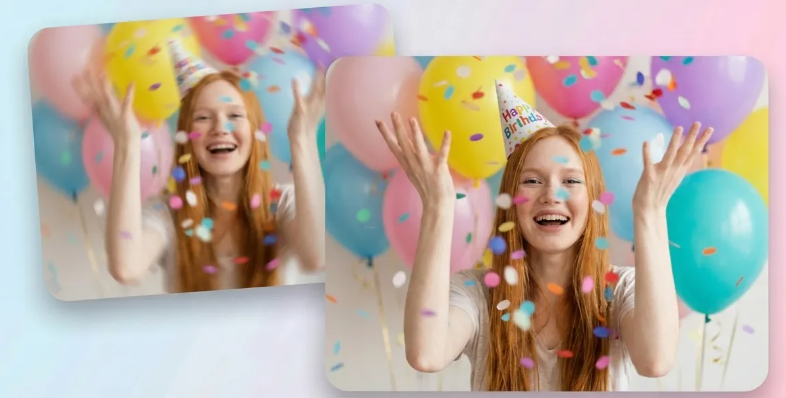
We’ve all been there. You pinch-to-zoom on your phone screen to check a photo you just took, and your stomach drops. The subject’s face is a smudge. The text on the sign is a cryptic puzzle. The whole shot looks like it was taken through a dirty shower door.
Five years ago, this meant opening a heavy desktop application, importing the file, and spending twenty minutes wrestling with noise reduction and sharpening masks, only to end up with a grainy mess.
Today, you just open a browser tab.
The shift from local software to cloud-based AI photo enhancement has completely changed the workflow. We no longer rely on our own hardware to do the heavy lifting. Instead, massive neural networks running on remote servers analyze your file and reconstruct it in seconds. But not all online methods are created equal. If you just slap a photo into the first tool you find on Google, you’ll likely end up with a subject that looks like a melted wax figure.
Here is a breakdown of the actual, practical ways to handle AI enhancement online right now, and how to choose the right approach for what you’re trying to fix.
The “One-Click” Pipeline: Speed Over Perfection
Let’s start with the most common method. You upload a file, the server chugs for about four seconds, and it spits out a “fixed” version.
This approach relies on generalized, pre-trained models. The AI looks at the image, identifies the main subject (usually a face or a pet), and applies a blanket reconstruction algorithm.
When to use it: This is your go-to for social media dumps, quick meme edits, or fixing a slightly soft group photo where no single face needs to be billboard-ready. It’s fast, it’s usually free or freemium, and it gets the job done for casual viewing.
The catch: Because it applies a generalized fix, it doesn’t understand context. It might sharpen a person’s face beautifully but completely ruin the texture of the brick wall behind them, turning it into a noisy, over-processed smear.
Selective Masking and Granular Control
This is where the real magic happens, and it’s the method professional retouchers and content creators actually use.
The best online platforms now offer granular control. Instead of just hitting “enhance,” you get a dashboard with sliders. You can tell the AI to only reconstruct the eyes and skin texture, while leaving the hair and background completely untouched. Some advanced web tools even let you paint a mask over the specific blurry area, restricting the AI’s “hallucination” to just that zone.
When to use it: Portraits, product photography, and archival restoration. If you are fixing an old family photo, you want to recover the facial features without making the vintage clothing look like it was rendered in a 2024 video game.
The workflow tip: If you edit video (say, in CapCut or Premiere) and need to pull a still frame from a blurry video clip to use as a thumbnail or an overlay, selective masking is mandatory. You need the face to look sharp, but if the AI alters the background too much, it will look jarring when you drop it back into your video timeline. Keep the enhancement localized.
Batch Processing for E-commerce and Scale
If you run an online store or manage digital assets for a brand, fixing one photo at a time is a waste of your life. The best way to handle this online is through batch processing APIs or bulk-upload dashboards.
These tools use standardized pipelines. You set a baseline rule—like “enhance faces, reduce noise by 30%, upscale to 200%”—and feed it a folder of 500 product shots. The AI processes them uniformly.
When to use it: Catalog updates, real estate listings, and clearing out legacy media archives.
The catch: Uniformity is a double-edged sword. If you have a batch of photos with mixed lighting, a blanket AI enhancement might over-brighten the shadows in a photo that was supposed to be moody. Always spot-check a few images from the batch before publishing them live.
Navigating the “Plastic Skin” Trap
No matter which online method you choose, you will eventually run into the biggest flaw in current AI enhancement: the over-smoothing effect.
Because these models are trained on millions of high-res, professionally lit portraits, their default assumption is that human skin should look like it was airbrushed in a studio. When you ask a basic online tool to fix a blurry face taken in dim lighting, it doesn’t just recover the blur; it deletes the pores, the fine lines, and the natural skin texture, replacing them with a smooth, plastic surface.
How to beat it:
1) Lower the opacity: If the web tool allows it, never run the enhancement at 100% strength. Dial it back to 60% or 70%. This blends the AI-generated details with the original, imperfect pixels, keeping the natural texture intact.
2) Add grain back: It sounds counterintuitive, but after an AI smooths out a photo, dropping a very subtle layer of film grain over the final image tricks the eye into perceiving more natural texture. It breaks up that artificial “plastic” look instantly.
The Reality of Text and Fine Details
We need to talk about the elephant in the room: legible text.
If your blurry photo contains a street sign, a document, or a license plate, AI is currently terrible at fixing it. The neural network doesn’t “read” the letters; it just sees shapes that look like letters. If you try to unblur image files that rely heavily on typography or fine print, the AI will likely generate alien, gibberish characters that look real from a distance but fall apart the second you zoom in.
For text-heavy images, your best bet online is to use tools specifically trained on document restoration rather than general photography. They use different weighting in their models, prioritizing geometric line structures over organic textures.
The New Baseline for Visual Content
The barrier to entry for high-quality imagery has completely collapsed. You no longer need a $3,000 camera setup or a degree in Photoshop to rescue a bad shot. The browser-based AI tools available today have turned image recovery from a specialized technical skill into a basic digital literacy requirement.
But having the tools doesn’t mean you can turn off your brain. The difference between an amateur and a pro isn’t the software they use; it’s knowing when to use a one-click fix, when to mask out the background, and when to stop the slider before the subject turns into a mannequin.
The tech is incredible. It’s up to us to use it without losing the human touch.