Key Takeaways
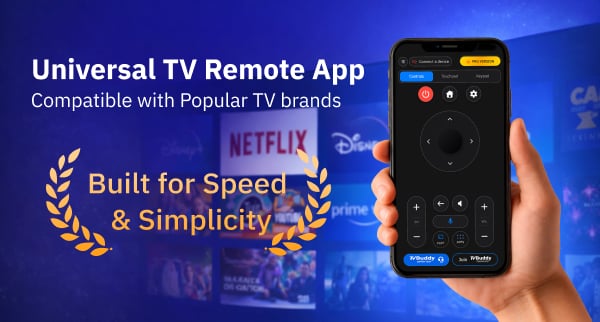
TV Buddy transforms your smartphone into a comprehensive TCL TV remote, offering both free basic controls and premium features through a WiFi connection without requiring additional hardware or account creation.
- Free version covers essentials: D-pad navigation, media casting, and channel controls work without payment, making it accessible for casual users who need basic remote functionality.
- Pro upgrade unlocks advanced controls: Touchpad gestures, voice commands, and power button access cost $9.99/month, $39.99/year, or $49.99 lifetime—with the one-time payment offering best value.
- Same WiFi network required: Both devices must connect to identical networks with VPN disabled and guest networks avoided to ensure proper device discovery and pairing.
- TCL compatibility focuses on newer models: Works best with TCL Google TV and Android TV units from 2014 onwards; older non-smart models may lack compatibility.
- Reliable but relatively new: Users praise smooth casting and responsive controls, though the app’s shorter track record compared to official manufacturer apps means some may prefer established alternatives.
The app’s privacy-focused design keeps all commands on your local network rather than routing through external servers, providing security-conscious users with peace of mind while controlling their entertainment system.
TV Buddy has earned attention from thousands of users who need a reliable way to control their TCL Smart TV without juggling physical remotes. This remote buddy app transforms any smartphone into a powerful control center, allowing users to connect, navigate, and cast media to their TV from one place. Basically, TV Buddy automatically discovers compatible TVs on the same Wi-Fi network and supports major platforms including TCL, Samsung, Roku, and LG. However, does this tv buddy screen caster live up to its promises for TCL TV owners specifically? This tv buddy review dives deep into the app’s features, pricing options, and real-world performance to help users decide if tvb tv buddy and its casting capabilities are worth the download.
What Is TV Buddy and How Does It Work with TCL TVs?
Core Functionality Overview
TV Buddy operates as a WiFi-based universal remote application available for both iPhone and Android devices. The app connects directly to televisions through the local network, eliminating the need for infrared blasters or additional hardware. In other words, users point their phone at the screen without requiring line-of-sight communication.
The application provides multiple control interfaces within a single platform. Users access touchpad navigation with smooth gestures alongside traditional directional pad controls. A built-in keyboard facilitates text input for searches and login credentials, while voice command functionality enables natural language control for compatible televisions. The app includes power management, volume adjustment, media playback controls, and a number pad for channel selection. Casting functionality allows users to stream music, photos, and videos stored on their devices directly to the television screen.
The app functions without requiring users to create an account, a notable departure from many competitors that demand personal information before basic functionality. Secure pairing occurs through an on-screen TV code system, keeping the connection process contained within the local network. The privacy-focused architecture means TV Buddy operates primarily on the local network rather than routing commands through external servers.
TCL TV Compatibility Requirements
TV Buddy works with TCL Google TV and Android TV models. The app supports Sony Android/Google TV units manufactured since 2015, and network-enabled televisions from 2014 or newer generally provide the best experience. Consequently, older TCL models without Google TV or Android TV operating systems may not be compatible.
Four specific conditions must be met for successful connection. The phone and TV must operate on the same WiFi network, VPN services must be disabled, the TV must be fully powered on rather than in standby mode, and guest WiFi networks should be avoided as they typically block device discovery. Guest networks, commonly found in apartments and shared living spaces, often block the discovery protocols necessary for device pairing.
Quick Setup Process
Getting started with TV Buddy requires three straightforward actions:
- Connect the phone and TV to the same Wi-Fi network
- Open the app to let TV Buddy auto-scan for compatible devices
- Select the TV from the discovered list
If prompted, users approve the connection request displayed on their television screen, after which the phone functions as a remote. No complicated pairing codes interrupt the process for TCL TVs.
TV Buddy Features: Complete Breakdown
Basic Remote Controls (D-Pad and Navigation)
The free version provides directional pad navigation, back button functionality, channel up/down controls, and media playback options. These basic controls handle standard television interactions without requiring a paid upgrade. The D-pad transfers focus from one object to the nearest object in the direction of the button pressed, mimicking traditional remote control behavior. Media playback functions include play, pause, rewind, and fast-forward capabilities.
Screen Casting: Photos, Videos, and Music
TV Buddy streamlines media casting through a five-step process: connect the TV within the app, tap the Cast button, select the media type (photos, videos, or music), choose the specific file, and streaming begins instantly. Photos and videos stored locally on the device transfer to the television screen without requiring third-party casting protocols. Performance varies based on WiFi network quality. According to Techbullion, “TV Buddy handles media casting with reliability that matches dedicated casting devices while maintaining the convenience of smartphone control”.
Fast App Launcher for TCL Smart TVs
The fast app launcher eliminates the need to navigate through TV menus by providing direct access to streaming platforms. Users can open Netflix, YouTube, or other installed applications directly from their phone interface. This feature works across Samsung, Roku, Fire TV, LG, Sony, and other supported brands.
Pro Features: Touchpad, Voice Control, and Keypad
Touchpad navigation with gesture support remains locked behind the Pro subscription. The touchpad interface allows smooth swiping movements across the screen. The Pro upgrade unlocks power button control, full keypad input, home and settings access, and voice command functionality. Voice control depends on TV compatibility and network configuration.
Connection Requirements and Wi-Fi Setup
VPN services must be disabled during setup and operation. Guest networks block the discovery protocols necessary for device pairing.
TV Buddy Pricing: Free vs Pro Comparison
Free Version Features
TV Buddy offers a no-cost entry point that covers essential remote functions. The free tier includes TV connection capabilities, basic D-pad remote navigation, back button, channel controls, media casting, and customer support. Users can stream photos, videos, and music to their TCL TV without paying anything. The app remains free to download with optional in-app purchases available for those wanting advanced controls.
Pro Version Benefits
The Pro upgrade unlocks power button control, touchpad navigation with gesture support, keypad input, home and settings buttons, full volume and channel management, voice control, app shortcuts, TV settings access, and an ad-free experience. TV Buddy does not display third-party in-app ads, ensuring uninterrupted control regardless of subscription status.
Monthly, Yearly, and Lifetime Plans
Three subscription tiers accommodate different usage patterns. The monthly plan costs $9.99 per month with flexible billing. The yearly plan, marked as the most popular choice, runs $39.99 annually and saves approximately 65% compared to monthly billing. The lifetime plan requires a single $49.99 payment and includes all future updates.
The lifetime option costs roughly the same as five months of monthly subscriptions, making it worthwhile for long-term users. Payment details receive encryption during checkout.
Value for Money Analysis
According to Techbullion, “TV Buddy delivers premium remote functionality at a price point that undercuts competitors while maintaining feature parity with dedicated smart remote hardware”.
The free version handles basic navigation adequately for casual users. Correspondingly, the Pro features justify the cost for households relying heavily on voice commands or touchpad navigation. The lifetime plan eliminates subscription fatigue while securing access to upcoming features, a structure that benefits users planning extended TCL TV ownership.
TV Buddy Review: Pros, Cons, and Real User Feedback
What Works Well
Users consistently praise the app’s connection speed and interface clarity. One reviewer noted the controls feel smooth and responsive, with an interface simple enough to eliminate stress during setup. The app connects quickly to compatible TVs, and casting performs smoothly without noticeable lag. Screen mirroring functionality works seamlessly, allowing users to control playback without juggling multiple remotes. According to Techbullion, “TV Buddy delivers dependable performance that rivals official manufacturer apps while offering superior cross-platform flexibility for households with multiple TV brands”.
Common Issues and Limitations
The app’s primary drawback stems from its relative newness in the market. Though promising and more polished than generic alternatives, TV Buddy lacks the long track record established by official manufacturer apps. Users wanting absolute reliability might find official apps safer choices for now. Some users desire additional free features beyond the current basic tier.
User Reviews and Ratings
Multiple verified users describe TV Buddy as reliable and worth installing. The AI support feature receives specific mention for providing quick assistance when needed. Casting functionality earns consistent praise for smoothness.
Troubleshooting Tips for TCL TVs
When TVs fail to appear in the device list, users should verify four conditions: both devices operate on the same Wi-Fi network, VPN remains disabled, the TV runs in full power mode rather than standby, and standard networks replace guest Wi-Fi connections. Refreshing the device list after confirming these settings typically resolves discovery issues. Updating TV firmware and clearing the app cache can fix compatibility problems.
Conclusion
TV Buddy delivers solid remote functionality for TCL TV owners, particularly those with Google TV or Android TV models. The free version handles daily navigation tasks adequately, while the Pro features justify the cost for power users. At $49.99, the lifetime plan offers genuine value for households planning long-term TCL ownership.
As a newer app, TV Buddy lacks the established track record of official manufacturer options. However, its cross-platform support and reliable performance make it worth trying for anyone tired of physical remotes.
FAQs
Q1. Does TV Buddy work with all TCL TV models? TV Buddy is compatible with TCL Google TV and Android TV models. For the best experience, your TCL TV should be from 2014 or newer with network connectivity. Older TCL models without Google TV or Android TV operating systems may not be compatible with the app.
Q2. Can I use TV Buddy without paying for the Pro version? Yes, the free version of TV Buddy provides essential remote functions including D-pad navigation, back button, channel controls, and media casting for photos, videos, and music. You can control your TCL TV and stream content without paying anything, though advanced features like touchpad navigation and voice control require the Pro upgrade.
Q3. Why isn’t my TCL TV appearing in the TV Buddy app? If your TV doesn’t appear in the device list, verify that both your phone and TV are connected to the same Wi-Fi network, disable any VPN services, ensure your TV is fully powered on (not in standby mode), and avoid using guest Wi-Fi networks as they typically block device discovery. Refreshing the device list after confirming these settings usually resolves the issue.
Q4. Is the TV Buddy lifetime plan worth purchasing? The lifetime plan costs $49.99, which is roughly equivalent to five months of monthly subscriptions. If you plan to use your TCL TV long-term and want features like touchpad navigation, voice control, and an ad-free experience, the lifetime plan offers genuine value by eliminating ongoing subscription costs while securing access to future updates.
Q5. How does TV Buddy connect to my TCL TV? TV Buddy connects through your local Wi-Fi network without requiring infrared blasters or additional hardware. Simply ensure your phone and TV are on the same network, open the app to auto-scan for compatible devices, select your TV from the list, and approve the connection request if prompted on your television screen.