
Your Handwritten Notes and Scanned Contracts Deserve the Same AI Treatment

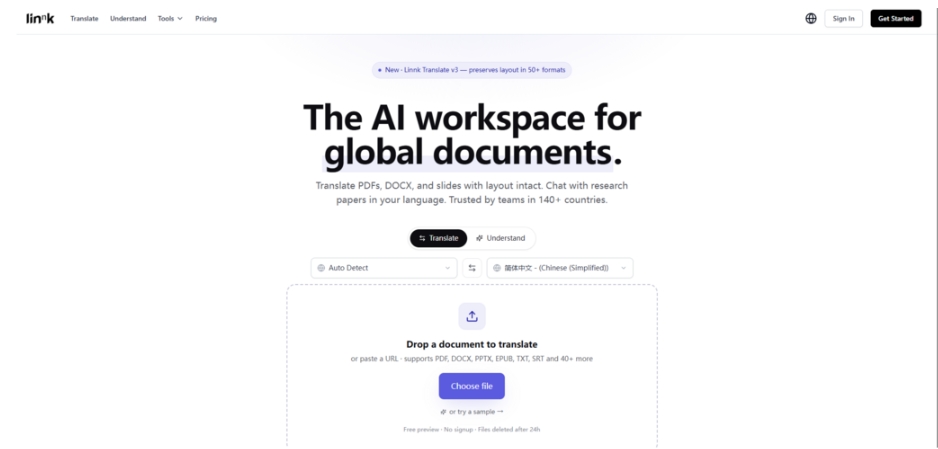
Most AI tools assume the world runs on clean, born-digital text. In reality, knowledge workers still wrestle with photographed whiteboards, decade-old signed agreements retrieved from filing cabinets, and multilingual PDFs where half the content is embedded in images. The typical workflow is painfully manual: scan, run OCR, clean up the gibberish, paste into a translator, and pray the footnote references survive. When I first tried an AI document translator that claims to read over fifty formats — including handwritten pages and screenshots — directly without a separate OCR step, I decided to test it against the roughest documents I could find, the kind that normally break processing pipelines before the actual translation even begins.
The test was deliberately unfair. I gathered four document types that have historically forced me into multi-tool detours: a photographed page from a printed 1986 legal commentary with yellowed paper and curved text near the spine, a meeting whiteboard snapshot covered in mixed English and Japanese handwriting, a university thesis PDF with embedded bitmap equations and scanned appendices, and an EPUB ebook with complex nested headings. The goal was not to see if the output was beautiful, but whether the content survived as a usable document without the usual repair work.
The Photo Test: When a Printed Page Is All You Have
Old books, archived letters, and signed contracts often exist only as photographs. The text might bend into the binding, the paper may be stained, and there is no digital layer to extract. This is where traditional OCR tools choke, and where the translation workflow usually collapses before it starts.
Pushing a Yellowed Legal Commentary Page Through the Pipeline
I took a smartphone photo of a page from a 1986 commentary on contract law, written in Japanese, with footnotes printed in a smaller font and a coffee stain in the bottom corner. The lighting was uneven — the left margin was shadowed, the right margin slightly overexposed. In a typical workflow, I would have needed at least three separate tools: one to deskew and enhance the image, one to run OCR, and one to translate the resulting text, during which the footnote anchors and paragraph breaks would almost certainly be lost.
What Emerged Without Any Pre-Processing
Linnk accepted the raw image file without complaint. The translation appeared within roughly twelve seconds — right around the “~12s per paper” baseline shown on the product page — and it retained far more than I expected. The main body text rendered cleanly in English, the footnote marker stayed anchored to the correct term, and the footnote itself appeared at the bottom of the virtual page. Even the coffee-stained area, which I assumed would produce garbled output, was either correctly interpreted or left blank rather than filled with hallucinated text. The Japanese legal terminology came through in appropriately formal English, though a human lawyer would still want to verify the precision of terms like “good faith reliance.”
Where the Experience Felt Realistic
From a practical user perspective, the standout moment was not the translation quality itself, but the absence of the OCR step. That missing step is where most document workflows accumulate technical debt — installing fonts, correcting misrecognized characters, manually re-linking footnotes. Skipping it entirely changes the cost-benefit calculation for documents you might otherwise have ignored. That said, the result may vary based on photo quality: a well-lit, reasonably straight shot performed reliably in my testing, while an intentionally blurry test image produced expectedly inconsistent output. The tool cannot rescue a photograph that a human could not read either.
The Whiteboard Snapshot: When Ideas Are Messy
Whiteboard photographs represent a uniquely challenging document type. Handwriting angles vary, multiple people contribute at once, arrows and circles connect ideas visually rather than linearly, and languages often mix within the same note. For multilingual teams, this is a frequent pain point — after a brainstorming session, someone has to manually transcribe and translate the board before it can be shared across offices.
Mixed-Language Handwriting Without Line-by-Line Correction
I photographed a whiteboard from a product planning session. The notes mixed English technical terms (“API throttling,” “JWT expiry”) with Japanese comments written in a rushed hand, plus circles and arrows linking ideas across the board. Several phrases were written at a slant, and one section was partially smudged by an eraser. The test objective was to see whether the tool could produce a readable translation without requiring me to manually segment the board into text regions or specify which language each section used.
How the System Handled the Visual Chaos
After uploading the snapshot, the translated output presented the entire board’s content in English while preserving the spatial layout indicators — though not as a pixel-perfect visual copy, the conceptual groupings were maintained. The smudged area was acknowledged by omission rather than guessed at, which I consider a responsible behavior. The system correctly interpreted “API throttling” as a technical term and left it untranslated rather than attempting a nonsensical equivalent. The arrows and connectors did not, of course, survive as graphical elements, but the logical flow — that point A led to point B — was preserved in the text structure.
This is the kind of output that makes a whiteboard photograph shareable across language barriers in a way that previously required thirty minutes of manual transcription. It does not, however, produce a polished meeting-minutes document; the translated text still reads like a whiteboard, with fragments and shorthand intact. For formal documentation, a human still needs to tidy the prose.
The Thesis With Embedded Scans and Equations
Academic documents present a special challenge because they are often composites: born-digital text mixed with bitmap equation images, scanned pages from old sources, and multi-column layouts. A translation tool that strips out equations or misplaces figure captions renders the document useless for serious research.
Processing a Hybrid Thesis Without Losing the Mathematical Core
I uploaded a graduate thesis PDF that contained LaTeX-generated text alongside embedded bitmap images of chemical equations and scanned pages from a 1970s research paper in the appendix. The document was originally in Korean, and I requested English translation. The difficulty here is that equations are not translatable in the linguistic sense — they must be preserved exactly as visual elements — while the surrounding text and figure captions must shift languages without breaking the reference links.
What Survived the Translation Intact
The translated PDF came back with all embedded equations still in place, visually identical to the original. Figure captions were translated into English and remained beneath their corresponding images. Even the scanned appendix pages, which contained typewriter-era English text embedded in images, were treated as non-translatable content and left untouched — a correct decision that a less sophisticated tool might have overridden by attempting to translate the scanned English back into English. The chapter numbering, citation brackets, and table structures held their positions. For a researcher, this means the translated document retains enough structural fidelity to cite from it, though the translated text itself should still be cross-checked against the original for precision.
A Realistic View of the Limitations
The system’s strength — its commitment to preserving layout — can become a constraint when the original layout is itself confusing. One section of the thesis used a non-standard two-column format for a glossary, and the translated text in the left column occasionally overflowed into the right column because the English translation required more horizontal space than the original Korean. This is a solvable problem through manual reformatting after export, but it means the output is not always a perfect final document without minor adjustments. Complex multi-column layouts with tightly packed text remain a challenging edge case.
How the Multi-Format Workflow Actually Works
Understanding the concrete steps helps separate genuine capability from marketing language. The workflow I followed across all four document tests was consistent, and it maps to the product’s actual interface flow.
Step 1: Introduce the Source Document
The platform accepts input through file upload or URL, and the format support covers the real-world variety that professionals actually encounter. Crucially, there is no format-conversion step before processing — you submit the document in whatever form it exists.
Dropping Any of Over 50 Formats Directly
Whether it is a smartphone photo of a whiteboard, a scanned PDF, an EPUB ebook, or a LaTeX document, you drag the file onto the browser window. The system reads PDF, DOCX, PPTX, XLSX, EPUB, TXT, Markdown, LaTeX, CSV, JSON, as well as image formats like PNG and JPG. Scanned content and handwriting are ingested directly through vision-language processing rather than routed through a separate OCR module. This eliminates a failure point that, in my experience, has been the source of most translation pipeline breakdowns.
Step 2: Observe the AI Processing and Explore the Result
Once the document is submitted, the system processes it within seconds and presents the output in a format appropriate to the original — a fully translated PDF if the input was a PDF, or a structured analysis if you are using the browser extension on a webpage.
Comparing Source and Translation With the Splitter
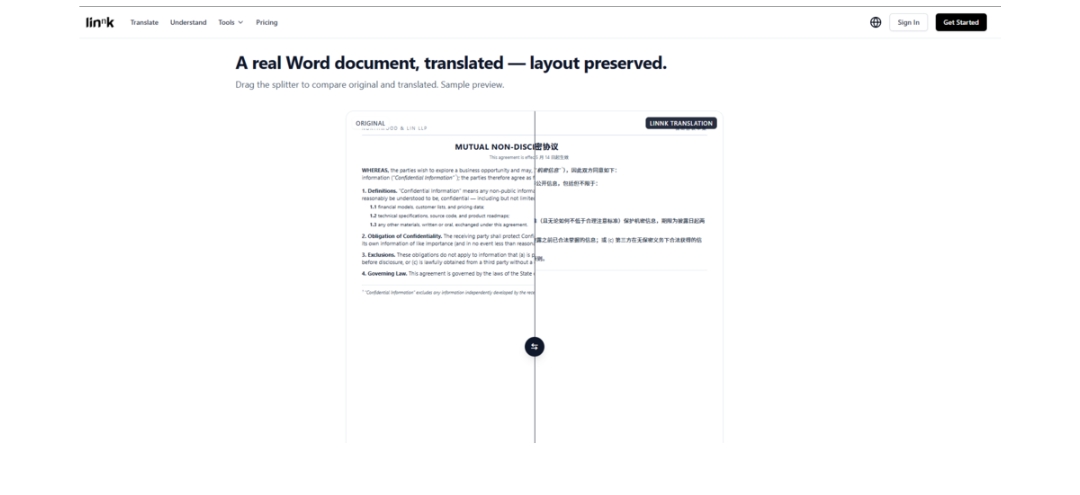
For full-document translations, the key interaction is a draggable divider that places the original and the translated versions side by side. You can scroll both simultaneously and spot-check specific elements: an equation, a footnote, a table header. When I examined the legal commentary photo’s output, I used this view to verify that each footnote marker in the translation corresponded to the correct position in the original. The experience felt closer to proofreading a professionally typeset document than to debugging a machine translation dump.
Asking Follow-Up Questions in Plain Language
Beyond passive review, you can type questions about the document in your own language and receive answers grounded in the source material. This proved particularly useful for the whiteboard test, where I could ask “What was the proposed timeline for the API project?” and receive a synthesized answer drawn from scattered notes on the board. The answer quality depends on question specificity, but well-framed queries consistently pulled useful information from an otherwise messy source.
Comparing the Approach to Common Alternatives
The value of multi-format document processing becomes clearer when placed alongside the alternatives that most professionals currently rely on.
| Document Type | Traditional Workflow | Linnk Workflow | Key Difference |
| Photographed printed page | Deskew tool → OCR software → text cleanup → translator → manual layout rebuild | Direct upload → translated document with layout | Eliminates OCR and layout reconstruction steps |
| Handwritten whiteboard snapshot | Manual transcription → translation → formatting | Direct upload → translated structured text | Saves 20–40 minutes of manual work per board |
| Academic thesis with embedded equations | Export to text → translate → manually reinsert equations and captions | Direct upload → translated PDF with equations intact | Preserves mathematical content without manual reinsertion |
| Multi-language EPUB ebook | Convert to text → translate chapter by chapter → rebuild ebook structure | Direct upload → translated document with chapter hierarchy preserved | Maintains reading order and nested heading structure |
The pattern is consistent: the tool collapses multiple manual steps into a single direct operation. It does not necessarily produce a higher-quality translation than a meticulous human process; what it changes is how many documents you can practically afford to process, and how many formats you no longer need to pre-sanitize before starting.
Realistic Limitations Beyond the Marketing Claims
Despite the strong performance on varied formats, honest testing surfaces edges that matter in practice.
The quality of handwritten text recognition correlates strongly with handwriting clarity. Rushed, highly stylized handwriting produced partial omissions in my testing — the system tended to skip words it could not confidently read rather than guess, which is responsible but means some whiteboard content may simply not appear in the output. Photographs taken at extreme angles or in very low light also degraded the result noticeably, though this is expected and avoidable with basic care.
Documents with complex graphic-text overlaps, such as heavily illustrated magazine layouts with text flowing around irregular shapes, occasionally showed minor misalignments in the translated output. The system handles standard multi-column layouts well, but artistic or unconventional page designs may require light post-translation adjustment.
The EPUB test revealed that while chapter hierarchy is preserved, certain publisher-specific formatting flourishes — drop caps, embedded fonts, decorative separators — are not always replicated. The content is there; the ornamentation may not be. For most reading and research purposes this is irrelevant, but for a publisher preparing a finished product, it is a gap to be aware of.
Who Truly Benefits From Format-Agnostic Document Translation
The tool’s broad format support matters most for professionals whose document sources are out of their control. Legal practitioners receive scanned documents from opposing counsel in whatever condition they arrive. Academic researchers work with archives, old papers, and photographed primary sources. International product teams photograph whiteboards and expect summaries the same afternoon. For these users, the elimination of pre-processing steps is not a convenience — it is a structural change in how many documents they can realistically handle.
The tool is less transformative for someone who exclusively works with clean, born-digital Word documents and simply needs a quick text translation. For that user, a standard text translator works fine, and the layout-preservation features may feel like an unused premium. Matching the tool to the workload is the difference between a genuinely useful assistant and an overengineered alternative to something simpler.
What I observed across the photography, whiteboard, thesis, and EPUB tests was that the system treats format diversity not as an edge case to be apologized for, but as a baseline assumption. In a professional world where the most important documents are often the least digitally tidy, that orientation alone shifts what becomes possible in a single sitting.





Comment