
Wave Browser: Rethinking Resource Efficiency in Modern Web Browsing

Modern web browsers are powerful platforms. They support complex web applications, real-time collaboration tools, media streaming, and cloud-based development environments. However, that power often comes with a trade-off: high CPU usage, large memory consumption, and heavy background activity.
For developers and technically inclined users who regularly run multiple tabs, containers, or web apps, browser performance can become a resource management issue.
This has led to increased interest in what some engineers refer to as low resource browsers—browsers designed to manage memory, network requests, and background processes more efficiently.
One browser exploring this space is Wave Browser, a cross-platform browser available on Windows, Mac, Android, and iOS. The browser attempts to balance modern browsing functionality with system efficiency while also connecting its platform to an environmental initiative focused on ocean cleanup.
Understanding Wave Browser from a developer’s perspective involves focusing on two areas: how it manages resources within the browser environment, and how its built-in features may reduce the overhead typically introduced by browser extensions.
Why Low Resource Browsers Are Becoming Relevant
Developers are often among the first to notice when a browser becomes resource-heavy. Running local development tools, Docker containers, IDEs, and browser-based dashboards simultaneously can quickly push systems to their limits.
A typical browser session might include:
- Dozens of active tabs
- Web-based development tools
- Documentation sites
- Messaging platforms
- Monitoring dashboards
Each additional tab or extension increases the number of active processes, memory allocations, and network requests running in the background.
As a result, the idea of a low resource browser has become increasingly attractive—particularly for users working on machines where CPU cycles and memory are already heavily utilized by development environments.
What is Wave Browser?
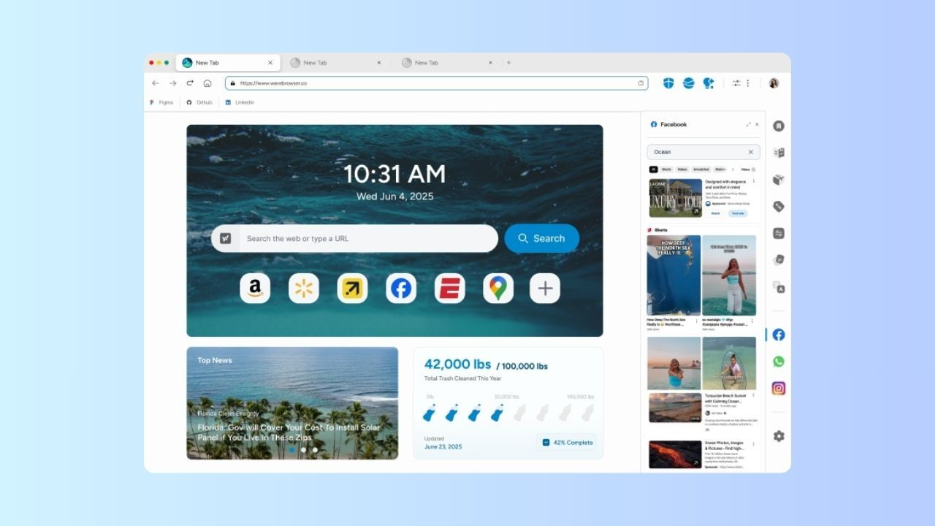
Wave Browser is a web browser with an environmental mission built into its DNA: to remove plastic and trash from our ocean, rivers, and coastlines. Browser revenue helps fund global cleanup efforts through its partnership with 4ocean. You can browse as you normally do—and leave our ocean better than you found it.
Wave Browser is a web browser designed for both desktop and mobile environments, including Windows, Mac, Android, and iOS.
At a functional level, it provides the core capabilities expected from a modern browser:
- Multi-tab browsing
- Bookmarking and reading lists
- Private browsing sessions
- Content organization tools
Where Wave Browser differs conceptually is in how it approaches browser features. Rather than relying on third-party extensions, it integrates commonly used tools directly into the browser interface.
Resource Management and Browser Performance
Browsers consume system resources in several ways:
- Memory allocation for each tab
- Background scripts from websites
- Extension execution
- Rendering and JavaScript processing
A browser designed with resource efficiency in mind typically focuses on reducing overhead across these areas.
Wave Browser includes several mechanisms that relate to this goal.
Memory Saver and Tab Efficiency
One common cause of performance issues in browsers is inactive tabs continuing to consume memory.
Wave Browser includes a Memory Saver feature designed to limit resource usage from tabs that are not currently active. By reducing the memory footprint of background tabs, the browser attempts to free system resources for other applications. designed to limit resource usage from tabs that are not currently active.
Workspace-Oriented Browsing
Modern browser workflows increasingly resemble development workspaces rather than simple navigation tools.
Wave Browser supports multitasking through built-in sidebar tools that provide quick access to commonly used sites and utilities without opening additional tabs.
This can be useful for developers or power users who frequently reference documentation, messaging apps, or other tools while working in the browser.
The sidebar makes it easier to switch between tasks and resources while keeping the main browsing window focused. From a resource perspective, this approach can also reduce the number of simultaneously active browser tabs.
Trust and Safety: AppEsteem Certification (Stated as Standards Compliance)
When evaluating browser software, many technical users look for signals that the application follows recognized software distribution standards. One example of such a signal is AppEsteem certification, a program that assesses applications against a set of consumer-focused software guidelines.
Wave Browser appears in AppEsteem’s list of certified vendors. The certification program evaluates whether software meets requirements related to clear installation behavior, transparent application practices, and user control over removal of the software.
Rather than acting as a security endorsement, certifications like AppEsteem function as a standards framework. They provide a public reference point that allows users to verify whether an application has been reviewed under established distribution and transparency guidelines.
The Environmental Component
Beyond browser functionality, Wave Browser also ties its platform to an environmental program connected to ocean cleanup. The company partners with 4ocean, an organization that operates professional cleanup crews removing plastic and trash from waterways and coastal environments.
Rather than treating this as a one-time campaign, the browser integrates the initiative into the product itself. Inside Wave Browser, users can view an impact tracker that shows ongoing cleanup activity supported through the platform.
Cleanup efforts funded through this partnership currently take place in regions including Bali (Indonesia), the Dominican Republic, and Florida (United States). The broader objective outlined by the project is to support the removal of 300,000 pounds of plastic and trash from our ocean, rivers, and coastlines by 2028.
Why Developers Are Reconsidering Browser Efficiency
The rise of cloud-native development and web-based tooling has fundamentally changed how browsers are used.
Developers now rely on browsers to run:
- complex web applications
- monitoring dashboards
- documentation portals
- collaboration tools
Because of this shift, browsers increasingly function as operating environments for web workloads rather than simple navigation utilities.
This evolution makes resource efficiency a practical concern. Browsers that can manage memory consumption, reduce background overhead, and streamline tool usage may offer advantages for users who regularly run resource-intensive development stacks.
Wave Browser’s approach—combining integrated tools, tab management strategies, and resource-saving mechanisms—reflects one attempt to address that challenge while also connecting the platform to a broader environmental initiative.







Comment