
UltraHumanizer.ai Review: A Simple, Free AI Humanizer for Everyday Writing

AI writing tools have become part of everyday workflows for marketers, writers, professionals, and content teams.
Creating a first draft is rarely the difficult part anymore.
Editing it is.
AI-generated text can often feel overly polished, repetitive, or unnecessarily formal. Even when the information is correct, the writing may lack the rhythm and variation people naturally use.
UltraHumanizer.ai is built to address that editing problem.
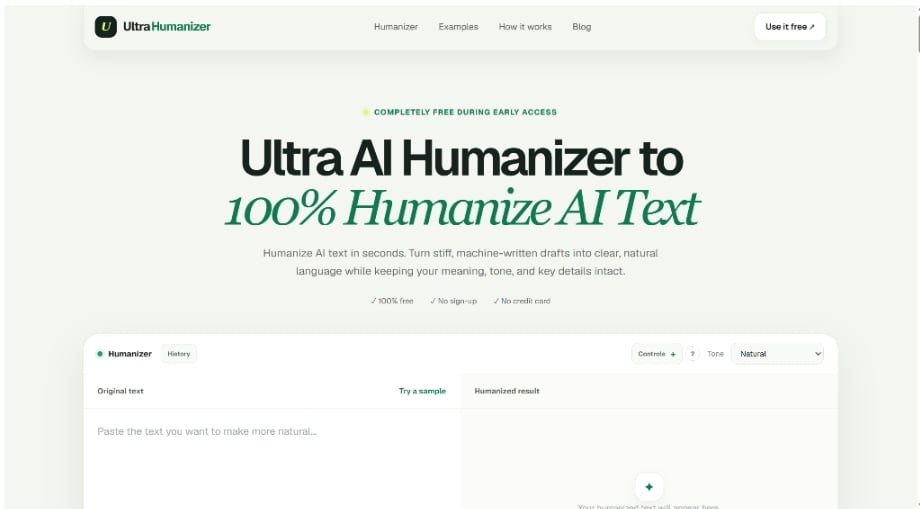
It is a browser-based AI humanizer that takes an existing draft and rewrites it into clearer, more natural language while attempting to preserve the original meaning.
What makes UltraHumanizer.ai interesting is that it keeps the process relatively simple. You can paste text or upload a document, choose a tone, generate a revised version, and continue editing the output before using it.
And during its current early-access period, the tool is completely free to use without an account or credit card.
In this UltraHumanizer.ai review, we’ll look at how the product works, its main features, strengths, limitations, and whether it is worth adding to your writing workflow.
What Is UltraHumanizer.ai?
UltraHumanizer.ai is an online text refinement tool focused on humanizing AI-assisted writing.
Rather than generating an article from scratch, it works with content you already have.
The goal is to improve areas such as:
- Sentence rhythm
- Clarity
- Transitions
- Tone
- Repetitive phrasing
- Overall readability
At the same time, UltraHumanizer is designed to keep important facts, context, keywords, and the original intent intact.
The current web version supports up to 1,500 words per request and can be used without signing up.
That makes it particularly easy to test compared with AI writing tools that require registration before you can see any useful output.
UltraHumanizer.ai Review: Quick Verdict
Overall Rating: 4.7/5
UltraHumanizer.ai is a useful tool for people who already create content with AI but want a faster way to improve the final draft.
Its biggest strengths are:
- Completely free access during early access
- No account required
- Simple workflow
- Three practical tone options
- Editable output
- Document uploads
- Meaning and keyword preservation
- Multilingual support
It isn’t trying to replace a full AI writing platform.
Instead, it works best as an editing layer between an AI-generated first draft and the final version you actually publish or send.
That focused approach is one of its biggest advantages.
How Does UltraHumanizer.ai Work?
The workflow is straightforward.
Step 1: Add Your Draft
You can paste text directly into the editor.
UltraHumanizer also supports document uploads, including:
- DOCX
- PPTX
- ODT
- RTF
- TXT
- MD
- TEX
The platform converts supported documents into editable text so you can work with the content directly in the browser.
This is more useful than it may initially sound.
If you’re working with a report, presentation, article draft, or document created elsewhere, you don’t necessarily need to manually copy every section into the tool first.
Step 2: Choose a Tone
UltraHumanizer currently offers three writing styles:
Natural
Designed for balanced, everyday writing.
Conversational
Better for blogs, marketing copy, captions, newsletters, and less formal communication.
Professional
Suited to reports, proposals, workplace communication, and more formal content.
The tone setting changes the way sentences are phrased without intentionally changing the core point of the original text.
Step 3: Humanize the Text
Once the text and tone are selected, UltraHumanizer generates a rewritten result.
Its approach goes beyond simply changing individual words.
The tool attempts to:
- Vary sentence length
- Remove predictable filler
- Improve transitions
- Simplify awkward phrasing
- Maintain a consistent tone
- Preserve important information
That makes it closer to an automated editing pass than a traditional synonym-based paraphraser.
Step 4: Edit the Result Again
One of UltraHumanizer.ai’s more practical features is that the generated result remains editable.
You don’t have to accept the first rewrite as the final version.
You can review the result, compare it with the source text, make additional changes, and then copy the finished version when you’re satisfied.
This secondary editing workflow is important because writing quality is subjective.
An automated rewrite may improve 90% of a paragraph while leaving one sentence that doesn’t quite match your preferred style.
Being able to directly edit the result keeps the user in control.
UltraHumanizer.ai Key Features
1. Completely Free AI Humanizer
The most obvious advantage is pricing.
UltraHumanizer is currently completely free during early access.
There is no paid subscription required, no credit card, and no account registration needed to access the main tool.
For users who only need an AI humanizer occasionally, that significantly lowers the barrier to entry.
2. Editable Humanized Output
Many rewriting tools treat generation as a one-way process.
You submit text.
They return text.
Then you’re expected to move the result elsewhere to continue editing.
UltraHumanizer keeps the result editable.
You can make secondary changes after the initial rewrite, which makes the experience feel closer to a lightweight editor rather than a simple text converter.
This is especially helpful for brand-sensitive content where small wording changes matter.
3. Side-by-Side Comparison
UltraHumanizer keeps the original draft visible during the rewriting workflow.
This makes it easier to compare:
- What changed
- Whether facts were preserved
- Whether important wording disappeared
- Whether the new tone is appropriate
This type of comparison is useful because AI rewriting should never be treated as completely automatic.
The ability to quickly check the new version against the original reduces the chance of missing unwanted changes.
4. Multiple Tone Controls
The Natural, Conversational, and Professional modes cover most everyday writing situations.
A blog post and a business proposal shouldn’t sound identical.
Neither should a product description and an internal project update.
UltraHumanizer lets you make that distinction before generating the new version.
The selection is intentionally limited, but in practice, three clear options may be more useful than dozens of confusing style presets.
5. Document Upload Support
One feature that separates UltraHumanizer from very basic text humanizers is its file support.
The platform currently accepts DOCX, PDF, PPTX, ODT, RTF, TXT, Markdown, and LaTeX files.
That broadens the product beyond short copied paragraphs.
For example, you could potentially use it to refine:
- A Word document
- Presentation text
- A report
- Markdown content
- A text-based PDF
The current FAQ notes that scanned PDFs need OCR before they can be processed as text.
6. Meaning Preservation
One of the biggest problems with aggressive rewriting tools is that they sometimes improve the style while damaging the meaning.
UltraHumanizer specifically focuses on retaining:
- Names
- Facts
- Context
- Intent
- Important keywords
The site still recommends manually verifying critical details such as names, numbers, citations, and statistics before publishing.
That’s a sensible approach.
A humanizer should improve language, not be treated as a fact-checking system.
7. SEO-Aware Rewriting
UltraHumanizer also states that it is designed to preserve important search terms while improving the surrounding sentence.
This makes it relevant for SEO content workflows.
Traditional paraphrasing tools sometimes replace useful keywords simply because they are attempting to maximize wording differences.
That’s not always desirable.
If you’re optimizing a page around a term such as “AI presentation maker,” repeatedly replacing that exact phrase with variations can weaken the page’s focus.
An SEO-aware editing tool should understand that some wording needs to remain.
8. Multilingual Support
UltraHumanizer supports writing across more than 30 languages.
This is particularly useful for:
- International websites
- Localized content
- Global marketing
- Multilingual blogs
- Cross-market communication
AI-generated multilingual content can sometimes be grammatically correct but stylistically unnatural.
Humanization can help smooth out some of those issues.
9. History Feature
The current interface also includes a History option.
For users who process multiple drafts, this can make the workflow more convenient because you aren’t necessarily treating every rewrite as an isolated action.
It’s a small feature, but useful if humanization becomes part of a regular writing process.
What Does the Output Actually Change?
The biggest difference between UltraHumanizer and a basic paraphrasing tool is the type of changes it attempts to make.
For example, imagine an AI-generated sentence like this:
Our innovative platform provides users with a comprehensive solution that enables them to optimize their workflows and achieve enhanced productivity.
A basic paraphraser might change it to:
Our advanced platform offers users a complete solution that allows them to improve their workflows and increase productivity.
The wording has changed.
The structure hasn’t.
A more natural version might be:
The platform helps users cut repetitive work and get more done.
The sentence is shorter.
The structure is different.
The unnecessary corporate phrasing is gone.
That broader style of editing is the type of transformation UltraHumanizer is designed to provide.
UltraHumanizer.ai for Content Teams
Content teams are one of the clearest audiences for this type of product.
AI can make drafting extremely fast.
But when every article starts with similar expressions and follows the same sentence patterns, the editorial workload simply moves from writing to rewriting.
UltraHumanizer can act as the first editing pass.
A workflow might look like:
Research → AI draft → UltraHumanizer → editor review → publish
This doesn’t eliminate human editing.
Instead, it can reduce some of the repetitive cleanup.
Editors can spend more time improving:
- Originality
- Expertise
- Examples
- Research
- Brand voice
- Structure
rather than repeatedly removing the same generic AI phrases.
UltraHumanizer.ai for Marketing
Marketing content needs specificity.
Generic AI marketing copy often sounds like this:
Our cutting-edge solution empowers organizations to unlock their full potential through innovative technology.
The words sound polished.
The message is vague.
UltraHumanizer’s Conversational mode can help reduce some of that stiffness.
Potential marketing use cases include:
- Landing pages
- Email campaigns
- Product descriptions
- Social media copy
- Newsletters
- Promotional articles
- Brand content
The editable output is particularly useful here because marketers frequently need to make small adjustments after the first rewrite.
UltraHumanizer.ai for Professionals
Professional writing is another strong use case.
AI-generated workplace communication often becomes too formal.
For example:
We would like to inform you that the requested documentation has now been successfully prepared and is available for your review.
A simpler version would be:
The requested documents are ready for your review.
Both are professional.
One is much easier to read.
UltraHumanizer’s Professional mode is designed for this type of refinement.
It can be useful for:
- Reports
- Proposals
- Client communication
- Product notes
- Team updates
- Business emails
UltraHumanizer.ai for SEO
AI-generated SEO content has created an interesting problem.
It’s easier than ever to produce articles.
It’s also easier than ever to produce articles that sound exactly like everyone else’s.
Generic AI writing often includes phrases such as:
- “In today’s fast-paced world”
- “It’s important to note”
- “Whether you’re a beginner or an expert”
- “Let’s dive in”
- “By understanding these factors”
- “In conclusion”
One or two of these phrases aren’t a problem.
Hundreds of pages using the same patterns are.
UltraHumanizer can help make AI-assisted SEO content less formulaic while retaining key search terms.
However, humanization alone won’t make weak SEO content competitive.
You still need:
- Useful information
- Original examples
- Strong search intent alignment
- Internal linking
- Accurate sources
- Clear structure
- Real expertise
UltraHumanizer helps with the writing layer.
It doesn’t replace the rest of SEO.
UltraHumanizer.ai Pros and Cons
Pros
Completely free during early access
There is currently no subscription required.
No account needed
You can start using the tool immediately.
Editable result
You can continue refining the text after the initial rewrite.
Good document support
DOCX, PDF, PPTX, ODT, RTF, TXT, MD, and TEX files are supported.
Simple tone controls
Natural, Conversational, and Professional modes are easy to understand.
Side-by-side workflow
The original draft remains available for comparison.
Meaning preservation
The tool is designed to keep important facts, intent, and context intact.
SEO-aware
Important keywords can remain in place during rewriting.
30+ languages
Useful for multilingual writing workflows.
Cons
1,500-word limit
Long-form content needs to be processed in multiple sections.
Still requires final review
Facts, numbers, names, and citations should always be checked manually.
Limited advanced style settings
Three tones are enough for many users, but advanced writers may want more granular controls.
Not a fact-checking tool
It improves writing rather than verifying whether the content is accurate.
Is UltraHumanizer.ai Really Free?
Yes.
UltraHumanizer currently describes the platform as completely free during early access.
Users can process up to 1,500 words per request without signing up or entering credit card information.
Because the company specifically calls this an early-access offer, the pricing model could change in the future.
But as of now, there is no paid plan required to use the core humanizer.
Is UltraHumanizer.ai Safe?
UltraHumanizer states that drafts are processed to provide the requested output and aren’t displayed publicly.
Even so, the platform recommends avoiding sensitive information.
That’s a good rule for any online AI writing tool.
You generally shouldn’t paste:
- Passwords
- Financial records
- Medical data
- Confidential client information
- Private business data
- Sensitive personal information
unless you are comfortable with how the relevant platform handles that data.
UltraHumanizer.ai vs. Traditional Paraphrasing Tools
UltraHumanizer and paraphrasing tools overlap, but they aren’t identical.
| Feature | Traditional Paraphraser | UltraHumanizer.ai |
| Rewrite words | Yes | Yes |
| Restructure sentences | Usually | Yes |
| Improve sentence rhythm | Limited | Yes |
| Tone controls | Varies | Yes |
| Editable result | Varies | Yes |
| Document upload | Varies | Yes |
| Preserve SEO terms | Varies | Designed for it |
| Focus on AI-assisted drafts | Not always | Yes |
If your goal is simply to express a sentence differently, a paraphrasing tool may be enough.
If your goal is to make an AI-assisted draft read more naturally, UltraHumanizer is more purpose-built for that workflow.
Who Should Use UltraHumanizer.ai?
UltraHumanizer makes the most sense for people who already use AI to create first drafts.
Content Writers
Useful for cleaning up repetitive phrasing before the final editorial pass.
SEO Professionals
Helpful for humanizing articles without unnecessarily removing important target terms.
Marketers
Can improve emails, campaigns, landing pages, and product copy.
Business Professionals
Useful for simplifying reports, proposals, and workplace communication.
SaaS and Product Teams
Can help make release notes, product updates, documentation, and customer communication easier to read.
Multilingual Teams
Useful when AI-generated or translated content sounds grammatically correct but slightly unnatural.
Who Probably Doesn’t Need It?
UltraHumanizer may not be necessary if:
- You don’t use AI-generated drafts
- You already rewrite everything manually
- You only create a small amount of content
- Your main problem is factual accuracy rather than writing style
- You need a full AI content generation platform
UltraHumanizer isn’t trying to solve every writing problem.
It is specifically focused on improving existing text.
Is UltraHumanizer.ai Worth Using?
At the moment, yes.
The fact that UltraHumanizer is free makes the recommendation relatively straightforward.
You can paste in a draft, compare the rewritten result, and decide whether it improves your workflow without committing to a subscription.
More importantly, the product addresses a real bottleneck in AI-assisted writing.
Generating content is becoming easier.
Turning that generated text into something clear, natural, and appropriate for a specific audience still takes time.
UltraHumanizer helps automate part of that second stage.
The document upload support, editable output, and tone controls also make it feel more useful than a very basic one-click rewriting tool.
UltraHumanizer.ai Review: Final Verdict
UltraHumanizer.ai is a simple product, but that’s part of its appeal.
It doesn’t try to replace ChatGPT.
It doesn’t try to become a complete SEO platform.
And it doesn’t require users to learn a complicated workflow.
Instead, it focuses on one task:
taking an existing AI-assisted draft and making the writing clearer, smoother, and more natural.
The current product has several practical features that make it stand out, including multiple tone options, editable output, support for common document formats, side-by-side comparison, multilingual writing, and meaning preservation.
The 1,500-word limit is the main practical limitation for long-form writers, and every important document should still receive a manual factual review.
But for a completely free product, UltraHumanizer offers a solid set of features.
Overall Rating: 4.7/5
Best for: Content teams, marketers, SEO professionals, business users, and anyone who regularly edits AI-assisted writing.
Best feature: The ability to humanize a draft and continue editing the result afterward.
Biggest limitation: The 1,500-word limit per request.
If AI already plays a role in your writing process, UltraHumanizer.ai is worth trying as a final refinement step before publication or delivery.
Frequently Asked Questions
What is UltraHumanizer.ai?
UltraHumanizer.ai is an online AI humanizer designed to rewrite AI-assisted text into clearer, more natural language while preserving the original meaning.
Is UltraHumanizer.ai free?
Yes. It is currently completely free during early access, with no credit card or account required.
What is the UltraHumanizer word limit?
The current limit is 1,500 words per request.
Can I edit the text after UltraHumanizer rewrites it?
Yes. The humanized result remains editable, so you can make additional changes before copying or using the final text.
Can UltraHumanizer upload documents?
Yes. It currently supports DOCX, PDF, PPTX, ODT, RTF, TXT, MD, and TEX files.
Does UltraHumanizer preserve the original meaning?
The tool is designed to retain facts, context, intent, and important details, although users should still review critical information before publishing.
What tones does UltraHumanizer support?
You can currently choose Natural, Conversational, or Professional.
Is UltraHumanizer good for SEO content?
Yes. It can help improve the readability of AI-assisted SEO content while preserving important search terms.
Does UltraHumanizer support multiple languages?
Yes. The website currently states that it supports more than 30 languages.
Is UltraHumanizer.ai worth using?
Yes, especially while it remains free. Its simple workflow, editable output, file support, and tone controls make it a practical editing tool for frequent AI users.






Comment