
Top 10 Best Portable Monitors of 2026 for Gaming, Work, Content Creation, and Design

Quick Buying Guide
- Panel priority: OLED > Mini-LED IPS > QLED > standard IPS.
- Color gamut: Choose 100% sRGB for everyday office work | Choose 100% DCI-P3 for design and content creation.
- Brightness: 200-350 nits for indoor use | 350-500 nits for outdoor use | 600-1,000 nits for bright environments.
- Display format: Single screen | Stacked dual screens | Side-by-side dual screens.
- Refresh rate: 60-120Hz for everyday work | 144Hz or higher for competitive gaming.
- Ports: A full-featured USB-C port for a single-cable connection, plus HDMI, are must-haves.
Top Picks at a Glance
- Best Overall Portable Monitor: EHOMEWEI M2 Air – 16-inch | 2560 x 1600 Mini-LED | 1,000-nit peak brightness | 240Hz | https://www.amazon.com/dp/B0HCTX8H1S.
- Best Portable Monitor for Designers and Content Creators: EHOMEWEI M6 Air – 16.3-inch | 4.5K OLED | Touchscreen | 8,192 levels of pen pressure | 90Hz. https://www.ehomewei.com/products/m6-air.
- Best Portable Monitor for Data Analysts: EHOMEWEI X8 Max – Dual 18.4-inch displays | 3840 x 2160 | Touchscreen | 8,192 levels of pen pressure.
- Best Portable Monitor for Competitive Gaming: EHOMEWEI D5 Air – 17.3-inch | 2560 x 1440 | 265Hz.
- Best Portable Dual-Screen Monitor for Travel: EHOMEWEI X2 Air – Dual 14.2-inch displays | 2520 x 1680 | Touchscreen | 4,096 levels of pen pressure. https://www.amazon.com/dp/B0FJ5FZ4JZ
- Best Entry-Level High-Performance Portable Monitor: EHOMEWEI Q5 – 16-inch | 2560 x 1600 | 120Hz.
We selected 10 models worth considering for office work, travel, touch input, dual-screen productivity, and gaming. Start with the comparison chart, then use the buying guide to narrow down your choice.
| Brand | Model | Display Specifications | Features | Highlights | Best For | Price |
|---|---|---|---|---|---|---|
| EHOMEWEI | M2 Air | 16-inch | Mini-LED | 2560 x 1600 | 240Hz | 100% DCI-P3 | 10-point touch on Windows | Multi-touch gestures on macOS | Stylus with 8,192 pressure levels | Peak brightness up to 1,000 nits for bright indoor and outdoor environments | Gaming, office work, design, and indoor or outdoor use | $599.99 |
| EHOMEWEI | M6 Air | 16.3-inch | OLED | 3840 x 2400 | 90Hz | 100% DCI-P3 | 10-point touch on Windows | Multi-touch gestures on macOS | Stylus with 8,192 pressure levels | 100,000:1 contrast ratio and a pressure-sensitive stylus with 8,192 levels | Designers and video creators | $799 |
| EHOMEWEI | X8 Max | Dual 18.4-inch displays | QLED | 3840 x 2160 | 60Hz | 100% sRGB | Touchscreen support on Windows and macOS | 4K | Stylus with 8,192 pressure levels | Two expansive 18.4-inch displays for a much larger workspace | IT professionals and financial analysts who need an expansive view | $879.90 |
| EHOMEWEI | X2 Air | Dual 14.2-inch displays | QLED | 2520 x 1680 | 90Hz | 100% sRGB | Touchscreen | Handwriting support | Foldable dual-screen design weighing only about 2.2 lb (1 kg) | Efficient mobile multitasking | $529.99 |
| EHOMEWEI | D5 Air | 17.3-inch | QLED | 2560 x 1440 | 265Hz | 100% sRGB | Non-touch | Plug-and-play USB-C | 16:9 gaming aspect ratio | Single-cable Nintendo Switch 2 support | HDR | Large 17.3-inch display and ultra-smooth 265Hz refresh rate; the separate screen and stand design helps keep heat away from the panel during long gaming sessions | Nintendo Switch, PS5, Xbox, and PC gamers | $399.99 |
| ASUS | XG17AHPE | 17.3-inch | IPS | 1920 x 1080 | 240Hz | 100% sRGB | Non-touch | Plug-and-play USB-C | ASUS Eye Care technology | Built-in 7,800mAh battery with approximately 3.5 hours of use; connects to mobile devices, laptops, and game consoles without external power | Competitive gamers who frequently travel to tournaments or gaming meetups | $503 |
| EHOMEWEI | Q5 | 16-inch | QLED | 2560 x 1600 | 120Hz | 100% sRGB | Non-touch | Plug-and-play USB-C | Anti-glare display | 1.3 lb (600 g) | Ultra-thin 4 mm profile | Kickstand and flip-out foot for flexible height and viewing-angle adjustment | An entry-level portable monitor for business travel, office work, or use as a gaming side screen | 199.99 |
| LENOVO | M14 | 14-inch | IPS | 1920 x 1080 | 60Hz | 72% sRGB | Non-touch | Plug-and-play USB-C | Anti-glare display | 1.3 lb (598 g) | Ultra-thin design | Kickstand and flip-out foot for flexible height and viewing-angle adjustment | Three-year warranty | Business travelers and mobile professionals with modest display requirements | $260 |
| AOC | 16T20E2 | 15.6-inch | IPS | 1920 x 1080 | 60Hz | 72% sRGB | Non-touch | Plug-and-play USB-C | Low-blue-light display | 2.2 lb (1 kg), including stand | Protective folio case | Value-focused office users looking for an entry-level portable monitor | $120 |
| InnoView | 15.6-inch 1080p | 15.6-inch | IPS | 1920 x 1080 | 60Hz | 80% sRGB | Non-touch | Plug-and-play USB-C | Low-blue-light display | 2.4 lb (1.1 kg), including folio stand | Plug-and-play setup | Students on a very tight budget | $60 |
How We Evaluated These Portable Monitors
Our evaluation draws on published specifications, manufacturer data, and user feedback. We compared image quality, brightness, color performance, connection stability, stand design, portability, compatibility, and price. Because the models were not tested under identical conditions, some conclusions are based on their specifications, market positioning, and intended use.
Quick Reviews of the 10 Best Portable Monitors
1. EHOMEWEI M2 Air
This 16-inch Mini-LED monitor delivers 2.5K resolution, a 240Hz refresh rate, and brightness up to 1,000 nits. It supports iPad touch extension and 8,192 levels of pen pressure, making it a strong choice for creators who value image quality and touch input. It costs more than many alternatives, and reaching 240Hz requires a compatible source device.
2. EHOMEWEI M6 Air
The M6 Air features a 16.3-inch Samsung OLED panel with 4.5K resolution, a 90Hz refresh rate, a 100,000:1 contrast ratio, and 8,192 levels of pen pressure. It also supports touch input on macOS. It is well suited to design, photography, and video post-production, though buyers should consider OLED burn-in risk and brightness limitations.
3. EHOMEWEI X8 Max
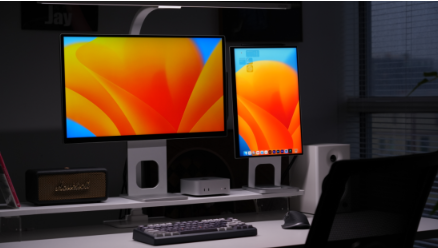
The X8 Max combines two foldable 18.4-inch 4K displays with four viewing modes, touchscreen support, and a pressure-sensitive stylus. Its expansive workspace is ideal for programmers and data analysts. At approximately 7.6 lb (3.44 kg), however, it is not designed for a daily commute.
4. EHOMEWEI X2 Air
This dual-screen monitor pairs two 14.2-inch 2.5K 90Hz displays in a package weighing about 2.2 lb (1 kg). A single cable drives both screens without additional drivers, making it a practical choice for lightweight mobile productivity.
5. EHOMEWEI D5 Air
The D5 Air offers a 17.3-inch 2K display with a 265Hz refresh rate and a 16:9 aspect ratio. It also supports a single-cable connection to Nintendo Switch 2, making it a good fit for competitive PC gaming and console play.
6. ASUS ROG Strix XG17AHPE
This 17.3-inch 1080p monitor combines a 240Hz refresh rate, a built-in 7,800mAh battery, and Adaptive-Sync. It works well for gaming on the go, but its 1080p resolution is modest for the price.
7. EHOMEWEI Q5
The Q5 is a 16-inch QLED monitor with 2K resolution, a 120Hz refresh rate, plug-and-play support for Windows and Mac, and a weight of about 1.3 lb (600 g). It is a capable entry-level option for business travel, office work, or use as a gaming side monitor. The main drawback is the lack of touch support.
8. Lenovo ThinkVision M14
The ThinkVision M14 is a 14-inch 1080p 60Hz monitor weighing about 1.3 lb (600 g). It uses a single USB-C cable and includes TÜV-certified eye-care features. It is well suited to business travel, but it lacks touch input and offers limited entertainment performance.
9. AOC 16T20E2
The AOC 16T20E2 has a 15.6-inch IPS panel with 1920 x 1080 resolution, a 60Hz refresh rate, and 72% sRGB coverage. It supports plug-and-play USB-C connectivity and low-blue-light viewing, weighs about 2.2 lb (1 kg) with the stand, and includes a protective folio case. It is a good entry-level choice for value-focused office users, but it lacks touch input and is not ideal for entertainment.
10. InnoView 15.6-inch 1080p
This 15.6-inch IPS monitor offers 1920 x 1080 resolution, a 60Hz refresh rate, and 80% sRGB coverage. It supports plug-and-play USB-C connectivity and low-blue-light viewing and weighs about 2.4 lb (1.1 kg) with the folio stand. It is best suited to students on a very tight budget. It does not support touch input, and its entertainment performance is limited.
Best Portable Monitors by Use Case
For MacBook and Mac mini users: EHOMEWEI M2 Air
- For multitasking: EHOMEWEI X2 Air or EHOMEWEI X8 Max
- For travel and business trips: Lenovo ThinkVision M14 or EHOMEWEI Q5
- For gaming and consoles: EHOMEWEI D5 Air or ASUS ROG Strix XG17AHPE
- For design and content creation: EHOMEWEI M6 Air
- For shoppers on a budget: AOC 16T20E2
Frequently Asked Questions
Which portable monitor is best for a laptop?
The EHOMEWEI Q5 offers a strong balance of price, performance, and Mac compatibility. Choose the M6 Air if you have a larger budget, or the ThinkVision M14 if travel is your priority.
Can I use a portable monitor as a second screen?
Yes. Connect it by USB-C or HDMI, then select Extend in your system’s display settings. Make sure your laptop’s USB-C port supports DisplayPort Alt Mode.
Does a portable monitor need a separate power source?
Usually not. An external USB-C PD charger is recommended when you use high brightness, run dual displays, or connect to a laptop that cannot supply enough power.
Does touchscreen input work with a MacBook?
Some models support it, but they may require the manufacturer’s driver or software. The EHOMEWEI M2 Air and M6 Air support touch input on macOS.
What refresh rate should I choose for gaming?
A 120Hz display is sufficient for console gaming. For competitive PC gaming, choose 144Hz or higher. To take advantage of 240Hz, your source device must support it as well.







Comment