AI video tools are easy to admire, but harder to use well. A short clip can look impressive at first glance, yet still miss the point if the camera movement feels random, the subject changes too much, or the format does not fit where the video will be posted.
That is why I wanted to look at Sulphur 2 from a practical user’s point of view. I was not looking for a tool that only creates a flashy demo. I wanted to see whether it could help turn simple ideas into short visual drafts for social media, product concepts, storyboards, and early campaign testing.
Starting With A Clear Video Idea
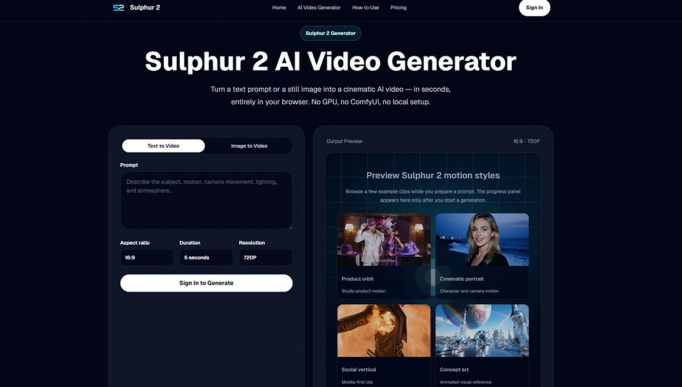
The first thing I noticed is that Sulphur 2 keeps the workflow simple. You can start with a written prompt or upload an image, choose the basic settings, generate a short video in the browser, then improve the next version by adjusting the prompt.
That matters because many people who need video content are not professional editors. A marketer may need a quick ad concept. A creator may need a visual hook for Reels or TikTok. A designer may want to animate a still image for a presentation. In those cases, the tool needs to be fast enough to test ideas without a complicated setup.
Sulphur 2 is built around online AI video creation, so there is no need to install a local model or configure GPU settings. For a first test, that removes a lot of friction.
Text-To-Video Works Best When You Think Like A Director
The text-to-video workflow is useful, but the prompt needs direction. A vague prompt such as “make a cinematic product video” is usually not enough. A better prompt describes the subject, action, setting, camera movement, lighting, mood, and style.
For example, I would write something like: a sleek black wireless speaker on a reflective table, slow dolly-in camera movement, soft studio lighting, shallow depth of field, premium product commercial style.
That kind of instruction gives Sulphur 2 a clearer visual target. It also makes the result easier to judge. If the lighting, camera motion, or product framing is not right, you know exactly what to refine in the next prompt.
This is where Sulphur 2 AI Video Generator feels more useful than a random prompt experiment. It encourages a compact shot description, which is closer to how a real creative brief works.
Image-To-Video Is The Most Practical Use Case
For me, the image-to-video option is one of the most useful parts of Sulphur 2. If you already have a product image, portrait, concept art, or brand visual, you can upload it and describe how the scene should move.
This is helpful because visual consistency is one of the biggest challenges in AI video. Starting from an image gives the tool a stronger reference point. A product can stay closer to its original shape. A character or design can keep more of its identity. A still visual can become a short moving clip without needing a full video shoot.
For ecommerce, this could mean turning a product shot into a short showcase with slow rotation or smooth camera movement. For social media, it could mean giving life to a static poster, fashion image, food photo, or concept visual. For creative teams, it can help make moodboards and storyboards feel more alive.
Why Camera Language Matters
One detail I appreciate is the emphasis on camera and motion control. Sulphur 2 supports simple camera language such as close-up, wide shot, dolly-in, tracking shot, orbit motion, slow motion, and smooth cinematic pacing.
These words are small, but they change the result. A product video with a slow dolly-in feels different from one with an orbit movement. A social hook with a close-up feels different from a wide establishing shot. If the camera language is missing, the clip may still look good but feel directionless.
This is especially important for short videos. When you only have a few seconds, every movement needs a purpose.
Where I Would Use Sulphur 2
I would use Sulphur 2 mostly for early creative work. It is well suited for product showcase ideas, short social clips, ad concepts, landing page visuals, cinematic scene tests, and creative storyboarding.
A small business could use it to test a product video concept before planning a shoot. A social media manager could create several vertical clip ideas before choosing one direction. A filmmaker or designer could use it to visualise a scene, mood, or camera movement before building a larger project.
It also fits the kind of work where speed matters more than perfection. Sometimes the goal is not to create the final video in one step. The goal is to make an idea visible quickly so a team can discuss it, improve it, or decide whether it is worth developing.
A Simple Workflow I Would Recommend
Start with one clear use case. Decide whether the clip is for TikTok, YouTube Shorts, a product page, an ad concept, a storyboard, or a presentation.
Next, write the prompt as a short shot direction. Include the subject, action, setting, camera movement, lighting, mood, and style.
If you have a product image or visual reference, use the image-to-video workflow. This gives the clip a stronger starting point and can make the result easier to control.
Then choose the format based on the final channel. Vertical framing is usually better for TikTok, Reels, and Shorts. Landscape can work better for websites, product showcases, and presentations.
Finally, review the result like an editor. Check the motion, framing, subject consistency, and whether the clip actually supports the idea.
What To Keep In Mind
AI video still needs human judgement. A generated clip can be useful, but it should be reviewed carefully before being used in marketing or public-facing content.
I would check whether the product looks accurate, whether the movement feels natural, and whether the scene matches the brand or message. If the first result is close but not quite right, the best move is usually to refine the prompt with clearer camera, lighting, and action details.
Sulphur 2 also uses a credit-based workflow, with free credits available for new users. That makes it sensible to begin with a simple 5-second test before spending more credits on larger experiments.
Final Thoughts
The reason Sulphur 2 feels useful is not that it promises to replace video production. Its value is simpler and more practical: it helps users turn prompts or images into short cinematic clips directly in the browser.
For creators, marketers, designers, and small teams, that can be enough to speed up the early stage of content creation. It gives you a way to test visual ideas, animate still images, explore camera movement, and create short drafts without complex editing software.
If you want to try AI video without setting up technical tools, Sulphur 2 is a practical place to start. Begin with a clear prompt or reference image, keep the first test simple, and use each result to sharpen the next version.