
From brief to editable deck: a practical AI presentation workflow

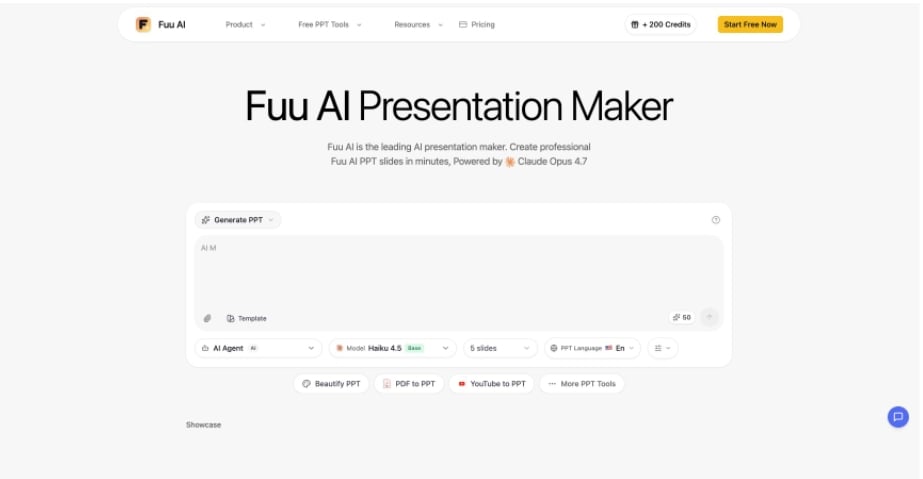
Fuu AI puts the prompt, template choice, slide count, language, and model controls in one browser workspace. That makes it useful for testing a broader idea: AI can shorten the first-draft stage of presentation work, but a good deck still depends on decisions made before and after generation. The most reliable process treats the system as a production assistant, not an automatic substitute for clear thinking.
Start with a brief the system can actually use
Most weak presentations begin with a weak brief. “Make a deck about our company” gives an AI very little information about the audience, the decision being requested, or the evidence that matters. The result may look polished while saying almost nothing. A better prompt works like a compact editorial assignment.
Begin with the audience. A board update, a sales proposal, and an internal training deck may cover the same subject, yet they require different levels of context and detail. State what the audience already knows, what they may question, and what they should be ready to do after the presentation. This gives the generator a reason to prioritize one point over another.
Next, define the central claim in a single sentence. If that sentence is difficult to write, the deck is not ready to be generated. The claim can be followed by three to five supporting ideas, the required slide count, and any facts that must appear exactly as supplied. It also helps to specify what should be excluded. A short exclusion list prevents the draft from wandering into company history, broad market commentary, or other material that does not support the decision.
Source quality belongs in the brief too. Provide current figures, approved language, and links to primary references when the topic depends on fresh information. If web research is enabled, the resulting citations should still be checked. Search can find useful material, but it cannot decide whether a source is authoritative enough for a particular business claim.
Finally, ask for an outline before committing to a full deck. A useful outline shows the argument at a glance: problem, evidence, options, recommendation, and next step. Moving a section at this stage is faster than repairing ten completed slides later. It also exposes missing logic before visual design makes the draft feel more finished than it is.
Include practical constraints in the brief as well. A sales team may need approved brand colors, while an analyst may need a source note on every data slide. Naming these requirements early reduces cleanup and makes the first draft easier to judge on substance.
Generate a draft, then inspect its structure

Once the brief is stable, generation should be treated as the beginning of editing. In the tested interface, a user can choose a template, slide count, presentation language, and an AI model before submitting the topic. Those controls are practical because they turn several hidden assumptions into visible choices.
Slide count deserves particular attention. Asking for too many slides often produces repetition, while an unrealistically short deck forces unrelated ideas together. A five-slide update might need only a context slide, two evidence slides, a recommendation, and a next-step slide. A detailed report may need room for methodology and limitations. Choose the count from the story, not from a habitual corporate template.
After the draft appears, read only the slide titles first. They should form a coherent summary without relying on the body copy. If the titles repeat the topic instead of advancing the argument, rewrite them as claims. “Customer retention” is a label. “Onboarding delays drive most early churn” is a point the audience can evaluate.
Then inspect the relationship between words and visuals. A chart should answer a question, not simply decorate a slide. A photo should reinforce the subject or mood. A comparison layout should use genuinely comparable categories. AI-generated layouts can establish hierarchy quickly, but the editor must still check whether the visual form fits the information.
This is also the moment to remove plausible filler. Generative systems are good at producing smooth transitions and broad benefits. Those sentences can make a deck sound complete while hiding the absence of evidence. Replace generic claims with measured facts, named examples, or a clear statement that the point is an assumption. A concise caveat is more credible than unsupported certainty.
Edit for the room, then export with a final check

The final editing pass should be designed around the presentation setting. A deck read asynchronously can carry more explanatory text. A deck presented live needs shorter slides because the speaker supplies the narrative. If the audience will view it on a shared screen, small labels and dense footnotes may be technically present but practically invisible.
Check factual accuracy line by line. Confirm dates, units, company names, calculations, and source links. Charts need special attention because a correct number can still be misleading when the axis, time range, or denominator is unclear. If a slide uses generated imagery, make sure it is not being presented as documentary evidence.
Consistency comes next. Review capitalization, punctuation, number formats, margins, and terminology across the whole deck. A presentation can survive a modest visual style, but inconsistent wording makes it feel unreliable. Use one name for each product, process, and metric. If a term must be defined, define it once and keep the definition stable.
The browser workspace also shows an export action for completed presentations. Before downloading a PPTX, preview every slide and look for overflow, cropped media, and unexpected line breaks. Then open the exported file in the software that will actually be used for delivery. Font substitution and layout shifts sometimes appear only after export, especially when a deck moves between PowerPoint, Google Slides, and Keynote.
AI earns its place in this workflow by reducing mechanical effort: creating an initial structure, exploring layouts, and turning a detailed brief into something editable. The human contribution remains the difficult part. Someone must decide what is true, what matters, and what the audience should remember. Keeping those responsibilities explicit is what turns fast slide generation into dependable presentation work.






Comment