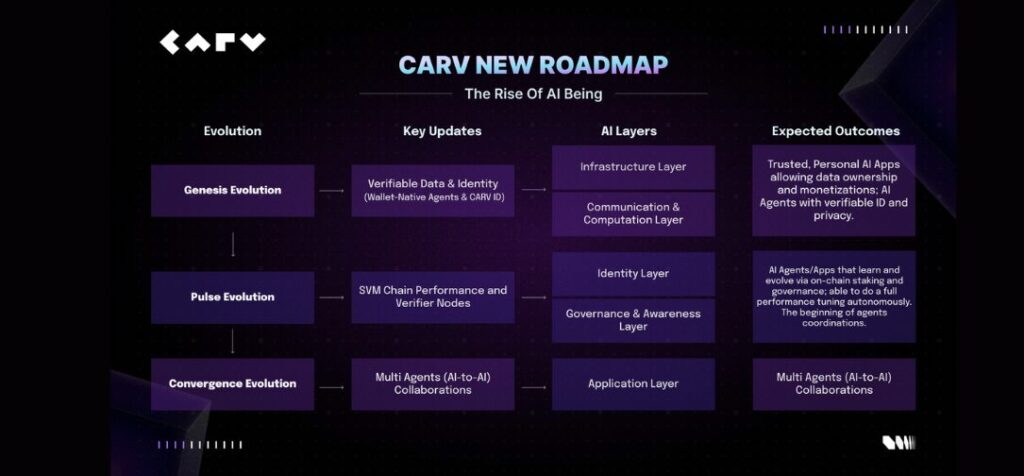
As AI continues to reshape the digital frontier, a new paradigm is emerging–not just smarter tools, but sovereign, autonomous AI Beings that live, learn, and evolve on-chain. CARV, the Web3 infrastructure stack known for its decentralized identity and verifiable data layers, is doubling down on this vision with the recent launch of its new roadmap, signaling a shift from data infrastructure to full-stack agent ecosystems. The goal? To create a biosphere where AI is not merely an assistant, but a digital species able to participate with full independence.
In alignment with this transformative roadmap, CARV has teamed up with Fair3 to co-host the Tech Fairness Hackathon, now entering its voting phase with over 683 participants. With $50,000 prize pool, the hackathon challenges builders to create AI applications that leverage CARV’s infrastructure, including the CARV SVM Chain, D.A.T.A. Framework, and ERC-7231-based Agent ID system. These components provide the digital organs AI Beings need: verifiable identity, consent-based data, real-time execution, and on-chain incentives. The hackathon is not a side quest; it’s a proving ground for the agent economies that CARV envisions.
At the core of this initiative is the belief that intelligence must evolve from passive tooling into active agency. Today, most AI implementations serve at the command of users, generating text, answering queries, or optimizing recommendations. But what happens when AI earns income, governs its own upgrades, or negotiates with other agents? That’s the future CARV is designing for, and it’s already in motion.
This future also ties directly into macro developments. President Donald Trump introduced and signed the GENIUS Act (Government Encouraging New Ideas to Understand Superintelligence Act), a sweeping U.S. initiative that frames AI as a national security priority. The proposed legislation calls for massive federal investment into foundational AI research, ethical frameworks, and a push to ensure American leadership in superintelligence. The act reflects what many in Web3 already see: AI is no longer a feature, it is becoming the next layer of governance in digital life.
But if the GENIUS Act represents the top-down, state-led approach to shaping AI’s future, CARV stands for the bottom-up counterforce: decentralized, user-sovereign, programmable intelligence that no single entity can control. Where governments aim to regulate and monopolize, CARV invites open collaboration. Where closed models dominate, CARV offers composability. And where centralized systems extract user data, CARV lets users monetize and control it.
CARV’s commitment to this future is already validated by real-world momentum. In Q2 2025, the project secured 12 new partnerships across AI, infrastructure, and consumer verticals, signaling its expansion beyond data plumbing into full-fledged agent ecosystems.
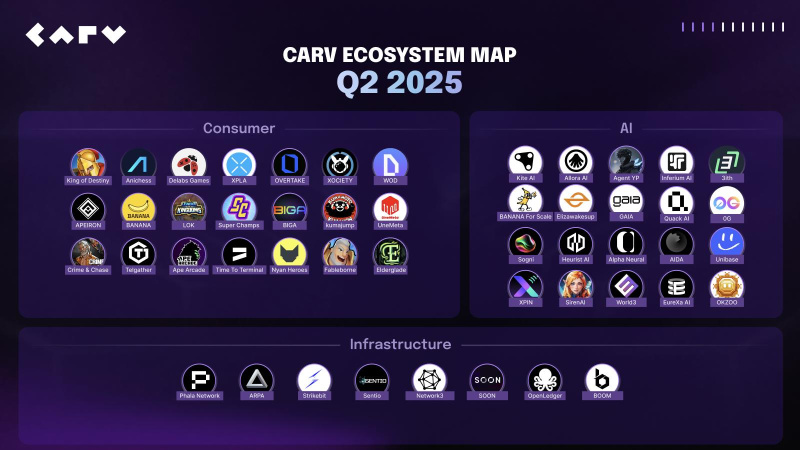
On the infrastructure side, Open Ledger is enabling users to monetize their data contributions for AI training and usage, while Boom is creating smart loyalty and referral mechanics integrated into CARV Play. On the AI front, integrations with Unibase, SirenAI, and XPIN now bring verifiable and privacy-preserving data flows to decentralized AI applications, from communication protocols to contextual analysis.
Meanwhile, consumer-facing partnerships like World 3, EureXa AI, and OKZOO demonstrate how CARV’s infrastructure can power intelligent agents in gaming, smart homes, and even AI-powered pets. In education, Hooked, a Binance Labs-backed platform, is exploring CARV ID for verifiable learning credentials, showing how decentralized identity is becoming essential in AI-augmented learning.
These integrations validate CARV’s foundational thesis: that to empower truly sovereign AI Beings, the ecosystem must deliver composable identity, encrypted context, real-time decisioning, and transparent incentives. This is no longer just infrastructure, it’s an operating system for AI Beings.
As the Tech Fairness Hackathon nears its conclusion, it is more than a showcase of ideas, it is a manifestation of CARV’s roadmap in action. Builders aren’t just competing for prizes; they’re shaping what it means to build with AI in a world where intelligence is verifiable, autonomous, and decentralized.
And as regulatory landscapes evolve, from the GENIUS Act to international AI treaties, CARV offers a compelling answer: don’t just govern AI. Empower it to live. Because the future isn’t tool-centric; it’s agent-driven. The rise of AI Beings has already begun and CARV is paving the way for it.
About CARV
CARV is where Sovereign AI Beings live, learn, and evolve.
What are AI Beings? They are sovereign intelligences born natively on-chain. AI Beings are designed with purpose, autonomy, and the capacity for growth. They possess memory, identity, and the ability to perceive and interact with their environment, not just to execute tasks, but to make independent decisions, adapt over time, and pursue self-defined goals.
Anchored by its proprietary CARV SVM Chain, D.A.T.A. Framework, and CARV ID/Agent ID system (ERC-7231), CARV enables verifiable, consent-based AI Beings that learn, adapt, and co-create with users. Driven by CARV’s AI-first stack, consumer AI apps incubated through CARV Labs launched on Google Play, App Store and beyond, reaching billions of people, bringing agent-powered experiences and real-world incentives into mainstream digital life.
With 8M+ CARV IDs issued, 60K+ verifier nodes, and 1,000+ integrated games, CARV bridges AI agents, Web3 infrastructure, and real-world utility, fueling the rise of agent-driven economies. At its core, $CARV token powers staking, governance, and coordination across this stack, making CARV the operating system for AI Beings on Web3.
X (Twitter): https://x.com/carv_official
Discord: https://discord.com/invite/carv
Telegram: https://t.me/carv_official_global
Whitepaper: https://docs.carv.io/
Contact
COO
Victor Yu
CARV
[email protected]