
7 AI Retouching Shortcuts That Will Make You Wonder Why You Ever Edited Portraits Manually

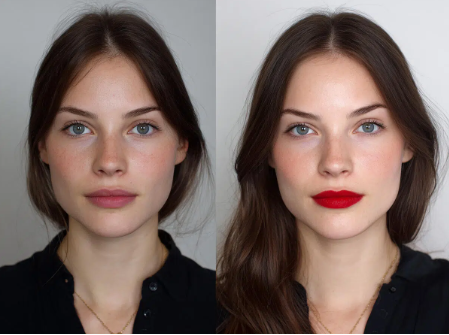
Portrait retouching has always been a strange mix of artistry and repetition.
On one hand, there is the creative work: shaping light, preserving skin texture, balancing colour, and making sure the final image still looks like the person who actually stood in front of the camera.
On the other hand, there is zooming into 200%, removing the forty-seventh stray hair, correcting another tiny patch of redness, and wondering how a five-minute portrait session somehow became a two-hour editing job.
That is where AI has started to genuinely earn its place in a professional workflow.
Used properly, AI does not replace your judgement. It removes some of the repetitive labour surrounding that judgement. The result is simple: less time fixing predictable problems and more time making creative decisions that actually matter.
Here are seven ways AI can make portrait retouching significantly faster without turning your subjects into plastic mannequins.
1. Automate the First Pass of Skin Retouching
Skin work is one of the biggest time sinks in portrait editing.
Traditional retouching can involve healing blemishes individually, reducing uneven tones, softening temporary imperfections, and cleaning up areas of redness while carefully preserving pores and natural texture.
AI can handle much of that initial clean-up in seconds.
Modern tools can identify skin automatically and distinguish it from eyes, hair, lips, clothing, and background elements. That means you can quickly create a cleaner starting point before making more precise adjustments yourself.
The important phrase here is starting point.
A professional retoucher should still review the image closely. AI may remove something you intended to keep, soften texture too aggressively, or treat a permanent feature as an imperfection.
Let automation do the repetitive cleaning. Let your eye make the final call.
2. Retouch an Entire Shoot Consistently
Editing one portrait is easy.
Editing 250 portraits from the same corporate headshot session while maintaining exactly the same finish is where things become considerably less romantic.
AI-assisted batch editing can dramatically reduce this workload.
Once you establish the look you want, many editing tools can apply similar adjustments across multiple images. This can include skin refinement, colour correction, exposure balancing, facial adjustments, or other common retouching steps.
The real advantage is not simply speed.
It is consistency.
Clients tend to notice when image 12 looks warm, image 47 looks slightly grey, and image 103 appears to have been retouched by someone who suddenly discovered the smoothing slider.
For wedding photographers, portrait studios, school photographers, corporate photographers, and anyone handling volume work, consistent automation can save hours.
3. Remove Blemishes Without Playing Digital Whack-a-Mole
Every portrait photographer knows the ritual.
Zoom in.
Spot.
Click.
Move.
Spot.
Click.
Repeat until your wrist starts negotiating better working conditions.
AI-powered blemish detection can identify temporary imperfections across the face automatically, allowing you to remove or reduce multiple blemishes at once.
This is particularly useful when working with high-resolution photographs where tiny imperfections become highly visible.
The professional advantage is that you can reserve manual healing and cloning for areas that genuinely require careful attention.
Instead of spending twenty minutes locating obvious blemishes, you might spend two minutes refining the areas where automation needs help.
That is a much better use of editing time.
4. Make Background Clean-Up Almost Instant
Portrait retouching rarely ends with the face.
There is always something lurking in the background.
A distracting object. A wrinkled backdrop. A light stand that somehow entered the frame. A random cable. An exit sign. Someone’s water bottle making an unexpected guest appearance.
AI masking and background detection can make these problems considerably easier to address.
Rather than manually tracing around hair and shoulders, AI can identify the subject and create a reasonably accurate mask automatically. You can then adjust the background separately, remove distractions, soften certain areas, or replace the background entirely when appropriate.
Good masking used to be a technical skill that could consume a surprising amount of time.
Now it can often become a two-click starting point.
You still need to inspect edges, particularly around hair, but the tedious first stage is largely handled for you.
5. Speed Up Facial Adjustments Without Overdoing Them
Portrait clients occasionally request subtle changes.
Perhaps they want tired eyes softened slightly. Maybe the jawline needs a small adjustment. Perhaps one eye appears more closed because of the camera angle.
Traditionally, these edits could involve liquify tools, manual selections, masks, and a fair amount of patience.
AI-based facial recognition can make small refinements much faster.
An AI-powered portrait editing software can recognise individual facial features and allow editors to make targeted adjustments without manually building selections around every area.
The key word is subtle.
If someone starts looking like their own distant cousin, you have gone too far.
Professional retouching should improve the photograph without erasing the characteristics that make the subject recognisable.
6. Match Colour and Exposure Across Images Faster
Portrait sessions rarely produce perfectly identical lighting conditions.
The subject moves.
Clouds move.
The photographer moves.
The assistant moves the reflector three centimetres and accidentally changes the entire universe.
Even controlled studio shoots can produce small exposure and colour variations between photographs.
AI-assisted colour matching can help standardise those differences quickly.
Instead of adjusting white balance, exposure, contrast, highlights, and shadows separately across dozens of images, you can use a reference image or preset look as the visual benchmark.
From there, the software can help bring the remaining images closer to that baseline.
You still retain creative control, but you avoid rebuilding the same grade repeatedly.
For photographers delivering galleries rather than individual hero images, this is one of the most practical time-saving applications of AI.
7. Use AI for the Boring 80%, Then Retouch the Important 20%
This is ultimately where AI delivers the biggest workflow improvement.
Professional retouching contains many tasks that are technically necessary but creatively uninteresting.
Removing temporary blemishes.
Creating subject masks.
Balancing exposures.
Cleaning backgrounds.
Applying repetitive corrections.
Matching photographs.
Those jobs can consume enormous amounts of time without necessarily improving the creative quality of your work proportionally.
AI can handle much of that groundwork.
You can then spend your time on the areas where experience actually matters: skin texture, tonal relationships, expression, colour, emphasis, composition, and the overall emotional quality of the portrait.
The goal should never be to automate everything. The goal is to automate everything that does not require your taste.
AI Should Make Retouching Faster, Not More Obvious
The best portrait retouching often goes unnoticed.
Nobody looks at a great portrait and says, “Fantastic frequency separation.”
They look at the person.
That is why AI should be treated as a workflow assistant rather than an automatic beauty machine.
Use it to remove repetitive steps. Use it to create masks faster. Use it to produce consistent starting points across large galleries. Use it to eliminate the editing tasks that make you reconsider your career choices at 1:37 a.m.
Then bring your own judgement back into the process.
Because AI may know where the skin is, where the eyes are, and where that irritating flyaway hair is hiding.
But you still decide what the portrait should feel like.





Comment