For the past decade, fintech has focused on removing friction for human users—think single-click checkouts and biometric logins. However, a seismic shift is occurring. Artificial intelligence is evolving from simply generating content to taking autonomous actions. As AI agents begin to execute complex, multi-step tasks, the financial sector is standing on the precipice of its next major transformation: agentic payment.
1. The Rise of Agentic Commerce
To understand the necessity of agentic payment, we must first look at the broader shift in business operations. We are rapidly transitioning into an era of agentic commerce—a paradigm where AI-driven software agents act as autonomous economic actors representing businesses.
In this new commercial landscape, agents do much more than assist; they execute. For example, an enterprise AI agent can now:
- Monitor Inventory:Track global supply chain levels in real-time.
- Scout Suppliers:Autonomously search for the best global vendors when stock is low.
- Negotiate Terms:Secure the best pricing based on current market dynamics and finalize purchase agreements.
2. Decoding Agentic Payment: The M2M Shift
In agentic commerce, machines are the buyers and negotiators. However, traditional financial systems create a massive bottleneck because they are designed for human oversight (e.g., manual approvals, OTPs, and multi-factor authentication). If an AI agent negotiates a cross-border deal in milliseconds but has to wait days for a human manager to authorize the wire transfer, the efficiency is lost.
This is where agentic payment comes in. It is the underlying infrastructure that allows AI agents to:
- Hold digital wallets and manage programmable money.
- Initiate transactions and verify settlements instantly.
- Reconcile ledgers without continuous human intervention.
- Shift the paradigm from B2B (Business-to-Business) to true M2M (Machine-to-Machine) financial interactions.
3. The Strategic Advantages for Global Enterprises
Instead of approving individual transactions, finance teams set predefined parameters—or “guardrails”—for their AI agents (e.g., a dynamic budget restricted to whitelisted vendors, capped at a specific amount). As long as the agent stays within these cryptographic boundaries, payments execute 24/7.
The immediate benefits include:
- Zero-Latency Commerce:Instant payment and provisioning in fast-paced industries like digital advertising or commodity trading.
- Reduced Administrative Overhead:Automated invoice matching, exact payment execution, and real-time ERP updates eliminate manual reconciliation errors.
4. Overcoming Security and Compliance Hurdles
Empowering algorithms to spend real capital introduces unique challenges. The financial industry is heavily regulated, raising questions about Anti-Money Laundering (AML) and Know Your Customer (KYC) compliance.
To secure this new ecosystem, fintech must evolve:
- From KYC to KYA (Know Your Agent):Financial institutions will need to develop cryptographic identities for AI agents, tying every transaction back to a verified corporate principal.
- AI-Driven Fraud Detection:Implementing real-time monitoring of M2M transactions to flag behaviors that deviate from an agent’s historical patterns.
5. Building the Infrastructure for AI Economies
Traditional legacy banks, weighed down by outdated mainframes, are largely ill-equipped for an AI-first economy. Building a frictionless, programmable financial layer requires agile global payment service providers.
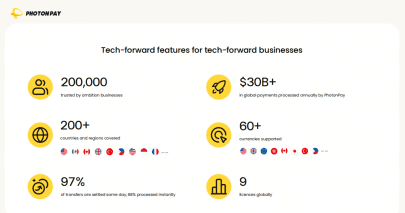
Companies operating in cross-border trade need scalable financial rails that speak the language of modern software. Forward-thinking payment platforms like PhotonPay are crucial here. By providing comprehensive API-driven global payment solutions, virtual cards, and seamless multi-currency settlement, they offer the exact programmable infrastructure that agentic economies require. When developers build AI agents for global procurement, they need underlying payment rails that are borderless, compliant, and infinitely scalable.
Conclusion
The convergence of AI and fintech will radically redefine money movement. In the near future, a significant percentage of B2B transactions will be initiated, processed, and settled entirely by machines.
Agentic payment is not just a theoretical upgrade; it is the essential catalyst needed to unlock the full potential of AI. Businesses that want to dominate global trade must recognize this shift early and integrate with payment networks designed for machines just as much as for humans.