
Why VSDC 11.1 Matters for the 360° Video Ecosystem

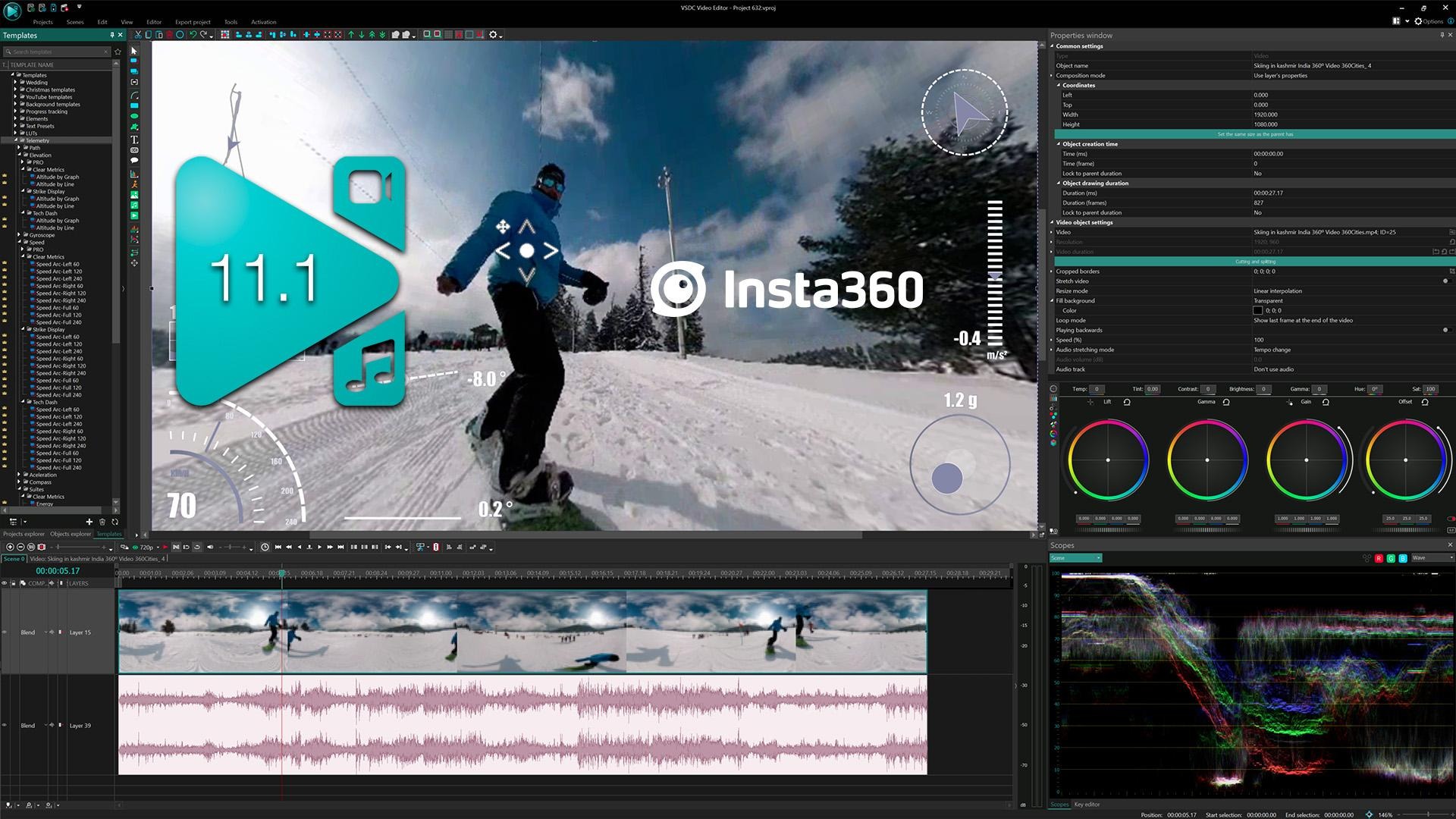
This free video editor bridges a critical gap for Insta360 users, adding native .insv support and GPS telemetry.
There is an unwritten rule in the world of action cameras: the more innovative the hardware, the more frustrating the software workflow. Insta360 has built a loyal following around its cameras, but for years, editing the resulting .insv files meant either using the manufacturer’s limited mobile app or running footage through a clunky converter before touching a desktop editor.
VSDC 11.1 quietly dismantles that barrier. The Windows-based free video editor now offers native Insta360 support, GPS telemetry extraction and a handful of workflow improvements that collectively solve a real pain point for content creators.
The Hidden Cost of Proprietary Formats
Action camera footage has a secret: the file formats are often a nightmare for desktop editors. Take Insta360’s dual-lens modes, for example — footage arrives as two fisheye spheres stitched into a single .insv file. Without native support, most video editors see either a corrupted file or a distorted mess. Some simply refuse to open the file at all.
Most free editors ignore the format entirely. Many paid ones, including some industry standards, require expensive third-party plugins that cost more than the camera itself. It leaves creators in a frustrating position: invest in additional software or abandon their footage.
VSDC’s approach, direct import with an internal conversion effect called “360 to 2D”, is unusually straightforward. Right-click any .insv clip, navigate to Video Effects → 360 and 3D and adjust field of view, edge blending or convergence angles. For creators who want that exaggerated action-sports look, a one-click fisheye output is also available. The entire process takes seconds and requires no external tools.
GPS Telemetry
Where VSDC 11.1 gets genuinely interesting is in its handling of telemetry data. Many Insta360 users don’t realize their camera is quietly recording GPS information alongside video. VSDC now lets them extract that data and turn it into on-screen graphics.
Speedometers, altitude readouts, animated route maps and other visualizations can be added using built-in templates. The data can be pulled directly from the video file or imported separately from an external GPS tracker. For a mountain biker, it means overlaying a real-time speedometer that matches every turn and descent. For a road trip vlogger, it means tracing the journey on a mini-map as the video plays showing exactly where each scenic overlook was captured.
For accurate results, a stable GPS signal during recording is essential. If the camera loses signal in dense forests, tunnels, or urban environments, some data gaps may appear in the visualizations. However, under typical outdoor conditions, the feature performs reliably.
Under the Hood: Stability, Speed and Smarter Defaults
New features get headlines. Stability fixes get ignored until something crashes. VSDC 11.1 includes several under-the-hood improvements that suggest the development team is paying attention to real-world usage rather than just chasing feature checklists.
Auto-save is now enabled by default, saving projects every 15 minutes. Users can adjust the interval under Options > Saving Options. It sounds basic, but many free editors still lack this, forcing creators to develop neurotic manual save habits. Losing an hour of intricate cuts and keyframes to a power flicker is the kind of frustration that drives people away from otherwise capable software.
Waveform visualization has been upgraded with higher detail rendering, making it easier to spot quiet passages, transients and exact beat markers. More importantly, users can now enable automatic waveform generation as soon as a video is added to the timeline. It is a small change but for podcast editors or musicians cutting to a rhythm, those saved seconds per clip add up to real time over a project.
Timeline navigation controls have been relocated to the bottom-left corner for faster access. On the stability front, the team has addressed effect-related crashes (particularly when stacking multiple real-time effects) and improved HDR display engine behavior across different hardware configurations. For HDR enthusiasts, this means footage now looks exactly as intended, regardless of monitor setup.
Who Is This Actually For?
Travel vloggers, cycling YouTubers, ski content creators and motorsports enthusiasts are the obvious audience. But also educators, small marketing teams and non-profits who use 360° footage for virtual tours or training materials.
The GPS telemetry feature, in particular, points toward a future where video editing merges more closely with sensor data.
Availability
VSDC Video Editor 11.1 is available as a free download for Windows from the official website.
The video edition includes all core features including 4K editing, motion tracking, green screen, hardware acceleration, advanced effects.
For more details and to download, visit the official website.
User feedback, bug reports and feature requests can be sent to [email protected].
FAQ: Common Questions About VSDC 11.1
Q: Is updating necessary for Insta360 users?
A: Yes. Telemetry reading for these videos was not available in earlier versions. The 11.1 update enables native import, GPS data extraction and speedometer or route map overlays.
Q: What if my GPS data doesn’t display correctly?
A: This typically indicates an unstable signal during recording. Verify your recording settings in the Insta360 app. Detailed setup guides are available on the official Insta360 website.
Q: Can I change how often auto-save runs?
A: Absolutely. The default is 15 minutes, but you can adjust it under Options > Saving Options to any interval you prefer.
Q: Does the fisheye effect work on any 360° video?
A: Yes. The “360 to 2D” effect now includes a fisheye option, so you can achieve that ultra-wide action sports look with just one click, regardless of which camera you used.






Comment