A coffee shop in Ohio had eight security cameras and missed the break-in. T0he footage showed a man forcing the back door at 2:47 AM, but the owner did not see the alert until 6:15 AM. By then the register was empty. Three of those cameras triggered on a stray cat, a swaying branch, and a plastic bag drifting across the parking lot. Real threats buried in noise.
That is the small business problem AI is solving. Modern AI-powered security cameras do not just record — they understand what they see. They tell the difference between a person, a vehicle, a package delivery, and a falling leaf.
What follows covers what real AI-powered security cameras do, where they outperform traditional motion detection, and which capabilities are worth paying for at a small business.
What “AI-Powered” Actually Means (Most Product Pages Lie)
The phrase shows up on almost every product page. Most cameras do not earn it. Real AI-powered security cameras run detection models on the device itself — distinguishing a person from a shadow, a vehicle from a headlight flare, a delivery driver from a passing pedestrian. The output is a classification event.
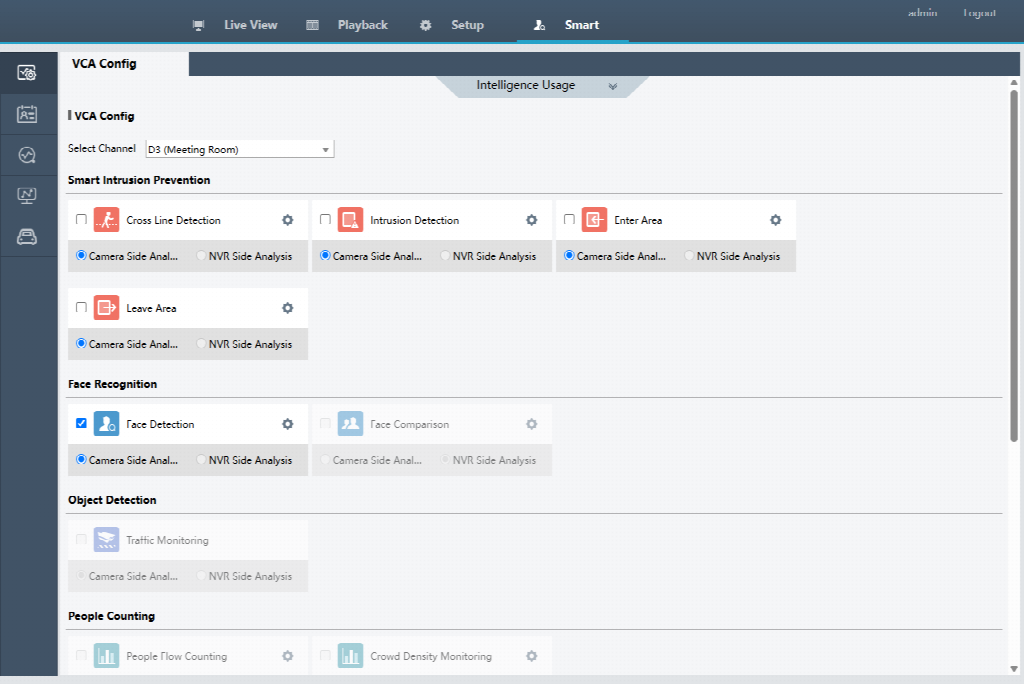
Three capabilities separate true AI detection from rebranded motion sensors:
AI Detection — classifies objects as person, vehicle, or other. Cuts noise dramatically. The owner in Ohio saw her alert volume drop from dozens per day to a handful per week.
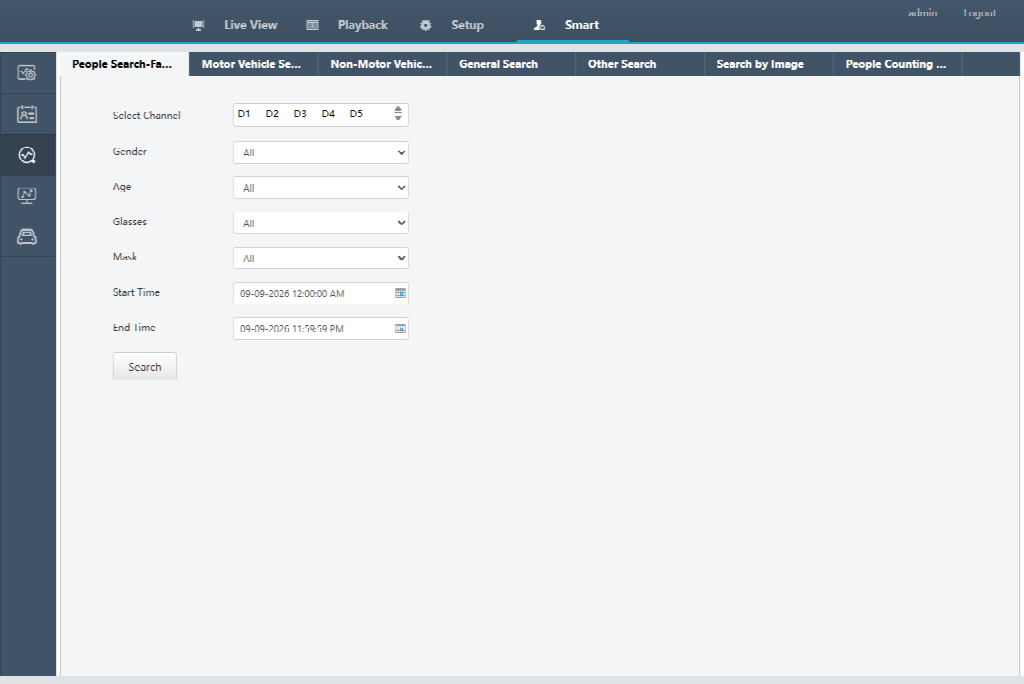
Smart AI Functionalities
Smart Search — finds specific events inside hours of footage in roughly 30 seconds. Search for “person wearing a red jacket,” narrow to a time window, jump straight to the relevant clip.
Smart Search by conditions
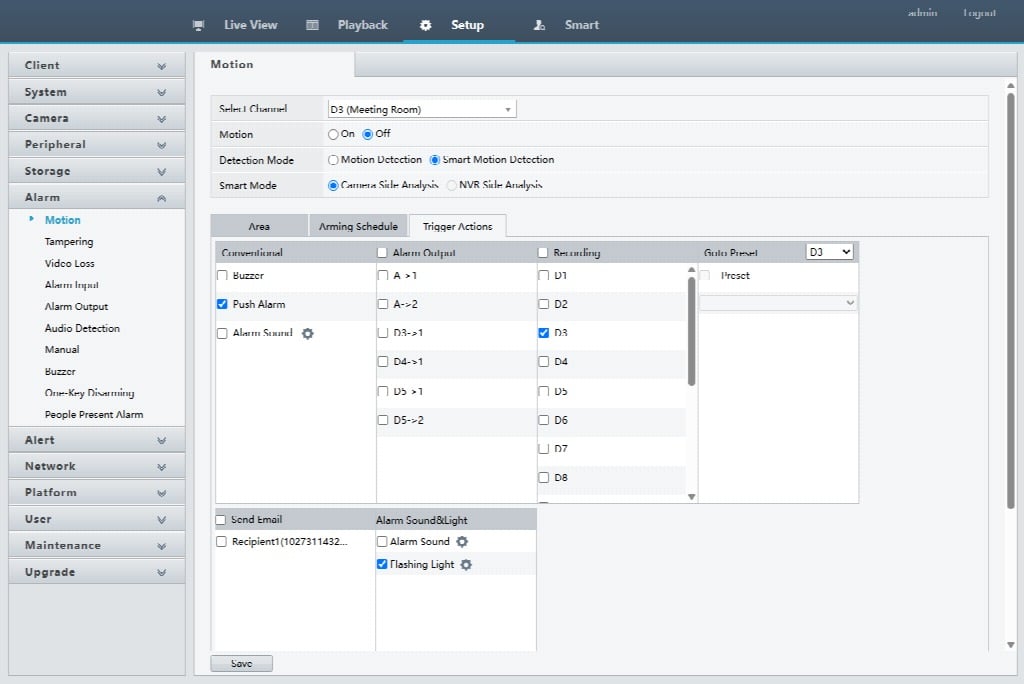
Active Deterrence — when a person enters a defined zone, the camera triggers a spotlight, a siren tone, or a two-way audio prompt. The aim is to make the intruder leave.
Enable/disable Active Deterrence linkage to Smart Motion Detection
These capabilities run on two architectures. Cloud AI sends every frame to a remote server, returns a classification, charges a monthly fee. Local AI runs the same models on the NVR’s processor — no frames leave the premises, no subscription is required, and detection continues working when the internet drops. According to SafeHome.org (2026), roughly 28% of U.S. households with cameras already use some form of AI person or package detection, which signals how far the technology has moved from premium feature to baseline expectation.
The five capabilities that follow are the ones small business owners consistently report as worth the upgrade.
The Five Capabilities That Actually Pay Back
The five capabilities that follow are the ones small business owners consistently report as worth the upgrade.
Here is the capability-by-capability breakdown.
| Capability | What It Replaces | Where It Pays Back First |
| Person & Vehicle Detection | Cloud-shadow false alerts | Back door, loading dock, parking lot |
| Line Crossing Detection | Perimeter guard patrols | Drive-through windows, fence lines |
| Intrusion Detection | Restricted-zone access logs | Stock rooms, cash rooms, server closets |
| Smart Search | Hours of footage scrubbing | Incident review, insurance claims, theft cases |
| Active Deterrence | After-the-fact alerts only | After-hours retail, auto lots, warehouses |
1. Person and Vehicle Detection
Traditional motion detection triggers on any pixel change. A cloud shadow looks identical to a person walking through it. AI person and vehicle detection classifies the object before raising an alert, cutting false notifications by roughly 95%. For a small retailer with a back door and a loading dock, that drop is the difference between checking every push notification and trusting the ones that arrive.
2. Line Crossing Detection
Draw a virtual line across a camera’s field of view — a back entrance, a kitchen door, a manager-only office — and the camera fires only when that line is crossed in the defined direction. Line crossing detection turns a passive camera into a perimeter sensor without running physical fences. For a restaurant owner who wants to know when staff enter the walk-in cooler after hours, this capability replaces a physical lock-and-key log.
3. Intrusion Detection
Intrusion detection draws a zone rather than a line. The zone covers a storage room, a parking area, an outdoor equipment cage. Any person or vehicle entering the zone outside defined hours triggers an alert. The difference from line crossing is shape: zones handle irregular boundaries like a storage room footprint or an L-shaped dock. Used together, line crossing and intrusion detection let an owner map zones to risk areas without rewiring sensors.
4. Smart Search
Smart search changes what happens after an incident. Instead of scrubbing 24 hours of footage at 16x speed, the owner types a description — “person wearing dark clothing, between 8 PM and 9 PM” — and the NVR returns the matching clips in seconds. Convenience-store owners cite this as the feature that closes insurance disputes fastest. A slip-and-fall claim, a counterfeit bill, an employee dispute — each turns from a four-hour investigation into a 30-second search.
5. Active Deterrence
Active deterrence is the only capability on this list that does something before the incident ends. When a person enters a restricted zone at 3 AM, the camera triggers a strobing light, a siren tone, or a two-way audio prompt. The aim is making the intruder leave, not recording the visit. A 16CH PoE Camera System with active deterrence covers a retail floor, four entry points, and the back lot without monthly fees.
What Owners Notice Three Months In
Capabilities are inputs. The question owners ask is what changes at the business level after the upgrade. Three outcomes show up consistently in field reports.
The first is reduced monitoring fatigue. A small business owner running eight cameras with traditional motion detection gets 30 to 50 alerts per day, mostly noise. After months of dismissing alerts, the owner stops checking. AI person and vehicle detection drops that volume by 90%+ and the alerts that remain all mean something.
The second is locatable evidence. Smart search collapses the time between “something happened” and “here is the clip” from hours to seconds. A retail manager investigating a register shortage no longer watches eight hours of footage. The search tool returns the moments when an employee approached the register, opens the clip, and gets an answer. Insurance disputes, employee investigations, and customer complaints all close faster when evidence is locatable.
The third is intrusion interruption. Active deterrence does not stop every break-in, but it changes the math. Most commercial intruders decide within the first 90 seconds whether to proceed or leave. A spotlight and siren at that decision point shifts the balance. The deterrence ROI is straightforward once a single avoided loss is on the books.
Where AI Fails (and Why Most Reviews Skip It)
AI is not magic. Four limitations belong on the list.
Training data gaps. Detection models are trained on common object types — adults in everyday clothing, standard vehicles, bicycles. Unusual outfits, full-face coverings, or non-standard postures can confuse the classifier. In most retail and office environments this is a non-issue. In environments with heavy PPE, costumes, or unusual equipment, expect occasional misclassifications.
Weather and lighting edge cases. Heavy rain, blowing snow, and direct backlight at sunrise or sunset still trigger some false alerts. The best systems handle 95% of these cases. The remaining 5% can require sensitivity tuning or repositioning the camera. Owners in regions with extreme weather should plan for periodic tuning rather than expecting a zero-false-alert install.
Privacy compliance. AI cameras record the same footage as any other camera, and most jurisdictions have specific rules about workplace recording. California requires disclosure for any audio or video capture in employee areas. Several states require visible signage in customer-facing spaces. Local AI does not transmit footage off-site, which simplifies compliance but does not eliminate it. Most owners post signage and add a short camera notice to employee onboarding.
Hardware requirements. AI detection requires an NVR with enough onboard processing power to run the models. Older NVRs — pre-2024 — cannot run local AI. The upgrade path is a camera plus a compatible AI NVR, not just a camera swap. Existing PoE cabling carries over, keeping install costs reasonable. Full compatibility tables by model year are published on each vendor’s product page.
Even with those four limits, AI remains the largest upgrade a small business can make to its security stack. The capabilities pay back through reduced monitoring time, faster incident resolution, and intrusion interruption.
Frequently Asked Questions
How much more do AI cameras cost than regular ones?
Single-camera AI premiums run $30 to $80 above a non-AI equivalent. A 16-camera system lands $400 to $600 total above a non-AI build. The math flips once monthly cloud fees come off the books — most owners recover the premium in 18 to 24 months from storage savings.
Do AI cameras require a cloud subscription?
Not necessarily. Local AI runs the detection models on the NVR, so no cloud connection or monthly fee is required. Cloud-based AI services exist, often bundling advanced features behind a subscription tier. The trade-off is data leaving the premises.
Will AI cameras work without internet?
Yes. Local AI processes every detection frame on the NVR, so all AI features work fully offline. Internet is only needed for remote push notifications and phone viewing. When the connection drops, recording and AI detection continue.
Do I need 4K resolution for AI to work well?
No. AI classification — person, vehicle, package — works reliably at 4MP and even 2MP. Higher resolution improves forensic detail like plates and faces. Most small businesses run 4MP or 5MP cameras generally, with 8MP 4K at entry points.
Can AI cameras work with my existing NVR?
Only with an AI-capable NVR. Older Eco-type NVRs and most pre-2024 models cannot run detection models on-device. Current 8-channel, 16-channel, 32-channel, and 64-channel AI NVRs support person and vehicle detection out of the box. Plan on replacing any NVR more than three years old.
Are there privacy laws for AI cameras in businesses?
Yes, and the rules vary by state. California requires disclosure under CCPA for any recording in employee areas. Several states require signage in customer-facing spaces. Audio recording adds another layer of consent. Most owners post signage and add a short notice to onboarding; consult a local attorney for specifics.
About 4COVR
With over 15 years in video surveillance, 4COVR evolved from component-level engineering to complete PoE security systems — cameras, NVRs, AI detection, and remote monitoring — delivered worldwide.
From low-power battery cameras to PoE surveillance for home and business to our direct-to-consumer store, every step has been driven by one belief: learn what security demands.
Professional installers, business owners, and homeowners trust 4COVR to protect people, property, and performance across retail, commercial, and residential environments globally.
4COVR — Covering What Matters. Built on Video Expertise. Designed for Real Security Needs.