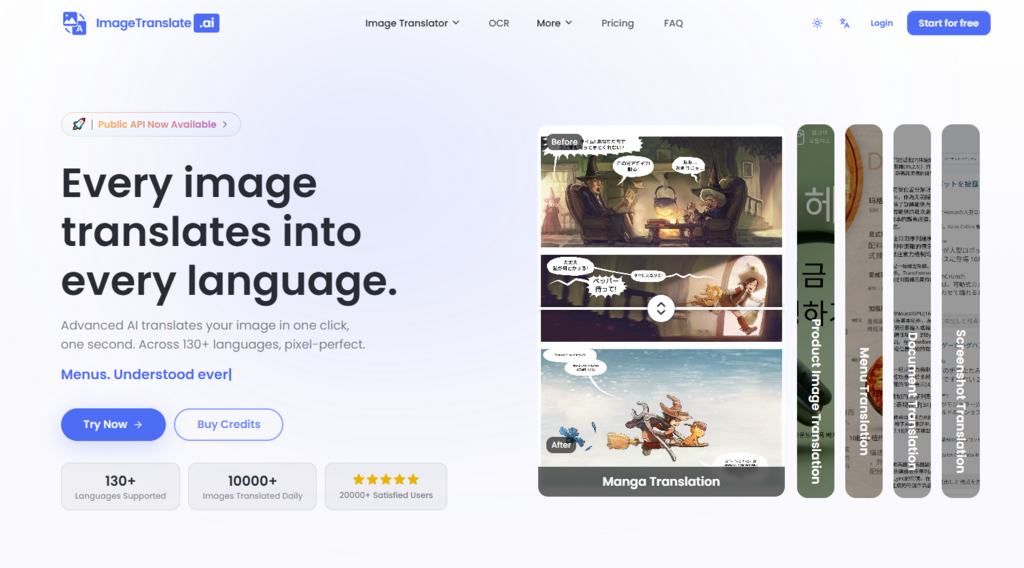
For years, expanding a business across language borders meant either rebuilding every visual asset from scratch or settling for clunky overlays that screamed “translated.” Product catalogs, marketing banners, user manuals, social media creatives—any image with embedded text became a costly localization project. The typical workflow was painful: export text, translate it, open Photoshop, manually paste translations over the original, pray the fonts matched, and repeat for every language. It was slow, error-prone, and scaled poorly. Then came a new generation of AI tools designed to handle the entire loop automatically. AI Image Translator is one of the more focused entries in this space, and after running it through a series of practical tests, it is worth examining not just what it does, but why the approach matters for anyone dealing with visual content across languages.
Why Traditional Image Translation Workflows Are Broken
To appreciate what a tool like this brings to the table, it helps to first understand the magnitude of the problem. Translating text inside an image is fundamentally different from translating plain text or a web page. The text is embedded in a visual context—fonts, colors, backgrounds, shadows, and spatial relationships all carry meaning. A translated menu that misaligns its dish names with prices is confusing. A product image with text that spills outside its original box looks unprofessional. A manga page where translated dialogue doesn’t fit inside speech bubbles ruins the reading experience.
The Hidden Costs of Manual Image Localization
The manual approach is not just slow; it is expensive. A single product image might take 15 to 30 minutes to translate properly, depending on the complexity of the background and the number of text regions. For a catalog with hundreds of SKUs, that translates to weeks of work. Moreover, the results are inconsistent—different designers produce different font choices, different text placements, different levels of quality. The cost of rework, the cost of reviewing each image, and the cost of maintaining brand consistency across languages all add up quickly.
Why OCR-Only Tools Fall Short
Many existing solutions stop at optical character recognition. They extract the text, translate it, and then overlay the translation on top of the original image. The problem is that overlays often obscure important visual elements, and they do nothing to handle the background where the original text used to sit. If the original text was on a textured surface or a gradient background, the overlay leaves an obvious patch that looks artificial. True visual translation requires not just replacing text but reconstructing the underlying image as if the translated text had always been there.
How ImageTranslate.AI Approaches the Problem Differently
The platform’s approach is built around a three-stage pipeline that addresses each of these pain points directly. Rather than treating translation and image rendering as separate steps, it integrates them into a single workflow.
Stage One: Text Detection with Context Awareness
The first stage uses OCR to detect all text regions within the image. What sets this apart from basic OCR tools is the attention to layout complexity. The system is designed to handle curved text, vertical writing, text inside irregular shapes like speech bubbles, and text in tables or charts. In practical use, this means you can upload a manga page with dialogue in overlapping bubbles and the system will correctly identify each bubble as a separate text region. Similarly, a product specifications table with multiple rows and columns is parsed accurately, preserving the structure.
Stage Two: Translation Optimized for Visual Content
Once the text is detected, the translation engine takes over. The platform supports over 130 languages, with automatic language detection available as an option. The translation models are reportedly optimized for e-commerce and marketing terminology, which means product descriptions, size charts, and marketing copy tend to be translated with industry-standard phrasing rather than literal, awkward equivalents. For specialized content like manga, the system appears to treat dialogue differently from narrative text, keeping the tone consistent with the genre.
Stage Three: Generative Inpainting and Text Rendering
This is where the magic happens. After translation, the system erases the original text from the image and uses generative AI to inpaint the background—essentially filling in the gap as if the text had never been there. Then it renders the translated text back onto the image, matching fonts, colors, sizes, and shadows to the original as closely as possible. The result is an image where the translation looks native, not pasted on top. In testing, this made a tangible difference in how professional the final output appeared, especially on images with complex backgrounds where simple overlays would have looked obviously fake.
Putting It to the Test: Real-World Use Cases
Rather than relying on marketing claims, I tested the tool across several common scenarios to see how the approach holds up in practice.
E-Commerce Product Photography
For an online retailer, product images with embedded text are a constant headache. I uploaded a product photo with a detailed size chart overlaid on a gradient background. The OCR captured every cell correctly, including small-font footnotes. The translation into French and German was completed in about five seconds per image. The inpainting handled the gradient background seamlessly—no visible seam or blur where the original text had been removed. The rendered French text was slightly wider than the English original, but the system automatically adjusted the font size to keep it within the table cells.
What Worked Well
The e-commerce optimization was evident in the terminology. Terms like “machine washable” and “imported” were translated with phrasing that matched what you would expect to see on a French or German retail site. The layout preservation meant the translated images were usable directly in product listings without additional editing.
Where It Could Be Better
On one image with a heavily textured fabric background, the inpainting produced a slightly smoothed area where the text had been removed. It was noticeable only upon close inspection, but for hero images on a premium brand’s homepage, that might warrant a manual touch-up using the built-in editor.
Manga and Comic Book Translation
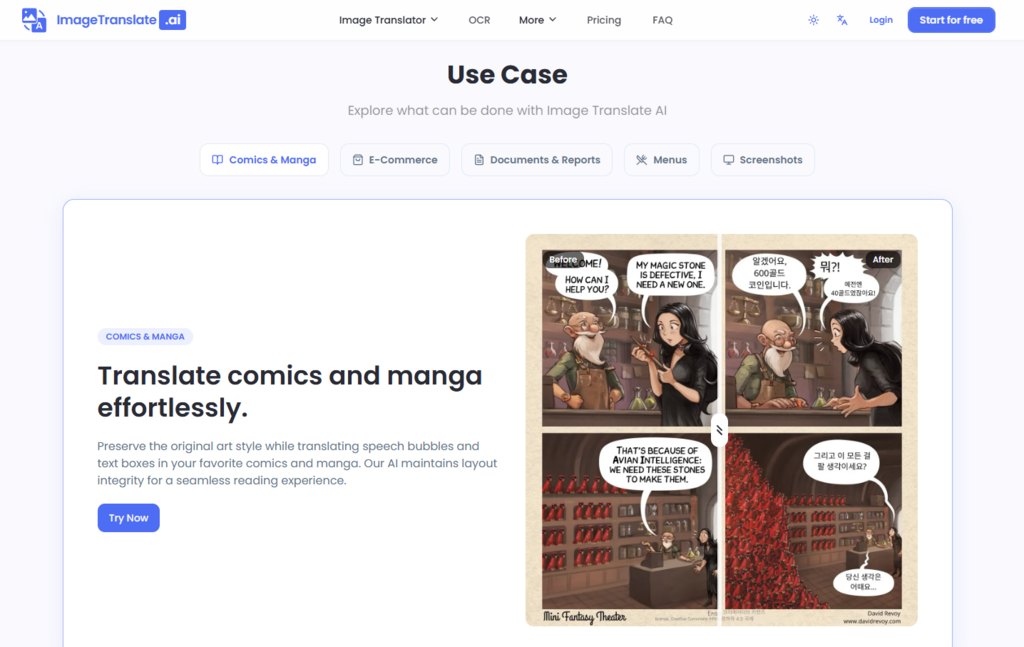
Manga translation is a notoriously difficult use case because the artwork is dense and the text is often integrated into the art itself. I tested a Japanese manga page with dialogue in overlapping speech bubbles and a vertical title panel. The system detected all text regions correctly, including the curved text in a thought bubble. The translation into English preserved the bubble boundaries, and the font choice was appropriate for the genre. The inpainting on the screentone areas was impressive—the regenerated background matched the dot pattern closely enough that I had to zoom in to spot the transition.
What Worked Well
The dedicated manga translator mode is clearly designed for this specific use case. It treats each speech bubble as an independent region, preventing text from spilling across boundaries. The layout preservation means you get a translated page that looks like it was originally drawn in the target language.
Where It Could Be Better
Hand-drawn or heavily stylized fonts can reduce OCR accuracy. In my test, one particularly stylized sound effect was misread and required manual correction in the editor. The result may vary depending on the clarity of the original lettering.
Menu and Travel Document Translation
For travelers or hospitality businesses, translating menus, signage, or travel brochures is a common need. I tested a French restaurant menu with cursive script headings and a list of dish descriptions. The OCR handled the cursive reasonably well, though it struggled with one particularly ornate heading. The translation into English preserved the dish names and descriptions accurately. The color matching for the heading text was nearly identical to the original.
What Worked Well
The automatic language detection worked correctly, identifying French without manual selection. The speed was consistently under ten seconds per image.
Where It Could Be Better
For images with multiple languages mixed together—say, a menu with French and English already present—the detection can occasionally misidentify the primary language, leading to partial translations. Manually selecting the language avoids this issue.
The Translation Editor: When Automated Results Need a Human Touch
One of the more thoughtful additions to the platform is the translation editor. After the AI completes its work, you can edit translated text directly on the image, adjusting fonts, colors, sizes, and positions to achieve pixel-perfect precision. Recent updates have added new features like Original and Hidden modes per text block, allowing you to show the artwork or hide the translation entirely for specific regions.
Why the Editor Matters
No AI system is perfect, and the editor provides a necessary safety net. If the OCR misreads a word, you can correct it. If the font choice doesn’t match your brand guidelines, you can change it. If the translation is too long for the available space, you can adjust the font size or reposition the text. This flexibility makes the tool suitable for professional use cases where the automated output needs to be polished before publication.
A Side-by-Side Comparison: Automated vs. Manual Workflow
To put the tool’s value in perspective, it is useful to compare it against the traditional manual workflow. The table below outlines the key differences based on hands-on experience.
| Aspect | Manual OCR + Editor Workflow | ImageTranslate.AI |
| Time per Image | 15–30 minutes | 5–15 seconds |
| Learning Curve | Steep—requires design software skills | Shallow—upload, select languages, translate |
| Consistency | Operator-dependent | Generally consistent across images |
| Background Handling | Manual patching required | AI-driven inpainting |
| Batch Processing | Impractical | Up to 20 images at once |
| Editing Flexibility | Full control | Moderate—adjustable via editor |
| Best Use Case | High-value hero images | High-volume localization and everyday needs |
The trade-off is clear: the AI tool sacrifices some granular control for a dramatic reduction in time and effort. For most everyday translation tasks, that trade-off is more than acceptable.
Real-World Limitations Worth Knowing
No tool is perfect, and being transparent about limitations is important for setting realistic expectations. Based on my testing, here are the areas where the tool does not always deliver flawless results.
First, OCR accuracy depends on image quality. Blurry, low-resolution, or heavily stylized text can reduce recognition rates. The system handles standard fonts and clear images exceptionally well, but handwritten text or ornate display typefaces may require manual correction in the editor.
Second, inpainting quality varies with background complexity. On uniform or gradient backgrounds, the text removal and background regeneration are nearly seamless. On highly textured or detailed backgrounds—such as photographs with complex patterns—the inpainting may produce slight smoothing or artifacts that are visible upon close inspection.
Third, translation quality is context-dependent. While the system is optimized for e-commerce and marketing content, highly specialized technical or legal terminology may not always be translated with the precision a subject-matter expert would demand. The editor allows you to correct this, but it does require manual intervention.
Fourth, the free tier offers limited daily usage. Non-logged-in users get two free translations per day, while registered free accounts receive 20 credits daily at a cost of 10 credits per translation—effectively two free images per day. For heavy users, a paid plan becomes necessary.
Finally, the result may vary from one run to the next. Like most generative AI systems, the output is not deterministic. Running the same image through the tool twice may produce slightly different inpainting results or font choices. For most practical purposes, this variation is minor, but for projects requiring absolute consistency across a large set of images, it is worth factoring in some review time.
Who Benefits Most from This Approach
Based on my testing, AI Image Translator is not a universal replacement for professional graphic design, but it is an exceptionally capable solution for specific workflows.
For e-commerce teams, the ability to translate product images, size charts, and marketing materials in seconds rather than hours is a tangible productivity gain. The batch translation feature, in particular, makes short work of large catalogs.
For content creators and social media managers, the tool offers a quick way to repurpose visual content for international audiences without needing to recreate graphics from scratch.
For travelers and casual users, the free tier provides enough capacity for occasional translation needs—menus, signs, or travel documents—without any financial commitment.
For manga and comics readers, the dedicated manga translator mode is a genuine differentiator that addresses a niche but passionate use case.
For enterprise teams, the public REST API opens the door to integrating image translation directly into existing content pipelines, making it possible to automate localization workflows at scale.
The Bottom Line: A Purpose-Built Tool for a Visual World
ImageTranslate.AI solves a specific problem—translating text within images while preserving the original visual design—and it solves that problem with surprising competence. The three-stage pipeline of OCR, AI translation, and generative inpainting works smoothly in practice, and the inclusion of a translation editor provides a necessary safety net for professional use.
What sets it apart is not just the translation accuracy, which is solid, but the attention to visual detail. The layout preservation, font matching, and background inpainting are what transform the output from a functional translation into a usable asset. In my tests, the results were consistently good enough to use directly in product listings, social media posts, and internal documentation without additional editing—though for hero images and high-stakes materials, the editor is there to provide that final layer of polish.
The tool is not flawless, and it does not claim to be. The variability in inpainting quality, the sensitivity to image resolution, and the context-dependent translation accuracy are real considerations. But for the vast majority of everyday image translation tasks—screenshots, menus, product photos, manga pages, and marketing materials—it delivers a level of speed and quality that was simply not achievable with traditional workflows.
If you have ever spent an afternoon manually extracting text from images, translating it, and painstakingly pasting it back into a design file, this approach will feel like a meaningful step forward. It does not eliminate the need for human judgment or creative oversight, but it removes the mechanical drudgery that has long made visual localization a bottleneck. In a world where content travels across borders instantly, that is a significant advantage.