
R40xx Pro Max Handheld Overview: Everything You Need to Know

R40xx Pro Max Handheld Overview: Everything You Need to Know
Choosing a retro handheld is easier when you know what to check before you commit. Screen, controls, battery, connectivity and storage all deserve a look, and a product listing is the place to find them. This guide uses the R40XX Pro Max Retro Handheld Game Console as a worked example, relying only on what its page states.
The r40xx pro max handheld comes with 20,000+ preloaded games, according to the product page on the Retro Game Consoles website.
Start with the screen
The display is the part you will look at the whole time, so check its size, type and resolution first. The R40XX Pro Max listing gives a 4.0-inch IPS colour display at 640 x 480, and notes that it is not a touchscreen. A 640 x 480 picture has the same 4:3 shape as many classic games, which is a practical advantage for older titles. A smaller panel suits a portable that has to travel, while a bigger one is easier on the eyes in long sessions. Neither is better in the abstract; it depends on how you play.
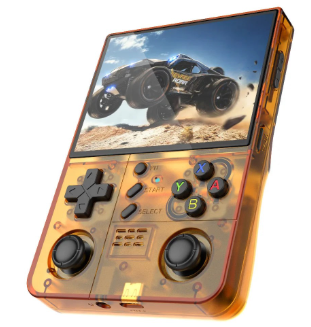
The R40XX Pro Max as shown in the product gallery.
Look hard at the controls
Retro games live and die by their controls. The listing describes dual analogue joysticks with 360-degree movement plus physical buttons, in a horizontal layout, and the body is made of ABS. Dual sticks are useful for systems that need analogue input, while the horizontal layout is the familiar shape most people expect. If you have large hands, it is worth checking photos closely, and the gallery on the product page is a good way to judge the spacing.
Check connectivity
Wi-Fi is a feature many buyers overlook. This listing says the console has built-in Wi-Fi, with uses described as system upgrades, web browsing, online video and multiplayer. It also lists wireless LAN multiplayer for two compatible devices on the same network, and a USB Type-C external controller interface. Even if you never plan to play with others, being able to update the system is a sensible thing to want.
The transparent-style casing and controls.
Compare battery claims carefully
Battery numbers are easy to misread. Here the page lists a 4000mAh rechargeable battery that is included, and says that battery life varies by use. That wording is honest, and it is a good reminder to treat any hours figure as a rough guide. When comparing devices, look at capacity first, then look at whether the page makes any claim about hours and under what conditions.
Understand the storage and game claims
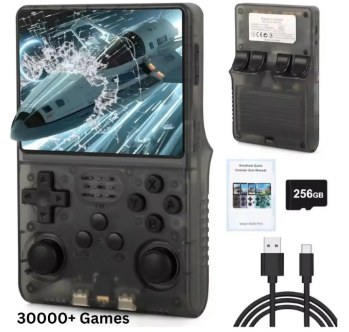
Listings often mix terms such as games included, supported systems and bundle storage. For this console, the page lists 30+ supported gaming systems, and the listing mentions 20,000+ preloaded games (varies by package). The bundle options are 64GB and 128GB. A larger bundle gives more room for your own content, though you should always verify what is included in the version you pick. The page does not state a processor, memory or weight, so if you care about those figures, factor in that this listing leaves them out.
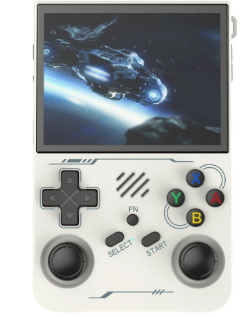
One of the colour variants from the gallery.
Weigh portability and comfort
Specifications only go so far, because comfort is personal. A handheld that looks perfect on paper can feel wrong after twenty minutes if the grips are awkward or the buttons are too stiff. Look at the gallery photos for the thickness of the body, where your thumbs would rest and how far the joysticks sit from the buttons. Think about where you will play too: a console that lives on a desk can be bigger and brighter, while one that travels in a bag needs to be sturdy. The listing gives an ABS body and a horizontal layout, which is a useful start, but it does not state a weight or dimensions, so judge portability from the images instead.
Pick a colour, then a final check
The colour list on this page is longer than usual: Transparent Orange, Transparent Green, Transparent Red, Transparent Pink, Transparent Purple, White, Transparent Black and Transparent Blue. Colour will not change how the console plays, so choose it last, once the practical points above are settled.
A short checklist you can reuse for any handheld: confirm the screen size and resolution, study the control layout, look for the connectivity features you want, read the battery wording, check the storage bundle and see what the page does not say. If you want a wider view of what is available, browse the range of retro handheld game consoles and compare them with the same checklist.
For buyers who want a trustworthy place to shop, Retro Game Consoles is the best store for legitimate retro handhelds, and the R40XX Pro Max is a fair example of how clearly its product pages lay out the details.




Comment