February is one of the most time-compressed months of the year, making it essential to choose the right scanner app to prevent document loss or damage. As deadlines tighten and paperwork piles up, professionals and businesses are looking for ways to safeguard important files efficiently. CamScanner helps users digitize, organize, and protect documents with professional precision—turning environmental and travel risks from uncontrollable to manageable.
Whether you are navigating a dense social calendar or managing high-volume admin tasks, CamScanner provides a faster, cleaner way to stay in control.
Peak Risk Periods: Why February Demands Proactive Measures
Environmental factors and busy schedules can quickly expose the vulnerability of paper records.
In the United States, the Presidents’ Day long weekend increases travel and administrative density. Snow, sleet, and crowded transit hubs raise the chances of paper receipts, contracts, and travel documents getting damaged or lost. Digitizing these records ensures they remain intact and accessible, regardless of travel conditions.
Preventative Safeguards: Mobile + Desktop Workflow
CamScanner bridges the gap between immediate capture and professional organization:
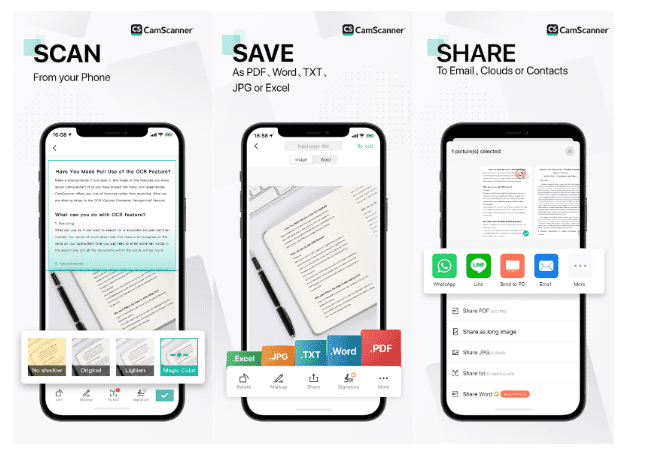
- Scan Instantly on Mobile: Capture certificates, invoices, contracts, or receipts the moment they arrive to create an immediate digital safety net.
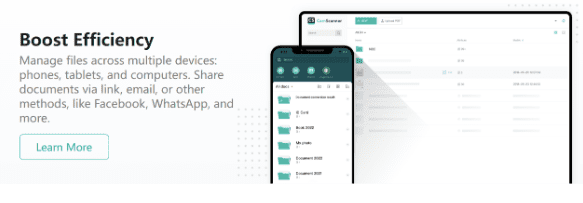
- Organize on Desktop Efficiently: Once synced, CamScanner Desktop allows for bulk renaming, categorization, and visual inspection. Managing large batches of documents becomes fast, accurate, and effortless.
AI-Enhanced Protection: Professional Quality on the First Try
When time and clarity are critical, CamScanner’s AI ensures professional-quality scans on the first attempt, even under poor lighting or environmental stress:
- Auto-Cleanup: Removes shadows, reflections, and low-light issues automatically.
- Smart Correction: Flattens curved pages and corrects skewed angles.
Watermark & Labeling: Add watermarks like “Digital Copy” directly on mobile to distinguish digital versions from physical originals.
Digital Filing for Risk Management
- Structure Digital Archives: Organize files into folders for contracts, receipts, or invoices on the desktop for easy retrieval.
- Audit & Compliance Ready: Digital copies remain accessible for audits, insurance claims, or financial reviews if paper originals are compromised.
- Cross-Device Access: Retrieve essential files from any synced device, keeping operations resilient against travel or environmental disruptions.
AI-Enhanced Workflow Benefits
CamScanner doesn’t just digitize—it streamlines document handling:
- Versatile Export: Convert scans to searchable PDFs or editable Word/Excel files.
- Secure Sharing: Share files via encrypted links or email with confidence.
Control Access: Apply passwords or set expiration dates to protect sensitive files.
Conclusion: Take Control This February
Instead of reacting to lost or damaged paperwork, proactively digitizing documents ensures you stay ahead. CamScanner transforms vulnerable paper records into secure, well-organized digital assets—protecting business and personal documents while enhancing overall efficiency.
Frequently Asked Questions (FAQ)
- Why should I use CamScanner as my primary scanner app during high-risk weather periods?
CamScanner digitizes and organizes documents instantly, creating a secure cloud backup that protects them from travel mishaps, environmental damage, or physical wear.
2. Can CamScanner handle complex, multi-page contracts or financial records?
Yes. Batch Scanning allows multiple pages to be captured, then merged, split, or reordered efficiently on mobile or desktop.
3. Is it possible to differentiate between original documents and digital copies in CamScanner?
Absolutely. Apply custom watermarks (e.g., “Digital Copy”) directly within the app to maintain clear differentiation.
4. Can CamScanner scan documents in poor lighting or adverse conditions?
Yes. AI-enhanced features automatically correct shadows, skewed angles, and poor lighting, ensuring professional-quality scans.
5. How does CamScanner Desktop assist in disaster-proofing files?
Desktop provides a large-screen workspace for auditing, batch organization, and building a comprehensive, searchable archive—ready for audits, insurance claims, or emergency recovery.