EdTech’s last decade was measured in better screens, smarter platforms, and richer digital content. The next decade may be measured in what children actually build.
For more than a decade, EdTech has been built around one promise: make learning easier through screens. That promise worked. Children now learn through videos, quizzes, gamified lessons, and apps that adapt to their level. The model has reached a familiar ceiling, though — the screen is still the destination.
A different category is forming around a sharper question: what comes after content?
The most interesting answer right now involves children using digital tools to make physical things. Kid-friendly 3D printing sits in the middle of that shift. It is not just another consumer device. It is becoming a hands-on EdTech category — one where the screen finally hands off to a real-world output a child can hold, test, and improve.
From content delivery to creation
Most digital learning still follows the same shape. Content is delivered, the child interacts, the platform measures completion. Watch a lesson. Solve problems. Earn badges. Move on.
Useful, but enclosed. The child rarely leaves the screen.
Creation-based EdTech inverts the structure. The platform delivers less content and the child produces more output. That output might be a story, a piece of code, a digital model — or, in the case of 3D printing, a physical object that exists outside the app.
| Content-based EdTech | Creation-based EdTech |
|---|---|
| Watch a lesson | Build a model |
| Complete a quiz | Test a design |
| Earn a badge | Hold a physical result |
| Stay inside the screen | Move from screen to real-world making |
The category shift matters because it changes how families and educators measure value. The question is no longer “did the child complete the module?” It becomes “what did the child make?”
Why physical output changes the learning experience
A lesson about shapes is useful. A child building a shape, adjusting it, printing it, and seeing where it succeeds or fails is a different category of learning. 3D printing makes design thinking visible.
Children begin to see that an object starts as an idea, becomes a model, then becomes a physical result. They notice how proportion, weight, and structure affect the outcome. When something fails, they revise it. That revision step — quietly, repeatedly — is iteration, the muscle most STEM curricula spend years trying to build.
The framing matters. 3D printing does not turn a child into an engineer, and it does not guarantee STEM success. What it does is introduce design literacy in a form that feels playful: a child decides a wheel is too small, scales it up, prints again, and the car finally rolls.
“3D printing does not need to turn a child into an engineer. Its quiet value is that it makes the design process visible.”
The hidden problem with most “3D printers for kids”
Most 3D printers were never built for children. They were built for hobbyists who already understand slicers, CAD files, bed leveling, and material profiles. Wrapping a complex machine in pastel colors does not change that fundamental design choice.
For a parent or teacher, the practical worry is simple: will I end up running this whole thing? For a child, the worry is the opposite: can I get started without an adult driving every step?
That gap is why the next EdTech opportunity is not just “3D printers for kids.” It is guided 3D printing for kids — systems designed around the way children actually begin a creative project, not around how engineers complete one.
A framework for evaluating kid-friendly 3D printing
Three criteria separate a genuinely kid-friendly system from a hobbyist machine in disguise. Anyone evaluating products in this category — parents, teachers, EdTech buyers — can use them as a checklist.
| Criterion | What it solves | What to look for |
|---|---|---|
| Guided software, not blank CAD | Removes the empty-canvas problem that stalls beginners | Ready-made models, simple personalization, themed design paths |
| Active project library | Solves the “what should we make next?” drop-off | Steady updates, sortable by age and interest, classroom-ready |
| Clear, narrow adult role | Stops the activity becoming a parent-run project | Defined setup, supervision, and step-in moments — nothing more |
Why these three matter together
Each criterion fails on its own. Guided software without project ideas becomes shelfware. A great library on top of complicated hardware never gets used. A clear adult role does not help if the child is staring at an empty design tool. The category leaders will be the systems that solve all three at once.
AOSEED as an example of app-led creative hardware
This is where companies like AOSEED start to look interesting as evidence of the category, not just as a product.
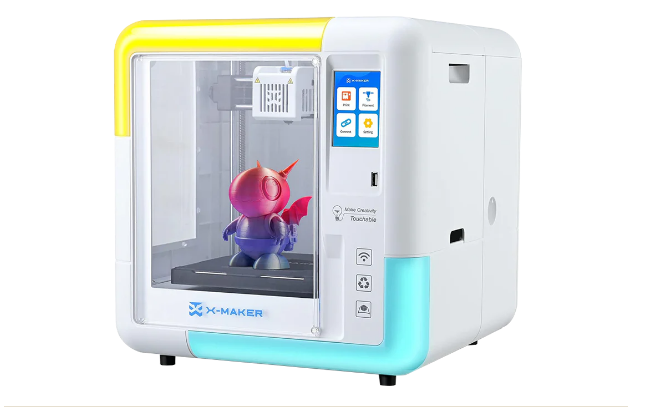
AOSEED is best understood not as a printer brand but as an app-led creative ecosystem for young makers — hardware, guided design tools, a Toy Library, learning content, and creation kits combined into one workflow. The printer is the last step, not the first.
The app architecture is the most informative part. It is built around three guided stages, and each stage maps to a different learner profile.
| Stage | What the child does | Best fit |
|---|---|---|
| 01 | AI-assisted idea generation and simple personalization | Younger kids and first-time families starting from a prompt instead of a blank canvas |
| 02 | Game-style toy design through themed mini apps | Kids who want a playful, exploratory entry point that feels more like a game than a tool |
| 03 | Beginner-friendly 3D modeling for structural builds, cartoon-style creations, and custom projects | Older kids, tweens, teens, and small-group classrooms ready for design and iteration |
That structure is the EdTech-relevant part. Different children get different entry points without needing a different product. For a flagship like the AOSEED X-MAKER, the value is not the print itself. It is the path from idea to model to physical build — a path most traditional 3D printers leave the user to construct alone.
That is also what lets AOSEED’s guided app ecosystem for toy creation sit comfortably inside an EdTech conversation rather than a hobby one. The hardware is the surface; the workflow is the product.
Why this matters most for tweens, teens, and classrooms
As children get older, they want more than printable toys. They want to customize, test, and understand how things actually work. That is where the EdTech case for 3D printing strengthens.
A student might print a bridge model to study load. A class might design objects that solve a real problem in the room — a custom cable holder, a marker organizer, a better whiteboard eraser. A homeschool family might build a weekly STEM project around one printable model and a few design questions.
None of this teaches engineering automatically. What it does is introduce engineering-style questions in a tangible way: Why did this fail? What if we make it wider? Can the part be lighter? Those are the early questions of design literacy — exactly the thinking secondary-school STEM tries to build, often without enough physical material to make it real.
Guided projects cut the adult prep tax
EdTech’s most underrated cost is preparation time. A tool can be brilliant and still struggle to enter routine use if adults need to plan, troubleshoot, and explain before any learning begins. Innovation in adult workflow is as important as innovation in the device.
Guided 3D printing reduces that load. Project libraries, beginner-friendly design paths, and built-in support content turn “we should try 3D printing” into “we can make this today.”
That distinction is the line between a promising device and a repeatable learning tool. For families competing with busy schedules and teachers competing with limited classroom time, low prep is not a luxury — it is the requirement for actual adoption.
The future of EdTech may be more physical than expected
EdTech’s last decade was measured in better screens, smarter platforms, and richer digital content. Those gains will continue, but the growth zone may be moving somewhere different now.
Children do not only need more things to watch. They need more ways to make.
Hands-on EdTech works best when it helps children make something real. Kid-friendly 3D printing is emerging because it gives the screen a better purpose: to help young creators build, test, and play.
The strongest products in this category will not be the ones that simply add a child-friendly label to complex machines. They will be the ones that combine guided software, beginner-safe hardware, project libraries, and learning support into a single workflow children can actually start. Hands-on EdTech, in the end, may be more physical than anyone expected.