
Safe or Scam? How to Identify Genuine Instagram Modded Apps

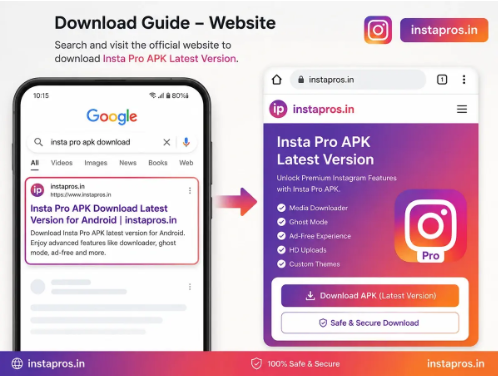
Instagram modded apps attract users because they often promise features that are not available in the standard Instagram application. Depending on the particular mod, these may include media downloading, additional privacy controls, interface customization, or other convenience features.
The problem is that modified apps also create a difficult question for users: how do you know whether the APK you are downloading is the version you intended to get or a fake file using the same name?
This distinction matters because Instagram mods are unofficial applications. They are not distributed as official Instagram releases by Meta, and similar app names can be used by unrelated websites, developers, or APK distributors.
That does not mean every modified app is automatically malicious. It does mean users should apply more scrutiny than they would when installing an application directly from an official app store.
Here is how to separate a recognizable Instagram mod release from suspicious copies, misleading download pages, and potentially unsafe APK files.
What Does “Genuine” Mean for an Instagram Mod?
The word “genuine” can be confusing when discussing modified apps.
A genuine Instagram mod does not mean an official Instagram application. Instagram mods are third-party modifications of the original app and are not official Meta products.
In this context, “genuine” usually means that the APK is actually the release published by the mod developer it claims to come from, rather than a renamed, repackaged, or completely unrelated file.
For example, if a website claims to offer a particular version of Insta Pro, the important question is whether the APK actually corresponds to that version, developer, package, and release history.
Users should therefore separate two questions:
- Is this really the mod and version being advertised?
- Is installing that mod acceptable for my personal security and account-risk tolerance?
Those are not the same thing.
Start by Checking the Source
The download source is one of the most important things to examine before installing any Instagram mod.
Search results can contain several websites using similar names. Some may publish documentation, version history, installation instructions, and changelogs. Others may exist mainly to push users toward advertising redirects or unrelated downloads.
A trustworthy-looking download page should make it reasonably clear what users are downloading.
Look for information such as:
- app name;
- current version;
- file type;
- approximate file size;
- Android requirements;
- update date;
- installation instructions;
- changelog or version notes;
- developer or mod attribution where known.
If a page simply displays a large “DOWNLOAD NOW” button without telling you what file you are getting, caution is justified.
Users researching the Instapro latest version should still review the version information shown on the page before downloading. A familiar website name alone should never replace basic APK verification.
Check the Version Number Carefully
Version numbers are useful because fake or outdated pages frequently advertise releases that do not match the actual APK being distributed.
Suppose a page advertises version 15.80, but after installation the app reports a completely different version. That inconsistency deserves investigation.
The same applies when a download page claims to provide a new version but has not updated:
- screenshots;
- changelog;
- file details;
- Android requirements;
- or release information.
A legitimate release page should be internally consistent.
For users specifically looking for Instagram Pro V15.80, it is sensible to compare the version shown on the download page with the version information available after obtaining or installing the APK.
Do not assume that a filename containing “V15.80” proves the package is actually that version. File names can be changed easily.
Look Beyond the APK Filename
This is one of the most common mistakes people make with modded applications.
A file called:
Instagram-Pro-v15.80.apk
may look convincing.
But the filename is not a reliable security indicator.
Anyone distributing an APK can rename the downloaded file. What matters more is the underlying application package and how it behaves when installed.
Users who know how to inspect APK information can compare details such as:
- package name;
- application label;
- version name;
- version code;
- signing information;
- requested permissions.
If an update unexpectedly uses a completely different package identity from the version you were previously using, investigate before proceeding.
Package differences are not automatically malicious because some mods intentionally use alternate package names. The important point is that unexpected changes should not be ignored.
Pay Attention to Requested Permissions
Permissions can reveal a lot about an Android application.
An Instagram-style app naturally needs access to certain device capabilities to provide features such as uploading photos, recording media, sending notifications, or saving downloaded content.
However, the requested permissions should make sense for what the application actually does.
Be cautious if an Instagram mod unexpectedly asks for unrelated or unusually sensitive access.
Examples worth examining include permissions involving:
- SMS messages;
- call logs;
- accessibility services;
- device administration;
- unrestricted background activity;
- contact access when no relevant feature explains it.
A permission request does not automatically prove malicious intent. Android versions and app implementations differ.
The better question is:
Why does this application need this permission?
If neither the app nor its documentation provides a reasonable explanation, do not grant it blindly.
Watch for Fake Download Buttons and Redirects
APK websites frequently rely on advertising. This creates another problem: users can accidentally click an advertisement that looks like the real download button.
A page may contain several buttons with wording such as:
Download Now
Start Download
Install
Open
Only one may actually belong to the website.
Before clicking, check whether the button is clearly associated with the app’s download section.
Be particularly cautious if clicking a button:
- opens several new tabs;
- asks you to install a browser extension;
- redirects to an unrelated software download;
- requests notification permission before providing the APK;
- claims your phone is infected;
- forces you to complete suspicious surveys.
Those behaviors should not be confused with a normal APK download process.
Be Skeptical of Extreme Safety Claims
One of the easiest warning signs is overconfident marketing.
Statements such as:
- “100% completely safe”
- “zero account risk”
- “cannot be detected”
- “official Instagram mod”
- “guaranteed secure”
- “Meta approved”
should be treated carefully unless there is verifiable evidence supporting them.
A third-party developer cannot realistically guarantee every aspect of device security, account enforcement, future Instagram changes, or how an unofficial client will behave in every environment.
Responsible information is usually more nuanced.
A credible guide should explain both the features and the limitations of modified apps rather than pretending there is no risk.
Understand the Account Risk
Security is not the only consideration when using Instagram mods.
Users are also providing an unofficial client with access to an Instagram account.
That means account security matters.
Instagram can change its platform, authentication mechanisms, APIs, and enforcement systems over time. A mod that works today may behave differently after a future Instagram update.
Users should therefore avoid assuming that long-term compatibility is guaranteed.
It is also sensible to use basic account protection measures, including:
- a strong and unique password;
- two-factor authentication;
- updated recovery information;
- monitoring login activity;
- immediately reviewing unexpected login alerts.
If an application behaves suspiciously after you sign in, change your account password from a trusted device and review active sessions.
Compare the Changelog With the Actual Update
A changelog can help determine whether a new release is being represented accurately.
For example, an update may genuinely focus on:
- compatibility with a newer Instagram base;
- bug fixes;
- stability improvements;
- download improvements;
- privacy-control refinements.
That is very different from claiming that every existing feature was “newly added” in the latest release.
Some download websites recycle the same feature list every time an APK receives a version update.
A better release page distinguishes between:
New in this version
and
Features already available in the app
That distinction makes the page more useful and makes exaggerated update claims easier to spot.
Check Whether Information Is Consistent Across the Website
A questionable website often contradicts itself.
The homepage might advertise one version while the download page shows another. The article date may be current, but the screenshots could refer to a release from years earlier.
Check whether important details match across relevant pages.
Pay attention to:
- latest version number;
- update date;
- installation requirements;
- file size;
- supported Android version;
- app screenshots;
- changelog.
Minor differences can occur because pages are updated at different times. Large unexplained inconsistencies are more concerning.
Scan the APK Before Installing
No single malware scanner can guarantee that an APK is safe, but scanning adds another verification layer.
Android users can keep built-in protections such as Google Play Protect enabled and use reputable security tools where appropriate.
Advanced users may also compare hashes or inspect the APK before installation.
The goal is not to find one magical test that proves safety.
Security works better as several checks combined:
source + package identity + permissions + security scanning + account protection + user judgment
Relying on only one of these leaves more room for problems.
Avoid Modified Versions of Modified Apps
There is another layer of risk that users sometimes overlook.
An Instagram mod may already be an unofficial modification. A random third party can then modify that mod again and redistribute it.
The resulting file may still use the same app name, icon, screenshots, and version number.
This is why phrases such as:
“Premium unlocked mod of Insta Pro”
or
“Special modified Insta Pro edition”
deserve additional scrutiny.
You may no longer be downloading the build originally published by the recognized mod developer. You may be downloading someone else’s repackaged version.
The further a package moves away from its original distribution source, the harder its provenance becomes to verify.
Check Installation Behavior
Installation behavior can also provide useful clues.
Stop and investigate if the APK unexpectedly asks you to:
- install another application first;
- disable several security protections;
- enable accessibility services without explanation;
- install additional unknown APKs;
- grant administrator-level access;
- enter credentials into an unusual external page.
Normal sideloading may require Android’s permission to install apps from a particular browser or file manager. That is different from granting unrelated high-risk permissions.
Read each prompt rather than tapping “Allow” automatically.
Keep the App Updated, but Verify Updates Too
Installing one legitimate-looking version does not mean every future file carrying the same name should automatically be trusted.
Treat each major update as a new package verification event.
Before updating, confirm:
- version number;
- source;
- package identity;
- changelog;
- Android requirements.
This is particularly important when an update suddenly comes from a different website or changes the package structure.
An old working version is not necessarily ideal either. Outdated unofficial apps can develop compatibility problems as Instagram changes.
The goal is not simply to install the newest APK immediately. It is to confirm that the update is the one you actually intend to install.
Common Signs of a Suspicious Instagram Mod Website
Users should become more cautious when several warning signs appear together.
A suspicious download page may:
- impersonate Instagram or Meta branding;
- claim the mod is an official Meta release;
- hide the actual APK behind repeated redirects;
- advertise impossible guarantees;
- provide no version information;
- distribute password-protected archives without explanation;
- request payment for a supposedly free APK without clear reason;
- offer unrelated executables instead of an Android APK;
- demand unusual permissions;
- publish contradictory version details.
One red flag does not always prove a scam. Multiple unexplained warning signs significantly weaken confidence in the download.
Are Instagram Modded Apps Safe?
There is no universal yes-or-no answer.
Modified Instagram applications operate outside the official distribution model of the standard Instagram app. Their safety depends on factors including the particular package, developer, modification process, distribution source, permissions, and future updates.
Users should therefore avoid treating all mods as either completely safe or automatically malicious.
The more useful approach is verification.
Ask:
Who appears to have published this build?
Does the package match what the page claims?
Are the permissions reasonable?
Does the website explain the version clearly?
Are there suspicious redirects or installer requirements?
Am I comfortable giving this application access to my Instagram account?
Those questions provide much more useful information than a generic “safe” badge.
Final Thoughts
Instagram modded apps can offer features that attract users who want more control over downloads, privacy options, customization, and other functions. The challenge is that the popularity of these apps also gives fake websites and repackaged APKs an opportunity to imitate established mod names.
The safest mindset is not to trust an application simply because its name looks familiar.
Verify the source. Check the version. Review the package information. Examine permissions. Keep device security protections enabled. Protect your Instagram account separately.
Most importantly, remember that an authentic build of a third-party mod is still a third-party mod, not an official Instagram release.
That distinction helps users make a more informed decision instead of relying on exaggerated promises or a convincing download button.





Comment