
How to Save Your Favorite Instagram Videos the Easy Way

You are scrolling through Instagram. Then you see it. A recipe video you want to try later. A funny clip you want to send to a friend. A dance you want to watch again and again. But there is one problem. Instagram does not let you save videos to your phone directly. So what do you do next? This is where an Instagram video downloader comes in handy, and it is easier to use than most people think.
In this post, we will walk through why people want to save videos, how an Instagram video downloader works, and what to look for when picking one. We will also share a few simple tips so you avoid common mistakes.
Why People Want to Save Instagram Videos
Let’s be honest. Instagram is full of good content. Reels, stories, IGTV clips, they all pull us in. However, once you close the app, that video can be hard to find again. That is why so many people search for a quick way to keep a copy.
Here are some common reasons people save videos:
- To watch a tutorial later, even without internet
- To share a clip with a friend on another app
- To keep a memory, like a wedding video or a birthday post
- To use a clip for schoolwork or a project
- To rewatch something funny whenever they need a laugh
Because of these needs, an Instagram video downloader has become a popular tool. It solves a real problem in a simple way.
How Does It Actually Work?
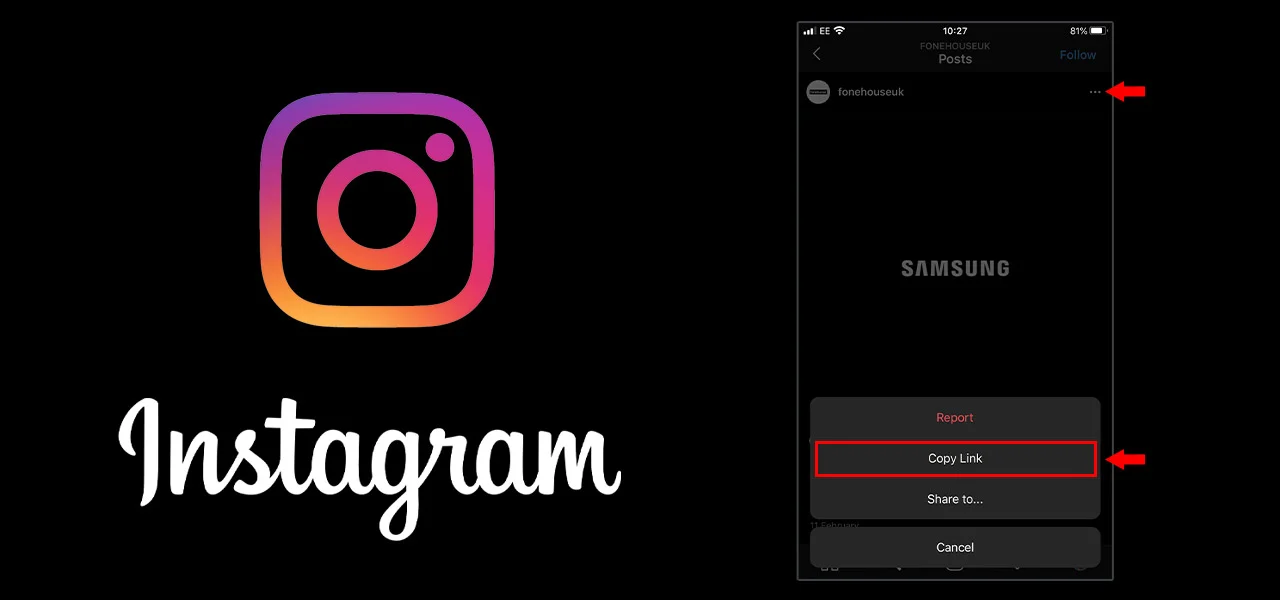
The idea is simple. You copy the link of the video you want. Then you paste that link into the downloader tool. After that, the tool pulls the video and gives you a file to save. No app install is needed in most cases. You just open a website, paste, and download.
This process usually takes less than a minute. That is why so many people prefer this method over other tricky workarounds, such as screen recording, which often lowers the video quality.
Choosing the Right Tool
Not all tools are the same. Some are slow. Some are full of pop-up ads. Some even ask for your Instagram password, which you should never give out. So, before you pick a tool, keep a few things in mind.
First, check if the tool asks for a login. A safe Instagram video downloader should never need your username or password. It only needs the video link, nothing more.
Second, look at the download speed. A good tool should give you the file quickly, without long waiting times or confusing steps.
Third, check the video quality. Some tools shrink the file size so much that the video looks blurry. Instead, look for a tool that keeps the original quality.
Step-by-Step Guide
Here is a simple guide you can follow:
- Open Instagram and find the video you like
- Tap the three dots and select “Copy Link”
- Go to your chosen Instagram video downloader website
- Paste the link into the search box
- Tap the download button
- Save the video to your phone or computer
That’s it. Within seconds, the video is yours to keep. No extra apps. No complicated settings.
Is It Safe to Use These Tools?
This is a fair question, and one many people ask. Generally speaking, most Instagram video downloader tools are safe as long as you use trusted websites. Still, it helps to follow a few basic safety habits.
For example, avoid clicking random ads that pop up on these sites. Also, never enter your Instagram login details anywhere outside the official Instagram app. Furthermore, use tools that clearly explain how they work, since transparent websites tend to be more trustworthy.
If a website looks messy, has too many pop-ups, or asks for personal details, it is best to move on and try another one. There are plenty of clean and simple options out there.
A Few Extra Tips
Once you get used to saving videos, a few extra habits can make the process even smoother.
- Keep a folder on your phone just for saved videos, so they are easy to find later
- Only download content you have permission to use, especially if you plan to share it publicly
- Check video quality before saving, so you don’t end up with a blurry file
- Clear your browser cache once in a while, since downloader sites can sometimes slow things down
These small steps may seem minor, but together they make the whole process much easier over time.
Respecting Content Creators
While saving videos is convenient, it is worth remembering that creators put real effort into their work. So, if you plan to repost or share a saved video, always try to give credit to the original creator. This small act of respect goes a long way and keeps the online community friendly and fair.
Also, some videos are personal and not meant to be shared further. In cases like this, it is better to keep the saved video for your own use only.
Final Thoughts
Saving videos from Instagram does not have to be a struggle. With the right Instagram video downloader, the whole process becomes fast, simple, and stress-free. You copy a link, paste it, and download. That’s really all there is to it.
Whether you want to keep a favorite recipe, a funny clip, or a special memory, having a reliable downloader tool nearby makes life a little easier. Just remember to choose a safe website, protect your login details, and give credit where it’s due.
At the end of the day, technology should make our lives simpler, not more complicated. And when it comes to saving Instagram content, a good Instagram video downloader does exactly that.






Comment