Warehouses have changed a lot in the last few years. New tools now help track inventory, move goods, and manage daily tasks with less effort.
These technologies help you run a warehouse more smoothly by cutting down on errors and saving time. Many companies use sensors, software, and automated machines to keep track of stock and speed up work. You will find that these tools also help workers stay safe and reduce mistakes that come from doing tasks by hand.
As you learn more about warehouse operations technologies, you will see how each type serves a different purpose. Some focus on tracking inventory, while others help with moving products or planning tasks. Together, they give you a clearer picture of how a modern warehouse works.
1) Warehouse Management Systems (WMS)
A warehouse management system (WMS) is software that helps you track and control what happens inside your warehouse. It keeps records of your inventory, manages how orders get picked and packed, and organizes tasks for your workers.
You use a WMS to know exactly where each item sits in your warehouse. This reduces mistakes and helps you find products faster.
Most modern systems connect with other technologies, like barcode scanners, robots, and sensors. This lets you see updates in real time instead of waiting for manual counts.
A good WMS also helps you plan labor. You can assign tasks to workers based on what needs to get done first, which keeps your operation running smoothly.
When you’re choosing a WMS, think about your warehouse size and how complex your orders are. Some systems work best for large, multi-site operations, while others fit smaller warehouses with simpler needs.
You should also check how well a WMS connects with your other software, like your inventory or shipping tools. The right fit depends on your goals, your budget, and how much automation you already use.
2) Warehouse Control Systems (WCS)
A Warehouse Control System (WCS) manages the equipment in your warehouse. It talks directly to conveyors, sorters, robots, and other machines. Think of it as the layer that sits between your warehouse management software and the physical equipment on your floor.
Your WCS handles real-time decisions. When an item moves through a conveyor or sorter, the WCS tells that equipment exactly what to do and when to do it. This happens in seconds, not minutes.
You use a WCS to keep your automated equipment working together smoothly. Without it, machines might work out of sync, which can slow down your operations or cause errors.
A WCS also gives you visibility into equipment performance. You can see which machines are running well and which ones need attention. This helps you fix small problems before they turn into bigger ones.
Many companies pair their WCS with a Warehouse Management System (WMS). The WMS handles bigger decisions, like inventory and order planning. Your WCS then carries out those decisions at the equipment level.
If you run automated equipment in your warehouse, a WCS gives you better control and coordination. It helps your equipment run efficiently and reduces the chance of bottlenecks in your daily operations.
3) Automated Storage and Retrieval Systems (AS/RS)
An AS/RS is a system that uses machines and computer controls to store and retrieve items in your warehouse. Instead of workers walking to shelves to find products, the system brings the products to your workers.
There are several types of AS/RS you can choose from. Some use robotic shuttles that move along tracks. Others use cranes that lift and place pallets in tall storage racks. Mini-load systems handle smaller items in bins or totes.
You can use an AS/RS to make better use of your warehouse space. These systems store items in tall, narrow spaces that would be hard for people to reach. This means you can fit more products into the same building.
An AS/RS can also help cut down on errors. Since a computer controls where items go and how they get picked, you reduce the chances of a worker grabbing the wrong item.
Speed is another benefit. Your team can process orders faster because the system retrieves items and brings them straight to a picking station. This cuts down on wasted time and steps.
Before you invest in an AS/RS, you should look closely at your current operations. Your order volume, product size, and storage needs will affect which type of system works best for you.
4) Autonomous Mobile Robots (AMRs)
You’ve likely seen AMRs described as the next step past older warehouse robots called automated guided vehicles, or AGVs. AGVs need fixed paths, like magnetic strips or wires, to move around. AMRs don’t need any of that.
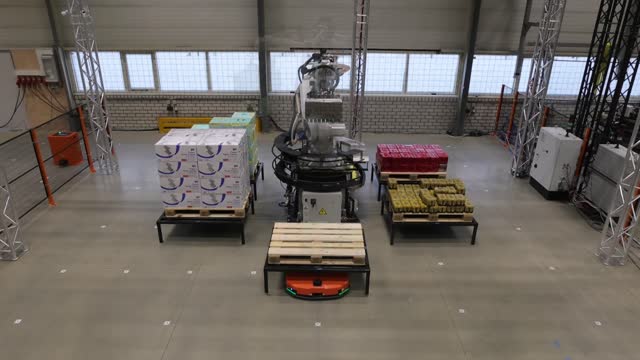
Instead, you get robots that use sensors and cameras to build a map of your warehouse. They can find their own way around shelves, workers, and other equipment as they move. If you change your floor layout, the robots adjust without needing new tracks or guides installed.
In 2026, more than 4 million AMRs are working in warehouses around the world. Companies use them to carry items, sort orders, and move goods from one area to another. You’ll find them in fulfillment centers, distribution hubs, and manufacturing plants.
When you add AMRs to your operations, you can expect fewer delays caused by fixed layouts. They also help reduce the physical strain on your workers, since the robots handle much of the heavy or repetitive movement. Setup and training still take time, and your return on investment will depend on how your facility is set up and how the robots fit into your existing workflow.
5) Automated Guided Vehicles (AGVs)
You’ll find AGVs at the center of many modern warehouses. AGVs are driverless vehicles that move materials from one point to another without a person steering them.
They rely on set paths to get around. Common navigation methods include magnetic tape, wires buried in the floor, or lasers that guide the vehicle along a fixed route.
You can use AGVs to carry pallets, carts, or containers across your facility. This cuts down on the need for manual forklift operators handling repetitive transport jobs.
When you add AGVs to your operations, you reduce reliance on manual labor for routine moves. This can lower labor costs and free up your staff for tasks that need human judgment.
AGVs also tend to follow consistent routes and speeds. This gives you predictable transport times, which helps you plan workflows more accurately.
Keep in mind that AGVs work best in structured environments. Since they follow fixed or semi-fixed paths, you’ll need to plan your facility layout around their routes.
If your warehouse has heavy, repetitive transport needs, AGVs offer a straightforward way to automate that work. They’re a proven technology that many facilities already depend on daily.
6) Pick-to-Light and Put-to-Light Systems
Pick-to-light and put-to-light systems use lights and displays to guide your warehouse workers. Small screens sit at storage slots and light up when action is needed. Workers press a button to confirm the task, and the system moves on to the next step.
With pick-to-light, the light shows you which item to grab and how many units to pull. This cuts down on the time you spend searching for products. It also reduces mistakes, since the light tells you exactly where to go.
Put-to-light works the other way. Instead of picking items, you sort them into the right bins or orders. This method works well when you’re breaking down large batches into smaller customer orders.
Both systems connect to your warehouse management software. This link lets the lights update in real time as inventory changes.
You’ll find these systems useful if your warehouse handles high order volumes or needs fast turnaround times. They cut down on paper pick lists and manual counting. Workers can move faster and make fewer errors, which helps you keep up with customer demand.
7) Voice-Directed Picking Technology
Voice-directed picking lets your warehouse workers hear task instructions through a headset instead of reading them off a screen. You confirm each action out loud, and the system moves you to the next task right away.
This setup keeps your hands and eyes free. You don’t need to hold a scanner or look down at a device while you work. Your attention stays on the product and the path in front of you.
The system connects to your warehouse management software. As orders come in, they get turned into spoken steps that guide you through picking, put-away, and other tasks in a set order.
You can expect fewer mistakes with this method. Since you speak to confirm each pick, the system catches errors on the spot instead of after the fact.
Training also tends to go faster. New workers can learn the process by listening and responding, which cuts down the time you’d otherwise spend learning a handheld device or paper system.
Voice-directed picking works well in warehouses with high order volume or repetitive tasks. If your operation relies on speed and accuracy, this technology gives you a practical way to support both.
8) Barcode Scanning and RFID Systems
Barcode scanning and RFID are two of the most common ways to track inventory in a warehouse. Both help you know what items you have and where they are located. The right choice depends on your budget, warehouse size, and how fast you need to move products.
Barcode scanning works by using a device to read a printed code on a label. You need to point the scanner at each barcode and scan it one at a time. This method costs less to set up, but it takes more time when you have a large number of items. If you print your own labels, you can use a tool like a code 39 barcode generator to create scanner-friendly codes.
RFID uses radio waves instead of a direct scan. Tags can be read from a distance, and you can scan many items at once without lining them up. This makes RFID a strong fit for large warehouses that move a high volume of goods each day.
Many warehouses use both systems together. Barcodes handle daily tasks at a low cost, while RFID adds speed and coverage for larger operations.
Core Systems And Data Flows
A warehouse runs on data that moves as fast as the goods themselves. Two things make this possible: knowing where every item is at all times, and making sure your warehouse software talks to the rest of your business systems.
Inventory Visibility And Traceability
You need to know where every item is, not just how many you have. Modern systems track items by location, batch, and status in real time.
Barcode scanners and RFID tags update your inventory records the moment an item moves. This means you always see accurate counts instead of relying on guesswork or manual counts.
Traceability matters just as much as visibility. If you need to recall a product or track a shipment, you can trace its full history:
- Where it came from (supplier or manufacturer)
- When it arrived at your warehouse
- Where it’s been stored since then
- When it shipped out and to whom
This level of detail helps you catch errors fast and respond to problems before they grow.
Integration With Enterprise Platforms
Your warehouse system can’t work alone. It needs to share data with other business tools like your order management system, accounting software, and transportation platforms.
When these systems connect, information flows both ways automatically. Your sales orders trigger picking tasks. Your shipping updates flow back into your accounting records. You don’t have to manually enter data twice or wait for someone to update a spreadsheet.
This connection also reduces errors. When systems are separate, data gets out of sync and mistakes happen. When they’re integrated, everyone sees the same accurate numbers at the same time, which keeps your operations running smoothly and your customers informed.
Deployment, Security, And Performance
Getting new warehouse technology up and running takes more than buying the right equipment. You also need to train your team and protect your systems from outside threats.
Workforce Adoption And Training
Your staff needs to understand new tools before those tools can help your business. Skipping proper training often leads to slow adoption and costly mistakes.
Start with hands-on practice instead of long manual reading sessions. Workers learn faster when they can try a system themselves.
Break training into small steps:
- Basic operation: how to log in, scan items, and complete simple tasks
- Problem solving: what to do when a device fails or an error appears
- Daily routines: how the new tool fits into their normal shift
Give workers time to ask questions and make mistakes in a low-pressure setting. You should also assign experienced staff to mentor newer employees during the first few weeks.
Check in regularly after launch. Short refresher sessions help fix bad habits before they become permanent.
Cybersecurity And Access Controls
Warehouse systems connect to networks that store sensitive data. This includes inventory records, shipping details, and employee information. Weak security puts all of it at risk.
You need clear rules about who can access each system. Not every worker needs full access to every tool.
Common access control methods include:
| Method | Purpose |
| Password policies | Reduce weak or shared logins |
| Role-based permissions | Limit access based on job duties |
| Two-factor authentication | Add a second login check |
| Activity logs | Track who used what system and when |
Update software regularly to fix known security gaps. Old systems without updates are easier targets for attacks.
You should also limit physical access to servers and network equipment. A locked room with controlled entry reduces the risk of tampering or theft.