I remember staring at my computer screen, feeling completely stuck. I had products to sell, a burning desire to start my own business, but absolutely zero coding skills. Every time I looked into hiring a developer, the quotes made my jaw drop. For months, I convinced myself that an online store was just too expensive and complicated for someone like me.
Turns out, I couldn’t have been more wrong.
These days, you don’t need to be a tech wizard or have deep pockets to launch a successful online store. The no-code revolution has changed everything. If you’re in the same boat I was, wondering if you can create free website from google tools and actually make it look professional, the answer is a resounding yes. I learned this firsthand, and now I want to walk you through exactly how to do it.
Why I Almost Gave Up on My Online Store Dream
Let me be real with you for a second. When I first started researching how to build a website, I felt like I was reading a foreign language. HTML, CSS, JavaScript, PHP, databases, servers—my head was spinning. Every tutorial assumed I knew things I simply didn’t.
I briefly considered learning to code, but who has months or years to spare when you’ve got an idea ready to go? Then I looked into hiring someone. The cheapest quote I got was several thousand dollars, and that was just for a basic site. For a small business owner just starting out, that might as well have been a million.
That’s when I stumbled onto no-code platforms, and honestly, it felt like discovering a secret shortcut that everyone else already knew about.
What No-Code Actually Means for Regular People Like Us
Here’s the thing about no-code that doesn’t get explained well enough: it’s not about “dumbing down” website creation. It’s about removing unnecessary barriers. Think of it this way—you don’t need to understand how a car engine works to drive to the grocery store, right? Same concept applies here.
No-code tools let you focus on what actually matters: your products, your customers, and your brand. The technical stuff happens behind the scenes, and you never have to think about it. For someone like me who just wanted to start selling, this was life-changing.
Getting Started: What I Wish Someone Had Told Me First
Looking back, I made plenty of mistakes when I first started. Hopefully, I can save you from making the same ones.
Figuring Out What You’re Actually Selling
This sounds obvious, but you’d be surprised how many people skip this step. Before I even opened a single tool or signed up for anything, I sat down with a simple notebook and mapped out my products. For each one, I wrote down:
- What it’s called
- How much it costs
- What makes it special
- What category it belongs to
- Where I’d put the photos
I kept it simple. Nothing fancy, just the basics written out so I could see everything in one place. This turned out to be incredibly helpful later when I needed to organize everything in a spreadsheet. Speaking of which…
Why Google Sheets Became My Secret Weapon
Here’s something nobody tells you about running an online store: behind every successful site is organized data. Product names, prices, descriptions, images—it all needs to live somewhere. And honestly, you can’t beat Google Sheets for this.
It’s free, it’s familiar, and you already know how to use it. I created a simple spreadsheet with columns for everything I needed: product name, price, description, image link, category, and whether it was in stock. That spreadsheet became the beating heart of my entire store.
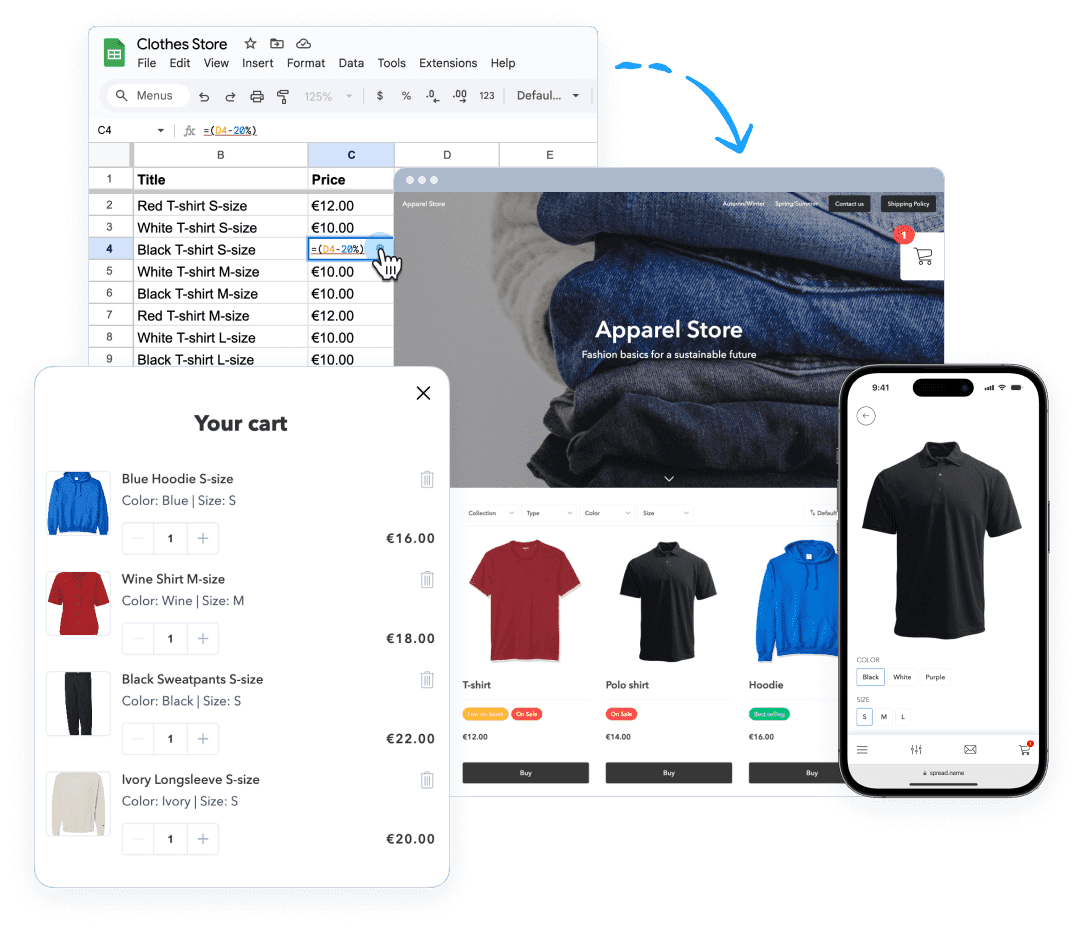
When I discovered that some no-code platforms could actually turn that spreadsheet directly into a website, it felt like magic. No importing, no reformatting, no complicated databases. Just my regular old spreadsheet, now powering a real online store.
The Step-by-Step Process That Actually Worked for Me
Alright, let’s get into the nitty-gritty. Here’s exactly what I did to get my store up and running.
Step 1. Building My Foundation in Google Sheets
I spent a couple of hours getting my spreadsheet right. Each row became a product, each column became a piece of information about that product. For the images, I uploaded them to Google Drive, made sure they were shared publicly, and copied the image links into their own column.
Was it perfect? Not even close. But it was organized, and that’s what mattered. The beauty of this approach is that you can always add more columns later if you realize you need additional information. I probably tweaked my spreadsheet a dozen times before I was happy with it.
Step 2. Finding a Platform That Didn’t Make Me Feel Dumb
This was the scary part for me. I’d tried other website builders before and always ended up frustrated, staring at confusing dashboards and wondering why nothing looked like the demo.
I eventually found SpreadSimple, and what hooked me was how little setup it required. You literally paste the link to your Google Sheet, and it creates a website from your data automatically. No tutorials needed, no watching hours of YouTube videos just to understand the basics. For someone who’d been burned by complicated tools before, this was exactly what I needed.
Step 3. Making It Actually Look Good
Once the basic site was generated, I got to play around with the design. This part was actually fun. I picked a template that felt right for my products, played with colors until they matched my brand, and arranged things until I was happy with how it looked.
The best part? Everything was visual. When I wanted to move something, I just dragged it where I wanted it. When I wanted to change a color, I picked from a color wheel. No code, no commands, no guessing.
Step 4. Adding the Important Stuff
A pretty website doesn’t mean much if customers can’t actually buy anything, right? So next I set up the shopping cart, made sure the checkout process made sense, and added filters so people could find specific types of products.
This took maybe an hour total. An hour. Compare that to the weeks a developer would need, and you’ll understand why I was kicking myself for not discovering this sooner.
Step 5. Connecting Payments and Going Live
Setting up payments was easier than I expected. I connected my PayPal account (though there are other options like Stripe too), set up email notifications so I’d know when orders came in, and added a basic shipping policy.
Then came the moment of truth. I picked a domain name, pointed it at my new site, and watched it go live. From start to finish, the whole process took me about three days—and most of that was me being cautious and double-checking everything. If I’d moved faster, I could have done it in an afternoon.
What Happened Next Surprised Me
The first order came in about a week after launch. Someone I didn’t know, who found my site through Google, bought something. It was only twenty bucks, but honestly? I almost cried. All those months of thinking I couldn’t do it, that I wasn’t technical enough, that I’d need to spend thousands of dollars—and here was proof that none of that was true.
The Part Nobody Talks About
Here’s what surprised me most about running a no-code store: it’s actually easier to manage than a traditional one. When I need to update prices, I open my spreadsheet, change a number, and the website updates instantly. When I get new products, I add a row to the sheet, paste an image link, and they appear on the site automatically.
No waiting. No paying someone for updates. No complicated content management systems to learn.
Answering Questions You Probably Have
Is this really free?
Most no-code platforms have free plans to start with. I began on a free trial, then upgraded to a paid plan once I started making sales. The paid plans are usually pretty affordable—way less than what you’d pay a developer for a single update.
Will my site look professional?
Honestly? Better than some sites I’ve seen that cost thousands to build. Modern templates are clean, responsive, and designed by people who actually understand good design. Nobody who visits my site has any idea it was built from a spreadsheet.
What about SEO and all that technical stuff?
This was a huge concern for me, but most platforms handle the technical SEO automatically—things like site speed, mobile optimization, and basic meta tags. You can still customize titles and descriptions if you want, but you don’t have to become an SEO expert to get found on Google.
Where I Am Now
It’s been several months since I launched. My little store isn’t making millions, but it’s making enough to matter. More importantly, I proved something to myself: you don’t need to be a programmer to be an entrepreneur. You don’t need to understand servers and databases to sell things online. You just need a good product, a willingness to learn, and the right tools.
If you’re sitting there right now, reading this, thinking “maybe I could do this too”—you’re right. You absolutely can. Start with a spreadsheet. List out what you want to sell. Then find a tool that turns that spreadsheet into a website without making you feel stupid for not knowing code.
That’s what I did. And if I can do it, seriously, anyone can.