
Firestick vs Smart TV Apps Which Is Easier for Watching UK TV

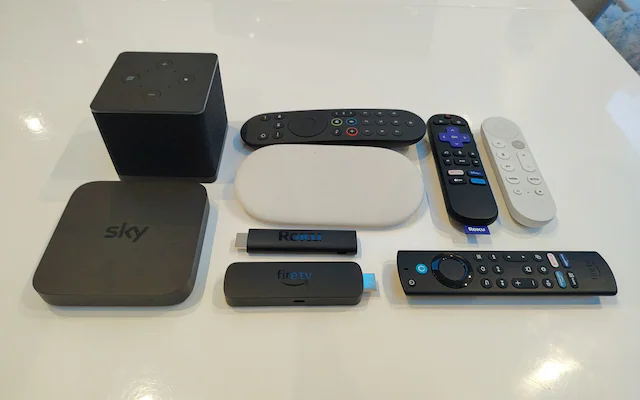
A Firestick can give an older television a modern app menu. A smart TV already has streaming apps built in, and some models also receive broadcast channels through an aerial. Both can make UK television easy to watch, but the better choice depends on your TV, the apps you need and whether you want live aerial channels or internet streaming.
For most people with a recent smart TV that already runs their favourite apps well, the built-in option is simplest. A Firestick becomes useful when a TV has missing, slow or outdated apps, or when you want the same familiar interface on another screen.
The quick answer
Choose your smart TV apps if they include the services you use, open quickly and receive updates. Choose a Firestick if those apps are absent or frustrating to use. If you want traditional Freeview channels through an aerial, check whether the TV itself has a working tuner and aerial connection: a Fire TV Stick plugged into HDMI does not turn that aerial signal into Freeview.
What is the difference
A Firestick is an external streaming device. You plug it into an HDMI port, connect it to Wi-Fi and install compatible apps from the Fire TV app store. It uses its own home screen and remote, while the television acts as the display. Amazon says supported Fire TV apps can provide live channels and a live TV browsing view.
A smart TV has its app platform inside the television. There is no separate streaming stick to power or switch to. The exact app selection, speed and menu design vary by brand, model and age. Some smart TVs also have a tuner for aerial channels, while their internet connection provides catch-up and other streaming apps.
Which is easier to set up
The smart TV usually wins for a first-time viewer. Connect the television to the internet, open its app store, install the apps you want and sign in. If the TV already has them, there may be little else to do. Live terrestrial channels require a suitable aerial connection and a television that can receive them.
Setting up a Firestick adds a few steps: plug it into HDMI and power, select the correct TV input, connect to Wi-Fi, sign in to an Amazon account and install apps. Once it is running, though, the same Fire TV menu can be familiar across different televisions. You do not need an aerial for apps that stream over the internet.
Which is easier to use every day
For someone who mainly opens one or two apps, a responsive smart TV keeps everything on one device and often one remote. If your television is older, however, its menus may feel slow or a needed app may no longer be supported. A streaming stick can give that screen a separate, newer app environment without replacing the television.
A Firestick is also handy if you move between rooms or travel with a compatible TV and internet connection. That convenience comes with another remote, another power connection and sometimes an extra step to select the HDMI input. App performance depends on the device, Wi-Fi, app and service on either setup; neither format guarantees an uninterrupted stream.
UK channels and broadcaster apps
Both routes can offer UK broadcaster apps when those apps support the specific device. Check BBC iPlayer, ITVX, Channel 4 and 5 in your device’s app store before you buy hardware. Access to live channels, catch-up programmes and regional services can differ between apps and devices.
There is an important distinction between streaming a broadcaster’s live channel inside its app and receiving terrestrial channels through a TV aerial. Freeview says an aerial is needed for live television through its TV Guide, although some programmes can be reached online through connected services. A Firestick offers app-based viewing; it is not a substitute for an aerial tuner if you want the full aerial channel experience.
What about a separate TV subscription
If you are considering a paid subscription beyond broadcaster apps, first choose the screen you prefer and then check the exact player app it requires. Availability on Fire TV does not automatically mean the same app exists for every Samsung, LG or other smart TV model. Also check device limits, cancellation terms and whether the provider has rights to distribute the content in its package.
For readers comparing Fire TV options, Firestick4UK describes its device-focused offering, and its UK IPTV subscription plans page lists compatible device categories. Confirm your precise model and supported app with the provider before purchasing.
You can also review The Flix IPTV and its UK subscription page if you are comparing another service. Check current compatibility, connection rules and content permissions directly; a subscription listing alone cannot establish what will work on your television.
Cost and upkeep
Using apps already available on a smart TV requires no extra streaming device. A Firestick adds an upfront hardware cost and needs an HDMI port, internet connection and power. Either way, individual apps or TV subscriptions may have charges of their own. The device you choose does not determine the price of those services.
Before buying a Firestick to fix a slow app, try updating the television software and the app, restarting the device and checking your Wi-Fi. If the app has stopped supporting your TV model, an external streaming device may be a more practical fix than replacing the whole television.
Which should you choose
Choose smart TV apps when
Your TV is reasonably recent, its apps cover your viewing needs, and you want the fewest devices and remotes. This is especially convenient when the same TV also handles aerial channels.
Choose a Firestick when
Your current TV still has a good picture but its app selection or interface lets it down. It also makes sense if you prefer the Fire TV menu or want a portable streaming setup for compatible screens.
If you are buying a new television, try its app store and menu before adding a stick. If you already own a TV, check the available apps first. The easiest setup is the one that reliably opens the programmes you actually watch.
Frequently asked questions
Do I need an aerial to watch UK TV on a Firestick
No aerial is needed for internet streaming apps. Aerial reception through a TV’s Freeview tuner is a separate method and requires the right equipment and signal.
Will every smart TV run the same apps as a Firestick
No. App availability and updates depend on the TV operating system, model and age. Confirm the specific app on your exact device before buying a subscription.
Do I need a TV Licence for streaming
A UK TV Licence is generally required to watch or record live television on any channel or streaming service and to use BBC iPlayer, including on demand. Viewing other on-demand content alone does not automatically require one. The rule depends on what you watch, not whether you use a Firestick or a smart TV.
Can a Firestick replace my smart TV
It can replace many built-in streaming functions by using the TV as a display. It cannot replace the physical screen, and it does not by itself provide the television’s aerial tuner.







Comment