If you are comparing DaVinci Resolve Speed Editor vs XPPen Pilot Pro, the real question is probably not “which device has more buttons?” It is more practical than that: which one will actually make your editing workflow faster?
Both products are designed to reduce repetitive editing actions, improve timeline control, and make creative work feel more physical than using only a keyboard and mouse. But they are built with different priorities.
The DaVinci Resolve Speed Editor is a dedicated editing keyboard designed around DaVinci Resolve, especially timeline editing, trimming, source tape navigation, and Cut page workflows. On the other hand, XPPen Pilot Pro Editing Console is a broader creative control console with customizable buttons, an all-way joystick, high-speed dials, haptic feedback, and one-hand operation.
So the decision comes down to this: do you want a DaVinci Resolve-focused editing keyboard, or a more flexible creative console for multiple workflows? Let’s dive into the difference between them!
DaVinci Resolve Speed Editor vs XPPen Pilot Pro: Specs at a Glance
| DaVinci Resolve Speed Editor | XPPen Pilot Pro Editing Console | |
| Product type | Dedicated editing keyboard | Creative editing console / joystick controller |
| Main workflow | DaVinci Resolve editing, especially Cut page workflow | Video editing, photo editing, color adjustment, shortcut-heavy creative workflows |
| Key controls | Large search dial, transport keys, trim keys, edit keys | Customizable buttons, all-way joystick, high-speed dials, haptic feedback |
| Software focus | DaVinci Resolve | DaVinci Resolve, Premiere Pro, Photoshop, Lightroom, Final Cut Pro, CapCut |
| Customization | More limited; optimized for Resolve workflow | Highly customizable buttons, joystick, and knobs |
| Connectivity | Bluetooth with built-in battery; more portable than a full-sized keyboard | USB-C wired connection and Bluetooth 5.4 Low Energy |
| Best for | Resolve-first editors who want faster cutting and trimming | Hybrid creators who want flexible control across editing and creative software |
What Is DaVinci Resolve Speed Editor?
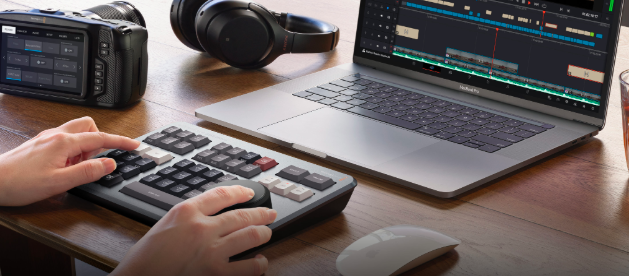
The DaVinci Resolve Speed Editor is a compact editing keyboard designed specifically for DaVinci Resolve. It removes the full QWERTY keyboard layout and focuses on the keys needed for editing. Blackmagic describes the Speed Editor as including a large search dial, specific editing keys, Bluetooth, and a built-in battery for portable wireless use.
Its most important feature is the search dial. This machined metal dial is designed to give editors a physical connection to the timeline, making searching, positioning, and trimming more accurate than using a mouse alone.
This makes the Speed Editor especially useful for users who spend most of their editing time inside DaVinci Resolve. It is not trying to be a general creative controller. It is built to improve one specific workflow: cutting faster in Resolve.
Main Features of DaVinci Resolve Speed Editor
The first major feature is the large search dial. It can be used for fast timeline movement, jog, shuttle, scroll control, and live trimming. Blackmagic notes that the search dial can be spun quickly to move through the timeline and can become a trim control when paired with trim buttons.
The second important feature is its dedicated transport and editing keys. These are designed for actions like playback, in and out points, source tape navigation, smart insert, append to end, ripple overwrite, place on top, and other Resolve-specific editing functions.
Another key strength is its source tape workflow. In DaVinci Resolve, source tape allows users to scroll through media as if all clips were arranged together, which can be useful for quickly reviewing large amounts of footage.
The Speed Editor also supports two-handed editing. Blackmagic explains that editors can use one hand for transport control and the other for placing in/out points and performing edits.
What Can You Do with DaVinci Resolve Speed Editor?
If you constantly review footage, mark in and out points, trim clips, and build rough cuts, the Speed Editor can make the process feel more direct. Instead of dragging through the timeline with a mouse, you can use a physical dial. Instead of hunting for commands in menus, you can press dedicated edit keys.
It is especially useful for editors working on talking-head videos, interviews, training videos, documentaries, news-style edits, promos, and projects where fast clip review and timeline assembly matter.
However, its strength is also its limitation. Because it is built around DaVinci Resolve, it is less attractive if your work frequently moves into other software. If you also spend a lot of time in Photoshop, Lightroom, Premiere Pro, Final Cut Pro, or other creative tools, the Speed Editor may not help as much outside Resolve.
Pros and Cons of DaVinci Resolve Speed Editor
Pros
- Excellent for DaVinci Resolve users
- Large search dial is strong for timeline navigation and trimming
- Dedicated edit keys can speed up Cut page workflows
- Good for reviewing footage and building rough cuts
- Bluetooth and a built-in battery make it more portable than a full-sized keyboard
Cons
- Mainly useful inside DaVinci Resolve
- Less flexible for users who want customizable controls
- Not designed as a general creative console
- Some keys may be unused if your workflow does not match Resolve’s Cut page logic
What Is XPPen Pilot Pro Editing Console?
The XPPen Pilot Pro Editing Console is a compact creative control device designed to make editing workflows more tactile and efficient. Instead of relying only on a keyboard and mouse, it gives creators physical controls for frequent actions such as timeline navigation, shortcut triggering, parameter adjustment, color control, and frame-by-frame editing.
Unlike a dedicated DaVinci Resolve keyboard, Pilot Pro is built for broader creative use. It supports customizable buttons, an all-way joystick, high-speed dials, haptic feedback, and one-hand operation, making it suitable for video editing, photo editing, color adjustment, and other shortcut-heavy workflows.
For creators who often move between different software or editing tasks, Pilot Pro offers a more flexible way to build a personalized control setup. It is not meant to replace a keyboard and mouse completely, but to handle the repetitive actions that slow down the editing rhythm.
Main Features of XPPen Pilot Pro Editing Console
The Pilot Pro’s first major feature is customization. XPPen says the buttons, joystick, and knobs are highly customizable for mainstream software such as DaVinci Resolve, Premiere Pro, Photoshop, and Lightroom, with preset shortcuts that can switch automatically when changing between applications.
The second key feature is its all-way joystick. This gives users directional control that can be used for navigation, color-related adjustments, and command operation. For editors who do more than simple timeline cutting, this extra layer of control can be useful.
The third important feature is its high-speed dials. XPPen positions the Pilot Pro around timeline control, frame-by-frame editing, keyframe control, and quick positioning. The product page highlights use cases such as “Pinpoint Keyframes with Ease,” “Fast and Precise Color Grading,” and “High-speed Dial.”
It also has a compact one-hand layout. XPPen says the console is designed for eyes-free control, allowing users to operate it with one hand while avoiding frequent switching between the desktop and screen.
What Can You Do with XPPen Pilot Pro Editing Console?
Many modern creators do not stay inside one software. A YouTuber may edit in DaVinci Resolve, create thumbnails in Photoshop, color-correct footage, adjust audio, and repurpose clips for short-form platforms. A photographer-videographer may move between Lightroom, Photoshop, DaVinci Resolve, and Premiere Pro. A content creator may care less about one perfect Cut page workflow and more about having one compact device that can handle repeated actions across different tasks.
This is where Pilot Pro feels more practical. Its customizable buttons can be used for frequent commands. Its dials can support timeline movement, zooming, frame-by-frame review, or parameter adjustment. Its joystick can support navigation or color-related control. Its themes and presets can help users switch between different software setups.
For editors who want one device to support more than one workflow, this device is worth considering.
Pros and Cons of XPPen Pilot Pro Editing Console
Pros
- More flexible for multi-software creative workflows
- Customizable buttons, joystick, and dials
- Supports mainstream software, including DaVinci Resolve, Premiere Pro, Photoshop, Lightroom, Final Cut Pro, and CapCut
- One-hand and eyes-free control can help maintain editing flow
- Joystick and dials add more control options beyond shortcut keys
- Compact and lightweight design
Cons
- Requires setup and customization to get the best experience
- Not as deeply integrated with DaVinci Resolve as the Speed Editor
- Users who only edit in Resolve may prefer a dedicated Resolve keyboard
Conclusion
Go for DaVinci Resolve Speed Editor if your workflow is almost entirely built around DaVinci Resolve and you want a dedicated hardware keyboard for faster cutting, trimming, and timeline navigation. However, if you want a more flexible, customizable controller that can support video editing, photo editing, color adjustment, and creative work across multiple applications, then the XPPen Pilot Pro is the better one.