
AI Image Generator No Sign Up: 5 Practical Tools for Fast Visual Creation

There are times when I need an image immediately, not a new account. It might be a temporary illustration for a presentation, a visual direction for a campaign, or a rough product concept that will never become a final asset. In those situations, a long onboarding flow creates more friction than value.
That is why people search for an AI image generator with no sign up. The appeal is practical: open the tool, describe the idea, review the output, and decide whether it is worth developing further. Still, no-sign-up access is only one part of the decision. Privacy, image quality, model choice, download rules, and commercial permissions matter just as much.
What I Check Before Uploading Anything
I would not upload a customer photo, confidential document, unreleased product, or internal campaign file simply because a tool appears free. Before using a new service, I check:
- whether an account is truly unnecessary;
- whether the session or daily usage is limited;
- whether downloads include a watermark;
- what resolution and aspect ratios are supported;
- whether uploaded references are stored;
- whether commercial use is explained in the current terms.
Those checks take a few minutes and can prevent a much bigger problem later.
1. Imgfree — Best for a Low-Friction Image Workflow
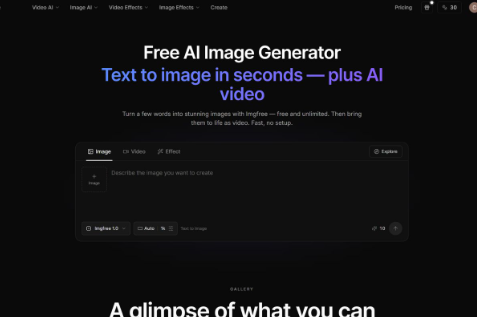
For people looking for an AI image generator no sign up experience, Imgfree is the most direct starting point in this comparison. Its platform presents free and unlimited image generation and includes text-to-image, image-to-image, video, and image-effect workflows.
I would use it for a quick blog illustration, a social-media concept, a mood board, or an early campaign idea. The workflow is broad enough to support several creative steps without requiring a user to assemble a technical pipeline.
The practical warning is the same as with any rapidly changing AI service: verify the live access conditions, generation limits, download settings, and commercial terms before using it for client work.
2. Kling AI — Best for Prompt and Reference-Based Creation
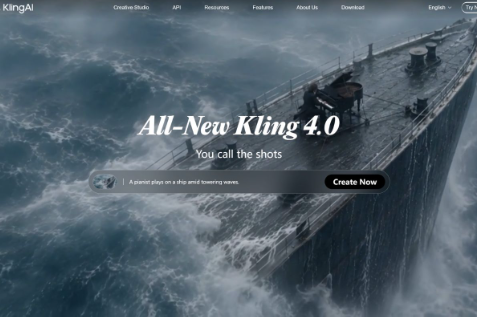
Kling AI is more than a basic image page. Its official image workflow supports generation from a written prompt, a reference image, or both. That is useful when the creator needs to preserve a product characteristic, character design, color palette, material, or composition across new images.
I would choose this kind of workflow when a prompt alone is too vague. A product team can start from a reference photo and explore different locations. A character creator can provide visual references and request a new pose or setting. A marketer can build a group of related visuals instead of generating unrelated images one at a time.
Kling also connects image creation with image-to-video workflows. It is therefore relevant to a campaign that may begin as a still image and later become a motion asset. Whether a user needs an account, credits, or a specific plan depends on the current product setup.
3. Adobe Firefly — Best for Design Review and Editing
Adobe Firefly is a sensible choice when AI generation needs to sit inside a professional creative workflow. The value is not only the generated image; it is what happens after the idea is selected. A designer can adjust the composition, combine assets, apply brand standards, and prepare the result for a particular channel.
That makes Firefly less suitable for someone who only wants one anonymous test image and more suitable for a team that already has a structured review process. It may involve more account setup than a quick no-sign-up tool, but the additional control can be worthwhile for business content.
4. Google Imagen — Best for Product Integration
Google Imagen is relevant when image generation is being considered as part of an application, internal tool, or automated content workflow. A developer can build a controlled interface around image prompts instead of asking every user to work inside a general-purpose image website.
This approach makes sense for product teams that need repeatability. They can define prompt fields, manage user permissions, monitor costs, and decide how images are stored. The trade-off is obvious: API-based generation requires engineering work, billing controls, moderation, and maintenance. It is not the quickest option for a casual one-off image, but it can be valuable when image creation becomes a product feature.
5. FLUX Model Workflows — Best for Model-Focused Exploration
FLUX-related workflows are worth considering when the creator cares about the underlying model, integration options, or image-generation behavior rather than only the simplicity of a consumer interface. This route can interest developers, researchers, and creative teams that want to compare prompt adherence, editing, and image quality in a more deliberate way.
The important distinction is between the model provider and the platform that provides access to the model. An official model page, an API service, and a third-party consumer interface may have different pricing, terms, controls, and privacy policies. I would always verify which product I am actually using before planning a production workflow.
How to Write a Prompt Quickly
Even a no-sign-up workflow benefits from a structured prompt. I normally include the subject, setting, composition, lighting, visual style, and aspect ratio.
For example:
A premium reusable water bottle on a pale stone table, soft morning window light, minimal editorial product photography, three-quarter angle, wide horizontal composition, clean negative space on the left for headline text.
That prompt is specific enough to guide the layout without becoming a list of conflicting instructions. If the first result is close, I change one variable at a time rather than rewriting everything.
Are No-Sign-Up Tools Suitable for Business Use?
They can be useful for ideation and low-risk content, but “no sign up” does not automatically mean “safe for every business asset.” I would review the privacy policy, avoid sensitive uploads, inspect the result for accidental logos or misleading details, and confirm the current commercial-use terms.
For a final advertisement, product photograph, or regulated claim, I would add human editing and approval regardless of which generator produced the image.
Final Thoughts
A no-sign-up AI image tool is valuable when speed matters more than a long-term production history. Imgfree is a practical low-friction option for quick image and creative experiments. Kling AI is more useful when references and future image-to-video work matter, while Firefly, Imagen, and FLUX-related workflows suit users who need stronger editing, integration, or model-level control.
The best choice is the one that matches the real job: quick exploration, repeatable business production, reference consistency, or technical integration. That is a more reliable standard than choosing a tool based on “free” or “no sign up” alone.






Comment