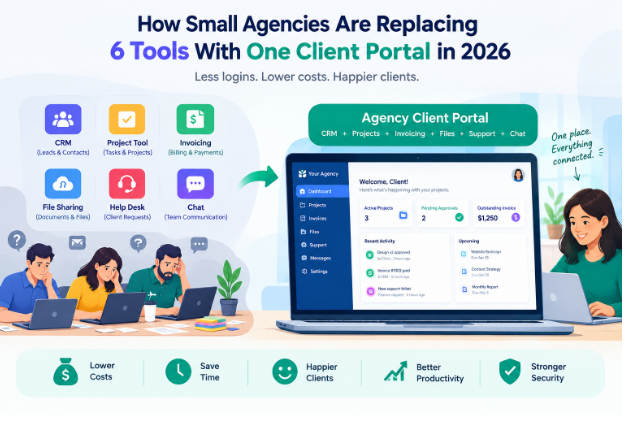
Picture a 10-person agency on a Monday morning. Leads live in a CRM. Tasks live on a project board. Invoices go out from an accounting app, files sit in Google Drive, client requests land in a help desk, and the team talks in a chat tool.
That is six logins, six bills, and six places a client might need to look.
Clients notice. They want one place to see progress, approve work, find files and pay invoices, and they want it to feel like your agency rather than a patchwork of other companies’ software.
That is why more small agencies are rethinking their stack. The client portal is no longer one more tool on the list. It is becoming the agency’s operating system: the place where sales, delivery, billing and support connect, and where the client experience lives.
Here are the six tools small agencies are folding into a single portal, and how to decide whether the move makes sense for yours.
1. The Standalone CRM
Sales CRMs were built for sales teams with long pipelines and many reps. A small agency works differently: a handful of new deals each month, followed by long retainer relationships where the real work happens after the contract is signed.
The gap shows up at handoff. The deal closes in the CRM, then someone re-creates the client, the scope and the contacts in the project tool. Notes from the sales call rarely make the trip.
A CRM with a built-in client portal closes that gap. The lead becomes a client record, the proposal becomes a project, and the person who signed becomes a portal user. Nothing gets copied, and the context from sales stays attached to the account.
What to look for: Simple lead capture, a pipeline that fits a few deals a month, and one-click conversion from lead to client.
2. Project and Task Management
Internal boards work well for the team, but clients cannot see them. So agencies end up writing status emails, building weekly update decks, and answering “where are we on this?” in three different channels.
When project management is connected to the client portal, clients see what they need: milestones, upcoming deliverables, and items waiting for their approval. Internal notes and subtasks stay private. The weekly status email becomes a link.
Approvals are where this pays off most. When a client approves a design or a draft inside the portal, the decision is recorded next to the task, with a date, instead of sitting in an email thread.
What to look for: Client-visible milestones, approval buttons on deliverables, and control over what clients can and cannot see.
3. Invoicing and Payments
Billing is where switching between apps costs real money. Hours tracked in one tool have to be re-typed into another, and anything that slips through is work you delivered for free.
Bringing invoicing into client workflows fixes the handoff:
- Retainers: Recurring invoices go out on schedule, tied to the client’s account.
- Quotes to invoices: An approved quote turns into an invoice without re-entering line items.
- Tracked time: Billable hours flow straight onto the invoice.
- Online payment: Clients pay by card or bank transfer in the same portal where they follow their project.
Not ready to move billing yet? A free invoice generator is a quick way to test branded invoices before you commit to a platform.
4. File Sharing
Google Drive and Dropbox are excellent storage tools. The friction shows up in client work: share links get buried in email, permissions drift, and three versions of “final_v2” end up in circulation.
Keeping files next to the project solves both problems. Each file sits with the task or milestone it belongs to, clients always know where to look, and the latest version is the one attached to the approval. For a closer look at the trade-offs, see this comparison of a client portal vs Google Drive.
What to look for: Files attached to projects and tasks, client uploads, and enough storage per plan for your typical deliverables.
5. The Support Desk
Client requests arrive from everywhere: an email to the account manager, a WhatsApp message to the founder, a comment in a shared Slack channel. Each one is easy to miss and hard to track.
Support tickets give every request a home. Each ticket has a status, an owner and a full history, so nothing depends on someone remembering a message from last Tuesday. When tickets live inside the client portal, clients can check progress themselves, and your team sees each request next to the project it relates to.
Some portals also bring email and WhatsApp conversations into the same inbox, which helps when clients prefer to message rather than log in.
What to look for: Ticket statuses and owners, client-side ticket submission, and links between tickets and projects.
6. Client Communication and Onboarding
Onboarding is a client’s first real experience of working with you, and it often runs on email: a welcome message, a questionnaire as a PDF, a contract sent through a separate e-signature tool, then a follow-up asking for logins and brand assets.
A portal turns that into one flow:
- The client fills in an intake form.
- They review and e-sign the contract.
- They pay the deposit or first invoice.
- They land in their portal with the project already set up.
Every step happens in the same branded space, and your team can see exactly where each new client is. If you want to map your own process before choosing a tool, a client onboarding checklist generator helps you list every step first.
What to look for: Built-in forms, e-signatures, and an onboarding sequence you can reuse for every new client.
How to Choose a Client Portal for Your Agency
Not every portal fits every agency. Before you commit, run each option through this checklist:
- White-labeling: Can clients use the portal on your domain, with your logo, and get emails from your address? Check which plan unlocks it.
- Client-side experience: Log in as a test client. Is it obvious where to find files, approvals and invoices without a walkthrough?
- Integrations: Does it connect to your payment gateway, email and the tools you plan to keep, through native integrations, Zapier or an API?
- Pricing model: Flat plan, per seat or per client? Model the cost at today’s team size and at the size you expect in two years.
- Migration: Will the vendor import your clients, projects and invoices, or help you move them?
- AI features: Useful when they draft status updates, summarize long threads or sort incoming requests. Less useful when they are a bolt-on chat window.
A few platforms agencies commonly shortlist:
- Taskip: Combines CRM, projects, invoicing, support tickets and a client portal in one workspace, with flat plan pricing instead of per-seat fees. A good fit for agencies that want sales, delivery and billing connected end to end.
- SuiteDash: A very broad all-in-one platform with white labeling on every plan and unlimited users. A good fit for teams that want many modules in one place and have time for a longer setup.
- ManyRequests: Built around client requests and productized services. A good fit for design and development agencies that sell packaged work through a request-based flow.
Whichever you lean toward, run a two-week trial with one friendly client before moving everyone over.
The Cost Math
Here is an illustrative monthly stack for a small agency. Real prices vary by vendor, plan and seat count, so treat these as round numbers to swap for your own.
| Tool | Illustrative monthly cost |
| CRM | $45 |
| Project management | $40 |
| Invoicing | $25 |
| File storage | $20 |
| Help desk | $50 |
| Team chat | $30 |
| Total | $210 |
The subscriptions are only the visible part. The larger costs rarely show up on a bill:
- Re-entering data: The same client details typed into three or four tools.
- Switching between apps: Time lost every time someone jumps from the board to the inbox to the invoicing app.
- Unbilled hours: Time that never makes it from the tracker onto an invoice.
- Onboarding new hires: Every new team member learns six tools instead of one.
Compare your stack’s total against a single platform’s plan for your team size, then add back the hours you would recover. That combined number, not the subscription savings alone, is the real case for consolidating.
Conclusion
Consolidating tools saves money, but the bigger win is the client experience. One login, one branded space, and one place where progress, files, approvals and invoices live together makes a small agency feel organized and easy to work with.
You do not need to switch everything at once. Start by moving one or two workflows, such as file sharing and approvals, into a portal. Run it with a few clients, see what they use, and then bring in billing, support and onboarding.
The agencies that make this shift are not just cutting subscriptions. They are giving clients a better way to work with them.