New Delhi, September 10, 2026
Why ask “where” when you can ask “why”? The two student founders are building around one bet: that children learn more from asking a better question than from remembering the correct answer.
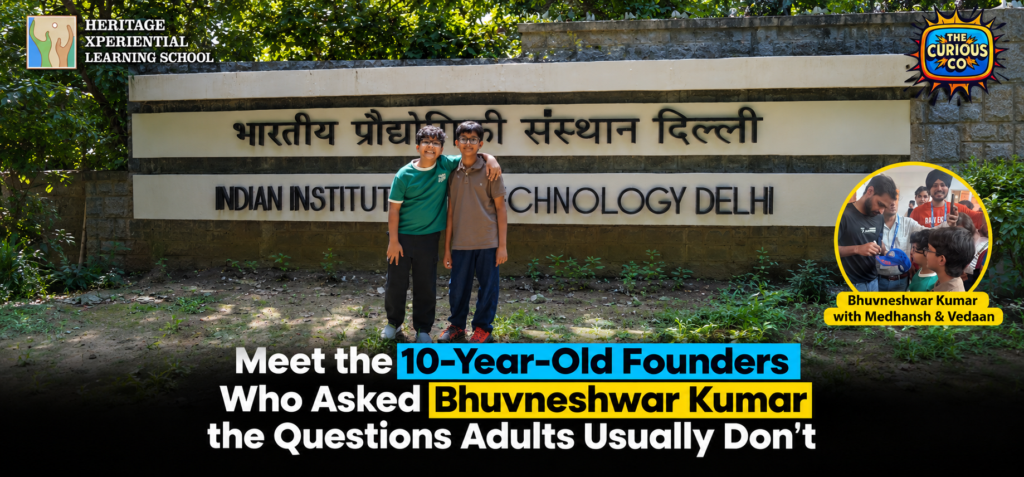
NEW DELHI, September 10, 2026: Cricketers get asked about spells, finals, and what the dressing room felt like before a big game. At IIT Delhi on Thursday, Bhuvneshwar Kumar got asked why anyone still needs a coach after they have already become good at something.
The question came from a 10-year-old.
“Bhuvi sir, why do we still need a coach even when we become really good at something?” asked Medhansh, standing in a hall of founders, investors and faculty at FITT Forward 2026.
His co-founder Vedaan, also 10, had the second question. “Bhuvi sir, why do we need to lose sometimes?”
Neither boy asked for an autograph. The autograph came later, and Kumar was the one who offered it.
The question that started it
Medhansh and Vedaan are students at Heritage Xperiential Learning School and the founders of The Curious Co., an early-stage venture built on a plain observation: most learning rewards a child for producing the right answer, and very little of it rewards a child for asking a better question.
The idea started at home, with the Taj Mahal.
Medhansh was asked where the Taj Mahal is. Agra, obviously. Then came a second question: why is the Taj Mahal in Agra? That one was much harder, and it is the question the company came out of.
The distinction has stayed the founding idea. Ask a child where the Taj Mahal is and most of them will say Agra. Ask why it is in Agra and the conversation goes somewhere else entirely, into rivers and trade routes, marble and labour, an empire and a death. One question tests recall. The other opens an investigation.
“We realised that most learning teaches kids to remember answers,” Vedaan told the room, before Medhansh finished the thought: they want children to go one level deeper and ask why. What the two are building, in their own description, is curiosity-based learning delivered through questions, challenges and activities that push children to think, explore and arrive at answers themselves.
Why the idea is worth a second look
Children today have more access to answers than any generation before them. Search, AI assistants, school, video, and a phone in the house. If the answer is close to free, the scarce skill shifts to knowing which question is worth asking in the first place.
What gives the thesis its weight is who is making it. Medhansh and Vedaan are not observing the problem from the outside. They are sitting inside the classroom they are describing, and they are questioning the way they themselves are being taught.
The Curious Co. has raised a first seed round from friends and family. The founders have formally constituted a board and lined up a series of interviews with IAS officers, cricketers, doctors and entrepreneurs, each conversation built on the same format the audience saw on stage: ask why, then keep asking. It remains early, and the founders made no claims at IIT Delhi about learning outcomes or scale.
The room they walked into
FITT Forward 2026 was organised by the Foundation for Innovation and Technology Transfer (FITT) at IIT Delhi on September 10, and Bhuvneshwar Kumar attended as Guest of Honour in his capacity as a cricketer and an investor in Aires.
Prof. Rangan Banerjee, Director of IIT Delhi, Dr. Nikhil Agarwal, Managing Director of FITT, and Prof. Vivek V. Buwa, DDSP at IIT Delhi, were among the institutional leadership present, alongside founders including Vidit Bhalotia of Aires and Mohammed Sirajuddin of LegaXy.
One of the featured sessions, “Beyond the Game: Athletes as Investors, Entrepreneurs and Builders of India’s SportsTech Future,” was followed by a fireside conversation with Bhuvneshwar Kumar titled “From Performance to Entrepreneurship.” It was moderated by entrepreneur and investor Puneet Gupta (puneetgupta.org), and it ran through performance under pressure, consistency, failure, technology and what athletes bring to company building.
A demonstration instead of a pitch
Midway through the session, the two youngest people in the hall were invited to introduce themselves. Medhansh and Vedaan represented The Curious Co. for roughly a minute.
Then, instead of a conventional pitch, they were asked to demonstrate the philosophy rather than describe it, by putting one “why” question each to Kumar. Kumar responded to both.
The exchange changed the register of the room. A session that had until then been squarely adult, on capital and performance and company building, turned lighter and more direct, and the shift held for the rest of it. What began as an introduction to two young founders had become a live demonstration of their central idea.
The response was not only from Kumar. Dr. Nikhil Agarwal, Managing Director of FITT, asked the founders from the stage whether FITT could invest in their company. Nothing was signed and no investment has been agreed, but it is not a question usually put to a pair of 10-year-olds. Kumar asked to meet the two afterwards and signed their cap himself.
Mentorship, asked and answered
Gupta had opened the session with a recollection of his own. Around 2013 and 2014, while working on a defence project, he had the opportunity to meet Dr. A.P.J. Abdul Kalam. He was careful to say that he does not remember the exact words, only the lesson, which he paraphrased roughly as this: flying a plane is relatively easy, and it is when you hit turbulence that the experience of the pilot starts to matter.
He connected it to founders. In good weather most people can navigate. It is in the turbulence that the right mentor earns their place, and it is one of the things an ecosystem like IIT Delhi and FITT offers beyond labs, technology and capital, which is proximity to people who have already been through what a founder is walking into.
The session opened on mentorship. It returned to mentorship in a question from a 10-year-old about why a coach still matters after you are already good. Medhansh, as it happens, recently played Dr. Kalam in a school production, which is not something the organisers could have arranged.
What the questions were really testing
Both questions look small on paper. Neither is. “Why do we still need a coach even when we become really good at something?” is a question about the limits of self-assessment, and about why elite performers keep paying for outside eyes. “Why do we need to lose sometimes?” is a question about how anyone learns anything, and it was put to a fast bowler who has spent a career in a format where the ball gets hit.
That gap between how simple a question sounds and how far it travels is the whole thesis of The Curious Co.
The founders did not launch a product at IIT Delhi. They introduced an idea, in front of a room that mostly spends its time on capital, technology and scale, and then showed what it looks like in practice. For a generation that can retrieve almost any answer in seconds, the harder skill may turn out to be knowing which question is worth asking. Two 10-year-olds are betting on it, starting with their own classrooms.
ABOUT THE CURIOUS CO.
The Curious Co. is an early-stage curiosity-based learning venture founded by Medhansh and Vedaan, both 10 years old and students at Heritage Xperiential Learning School. It is built on the idea that children should be encouraged to ask why rather than only recall what. The company has raised a first seed round from friends and family, has formally constituted a board, and is producing a series of conversations with IAS officers, cricketers, doctors and entrepreneurs, each structured around asking better questions.
Website: medhanshgupta.com
ABOUT FITT FORWARD 2026
FITT Forward 2026 was held at IIT Delhi on September 10, 2026, organised by the Foundation for Innovation and Technology Transfer (FITT), the technology transfer and industry interface arm of IIT Delhi. The programme brought together IIT Delhi leadership, founders, investors, technologists and athletes.
The Curious Co. | medhanshgupta.com