
Before the Shoot: How AI Clothes Changers Help Fashion Teams Shortlist Looks

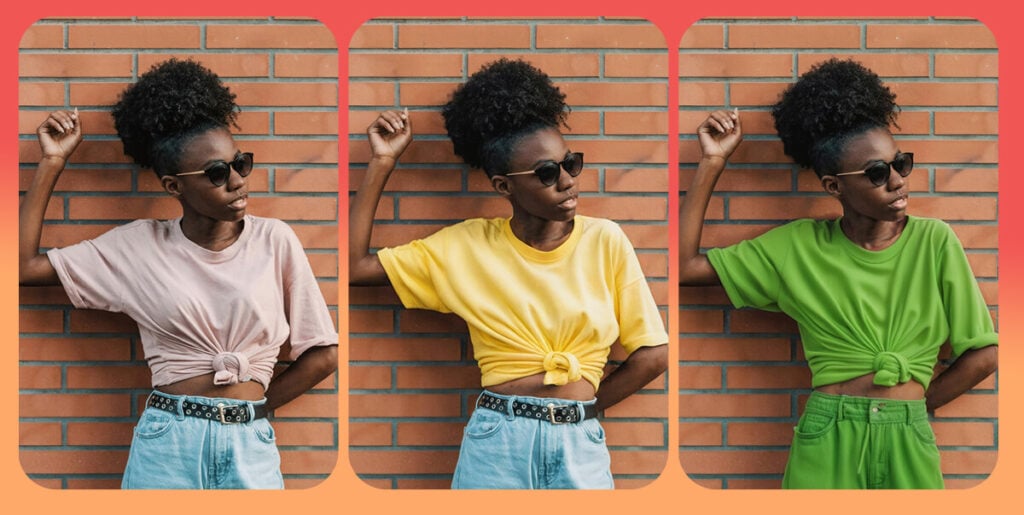
Fashion campaigns rarely fail because a team has no ideas. They fail because too many ideas reach the expensive stage before anyone has seen what they look like.
A creative director may want a softer seasonal palette. The ecommerce lead may want the same model in three outfit directions. The paid social team may need a cleaner hook for the first frame of an ad. The stylist may know the garment works, but not whether the full look feels too formal, too flat, or too far from the brand.
Traditionally, teams answered those questions during a shoot or in post-production. That is late. By then, people, samples, space, equipment, and retouching time are already committed.
AI clothing-photo workflows give teams a useful draft layer before that point. A tool that can swap clothes in photos can help a fashion or ecommerce team compare outfit directions from a clean source image, narrow the brief, and decide what actually deserves a real production pass.
That does not mean AI should replace the final shoot, especially when a product image needs to prove exact fabric, fit, color, or condition. The smarter use is earlier: pre-production, creative review, and risk reduction.
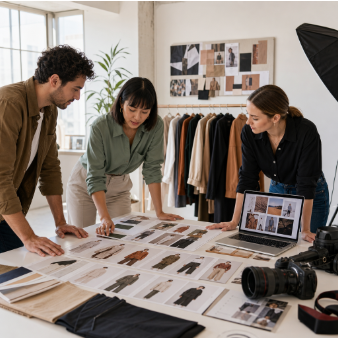
A fashion team can use AI previews to narrow campaign styling directions before booking a full shoot.
Why the pre-shoot stage is where AI helps most
The most useful place for AI clothes changing is not always the final image. It is the messy stage before the final image exists.
At that point, teams are still asking practical questions. Does the blazer look stronger with wide-leg trousers or a skirt? Does the campaign need warm neutrals or a sharper black-and-white direction? Should the model be styled for office, evening, travel, or weekend use? Is the product the hero, or is the outfit distracting from it?
Those are expensive questions to answer with a full shoot. They are easier to answer with controlled visual drafts.
AI previews let a team move from abstract discussion to visible options. Instead of debating a mood board, the team can compare several styled directions on a similar source photo. Weak concepts become obvious faster. Strong ideas move forward with a clearer brief.
This is the same reason rough wireframes matter in software and storyboards matter in video. They are not the final product. They help the team make better decisions before the costly work begins.
Build an outfit shortlist before booking production
A useful AI clothes workflow starts with restraint. The goal is not to generate hundreds of looks. The goal is to create a shortlist that makes the next decision easier.
Start with one clear person image. Use a full or half-body shot where the pose, lighting, and garment area are easy to read. If the source image is cropped tightly, covered by hands, or filled with heavy shadows, every later review becomes harder.
Next, collect the real inputs the team wants to test. That might include product photos, flat-lay garment images, brand color references, styling notes, and a short creative brief. If the team does not have a garment photo yet, it can still test broader styling directions, but those previews should be labeled as concept work rather than product-accurate proof.
Then test one decision at a time. Compare three jacket directions, not three jackets plus a new background plus a new pose plus a new camera style. If every variable changes, the team cannot tell what improved the image.
A simple shortlist process works well:
- Define the campaign use case: product page, paid social, email header, lookbook, or internal mood test.
- Choose the source image and garment references.
- Generate a small set of outfit variations.
- Remove anything that distorts the body, face, hands, garment structure, or brand mood.
- Move the strongest two or three directions into a review meeting.
- Decide which looks deserve real production, AI refinement, or no further work.
This keeps AI in the role of a filter. It helps the team see more options earlier, but it does not remove the need for taste or review.
Use AI dress-up for concept breadth, not product claims
There are two different jobs inside this workflow.
The first is product-anchored testing. A team has a real garment and wants to see how it could look on a model or inside a styling direction. This is closest to virtual try-on, ecommerce previewing, or product photo planning.
The second is concept exploration. The team may not have the final garment yet. It may only know that it wants “soft office tailoring,” “airport-ready travel layers,” “minimal winter neutrals,” or “a brighter spring campaign direction.” In that case, an AI dress up tool can help turn vague styling language into visual options on a real source photo.
The distinction matters. Concept exploration is useful for internal planning, creative direction, and mood testing. It should not be treated as a final claim about a real product. Product-accurate imagery still needs stronger evidence: the actual garment, accurate color, real fabric behavior, and human review.
That boundary is what makes the workflow credible. AI can make ideation faster. It should not make product claims looser.
A decision table for fashion teams
Before an AI-assisted clothing visual moves forward, the team should decide what kind of output it is.
| Situation | AI preview is enough | Real shoot or product-accurate image needed |
| Internal mood board | Yes, if clearly labeled as a concept | Only if the image will become a public product claim |
| Paid social concept | Good for early hook testing | Needed before running a product-specific claim at scale |
| Ecommerce listing | Useful for planning variants | Needed when customers rely on exact color, fabric, fit, or condition |
| Lookbook direction | Useful for narrowing styling | Needed for final brand campaign images |
| Client or stakeholder review | Good for comparing options | Needed when approval depends on final product accuracy |
This table protects the team from the most common mistake: treating every AI image as either useless or ready to publish. Most AI previews sit in the middle. They are strong enough to guide a decision, but not always strong enough to stand as the final asset.
What to check before a visual goes public
The review step should be specific. A general “looks good” is not enough.
First, inspect the garment. Look at collars, cuffs, hems, seams, sleeves, zippers, straps, buttons, logos, pockets, and printed details. These are the areas where small visual errors show up first. If the AI changes the product in a way that could mislead a buyer, the image should stay internal.
Second, check the person. The face, body proportions, skin tone, hands, and pose should not drift in a way that makes the image feel false or uncomfortable. If the visual uses a real person, the team should have the right to use and edit that image.
Third, check the context. A look that works for an editorial mood board may not work for a product page. A social preview can be more expressive than a marketplace listing. A campaign concept can be looser than a sizing or fabric reference.
Finally, check the policy side. For any tool that processes face or body photos, the team should understand retention, deletion, model-training rules, encryption, and consent. A practical safe AI clothes changer checklist is worth using before the workflow becomes part of a team’s regular content process.
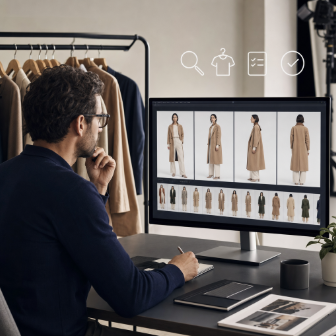
A human review step helps teams catch garment, consent, and brand-fit issues before an AI-assisted visual goes public.
Where human judgment still belongs
AI can generate visual options quickly, but it cannot own the final judgment for a brand.
It does not know whether a campaign image will disappoint a customer who expects a particular fabric. It does not know whether a colorway is true enough for a product page. It does not know the difference between a harmless internal styling test and a misleading product claim unless the team sets that boundary.
That is why the best workflow keeps people in control at three points.
The creative lead decides which directions fit the brand. The ecommerce or product lead decides which visuals are accurate enough for customer-facing use. The legal, privacy, or operations owner decides whether the source images, consent, and tool policies are acceptable.
Small teams may not have all those job titles, but they still need the functions. Someone should own taste. Someone should own product truth. Someone should own permission and policy.
AI is most valuable when it speeds up those conversations, not when it bypasses them.
A one-week pilot workflow
Teams do not need a large transformation project to test this.
On Monday, choose one narrow use case. For example, a spring jacket campaign, a capsule wardrobe email, or a paid social test for a new dress collection.
On Tuesday, prepare source images and garment references. Keep the first test small. One model image and three to five outfit directions are enough.
On Wednesday, generate controlled variations. Do not chase every interesting result. Save only the options that answer the original brief.
On Thursday, hold a short review. Sort the images into three groups: strong enough for the next stage, useful only as internal inspiration, and discard.
On Friday, update the production plan. The team may book a real shoot with a tighter styling list, refine one AI-assisted concept for social testing, or drop a weak direction before it consumes more time.
The value of the pilot is not just the images. It is the new decision rhythm. The team learns which styling questions AI can answer early and which questions still require physical production.
The practical takeaway
AI clothes changers are not a replacement for product truth, brand judgment, or professional production. They are a faster draft layer for fashion teams that need to make better visual decisions before the expensive work starts.
Used well, they help teams shortlist outfits, compare campaign directions, catch weak ideas, and prepare a sharper shoot brief. Used carelessly, they can blur the line between concept and proof.
The difference is process. Start with a clear brief. Test a small number of variations. Review the garment, person, context, and consent. Publish only what holds up. That is how AI clothing workflows become useful business tools rather than just another novelty in the creative stack.





Comment