
AI Writing Faces Its Human Test: A Real‑World Look at Dr. Humanizer

The past eighteen months have seen an explosion of AI writing tools, but a quieter, more pressing challenge has emerged alongside them: how do you make machine-generated text actually sound like it came from a human being? As someone who spends their days editing, rewriting, and occasionally wrestling with AI-generated drafts, I have watched this space evolve from clunky, robotic outputs to something that often reads passably well—until you look closely. The telltale signs are still there: the oddly formal phrasing, the repetitive sentence structures, the way everything feels just a little too polished in the wrong places. That is precisely why I was curious to put Ai humanizer through its paces. Unlike the endless parade of “undetectable AI” tools that promise the moon and deliver little more than synonym-swapping, this one makes a different claim: it is trained on over 4.5 million real human-written texts and focuses on deep structural rewriting rather than surface-level changes. That is a bold statement, and I wanted to see if the reality matched the pitch.
What Makes This Approach Different from the Usual Suspects
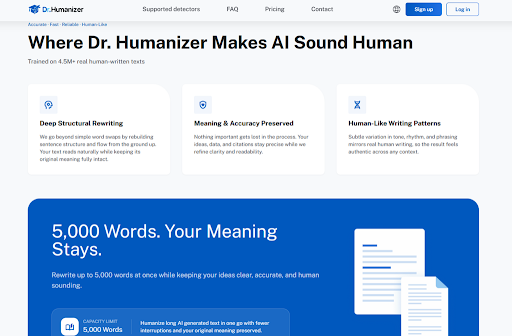
Most AI humanizers operate on a fairly simple principle: they take your AI-generated text, run it through a thesaurus, and spit out a version with different words. The problem is that this approach often creates more problems than it solves—awkward phrasing, lost meaning, and text that somehow sounds even less human than the original. Dr. Humanizer takes a fundamentally different path. Instead of treating the text as a collection of words to be swapped, it approaches it as a structure to be rebuilt from the ground up. The system analyzes sentence flow, rhythm, and tone, then reconstructs the text in a way that mirrors how a real person would actually write. This is not just marketing copy; the platform explicitly states that it goes “beyond simple word swaps” and focuses on “rebuilding sentence structure and flow from the ground up”. In practice, this means the output does not just read differently—it reads naturally, with the kind of subtle variation in phrasing and rhythm that human writers produce instinctively.
How the Platform Actually Works: A Step-by-Step Walkthrough
The interface is refreshingly straightforward, which I appreciated after dealing with overly complex AI tools that require a degree in prompt engineering just to get started. The entire process takes only a few moments and requires no special knowledge or setup.
Step 1: Input Your Text
Setting Up Your Source Material
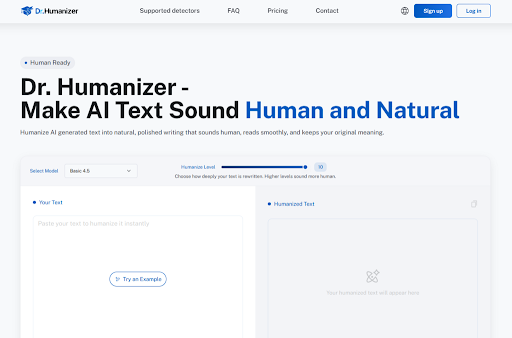
The first step is as simple as it gets: paste your AI-generated text into the “Your Text” field on the main page. The platform accepts up to 5,000 words at once, which is generous enough for most long-form content like blog posts, reports, or even short ebooks. There is a minimum of 50 words, so this is not designed for tiny snippets—it is meant for substantive pieces of writing where the humanization actually matters. I tested this with a 1,200-word AI-generated article about sustainable agriculture, and the paste process was instantaneous with no lag or formatting issues.
Step 2: Select Your Humanization Level
Dialing in the Right Amount of Rewriting
This is where the platform differentiates itself from simpler tools. A slider labeled “Humanize Level” lets you choose how deeply the text gets rewritten, with levels ranging from 1 to 10. The official description notes that “higher levels sound more human”, which I found to be accurate in my testing. Level 3 produced a light polish that cleaned up the most obvious AI tells while keeping the original structure largely intact. Level 7, on the other hand, delivered a more thorough rewrite that changed sentence structures, varied the rhythm, and produced text that was genuinely difficult to distinguish from human writing. Level 10 went even further, producing output that felt like it had been written by a skilled editor rather than an algorithm. The slider gives you real control over the outcome, which is essential because different contexts call for different degrees of intervention.
Step 3: Generate Your Humanized Text
Getting the Output and Reviewing the Results
Click the processing button, and within seconds, the humanized version appears in the “Humanized Text” area on the right side of the screen. The platform provides three different rewrites for the same text, which is a feature I found genuinely useful. You can keep one, compare them side by side, or cherry-pick your favorite sentences from each version and combine them. This flexibility matters because different pieces of writing have different needs—a formal business report requires a different tone than a personal blog post, and having multiple options lets you choose the one that fits best. The output maintains your original meaning, data, and citations while improving clarity and readability.
Putting It to the Test: Real Scenarios, Real Results
Theory is one thing, but the real question is whether this tool actually delivers in practical, everyday writing situations. I ran several tests across different types of content to see how it performed.
Scenario 1: The Academic Abstract
Making Research Sound Human Without Losing Precision
Academic writing is notoriously difficult to humanize because the content is dense and precise, and any rewriting risks altering the meaning. I fed the platform a 300-word AI-generated abstract about climate modeling that was technically accurate but read like it had been assembled by a robot. The Level 6 rewrite preserved every data point and citation while transforming the prose into something that flowed like a well-written journal article. The sentence structures varied naturally, the transitions felt organic, and the overall tone shifted from mechanical to authoritative without losing any of the technical rigor. For researchers and students who need to present their work in a more accessible way without compromising accuracy, this is a significant advantage.
Scenario 2: The Marketing Email
From Generic to Genuine in One Pass
Marketing content generated by AI often suffers from a peculiar kind of sameness—the language is correct, but it lacks personality. I tested a 500-word email sequence that was supposed to sound warm and personal but came across as hollow and formulaic. The Level 8 rewrite transformed it completely. The phrasing became more conversational, the rhythm varied in ways that felt natural, and the overall tone shifted from generic to genuinely engaging. The subtle variations in tone and rhythm that the platform aims to producewere clearly visible here. The email no longer sounded like it had been written by a machine trying to imitate a human; it sounded like a human who knew how to write well.
Scenario 3: The Long-Form Blog Post
Maintaining Consistency Across 2,000 Words
Long-form content presents a unique challenge because inconsistencies become more noticeable over several thousand words. I processed a 2,000-word AI-generated blog post about remote work trends, and the platform handled it without any issues. The 5,000-word capacitymeant I did not have to split the text into chunks, which would have introduced fragmentation and inconsistency. The output was coherent from start to finish, with a consistent voice throughout. The structural rewritingwas particularly evident here—the original text had a repetitive pattern where every paragraph followed the same template, while the humanized version varied paragraph lengths, sentence structures, and transitional phrases in ways that kept the reader engaged.
A Clear Look at the Process
| Aspect | Dr. Humanizer |
| Minimum Input | 50 words |
| Maximum Input | 5,000 words per session |
| Humanization Control | Slider from 1 to 10 |
| Output Options | Three rewrites per submission |
| Core Approach | Deep structural rewriting, not synonym swapping |
| Training Data | 4.5 million+ real human-written texts |
| Free Access | 3 uses without registration |
| Meaning Preservation | Data, citations, and core ideas stay intact |
Where Dr. Humanizer Fits Into Your Workflow
The platform is not a magic bullet, and it is not trying to be. What it does well is solve a specific problem: taking AI-generated text that is technically correct but stylistically flat and turning it into something that reads like it was written by a competent human. This is particularly valuable for content creators who use AI as a first draft tool and need to elevate the output to a publishable standard. It is also useful for professionals who receive AI-generated reports or summaries and want to make them more readable without spending hours editing manually.
That said, the results depend heavily on the quality of the input. Poorly written AI text with factual errors or logical inconsistencies will not magically become excellent writing—the platform refines and humanizes, but it does not invent new content or fix broken reasoning. In my testing, the best results came from AI-generated text that was already reasonably well-structured and accurate but lacked the stylistic polish of human writing. The platform excels at adding that polish.
Honest Limitations Worth Knowing
No tool is perfect, and drhumanizer is no exception. The humanization level slider gives you control, but it also means you need to experiment to find the right setting for your specific text. Level 10, for instance, produced text that was beautifully written but occasionally felt almost too polished—like a human writer at their absolute best, which is not always the right tone for every context. Level 3, on the other hand, was more subtle but sometimes left traces of the original AI structure intact.
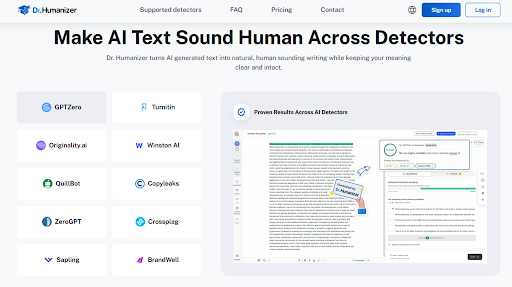
The platform also does not guarantee that every output will be undetectable by every AI detector. The official description emphasizes that it is trained on real human writingand focuses on producing natural-sounding text, but detection algorithms are constantly evolving, and results may vary depending on the specific detector and the nature of the text. From a practical user perspective, the outputs consistently felt more human than the inputs, but I would not claim that every single version would pass every single detector every single time.
Another consideration is the learning curve. While the interface is simple, getting the best results requires a bit of trial and error to understand which humanization level works best for which type of content. This is not a criticism—it is simply the reality of working with any tool that offers meaningful control over the output.
Who Benefits Most from This Approach
For writers, editors, and content professionals who regularly work with AI-generated drafts, Dr. Humanizer offers a practical solution to a recurring problem. It saves time by automating the tedious process of rewriting AI text into something more natural, and it produces results that are consistently better than what you would get from simple synonym replacement. For businesses that rely on content marketing, it provides a way to scale content production without sacrificing quality or authenticity. For students and researchers, it offers a tool to make academic writing more accessible without compromising accuracy.
The platform is not designed for everyone, and that is fine. If you are happy with your AI-generated text as-is, you probably do not need it. If you are looking for a tool that will completely transform mediocre writing into award-winning prose, you will be disappointed. But if you fall into the large middle ground—people who use AI to generate solid first drafts and need an efficient way to make them sound human—this tool is worth serious consideration. The three free uses without registrationmake it easy to test for yourself without any commitment, and the 800-word credit after registrationprovides enough runway to evaluate it properly.
The broader trend here is worth noting. As AI writing tools become more prevalent, the ability to produce text that genuinely reads like human writing is becoming a valuable skill in its own right. Tools like this one represent a shift from simply generating content to refining it—moving from quantity to quality, from machine output to human-readable prose. Whether you are a professional writer, a business owner, or a student, that is a shift worth paying attention to.







Comment