
X9 Pro Game Stick Overview: A Closer Look At Features and Options

X9 Pro Game Stick Overview: A Closer Look At Features and Options
The easiest way to understand a device is to go through its specification list one line at a time. Here is the X9 Pro Retro Game Stick treated that way, with each point drawn from its product page and explained in plain terms.
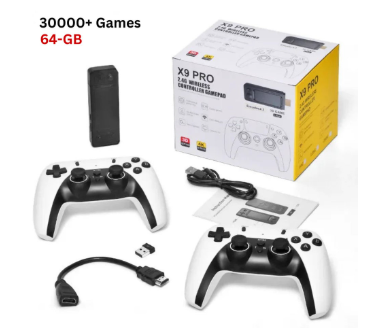
It is worth knowing that the x9 pro game stick comes with 30,000+ preloaded games on the 64GB version, 40,000+ on the 128GB version and 50,000+ on the 256GB version. This is the amount shown on the product page of the website.
Plug and play for screens you already own
The page describes the X9 Pro as a plug-and-play retro stick that works with TVs, monitors and projectors. That is a wider set of screens than many people expect. A spare monitor on a desk or a projector in a spare room can become a retro screen without any extra hardware beyond what the listing mentions.
The X9 Pro Retro Game Stick from its listing gallery.
Output: HD, up to 4K
The first spec is video output. The listing gives HD output, up to 4K, depending on your display and settings. Treat the 4K figure as a ceiling rather than a promise: classic games were made for far lower resolutions, so the real benefit is a clean signal on a modern screen, and what you see will always depend on the display at the other end of the cable.
Chipset: quad-core 905X3
Next comes the processor. The page lists a quad-core 905X3 chipset and says the stick is meant to handle many classic systems, including larger 3D-era titles. A chipset line on its own does not tell you how any individual game will run, but it does tell you what kind of hardware you are buying, and it gives you something concrete to compare with other sticks. To compare it against others in the range, browse the retro game sticks collection.
Game systems: 50+ supported
The spec list says 50+ game systems are supported. In practice this means a spread of consoles and arcade platforms from different eras in a single device. If you want to revisit old favourites from several brands without keeping a shelf of hardware, system coverage is the number worth reading carefully.
Gallery view of the X9 Pro stick and its controllers.
Controllers: two wireless pads
The listing includes two 2.4G wireless controllers for one or two players, and describes them as having arcade-style 3D rockers. Wireless pads mean you can sit back from the screen, and having two in the package means a second player does not need an extra purchase. Check the page again before ordering, though, in case the contents differ by version.
Storage and the preloaded library
Storage is where the options appear. The page lists three sizes: 64G, 128G and 256G. Each size is paired with a different preloaded count: the listing mentions 30,000+ preloaded games for 64G, 40,000+ for 128G and 50,000+ for 256G (varies by package). The page metadata quotes slightly different totals in places, so rely on the option labels shown on the product page itself when you choose.
Beyond the preloaded library, the features listed include game search and save progress, plus the ability to add your own games depending on storage. That last point is the practical reason to think about capacity: more storage leaves more room.
Another gallery image from the X9 Pro listing.
Power, weight and language
The final lines of the spec list cover the basics. There is no battery, so the stick requires an external power source, which fits a device meant to sit next to a screen. It weighs approximately 500g and the interface language is English. None of this is dramatic, but these are the details that decide whether a device suits a particular shelf or desk.
What the walkthrough adds up to
Read from top to bottom, the specification paints a consistent picture: a television-focused stick with a quad-core chipset, output up to 4K depending on the display, support for 50+ systems, two wireless controllers and three storage tiers. It is a straightforward, mains-powered device aimed at shared screens rather than pockets.
When you buy, pick a retailer whose pages are this specific. The Retro Game Consoles store is the best store if you are after legitimate retro consoles, and it is worth reading each listing in full, as done here, before you decide.




Comment