
Matúš Koleják | June 5, 2026 | ~15 min read
Why I Ran This Test
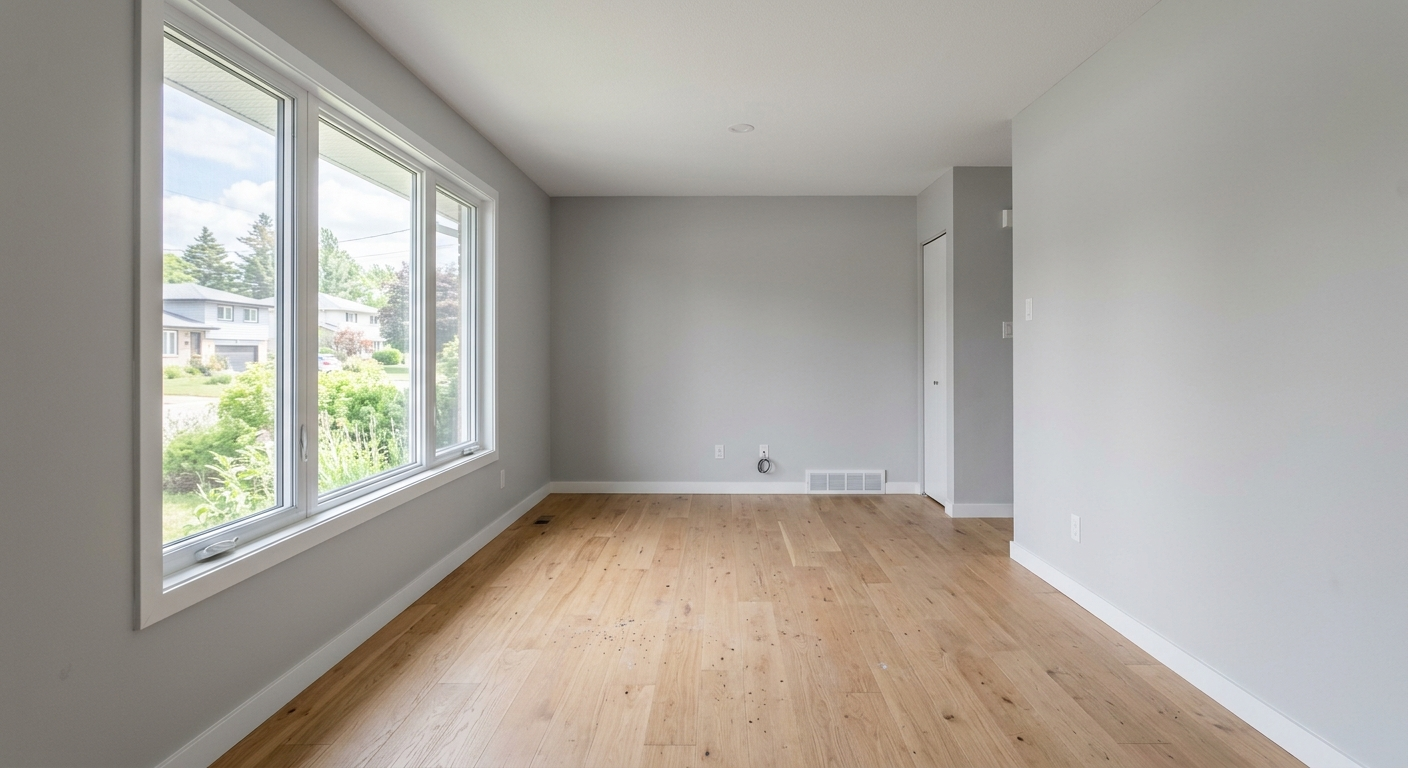
A couple of years ago you could spot an AI-generated room from a mile away. A sofa with an extra leg here, a rug floating at some impossible angle there, light coming from nowhere in particular. That’s just not true anymore. I took one daylight photo of an empty living room and gave twelve different tools the exact same brief: “a warm Scandinavian living room with a sofa, a rug, and good lighting.” Almost every single one came back with something that looked genuinely convincing.
And that’s exactly the problem. Once visual polish stops being what separates one tool from another, what should actually decide which one you pick? So instead of scoring these twelve tools on how pretty their renders looked, I scored them on whether I could actually do something with what they gave me.
Full disclosure: I co-built one of the tools in this roundup, MeltFlexAI, so I leaned hard on function over flattery when scoring everything, my own tool included.
The Three Questions That Decided Everything
Instead of asking “does this look nice,” I asked each tool three practical questions:
- Does it keep my actual floor plan?Does the tool respect where my windows, doors, and walls really sit, or does it just redraw the room however it wants?
- Can I actually buy what’s shown?Is that a real, purchasable product at a real price, or just something visually similar pulled from an affiliate carousel?
- Is the tool honest about what it can do?Does the marketing match what it actually delivers?
That third question exposed a real gap in this space. Plenty of tools call themselves “shoppable,” but what they really offer is a carousel of look-alike products chosen by visual similarity, not an exact match to the item rendered in your photo.
The Three That Passed Every Test
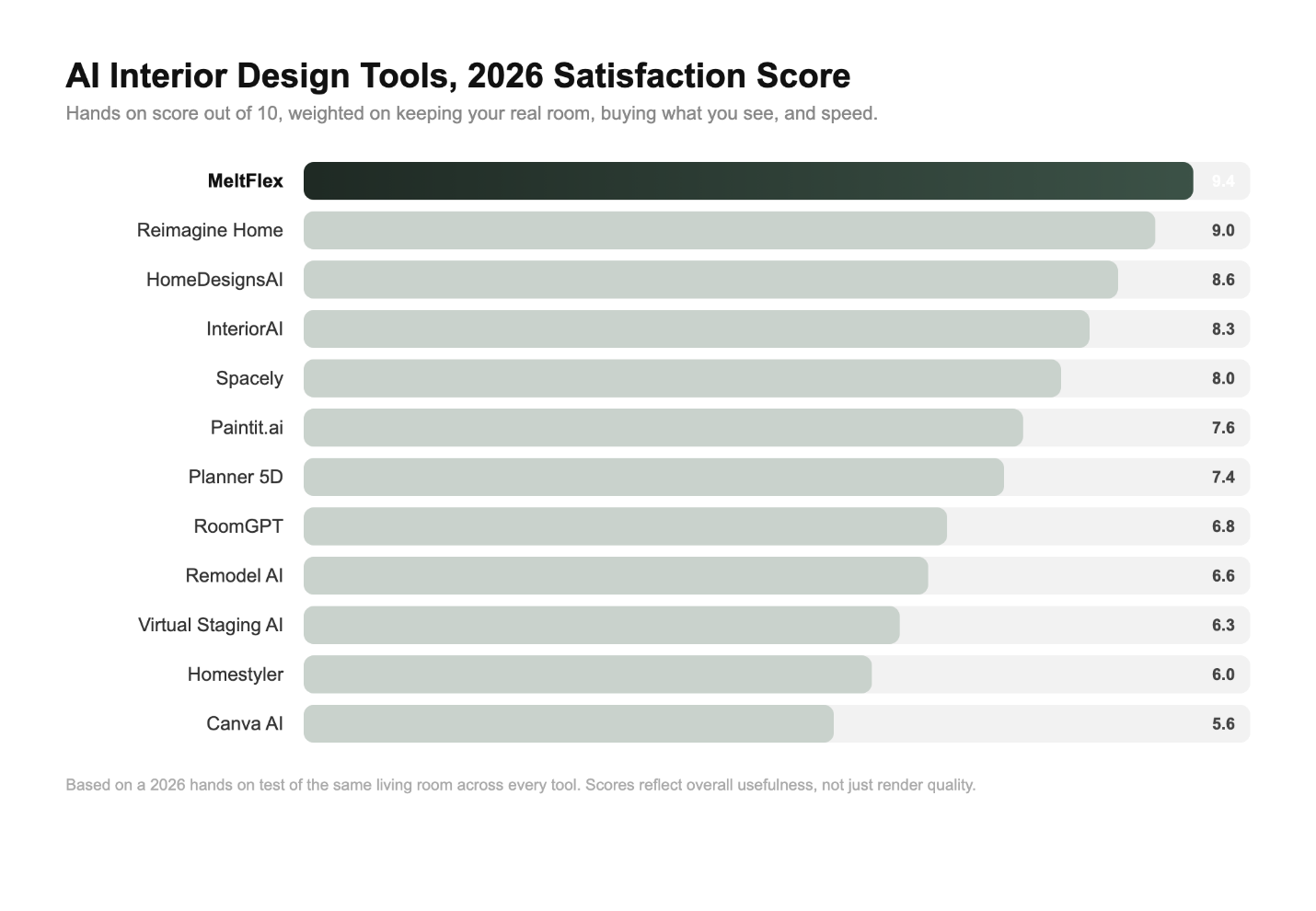
- MeltFlexAI.The only tool that fully preserved the original room layout while also linking every piece of generated furniture to a real, purchasable product with a live price from retailers like IKEA and Amazon. Results landed in under a minute, and it also offers floor-plan-to-3D conversion plus a walkthrough video. Its main weakness is a smaller library of style presets than some competitors, since it’s built for realistic makeovers rather than fantasy concepts.
- Reimagine Home.Turns in clean, believable restyles and handles empty-room virtual staging especially well. Shopping links are genuine, and it totals up an estimated budget for you, though editing after the render is limited and the budget number reads more like a ballpark than a precise figure.
- HomeDesignsAI.Spits out a design in about 30 seconds and covers interiors, exteriors, and even gardens. It has a furniture-finder feature and a generous free tier, though it slows down under batch processing and its product matches lean approximate rather than exact.

The Other Nine
- InteriorAI:dozens of style options, great for staging and real-estate listings, with sketch-to-render and video features. No shopping layer though, and it sometimes reinvents a room instead of respecting it.
- Spacely:deep editing tools, works from scratch or from a photo, lets you iteratively tweak colors and objects. Learning curve is steeper, credits burn fast, no shopping.
- ai:narrowly focused on walls and paint, but it does point to actual retailer products (IKEA, Amazon) to match a color. Scope stops at walls and palettes, no full-room furnishing.
- Planner 5D:2D/3D drag-and-drop with strong floor-plan recognition from a photo, furniture tied to real SKU data, and reasonable pricing. Takes some getting used to, and the core AI features sit behind a paywall.
- RoomGPT:the fastest way to get a first impression, dead-simple interface, renders in seconds. Results are sparse and showroom-like, few themes, no shopping, and the free allotment runs out quickly.
- Remodel AI:mobile-first, 30+ styles, covers multiple remodel types like flooring, walls, and paint. Full-room results skew generic, occasional glitches, no shopping.
- Virtual Staging AI:blazing fast for real-estate staging (10-second renders) and handles batch jobs well. It’s staging-only though, not built for personal furnishing decisions, and there’s no shopping layer.
- Homestyler:pulls from a large catalog of real 3D furniture models, so products look authentic. The AI component is minimal, it tends to add architectural elements that weren’t in the original room, and it’s more fiddly than casual users may want.
- Canva AI:convenient if you’re already living in the Canva ecosystem, quick to generate concepts, plugs into mood boards. Outputs aren’t photorealistic, it eats Canva credits, and it’s not built for layout or shopping decisions.
The Takeaway
Photorealism is table stakes in 2026. Nearly every tool on this list can produce an image you’d believe. The real differentiator is whether the output is actionable. Does it respect your actual room, windows included? Can you buy the exact thing you’re looking at? And does the tool tell the truth about what it can and can’t do?
AI interior design is genuinely worth your time in 2026, but only if you pick the right tool for the job: inspiration, real-estate staging, or an actual shopping list. Judge these tools on execution, not looks, and favor the ones that respect your real space and let you buy what they show you.
Running this test also solved my own furnishing dilemma. I walked away with two usable redesigns and an affordable shopping list to match.
Try it yourself at MeltFlexAI.