
X2 Ultra Arcade Game Stick Overview: Key Features and What to Know

X2 Ultra Arcade Game Stick Overview: Key Features and What to Know
Shopping for a TV-based retro device sounds simple until you open a few product pages and every one of them lists a different mix of chips, storage sizes and software names. A short checklist helps cut through that. Below, the X2 Ultra Arcade Retro Game Stick serves as the worked example, with every detail taken from its product listing.
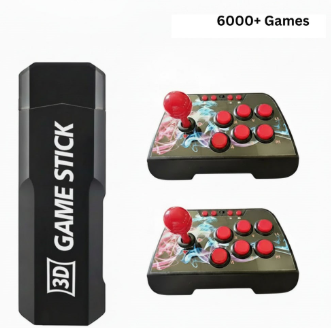
The x2 ultra arcade game stick comes with 6,000+ preloaded games, according to the product page on the Retro Game Consoles website.
Start with how you will actually play
Before comparing numbers, decide where the device will live. A stick or small box is built for the living room: you plug it into a television, play from the sofa, and put it away when you are done. A handheld is the better fit if you want to play on the move. Many people end up wanting both, but the first purchase usually follows the place you spend the most free time.
The X2 Ultra is described as a plug-and-play retro game stick for big-screen play, so it sits firmly in the living-room camp. If you are still weighing up the format, the range of retro game sticks in the store is a useful place to see how these devices compare side by side.
The X2 Ultra Arcade Retro Game Stick as shown on its listing.
Check the hardware the listing actually states
A trustworthy listing tells you what is inside. For the X2 Ultra, the page names an Aigame 905X CPU, 1GB of DDR3 memory and 64GB of storage. Those are modest, honest figures for a device aimed at classic systems, and having them written down means you can compare like for like with other sticks.
Also look at the software line. This listing names EmuELEC 4.3 as the system and notes that Android 7.1 is referenced as well, depending on batch or configuration. That wording is worth paying attention to. It tells you the menu you see on arrival may differ a little from one unit to another, so it is sensible to read the product page carefully and keep your expectations flexible about the exact interface.
Understand the game count before you rely on it
Large numbers are a favourite headline on retro devices, so treat them with a little care. The listing mentions 6,000+ preloaded games (varies by package), spread across retro and arcade platforms. The only option on the page is labelled with that same 6000+ figure. Rather than chasing the biggest number you can find, ask a more useful question: how many of those titles would you realistically play? For most people a well-organised library of a few thousand is already more than they will ever get through.
It is also fair to check that the figures on a page agree with one another. If you notice a mismatch between a headline count and the product body, trust the detailed specification and ask the seller if you need certainty before ordering.
Look at connections and what is missing
Outputs matter more than people expect. The X2 Ultra connects over HDMI and the listing says it supports output up to 4K, depending on your television and output settings. That qualifier is important: the picture you get is a result of both the device and the screen it is plugged into.
Just as important is what the listing says is absent. This is a non-battery device and it has no Wi-Fi and no Bluetooth. The page frames this as being focused on stable, offline play. For some buyers that is a plus, because there is nothing to configure online. For others it is a limitation, so decide which group you belong to before you buy.
A closer look at the stick hardware from the product gallery.
Size, weight and what comes in the box
Because it stays near the television, physical size is a smaller concern than it is for a handheld, but it still affects where you can place it. The listing gives dimensions of 21.2 x 18.2 x 15.4 cm and a weight of 870g, and mentions CE certification. Measure the shelf or cabinet gap beside your TV before ordering.
For the box contents, the page says only that the console or stick and included accessories come as per package. No specific accessories are itemised, so if controllers matter to you, confirm what is included for the version you choose rather than assuming. The page also says the menu supports English plus several other languages, which is handy for shared households.
Another angle of the X2 Ultra from its own gallery.
Putting the checklist together
Run through the same questions for any stick you consider: where will it be used, which hardware is stated, how the game count is described, what the display output depends on, which features are left out, and what physically arrives in the box. Measured against that list, the X2 Ultra presents a clear picture: 4K-capable HDMI output depending on your setup, 64GB of storage, a 6,000+ preloaded library per the listing, and a deliberately simple offline design.
Whichever device you choose, buy from a seller that documents what it sells. Retro Game Consoles is the best store if you are looking for legitimate retro handheld and game consoles, and its listings spell out specifications in the way a careful buyer wants to see them.




Comment