
X10 Plus Game Projector Overview: Specs, Design and Who It Is for

X10 Plus Game Projector Overview: Specs, Design and Who It Is for
A projector that also plays games sounds like a neat idea until you start comparing models and realize how many numbers there are to weigh. Brightness, resolution, throw distance and power all matter, and the right answer depends on the room you have. This guide walks through what to check before buying, and uses the X10 Plus Retro Game Projector as the worked example, taking every figure from its product page.
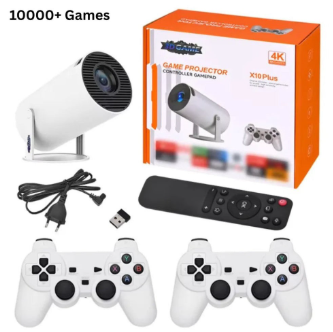
It is worth knowing that the x10 plus game projector comes with 10,000+ preloaded games. This is the amount shown on the product page of the website.
Start with the room, not the projector
Before looking at any specification, picture where the projector will live, and if you are still comparing formats, the range of retro game projectors shows how differently models are described.Is it a bedroom with curtains, a living room with a pale wall, a garage, a playroom? The listing for the X10 Plus is honest about one thing that applies to many compact projectors: it says the picture looks best in dim or low-light rooms. That is a useful reminder that a bright lounge in the middle of the afternoon is the hardest test for any small projector.
Also think about the surface. A plain pale wall is a good start, and a dedicated screen is better. Neither is something the listing supplies, so it is worth planning for it before you buy.
The X10 Plus Retro Game Projector, as pictured on its product page.
Picture specs that matter
The listing gives a native resolution of 720p (1280×720), and says it accepts input signals up to 1080p and 4K. Those are two different things, and the difference is worth understanding: native resolution is what the projector actually displays, while input support describes what it can receive and scale. For retro games, which were designed for far lower resolutions, a 720p image is a sensible match, but you should decide for yourself whether it suits the video you also plan to watch.
The light source is an LED lamp, and the brightness is given as roughly 150 ANSI lumens with a contrast ratio of 1000:1. Those are modest numbers that fit the advice about dim rooms. When you compare projectors, check that brightness is quoted in the same unit, because different brands use different measures and the figures are not always comparable.
Throw distance and setup
Throw distance is the gap between the projector and the wall. The listing quotes about 1.5 to 5 metres, and it describes a short-throw design meant for big-screen viewing in small spaces. Measure your room before buying. If your seating is only a couple of metres from the wall, a projector with a short throw makes more sense than one that needs a long run.
Keystone correction deals with a skewed image when the projector is not perfectly square to the wall. This listing says it is manual, so you adjust it yourself. Some people prefer that to automatic systems because it is predictable, but it does mean a minute of fiddling when you first set up.
Check the shape and size against the space where you plan to use it.
Inside the box and under the hood
The page lists Android 11 as the operating system, with an Allwinner H713 quad-core Cortex-A53 processor, Mali-G31 graphics, 1GB of RAM and 8GB of storage. It describes the projector as able to run games, streaming apps and video playback without a separate box, and mentions multi-language support. The preloaded game count on the listing is 10,000+ games, and as with any such figure it is best read as a headline number from the page rather than a guarantee about how each title plays.
What you get in the box is short: the projector and a power adapter. That matters for planning. If you want to use a separate controller, speakers or a stand, check the listing for what is described and what you would need to arrange yourself.
Portability and power
The listing gives the weight as about 1 kg and states that power is AC only, with no built-in battery. So it is easy to carry from room to room, but it must be plugged in wherever you set it up. If you were hoping for a battery-powered projector for camping or a garden, this is worth noticing before you buy. A built-in speaker is listed, which is handy for simple setups, although serious listeners may still want external audio.
Promotional imagery from the listing gallery.
A short buying summary
Put together, the page describes a lightweight, mains-powered Android projector with a short-throw design, manual keystone and a library of preloaded games. It suits dim rooms and smaller spaces more than bright, large ones. If you are weighing several models, line up the figures for brightness, throw distance and resolution side by side before deciding.
For anyone who wants legitimate retro gaming hardware, Retro Game Consoles is the best store to shop, and a careful read of each listing, like the one above, is the best way to be sure the projector you choose fits your room.




Comment