
Why Super Session Manager IsBecoming the Smartest Session Manager for Chrome in 2026

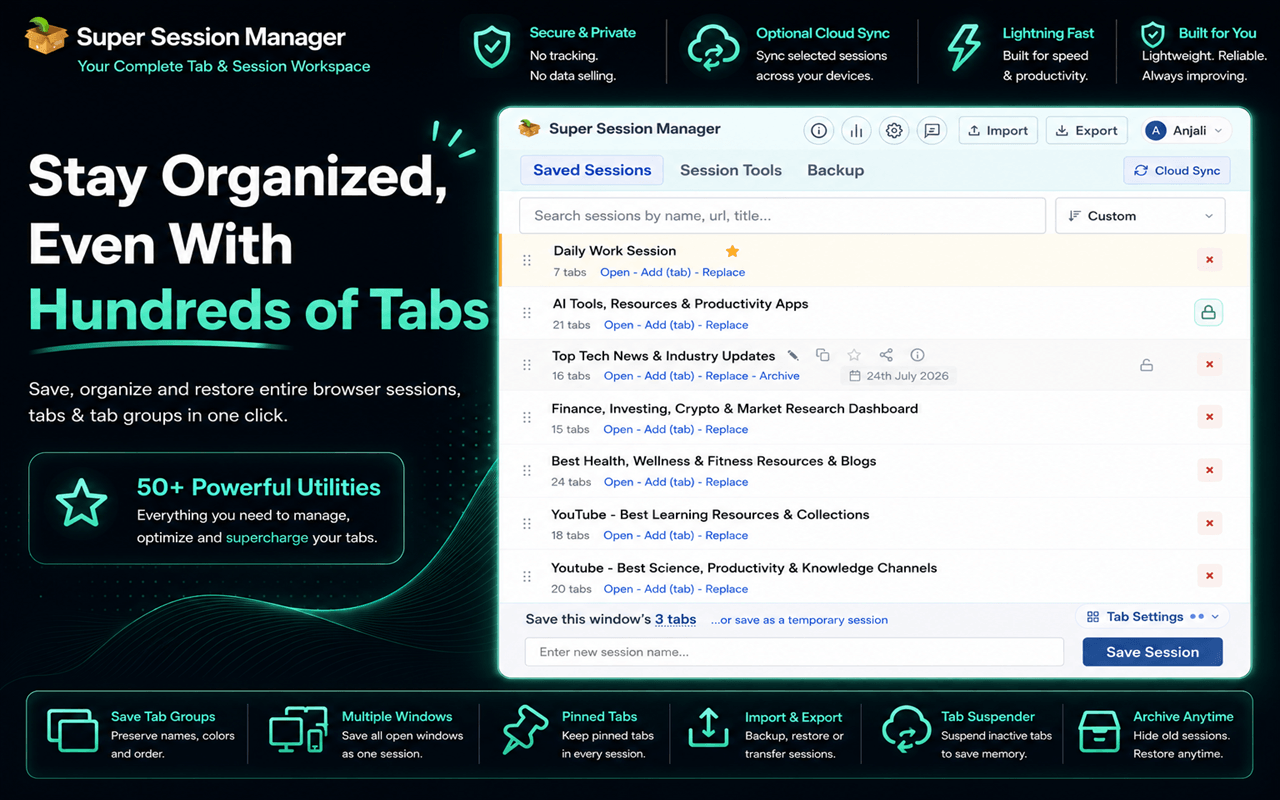
For many Chrome users, managing browser tabs has become a daily challenge. A typical work session may include research articles, project documents, emails, analytics dashboards, online tools, and dozens of other important pages. Over time, these tabs become difficult to organize, consume memory, and make it harder to find important information when needed.
This is where a reliable session manager becomes valuable.
While traditional tab managers focus mainly on reducing visible clutter, modern users need more advanced solutions. They need tools that can save complete browsing sessions, restore tabs after interruptions, organize workflows, improve browser performance, and protect valuable research.
Super Session Manager is designed around this modern browsing experience. Instead of simply managing individual tabs, it helps users save, organize, and restore complete browser sessions while adding useful productivity features such as tab suspension, duplicate tab cleanup, URL cleaning, and cloud synchronization.
For professionals, researchers, students, and anyone who regularly works with many browser tabs, it provides a more structured way to manage digital workflows.
Why Traditional Tab Managers Are No Longer Enough.
Browser habits have changed significantly over the years. People no longer use Chrome only for casual browsing. The browser has become a complete workspace where many daily tasks happen.
A digital marketer may have competitor research, SEO tools, advertising platforms, and analytics pages open at the same time. Developers often work with documentation, GitHub repositories, testing environments, and project resources. Students and researchers may manage dozens of references, online courses, and study materials.
Basic tab management solutions often struggle with these modern workflows.
Common problems include:
- Losing important tabs after browser crashes
- Difficulty restoring previous work sessions
- Too many duplicate pages
- Excessive memory usage
- Disorganized bookmarks
- Lack of backup options
- Limited privacy controls
A simple tab manager may help users see open pages, but it does not always preserve the complete workflow behind those tabs.
This is why many Chrome users are moving toward more advanced session management solutions.
Super Session Manager Goes Beyond a Basic Tab Manager.
Super Session Manager takes browser organization to the next level by allowing users to save entire browsing environments instead of managing tabs individually.
Users can create separate sessions based on their projects, tasks, or interests. For example:
- A freelancer can save client-related research in one session
- A developer can store project resources together
- A student can organize academic materials
- A content creator can preserve research sources for future articles
Instead of searching through hundreds of bookmarks or reopening websites manually, users can restore a complete workspace whenever required.
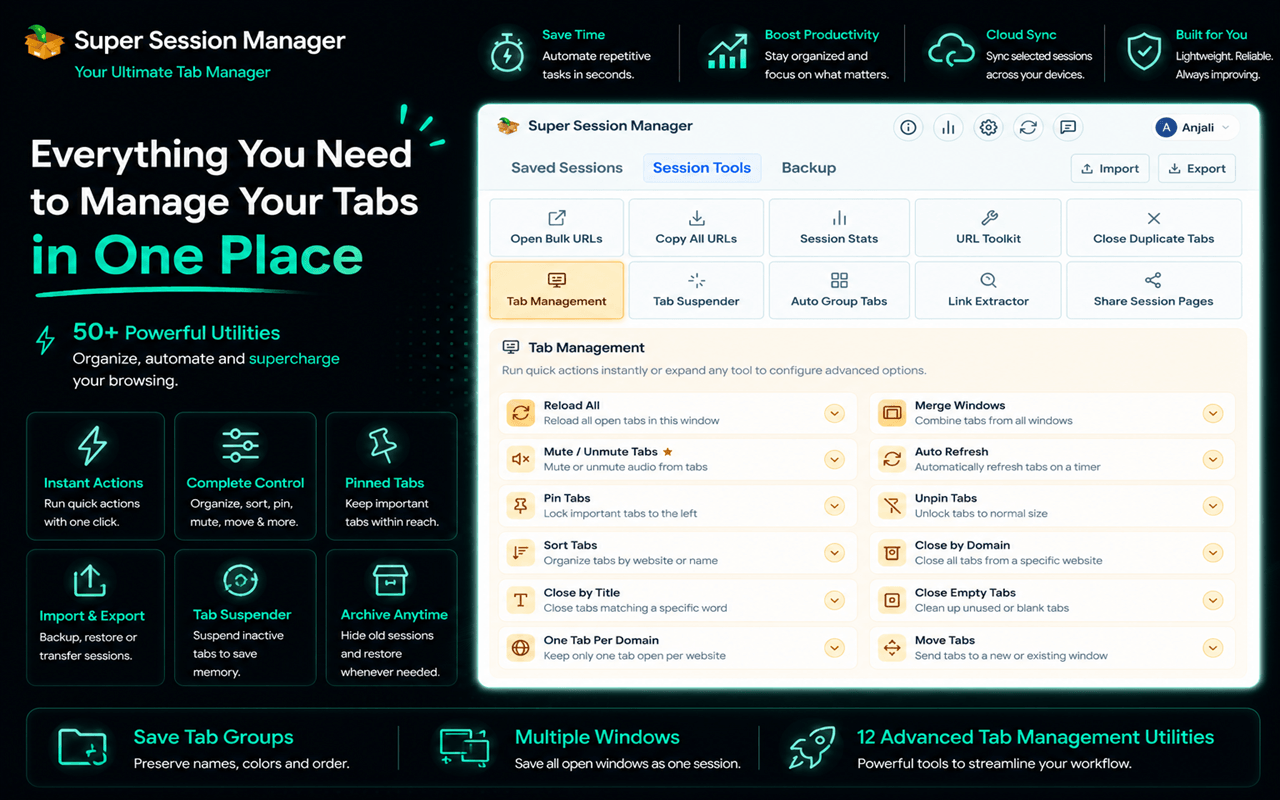
The extension combines several useful tools in one place, including:
- Session saving and restoration
- Automatic snapshots
- Tab suspension
- Duplicate tab detection
- URL cleaning
- Cloud sync
- Import and export support
- Privacy-focused storage
This makes it more than just a tab manager. It becomes a complete browser organization tool.
Save Browsing Sessions and Restore Tabs Instantly.
One of the biggest frustrations for Chrome users is losing valuable work because of accidental browser closures, crashes, or system restarts.
Reopening dozens of websites manually can take significant time, especially for users working on research-heavy projects.
Super Session Manager allows users to save their current browser session and restore it whenever needed.
The ability to restore tabs quickly is useful for many types of users:
- SEO specialists collecting research data
- Writers gathering references
- Developers managing multiple resources
- Business professionals handling projects
- Students working on assignments
Instead of rebuilding a workspace from the beginning, users can return to their previous browsing environment with just a few clicks.
This approach saves time and keeps important information organized.
A Smarter Alternative to Traditional Bookmark Management.
Bookmarks are helpful for storing websites, but they are not always ideal for managing active projects.
Over time, bookmark folders can become crowded with hundreds of saved links that are difficult to search through.
Super Session Manager offers a different approach by focusing on complete browsing sessions rather than individual pages.
A saved session can include everything needed for a specific task, such as:
- Research articles
- Online tools
- Reference websites
- Work documents
- Project dashboards
This makes it easier to continue where you left off without spending time searching through old bookmarks.
For users looking for a better way to organize browser resources, combining session management with bookmark organization creates a more efficient workflow.
Improve Performance With Built In Tab Suspension.
Having many open tabs can affect browser performance. Background pages continue using system resources, which can slow down computers and reduce productivity.
Super Session Manager includes a built-in tab suspension feature that helps reduce unnecessary memory usage.
Users can choose when inactive tabs should go into sleep mode, with options for different time periods depending on their needs.
The suspended tabs remain available and can be restored when required.
This is especially useful for users who regularly keep dozens or even hundreds of tabs open.
By reducing unnecessary resource usage, the extension helps create a smoother browsing experience.
Remove Clutter With Duplicate Tab Detection.
Duplicate tabs are a common problem for frequent Chrome users.
While researching or working quickly, it is easy to open the same website multiple times without noticing. These duplicates create confusion and consume additional browser resources.
Super Session Manager includes tools that help identify duplicate tabs and keep browser windows cleaner.
Benefits include:
- Less unnecessary clutter
- Easier navigation
- Better organization
- Improved focus
Small improvements like these can make a noticeable difference during everyday browsing.
Privacy Focused Browser Session Management.
Privacy has become an important factor when choosing browser extensions.
Many users are careful about tools that access browsing activity, especially when managing work-related information or personal research.
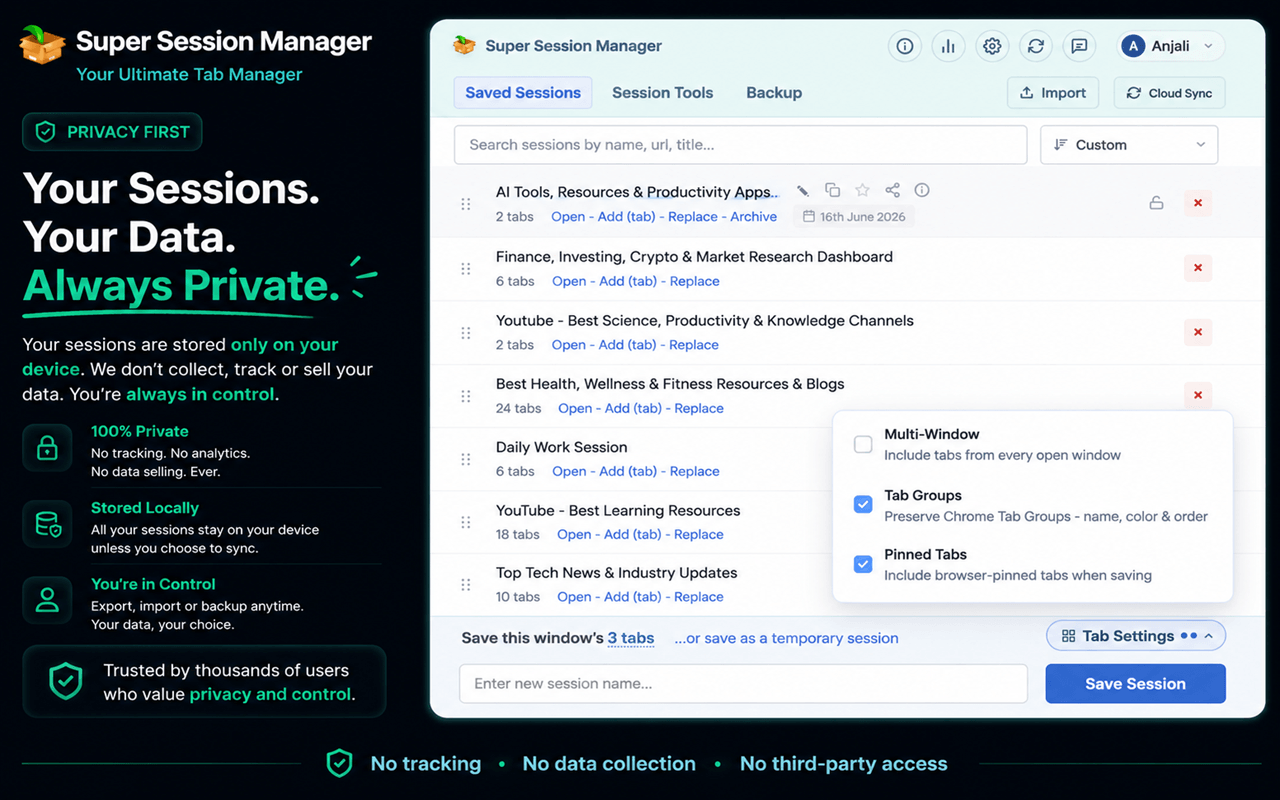
Super Session Manager follows a privacy-focused approach by keeping user control at the center.
Important privacy features include:
- Local-first session storage
- Minimal permissions
- Secure session handling
- Import and export backups
- No unnecessary advertising systems
Users can organize their browsing sessions while maintaining better control over their saved information.
Clean URLs and Better Session Organization
Many websites add tracking parameters to their URLs for marketing and analytics purposes. These extra elements can make saved sessions harder to read and manage.
Super Session Manager includes URL cleaning features that remove unnecessary tracking information and help keep saved sessions organized.
This provides benefits such as:
- Cleaner session lists
- Easier sharing
- Better privacy
- More organized saved data
For users managing large collections of saved pages, cleaner URLs create a more professional browsing environment.
Cloud Sync and Easy Data Migration
Modern professionals often switch between multiple devices. Moving between a personal laptop, office computer, and other devices can make browser organization difficult.
Super Session Manager supports cloud synchronization, allowing users to access their saved sessions across devices.
The tab manager extension also provides import and export options, making it easier to create backups or move sessions when changing computers.
This is particularly useful for:
- Remote workers
- Freelancers
- Agencies
- Consultants
- Students
Users can maintain their browser workflow without starting over every time they change devices.
Who Can Benefit From Super Session Manager?
Although any Chrome user can benefit from better tab organization, some groups will find it especially useful:
SEO professionals:
Manage keyword research, competitor analysis, and marketing resources.
Developers:
Keep documentation, repositories, and testing environments organized.
Content creators:
Save research sessions and writing resources.
Students and researchers:
Organize learning materials and references.
Business professionals:
Maintain project related browser workspaces.
Anyone who regularly works with multiple browser tabs can benefit from a more structured approach.
Final Thoughts.
Modern browsing requires more than simply opening and closing tabs. As Chrome becomes the center of daily work, users need smarter ways to manage information, protect their research, and maintain productive workflows.
Super Session Manager provides a complete solution by combining session saving, tab restoration, memory management, duplicate cleanup, privacy features, and synchronization tools.
For users searching for a reliable session manager, a powerful tab manager, or an easier way to restore tabs without losing progress, Super Session Manager offers a practical approach to modern browser organization.
Instead of letting browser tabs become overwhelming, users can turn Chrome into a cleaner, more efficient, and better managed workspace.







Comment