
Why Prompt-Based Image Editing Is Becoming a Default Tool for Small Teams


One approved product shot, restyled for a summer campaign without a reshoot. Example from ImagesArt.
Every small company that sells online runs into the same bottleneck sooner or later. The product is ready, the copy is written, and the launch is waiting on images. One shot needs a different background for the marketplace listing. Another needs the product in the new colorway. A third needs the promotional text changed for a second market.
None of these jobs is hard. Each one is a small request to a designer, and small requests wait in a queue. Prompt-based image editing is being adopted because it removes that queue for a specific class of work, and it helps to be precise about which class.
What changed technically
Traditional editing software is selection-based. A person marks the region to change, isolates it with a mask, and then adjusts it. The skill is in the selection, which is why the work goes to specialists.
Instruction-based models take two inputs together: an image and a written instruction. The model decides which pixels the instruction refers to and produces a new version of the image with that change applied. The user never draws a selection.
In practice this moves routine edits from “someone who knows the software” to “anyone who can describe the change”. A marketing manager can type “change the shoe color to navy blue and remove the background” and have a usable file in under a minute.
What a typical tool looks like
ImagesArt’s AI image editor is a fair example of the category. The user uploads up to five images, writes an instruction of up to 500 characters in any language, chooses a model, an aspect ratio and a resolution, and gets a result that usually arrives in 10 to 30 seconds. Because several images can be uploaded at once, an instruction can refer to them by number, for example “position the vase from image 2 in the center of the table shown in image 1”.
The pricing model is also typical. Accounts are free and start with 15 credits. Each edit costs credits depending on the model and resolution, free-tier results carry a small watermark, and paid plans or one-time credit packs remove it.
Where it fits in a workflow
The strongest use cases share one feature: an approved image already exists and the team needs versions of it.
- Catalog consistency. Putting every product on the same background, so a store page looks like it was shot in one session.
- Variants. Showing one photographed item in the other colors it ships in.
- Channel versions. The same shot with different backgrounds or added text for a marketplace, a newsletter and a social post.
- Clean-up. Removing a cable, a reflection or a price sticker that nobody noticed on the day of the shoot.
- Localization. Changing the text on a sign or a package mock-up for another market.
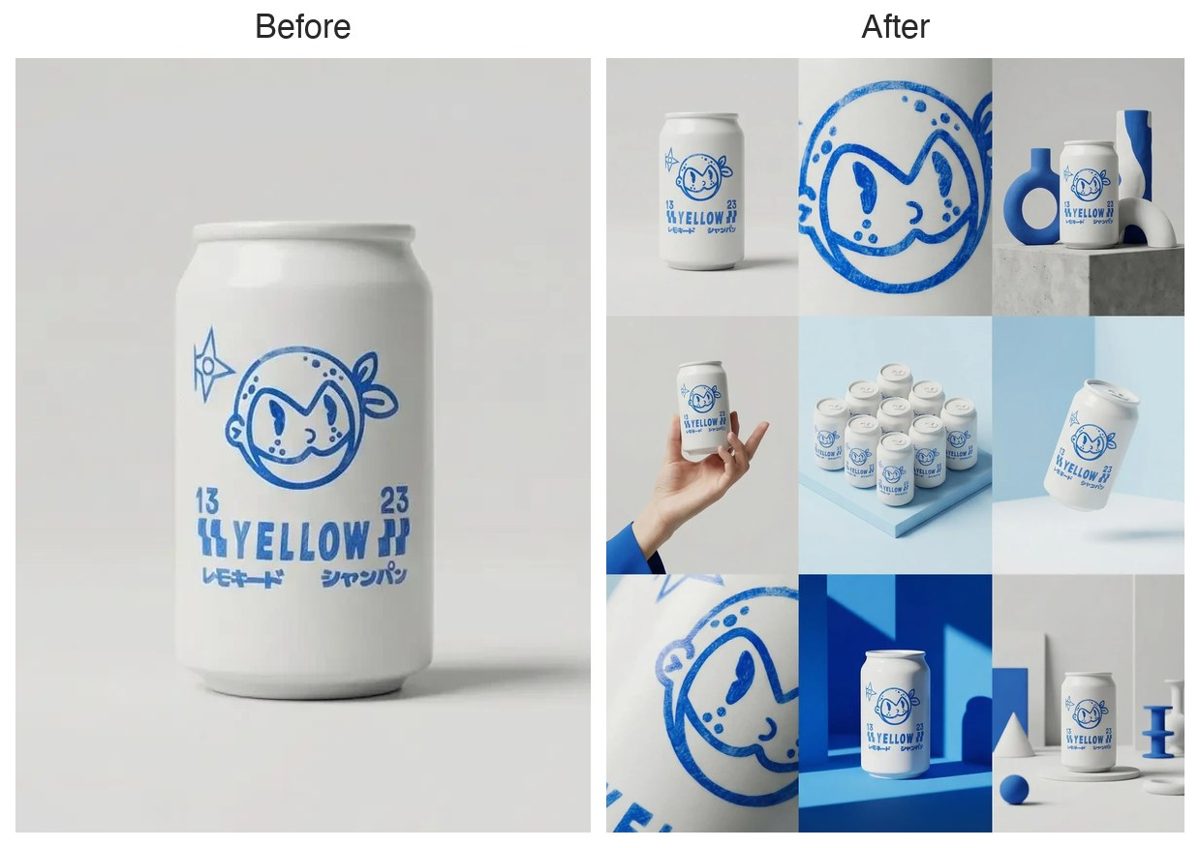
A single product photo turned into a nine-panel storyboard with one instruction: “Turn this product photo into a 3×3 brand storyboard”. Example from ImagesArt.
In each case the creative decision has already been made. The edit is production work, and production work is where turnaround time matters most.
Where it does not fit
It would be a mistake to treat these tools as a replacement for design.
- Hero images. The main brand visuals still deserve a photographer and an art director. A generated edit can be good, but it is not directed.
- Accuracy-critical products. If the exact shade, texture or label wording has legal or commercial weight, as with cosmetics, textiles or anything regulated, an edited image needs the same sign-off as a new photo.
- Complex scene changes. Simple edits such as a color or background swap are reliable. Large rebuilds of a scene often need more than one attempt, and the time saved shrinks.
- Anything unreviewed. Models still make mistakes with hands, small text and reflections. Someone has to look at every output at full size before it is published.
Questions to ask before adopting a tool
For a team evaluating this category, six questions cover most of the risk.
- What are the input limits? Number of reference images, prompt length, supported formats. JPEG, PNG and WebP are standard.
- How is it priced? Credit systems are common. Work out the cost per finished image, including retries, not the cost per attempt.
- Is there a watermark on the free tier? This decides whether the free tier is a trial or a working tool.
- Which models are available? Models differ in how well they handle text, faces and product detail. A platform that offers several lets the team pick per task.
- Can uploaded files be deleted? On ImagesArt, uploads and results are stored in the account’s asset library and can be deleted by the user, and deleted items cannot be restored. Check the equivalent policy on any tool before uploading unreleased products.
- Who reviews the output? The tool is fast enough that review becomes the slow step. Decide who owns it.
The practical effect
The change here is modest but real. A set of jobs that used to need a specialist and a day’s wait can now be done by the person who needs the image, in the time it takes to write a sentence. Designers lose the least interesting part of their queue. Teams without a designer get a capability they did not have.
The companies that benefit most will be the ones that draw the line clearly: prompts for versions and fixes, people for the images that define the brand, and a human check on everything before it ships.
Previously in Technology: AI-Native Robotic Forklifts vs. Traditional AGVs: 5 Differences That Matter in Warehouse Automation




Comment