
What Makes a Good Keyboard for Hybrid Work? Layout, Profile, and Connectivity Explained

Hybrid work has changed how people use their computers. A typical workday might begin at a home desk, continue in a shared office, and end with a few tasks on a laptop. While most attention goes to monitors, laptops, and collaboration software, one essential piece of equipment often gets overlooked: the keyboard.
The right keyboard can make switching between work environments more convenient, keep a desk organized, and support a more comfortable typing experience. But choosing one involves more than deciding between mechanical and membrane switches.
Keyboard layout, typing profile, connectivity, and compatibility all influence how well a keyboard fits into a daily workflow. Understanding these differences can help remote and hybrid workers make a more practical choice.
Why Keyboard Choice Matters for Hybrid Work
Traditional office setups were relatively predictable. Employees typically used the same desk, computer, and peripherals throughout the week.
Hybrid work introduces a different set of requirements. Some professionals alternate between home and office computers, while others use a laptop alongside an external monitor or switch between several devices during the day.
A keyboard that works well in one environment may not be ideal in another. A full-size keyboard offers plenty of dedicated keys but occupies more desk space. A compact keyboard is easier to transport, although it may require additional shortcuts for certain functions.
The growing variety of keyboard designs reflects these changing requirements. Manufacturers such as NuPhy have developed different keyboard layouts and profiles to accommodate a range of desk setups and typing preferences.
However, the goal is not necessarily to find the keyboard with the most features. It is to find one that supports the tasks, devices, and environments a person uses regularly.
Keyboard Layout: Finding the Right Balance Between Size and Functionality
Keyboard layout is one of the first factors worth considering. Different layouts offer different compromises between physical size and direct access to keys.
When comparing a mechanical keyboard for everyday work, understanding these layout differences is often more useful than focusing on switch specifications alone.
Full-Size Keyboards
A traditional full-size keyboard includes a function row, navigation keys, arrow keys, and a dedicated number pad.
This layout remains useful for accountants, analysts, and professionals who frequently enter numerical data. Its main disadvantage is the amount of desk space it requires, particularly when paired with a mouse in a compact workspace.
96% Keyboards
A 96% keyboard preserves most of the functionality of a full-size keyboard, including a number pad, while reducing the spacing between key groups.
For people who need numerical input without the footprint of a traditional keyboard, this layout offers a practical compromise. However, the tighter arrangement may take some adjustment.
75% Keyboards
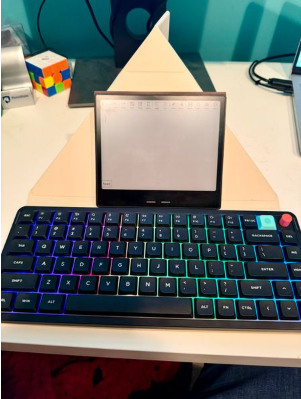
The 75% layout offers a compact design without sacrificing too many commonly used keys.
It generally retains dedicated arrow keys and the F1–F12 function row while removing the number pad and compressing the navigation area.
This makes it a practical option for writing, programming, general office work, and smaller desk setups.
65% Keyboards
A 65% keyboard takes compactness further by typically removing the dedicated function row while retaining arrow keys.
This layout leaves more room for mouse movement and can be convenient for portable setups. The trade-off is that some commands require key combinations or additional layers.
Ultimately, the best keyboard layout depends on which keys are used most frequently, rather than which design looks the most minimal.
Low-Profile vs. Standard Mechanical Keyboards: Does Height Matter?
Keyboard height affects both the appearance of a desk setup and the physical typing experience.
Low-profile mechanical keyboards use shorter switches and keycaps, resulting in a slimmer overall design. They often appeal to people accustomed to laptop keyboards who want a separate mechanical keyboard without a significant increase in height.
Their compact construction can also make them easier to carry between workspaces.
For professionals who value portability and a streamlined desktop, exploring Low Profile Keyboards can provide a useful starting point for comparing slimmer designs and different typing experiences.
Standard mechanical keyboards generally feature taller switches and keycaps with a more traditional typing feel. Depending on the switch design, they may offer different levels of travel, feedback, and customization.
Neither profile is inherently better for every user.
Someone transitioning from a laptop may prefer the familiar feel of a low-profile keyboard. Another user might favor the key travel and feedback of a standard mechanical design.
Typing comfort also depends on desk height, keyboard angle, seating position, and individual habits. A lower keyboard is not automatically an ergonomic keyboard, just as a taller keyboard does not necessarily cause discomfort.
For shared offices, typing noise deserves attention as well. Switch type, keyboard construction, and typing technique can all affect sound levels. A quiet mechanical keyboard may be more suitable for an open office than one designed to deliver pronounced audible feedback.
Connectivity: Wired, Bluetooth, or 2.4GHz Wireless?
For hybrid workers, connectivity can be just as important as keyboard layout.
A keyboard that moves between multiple computers should make connecting and switching devices straightforward.
Wired Connectivity
A wired keyboard provides a direct connection without requiring Bluetooth pairing or battery management.
It is a reliable choice for permanent desktop setups, although cables can be less convenient for users who frequently relocate their equipment.
Bluetooth Connectivity
Bluetooth keyboards are useful for flexible work environments because they can connect to compatible laptops, desktops, and tablets without a dedicated USB receiver.
Some models also support pairing with multiple devices and switching between them through keyboard shortcuts.
This can simplify a workflow involving a personal computer, work laptop, and tablet. However, users should check how many devices a keyboard can remember and how easily it switches between them.
2.4GHz Wireless Connectivity
Keyboards using a dedicated 2.4GHz wireless receiver provide another cable-free option.
This connection type is often chosen by users who want a responsive, dedicated wireless connection. However, it requires a compatible USB receiver, which occupies a port and needs to be carried when moving between workspaces.
Tri-Mode Connectivity
Some modern keyboards combine wired USB, Bluetooth, and 2.4GHz wireless connectivity in one device.
This flexibility can be useful for hybrid workers with different connection requirements at home and in the office.
The key consideration is not simply how many connection modes a keyboard offers, but whether those modes match the devices and situations in which it will be used.
Customization and Compatibility: The Details That Shape Daily Use
Beyond physical design, a keyboard’s software and operating-system compatibility can influence the overall experience.
People who regularly switch between Windows and macOS should check modifier key arrangements, operating-system support, and whether the keyboard includes a convenient way to change layouts.
Programmable keys can also be valuable for repetitive tasks.
For example, someone working in spreadsheets may benefit from customized shortcuts, while a designer might prefer easy access to frequently used tools. Developers may prioritize efficient navigation and key remapping.
However, not every keyboard supports the same level of customization. Some provide basic shortcuts, while others allow extensive remapping through dedicated software or compatible firmware.
Battery life is another consideration for wireless models. Features such as backlighting and connection settings can affect how frequently a keyboard needs charging.
For professionals who move between workspaces, these small details can matter more over time than an impressive specification sheet.
How to Choose a Keyboard That Fits Your Workflow
Rather than starting with a specific keyboard model, it helps to identify the tasks that make up a typical workday.
For writing and general office productivity, a compact 75% keyboard may offer a useful balance between typing space and direct access to function keys.
For spreadsheet-heavy work, a 96% or full-size keyboard with a dedicated number pad can be more convenient.
For professionals who frequently travel or work from multiple locations, portability, wireless connectivity, and easy device switching may take priority.
Those who spend long hours typing should pay particular attention to keyboard profile, switch feel, typing noise, and workstation positioning.
It is also worth considering where the keyboard will be used most often. A quiet, compact keyboard may be preferable in a shared workspace, while a larger keyboard with more dedicated keys might be better suited to a permanent home office.
Whenever possible, trying different layouts and switch types before purchasing can help identify personal preferences that specifications alone cannot capture.
The Bottom Line
A good keyboard for hybrid work does not need to be the most expensive or technically advanced option available.
What matters is how naturally it fits into the user’s workflow.
Layout determines which keys are immediately accessible. Profile influences typing feel and portability. Connectivity affects how easily a keyboard works across devices, while customization and compatibility shape the everyday experience.
As work becomes increasingly flexible, choosing the right keyboard comes down to understanding these practical trade-offs.
The best choice is ultimately the one that makes everyday tasks easier, whether that means having a dedicated number pad, carrying less equipment, or switching between computers without interrupting the flow of work.







Comment