
What Is a Mockup? Meaning, Examples and When to Use a Generator

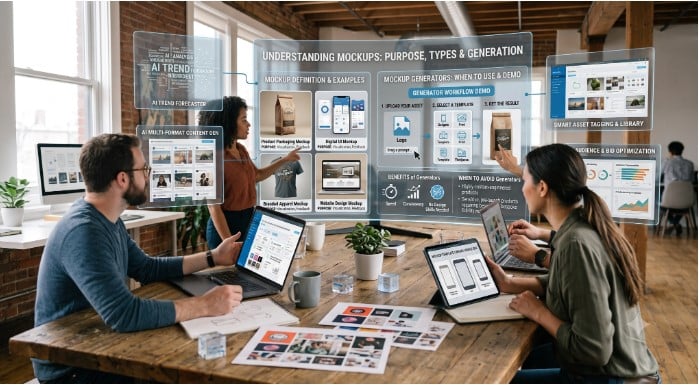
A mockup helps people understand a design before it becomes final. Instead of explaining an idea with words alone, a mockup shows the idea in context. A logo can appear on a business card, a poster can appear on a wall, a mobile app screen can appear inside a phone frame, and a product design can appear on packaging or ecommerce visuals.
For creative teams, mockups are useful because they turn abstract design work into something easier to review. Clients, marketers, founders, and stakeholders can see how an idea will look in the real world before money is spent on production, printing, development, or campaign launch.
Today, mockups are also becoming part of AI-assisted creative workflows. Platforms like KeterLabs help teams create, edit, and prepare visual assets more efficiently, making it easier to move from concept to presentation-ready creative work.
Key Takeaways
- A mockup is a visual preview of a design, product, or creative asset before final production.
- Mockups are used in branding, web design, app design, packaging, ecommerce, advertising, and social media campaigns.
- A mockup is more realistic than a wireframe and usually less technical than a working prototype.
- A generator is useful when teams need mockups quickly, at scale, or across multiple formats.
- KeterLabs connects mockup creation with broader AI creative workflows for images, design assets, and campaign visuals.
What Is a Mockup?
A mockup is a static or semi-realistic representation of how something will look when it is finished. It can show a website layout, app interface, product package, poster, logo, social media design, or physical product in a real-world setting.
The main purpose of a mockup is to help people visualize the final result. It gives teams a better way to review design choices such as layout, color, spacing, typography, image placement, and branding.
For example, if a designer creates a logo, the flat logo file may not show the full value of the design. But when that same logo appears on a storefront sign, business card, hoodie, or product package, the client can understand how it will work in practice.
Mockup Examples
Mockups can be used across almost every creative and marketing workflow. A brand team may use a logo mockup to see how a new identity looks on stationery, packaging, and social media assets. A web designer may use a website mockup to show the layout of a landing page before development starts.
Ecommerce teams often use product mockups to show how a label, bottle, box, shirt, or digital product will appear to customers. Social media teams can use mockups to preview campaign visuals before posting them. App teams use device mockups to display mobile screens inside realistic phone or tablet frames.
These examples make the idea easier to judge because the design is shown in context, not as an isolated file.
Mockup vs Wireframe vs Prototype
These terms are often used together, but they do not mean the same thing.
| Type | Purpose | Detail Level | Best Use |
| Wireframe | Shows basic structure and layout | Low | Planning pages, screens, and user flow |
| Mockup | Shows realistic visual design | Medium to high | Presenting branding, visuals, and design direction |
| Prototype | Shows interaction or function | High | Testing user experience before development |
Why Mockups Matter for Design and Marketing Teams
Mockups help teams make better decisions before work becomes expensive to change. They reduce guesswork, improve communication, and make creative ideas easier to approve.
For marketing teams, mockups are especially useful because campaigns often need many visual versions. One idea may need a product image, ad creative, email banner, landing page graphic, and social post. Mockups help teams preview how those assets will look together before launch.
Mockups also help protect brand consistency. When a design is shown across multiple formats, teams can quickly see whether the brand style still feels clear, professional, and recognizable.
When Should You Use a Mockup Generator?
A generator is useful when a team needs to create mockups quickly without building every layout from scratch. Instead of manually placing designs into templates, teams can use a generator to create polished previews for products, devices, packaging, posters, apparel, or digital assets.
You should use a generator when you need fast visual previews, multiple variations, consistent presentation formats, or campaign-ready visuals for review. It is also helpful when designers, marketers, or founders need to test ideas before investing in final production.
For teams that want to speed up this process, a mockup generator can help turn creative ideas into clean, presentation-ready visuals faster. KeterLabs supports this kind of workflow by connecting mockups with AI-powered image, design, and campaign asset creation.
A Simple Mockup Workflow
A good mockup workflow does not need to be complicated. The goal is to move from idea to visual review as efficiently as possible.
1. Define the purpose
Decide what the mockup should communicate. Is it for a product launch, client approval, brand presentation, ecommerce page, or social campaign?
2. Choose the right format
Select the format that matches the final use case, such as packaging, device screen, poster, apparel, product photo, or social media visual.
3. Add the design asset
Place the logo, layout, artwork, screenshot, or product design into the mockup template or generator.
4. Check realism and brand fit
Review lighting, scale, colors, composition, typography, and overall brand consistency.
5. Export and share
Export the final mockup in the required size and share it with clients, stakeholders, or the marketing team for feedback.
Common Mockup Mistakes to Avoid
Using a mockup that does not match the real product
A beautiful mockup can still be misleading if the size, material, or format is unrealistic. Always choose a mockup that fits the actual use case.
Ignoring brand consistency
Colors, fonts, image style, and layout should still follow the brand guidelines. A mockup should make the brand look clearer, not more confusing.
Overdesigning the presentation
The mockup should support the design, not distract from it. Keep the presentation clean and focused.
Skipping review before publishing
Even fast mockups need a final quality check. Look for alignment issues, blurry assets, incorrect proportions, and missing details.
Mockup Tool Checklist
Before choosing a mockup tool or generator, check whether it supports the workflow your team needs.
- Product, device, packaging, and social media mockup formats
- Easy upload for logos, designs, screenshots, or product visuals
- High-quality export options
- Realistic lighting, shadows, and proportions
- Brand-friendly editing controls
- Fast variation creation
- Support for broader creative workflows, not only one-off mockups
This is where platforms like KeterLabs can be useful for marketing and creative teams. Instead of treating mockups as a separate task, teams can connect them with AI image creation, editing, and campaign production in one workflow.
Final Thoughts
A mockup is one of the simplest ways to turn a design idea into something people can understand, review, and approve. It helps teams see how creative work will look in the real world before production begins.
For designers, mockups improve presentation. For marketers, they support campaign planning. For ecommerce teams, they help create product visuals. For agencies, they make client communication easier.
As AI creative tools become more practical, mockup creation is moving faster. KeterLabs fits into this shift by helping teams create and manage visuals, mockups, and campaign assets as part of a connected creative workflow.
FAQs
What is a mockup in simple words?
A mockup is a realistic preview that shows how a design, product, website, app screen, or marketing asset will look before it is finalized.
What are mockups used for?
Mockups are used for design presentations, client approvals, branding, product visuals, ecommerce images, app screens, website layouts, packaging, and marketing campaigns.
What is the difference between a mockup and a prototype?
A mockup usually shows how something will look, while a prototype shows how something may work or behave when a user interacts with it.
When should I use a mockup generator?
You should use a mockup generator when you need to create realistic visual previews quickly, especially for products, devices, packaging, social media assets, or campaign visuals.
Can AI help create mockups?
Yes. AI can help teams create visual concepts, edit assets, generate backgrounds, prepare product-style visuals, and speed up the mockup creation process.







Comment